
Sponsored

For Your Safety Blah Blah Blah

SkeeterB

2.0L EcoBoost
Well-known member
First Name
Bill
Joined
Nov 26, 2021
Threads
7
Messages
860
Reaction score
1,201
Location
The Woodlands, TX
Vehicle(s)
Maverick Lariat Lux, 4K, FX4, 360, Velocity Blue
Engine
2.0L EcoBoost
SkeeterB,
I recall reading in a F150 forum that the trick for the Sync 3 units might be to say you are in a different region. Not sure what settings you are seeing in the APIM module.

Maybe this thread can give you some insight?
https://www.f150forum.com/f30/browse-usb-while-driving-457573/
I looked, remedy is in APIM and my 2022 doesn't have one. Thanks for the heads up though. Correction, the spreadsheet I have doesn't have the APIM. I will look tomorrow to see if Forscan finds it and see if the F150 fix may work. Don't like going in blind.
Sponsored


billbillw

2.0L EcoBoost
Well-known member
First Name
Bill
Joined
Sep 15, 2022
Threads
2
Messages
759
Reaction score
811
Location
Metro Atlanta
Vehicle(s)
'23 Maverick Lariat FX4
Engine
2.0L EcoBoost
You guys with B&O (which is part of the Lariat Luxury Package) have an APIM, but it sounds like FORscan isn't accessing it. That's beyond my knowledge. You might need to ask some questions at the Forscan forum.
 

SkeeterB

2.0L EcoBoost
Well-known member
First Name
Bill
Joined
Nov 26, 2021
Threads
7
Messages
860
Reaction score
1,201
Location
The Woodlands, TX
Vehicle(s)
Maverick Lariat Lux, 4K, FX4, 360, Velocity Blue
Engine
2.0L EcoBoost
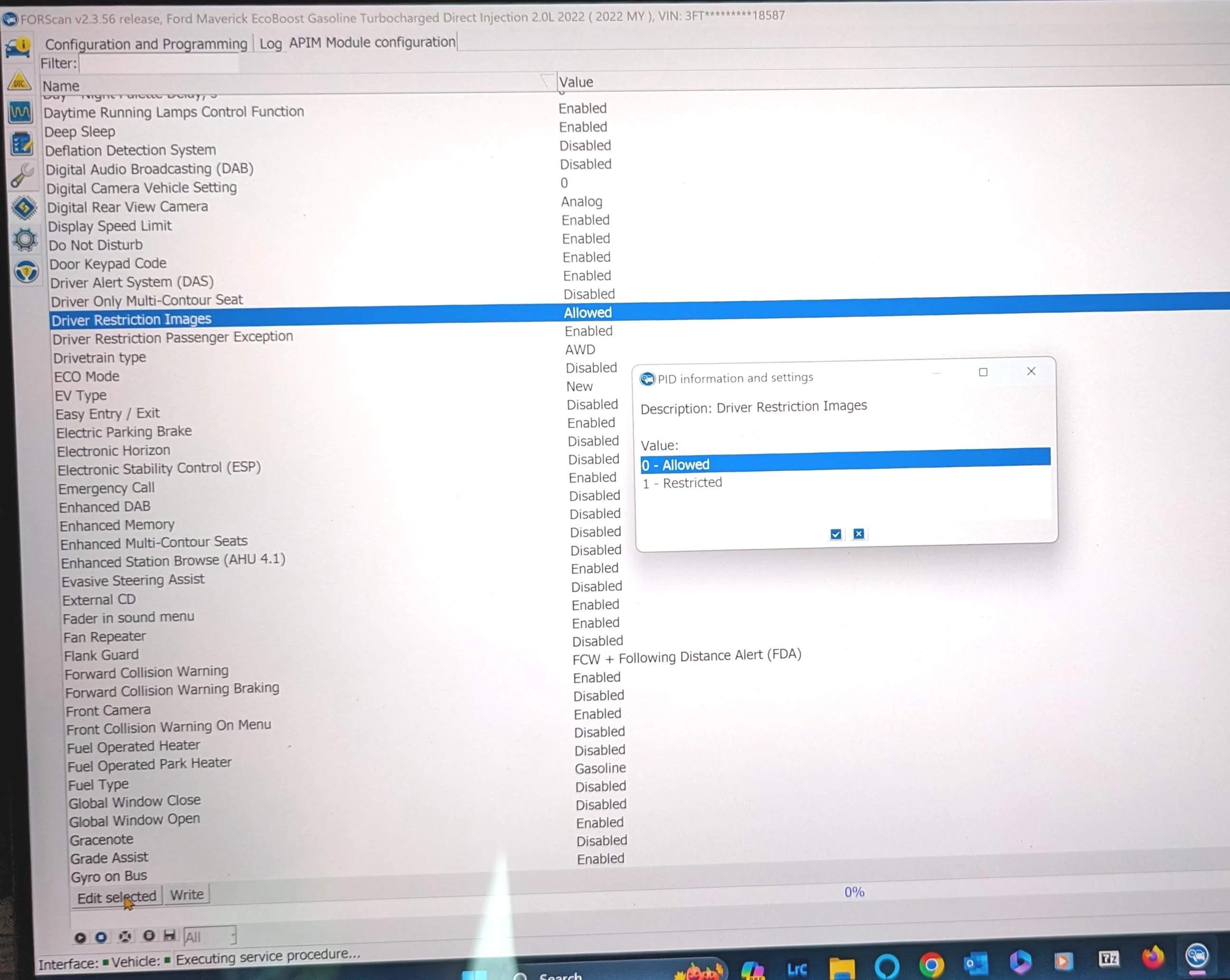
Here is a picture of the APIM "English Version" screen in the area of the driver restrictions. The highlighted line appears to not be relevant. The line below appears to enable the message I get with a passenger to allow playing with the USB functions. Those of you who can't play with the USB even with passengers should take a look at that line. My 2022 Lariat Lux with B&O allows playing searching with a passenger. Still no joy with the nanny stuff. Ratchet strap and a bag or stout box still my only way. If you look under the seat you find a fluid filled line going to a module that appears to be the pressure sensor. Might get brave and unplug the electrical to see what happens. I imagine the dash will light up like Christmas. Anyone gets joy, let us all know. I haven't given up.
Nav in motion is NOT in my APIM
Ford Maverick For Your Safety Blah Blah Blah APIM Screen Pictur
 
Last edited:

Maui

2.5L Hybrid
Well-known member
First Name
Jim
Joined
Nov 30, 2021
Threads
13
Messages
251
Reaction score
429
Location
Cape Cod
Vehicle(s)
'23 Kia Soul Convertble
Engine
2.5L Hybrid
Clubs
 
I got here late. I read something about drinking battery acid. Mixed with tonic water? Grapefruit juice? Bleach? Straight up? Details please.

Thanks
 

Silver23

2.5L Hybrid
Well-known member
Joined
May 19, 2023
Threads
11
Messages
458
Reaction score
390
Location
California
Vehicle(s)
2023 Ford Maverick Lariat
Engine
2.5L Hybrid
Here is a picture of the APIM "English Version" screen in the area of the driver restrictions. The highlighted line appears to not be relevant. The line below appears to enable the message I get with a passenger to allow playing with the USB functions. Those of you who can't play with the USB even with passengers should take a look at that line. My 2022 Lariat Lux with B&O allows playing searching with a passenger. Still no joy with the nanny stuff. Ratchet strap and a bag or stout box still my only way. If you look under the seat you find a fluid filled line going to a module that appears to be the pressure sensor. Might get brave and unplug the electrical to see what happens. I imagine the dash will light up like Christmas. Anyone gets joy, let us all know. I haven't given up.
Nav in motion is NOT in my APIM
APIM Screen Picture.jpg
I think the codes need to be changed in the APIM AS BUILT section. I'm going to try it when I get my new cable and if the APIM is listed (it's not with the cheapo cable)
Like this:
https://www.f150forum.com/f118/sync-3-4-usb-browsing-disabled-again-after-update-495091/
 

Sponsored

Gullzway

2.5L Hybrid
Well-known member
Joined
Dec 17, 2021
Threads
25
Messages
2,040
Reaction score
2,437
Location
OK
Vehicle(s)
1968 Ford Mustang Fastback
Engine
2.5L Hybrid
Here is a picture of the APIM "English Version" screen in the area of the driver restrictions. The highlighted line appears to not be relevant. The line below appears to enable the message I get with a passenger to allow playing with the USB functions. Those of you who can't play with the USB even with passengers should take a look at that line. My 2022 Lariat Lux with B&O allows playing searching with a passenger. Still no joy with the nanny stuff. Ratchet strap and a bag or stout box still my only way. If you look under the seat you find a fluid filled line going to a module that appears to be the pressure sensor. Might get brave and unplug the electrical to see what happens. I imagine the dash will light up like Christmas. Anyone gets joy, let us all know. I haven't given up.
Nav in motion is NOT in my APIM
APIM Screen Picture.webp
You need to manually change the values in the Apim from what I've read. Though this also appears to disable 911 assist and change Speed limit signs(if you activated them) to European, since your changing the country.
I don't use a USB stick so I dont run into this issue on my 2022 Lariat.

https://www.f150gen14.com/forum/thr...een-while-in-motion-disabled-by-default.9418/

APIM: 7D0-03-01 -> 5753 - xxxx - xx-- (change only the bolded numbers only, leave the "x" and dashes alone).
 
Last edited:

SkeeterB

2.0L EcoBoost
Well-known member
First Name
Bill
Joined
Nov 26, 2021
Threads
7
Messages
860
Reaction score
1,201
Location
The Woodlands, TX
Vehicle(s)
Maverick Lariat Lux, 4K, FX4, 360, Velocity Blue
Engine
2.0L EcoBoost
Just came back from trying the F150 fix. It did not work for me. The address was there and I changed to 5753. Could not search the USB. Anyone else try with better results. Sync 3 version 3.4 build 21194.
 

billbillw

2.0L EcoBoost
Well-known member
First Name
Bill
Joined
Sep 15, 2022
Threads
2
Messages
759
Reaction score
811
Location
Metro Atlanta
Vehicle(s)
'23 Maverick Lariat FX4
Engine
2.0L EcoBoost
That's a bummer. Part of me wanted to do the Sync3 upgrade detailed elsewhere in this forum, but if I can't search the USB, I will stick with my glitchy stock unit.
 

Silver23

2.5L Hybrid
Well-known member
Joined
May 19, 2023
Threads
11
Messages
458
Reaction score
390
Location
California
Vehicle(s)
2023 Ford Maverick Lariat
Engine
2.5L Hybrid
Just came back from trying the F150 fix. It did not work for me. The address was there and I changed to 5753. Could not search the USB. Anyone else try with better results. Sync 3 version 3.4 build 21194.
I get my new cable today, I'll post results later tonight or tomorrow.
 

Silver23

2.5L Hybrid
Well-known member
Joined
May 19, 2023
Threads
11
Messages
458
Reaction score
390
Location
California
Vehicle(s)
2023 Ford Maverick Lariat
Engine
2.5L Hybrid
I give up...
Bought the fancy $60 FORScan recommended cable and it still won't show an APIM.
crap...
 
Last edited:
Sponsored

SkeeterB

2.0L EcoBoost
Well-known member
First Name
Bill
Joined
Nov 26, 2021
Threads
7
Messages
860
Reaction score
1,201
Location
The Woodlands, TX
Vehicle(s)
Maverick Lariat Lux, 4K, FX4, 360, Velocity Blue
Engine
2.0L EcoBoost
Strange. Maybe hybrid is different for some reason. I have the eco boost, Also MY 2022. Ialso read the full F150 post with the fix which follows.


"Ever wondered if you or a passenger wants to input the address while driving on the Ford Navigation screen but turns out you can't as Ford locked you out while the vehicle is in motion? Well thanks to @Livnitup, we finally can enable this feature! By using FORScan, you can enable this by changing the following steps and as ALWAYS, make a backup of the APIM module before attempting ANY changes so you can revert back to factory when needed:

APIM: 7D0-03-01 -> 5753 - xxxx - xx-- (change only the bolded numbers only, leave the "x" and dashes alone).

Once you have changed this, you will see it will get a little glitchy at first 2-3 times of cycling on and off. Cycle the truck 3-5 times or until it goes back to normal and you're good to go; this is the only time you have to do this. You can now use the factory navigation screen keyboard while moving. Note; not all trucks will need to cycle more than 5 times. You can also do a hard reboot about 1-2 times if needed but not necessary. Press and hold the POWER button and the ">>" button together for a few seconds, let the APIM and screen reboot to splash screen then let go; you should be good to go.

*do at your own risk.

This mod currently works on the following models as of this posting:
-'21 and '22 F-150 XLT
-'21 and '22 F-150 Lariat
-'21 F-150 Platinum "

I did not cycle or reboot and don't expect to do that. The other spreadsheets in the tutorial I posted before had vastly different things shown for 7D0-03-01.

BTW, can your passenger scan the USB?
 

Silver23

2.5L Hybrid
Well-known member
Joined
May 19, 2023
Threads
11
Messages
458
Reaction score
390
Location
California
Vehicle(s)
2023 Ford Maverick Lariat
Engine
2.5L Hybrid
Strange. Maybe hybrid is different for some reason. I have the eco boost, Also MY 2022. Ialso read the full F150 post with the fix which follows.


"Ever wondered if you or a passenger wants to input the address while driving on the Ford Navigation screen but turns out you can't as Ford locked you out while the vehicle is in motion? Well thanks to @Livnitup, we finally can enable this feature! By using FORScan, you can enable this by changing the following steps and as ALWAYS, make a backup of the APIM module before attempting ANY changes so you can revert back to factory when needed:

APIM: 7D0-03-01 -> 5753 - xxxx - xx-- (change only the bolded numbers only, leave the "x" and dashes alone).

Once you have changed this, you will see it will get a little glitchy at first 2-3 times of cycling on and off. Cycle the truck 3-5 times or until it goes back to normal and you're good to go; this is the only time you have to do this. You can now use the factory navigation screen keyboard while moving. Note; not all trucks will need to cycle more than 5 times. You can also do a hard reboot about 1-2 times if needed but not necessary. Press and hold the POWER button and the ">>" button together for a few seconds, let the APIM and screen reboot to splash screen then let go; you should be good to go.

*do at your own risk.

This mod currently works on the following models as of this posting:
-'21 and '22 F-150 XLT
-'21 and '22 F-150 Lariat
-'21 F-150 Platinum "

I did not cycle or reboot and don't expect to do that. The other spreadsheets in the tutorial I posted before had vastly different things shown for 7D0-03-01.

BTW, can your passenger scan the USB?
I don't know about a passenger scanning, never tried it.
 

SkeeterB

2.0L EcoBoost
Well-known member
First Name
Bill
Joined
Nov 26, 2021
Threads
7
Messages
860
Reaction score
1,201
Location
The Woodlands, TX
Vehicle(s)
Maverick Lariat Lux, 4K, FX4, 360, Velocity Blue
Engine
2.0L EcoBoost
I get a message asking if you are the passenger, answer yes and you can scan and no you can't.


Top