
- Thread starter
- #1
...it sort of works. :: ::
:: 
I have a 2024 XLT which only has the backup camera, and while I did add a front and rear dashcam, that has a tiny screen that shuts off after about 5 minutes and the cameras are inside the truck. I know the Maverick is a small truck but it's almost two feet longer than my previous vehicle! That combined with the more boxy shape / very different site lines than what I'm used to has had me wanting a front camera since shortly after getting the truck in April. And since putting the tonneau cover on I've wanted to put a camera in the bed to help remind me when I leave things back there (which I have a habit of doing).
My first thought was to use a Raspberry Pi as an NVR to connect the cameras to and handle recording video, and use a tablet to connect to the Pi. There is software for doing this but I'm not the best with the Pi OS / Linus and the software isn't the most straightforward to make it all work. So after messing with that for a bit I had another thought, I have a Windows micro PC I could use. It's a lot bigger than the Pi but still only about the size of a CD case (but thicker), so small enough to hide easily. But now the problem is that runs off 19 volts via a power brick, and I don't have an inverter in my truck. There are other ways to make the power work, but despite being a compact PC it still draws 80 - 100 watts under load. Not terrible, but the other issue is since it's a PC it would need to be booted up and shut down with every trip.
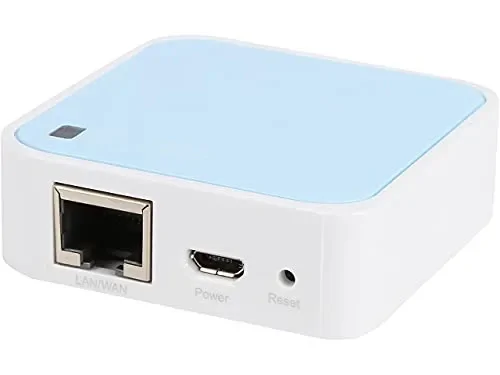
Then I remembered I have a nano router that runs off of 5 volts. It's a TP-Link N300 that I bought when I was travelling regularly so I could more securely connect to hotel WIFI, but I haven't used it for a couple of years. At most it is supposed to only draw 5 watts, and the cameras I found also draw less than 5 watts each.
I spent a lot of time searching for the right cameras which has been the biggest challenge. I wanted to do this on the smallest budget possible and there are very few small WIFI cameras that are outdoor rated, support RTSP / ONVIF (necessary for using 3rd party IP camera / NVR software), and are affordable. If I was going to spend $200+ I'd just get an RV / Big Rig camera kit that works out of the box (spoiler: probably will eventually get one of those kits). Anyway, the smallest camera I found that checked all the boxes is the TP-Link Tapo C121 which costs only about $30.
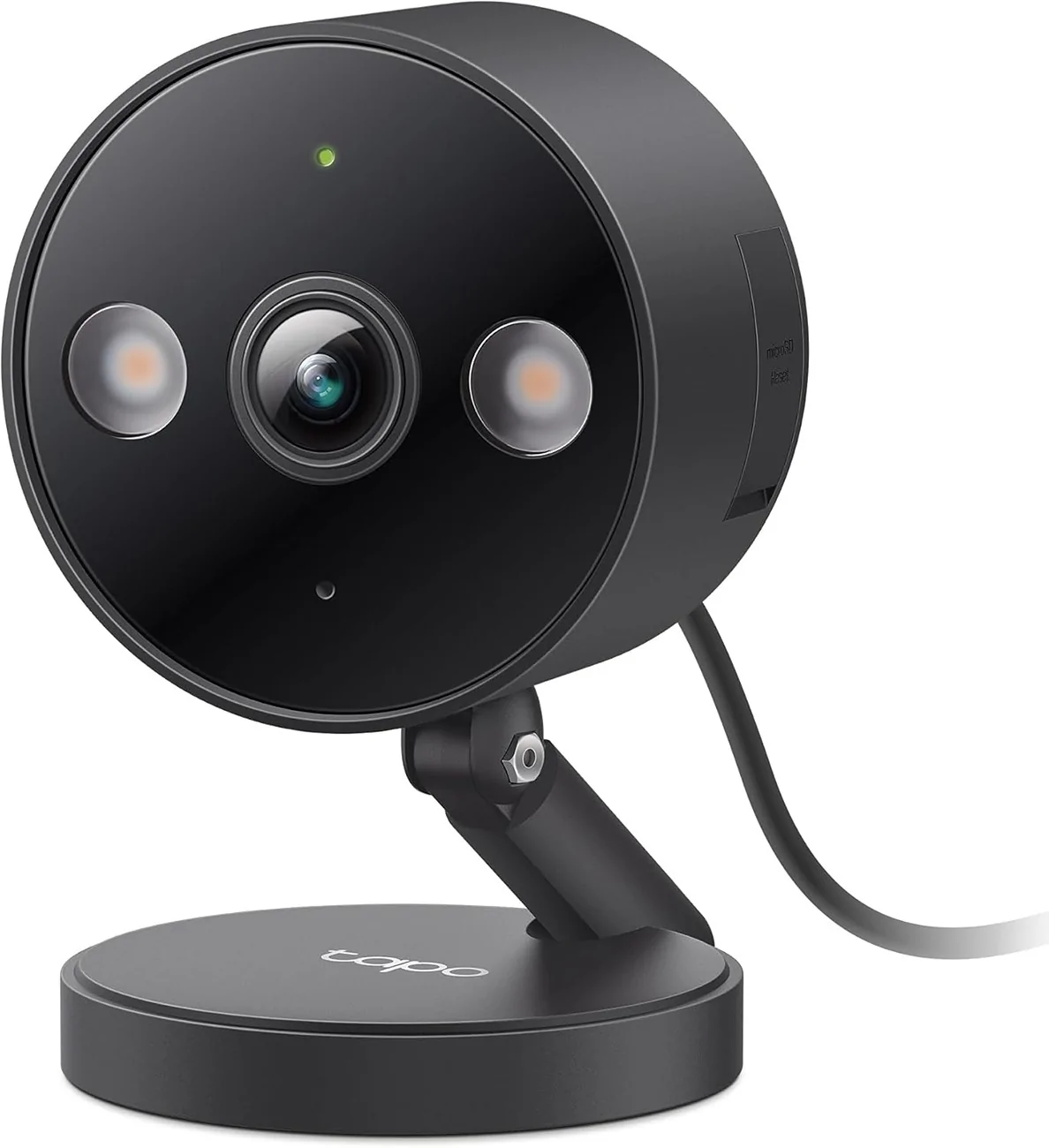
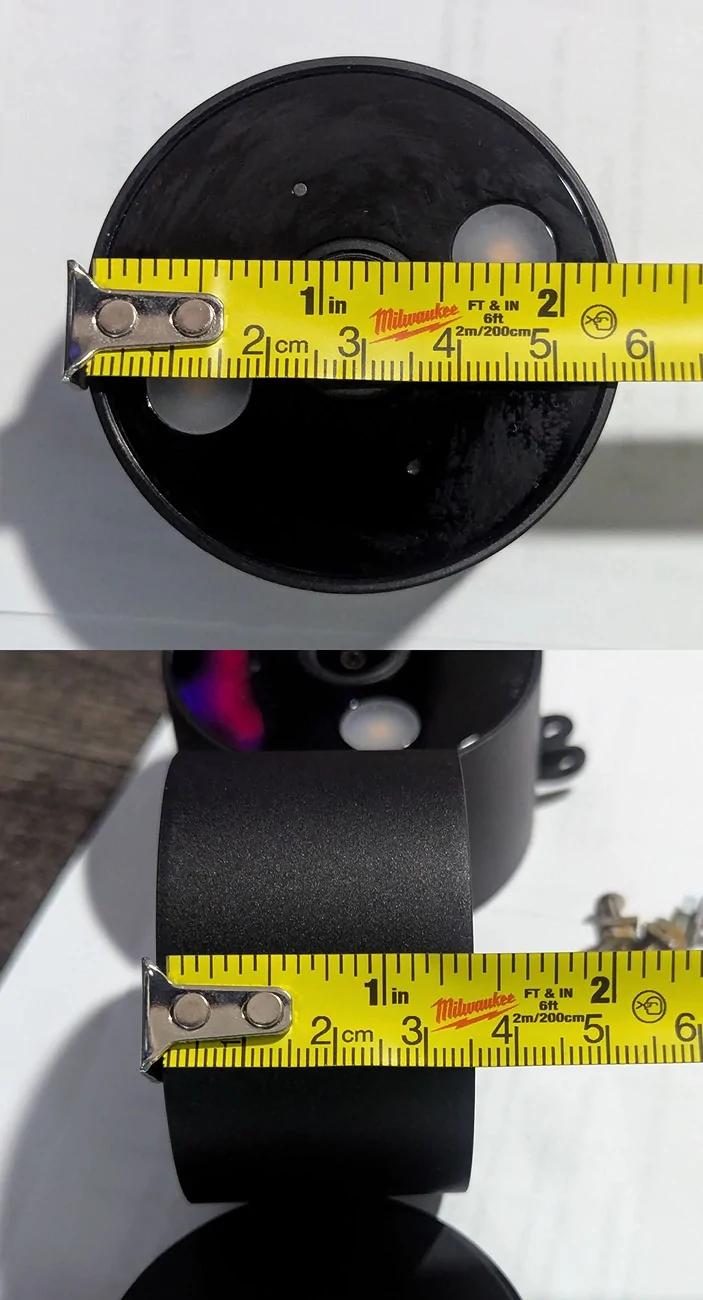
While they are fairly small, they aren't as small as I'd hoped to find which did prove to be a minor issue in the front. There's actually an older model that has a slightly lower resolution and costs about $10 less, but the two main things that drew me to the C121 were the flat magnetic base and the older model is only available in white. The older camera has a domed base that requires screws to mount and I was hopeful I could use the magnetic base and metal plate to attach these, at least in the bed. That did end up working well enough in the bed, and while I was able to get the metal plate in a spot behind the fit is very tight and there is uneven pressure on the magnet base and camera so it doesn't hold as well as I'd like it, and I ended up using some zip ties to secure it (which was my backup plan and would have been a lot harder with the dome shaped base on the older camera).
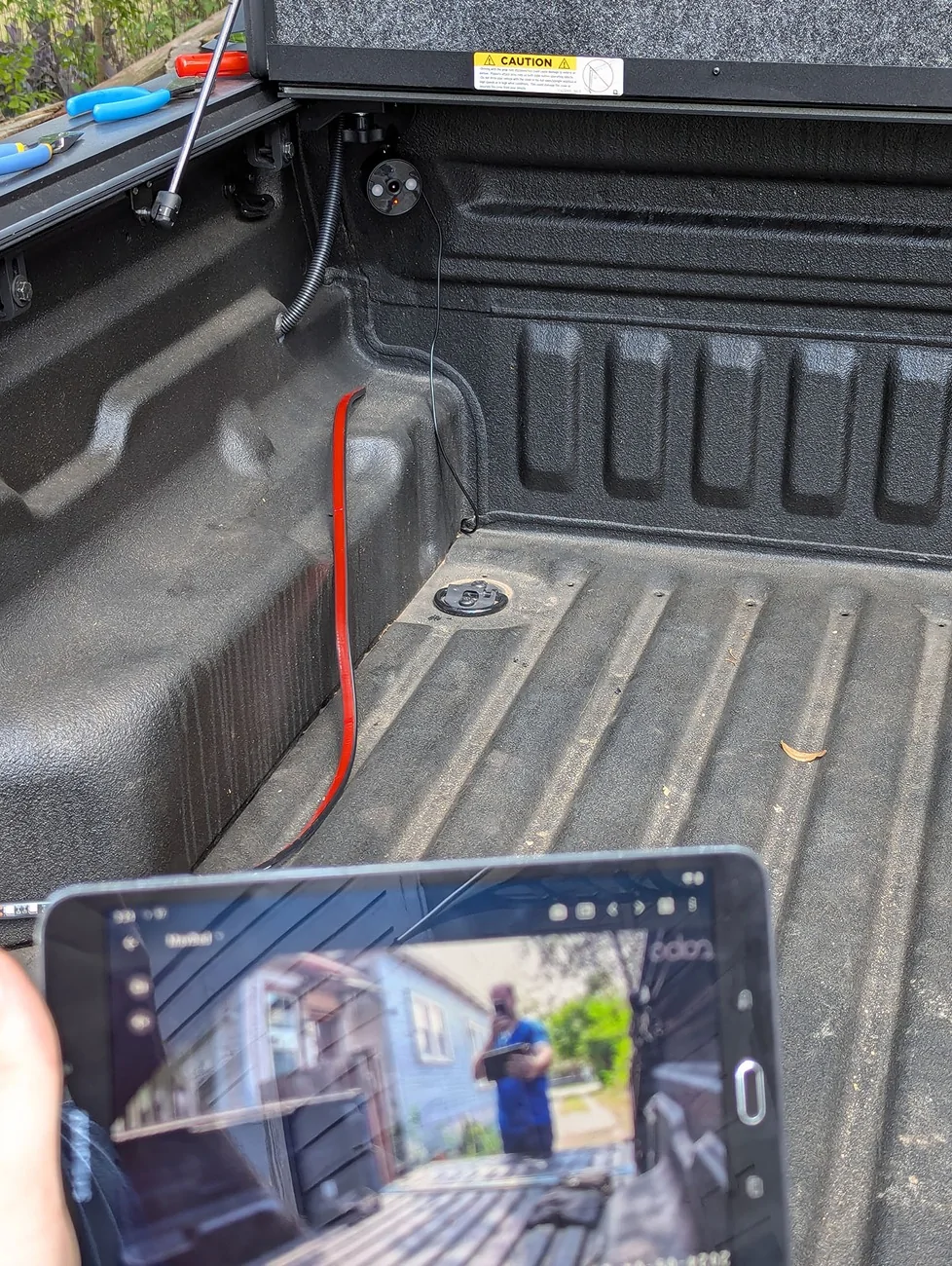
(now that I've adjusted the fit some more and zip tied it in, the camera doesn't stick out as much as in this photo)
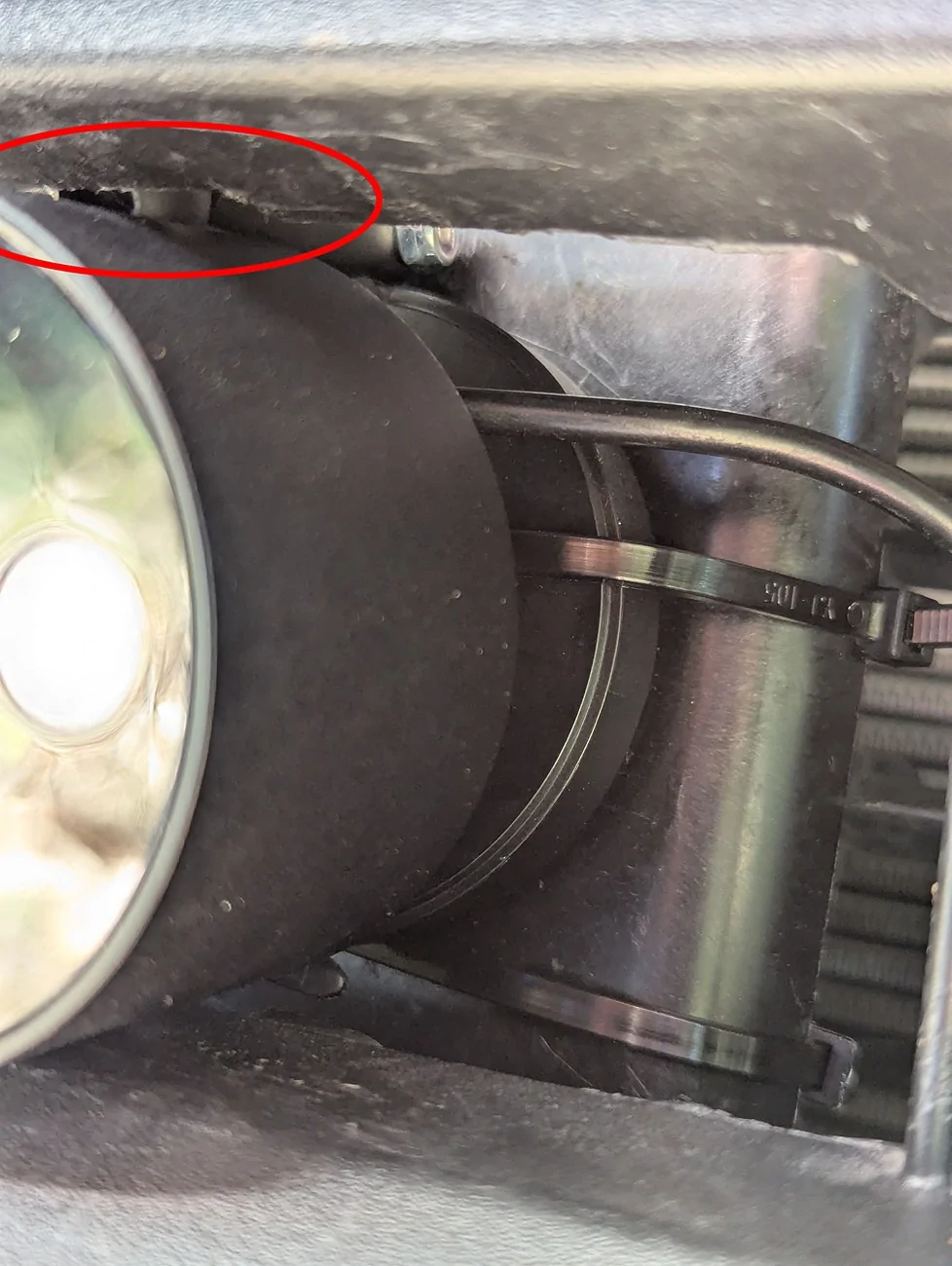
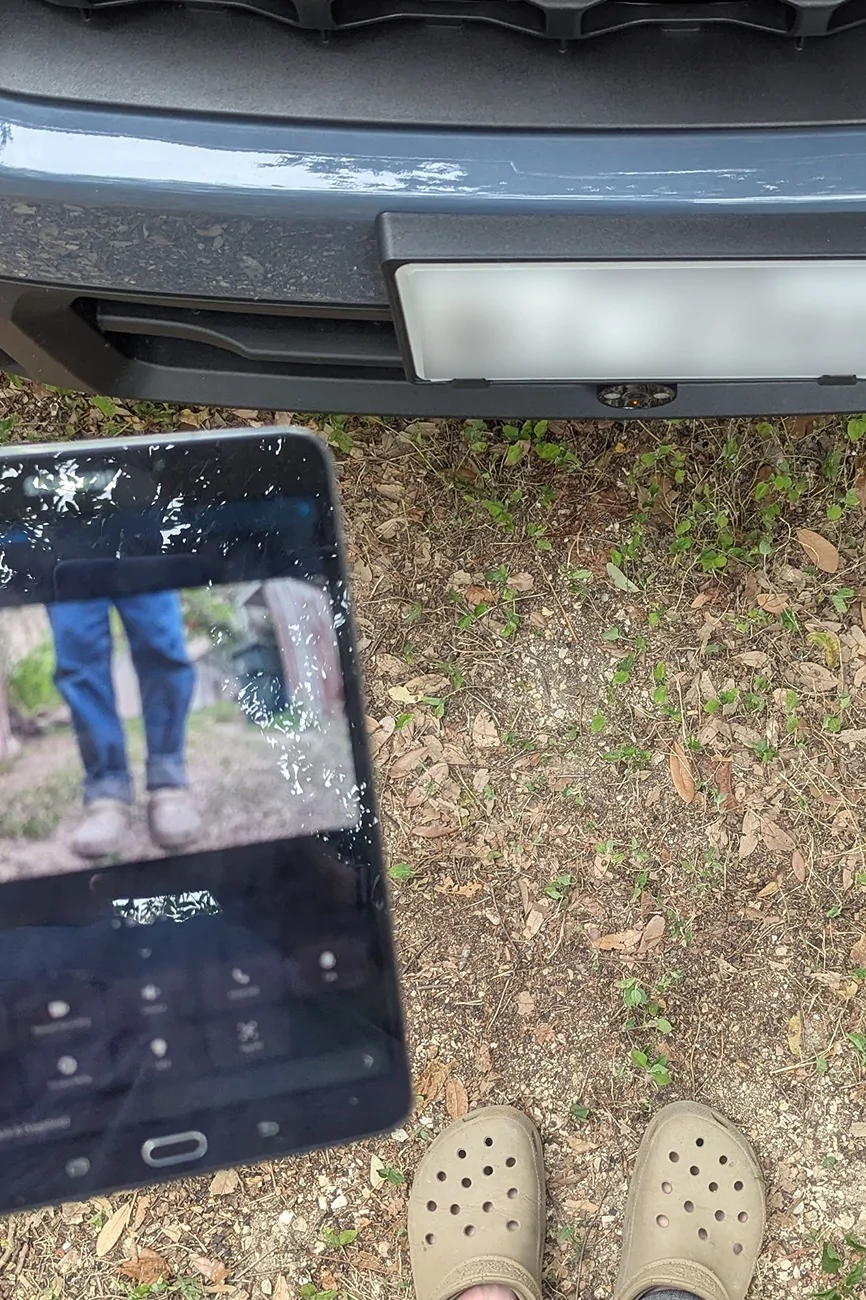
The camera literally only just fits in the gap between the two lower parts of the grille: the top and bottom of the camera are pushing against the grille and if it wasn't plastic with a little bit of flex, I'm not sure the camera would have fit. The one part that didn't fit was the mount / screw on the camera, the camera would fit sideways but that piece on the camera added too much height. I didn't want a vertical image so made a small cut in the second to lowest grille plastic, on the bottom so that it isn't visible unless you're under the truck. It's still a snug fit but wedges in there nicely.
One of the reasons I wanted to go with WIFI was so I didn't have to run wires into the cab, but that was the next challenge I ran into. The cameras run on 5 volts and I couldn't find any solid info on if they would work on 12 volts or go pop, so powering them from the nearest hot wire wouldn't work. At least, not without a buck converter, which I actually have a couple of from my RC hobby days. So I could have still powered these from outside the cab but since I wasn't sure how well any of this would even work, I decided to run the included USB cables into the cab.
For the camera in the bed I used one of the floor drain holes to feed the cable through, popped a few rivets off the wheel well plastic to get my arm in there, and fed it through one of the small openings of the filter behind the rear seats. There are three of those filters, one in the middle and one on each side of the truck. The one on the side was easy to reach from the wheel well but a little more of a challenge inside the truck, since it was behind some plastic molding that I didn't feel like going to the effort to remove. So I used a wire snake to help me get it through more easily. From there I ran the cable under the seat, under the floor mat, and plugged it into the rear 12v (with a 5v USB adapter).
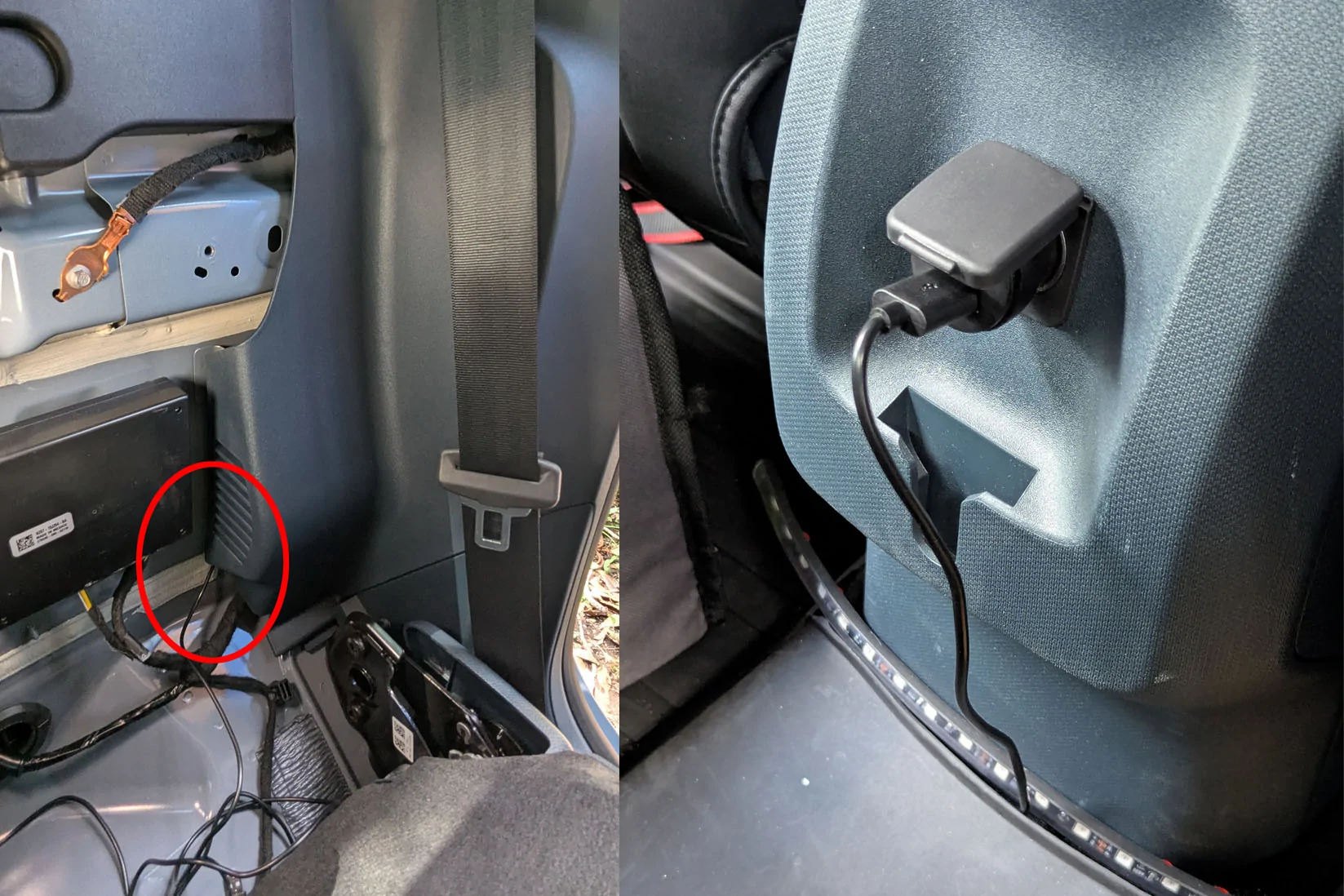
The wire for the front camera was harder because I wanted it to be as clean as possible under the hood and tried to keep it away from anything that might get too hot (I'm probably going to get some cloth tape for extra protection). The USB C connector is 90 degrees making it a little bulkier than if it were straight, but I found a spot I could feed it through that worked. Getting it all the way to the bottom of the grille was also a challenge since there's some solid components between the upper and lower grilles, but again with the help of a wire snake I was able to get it through.
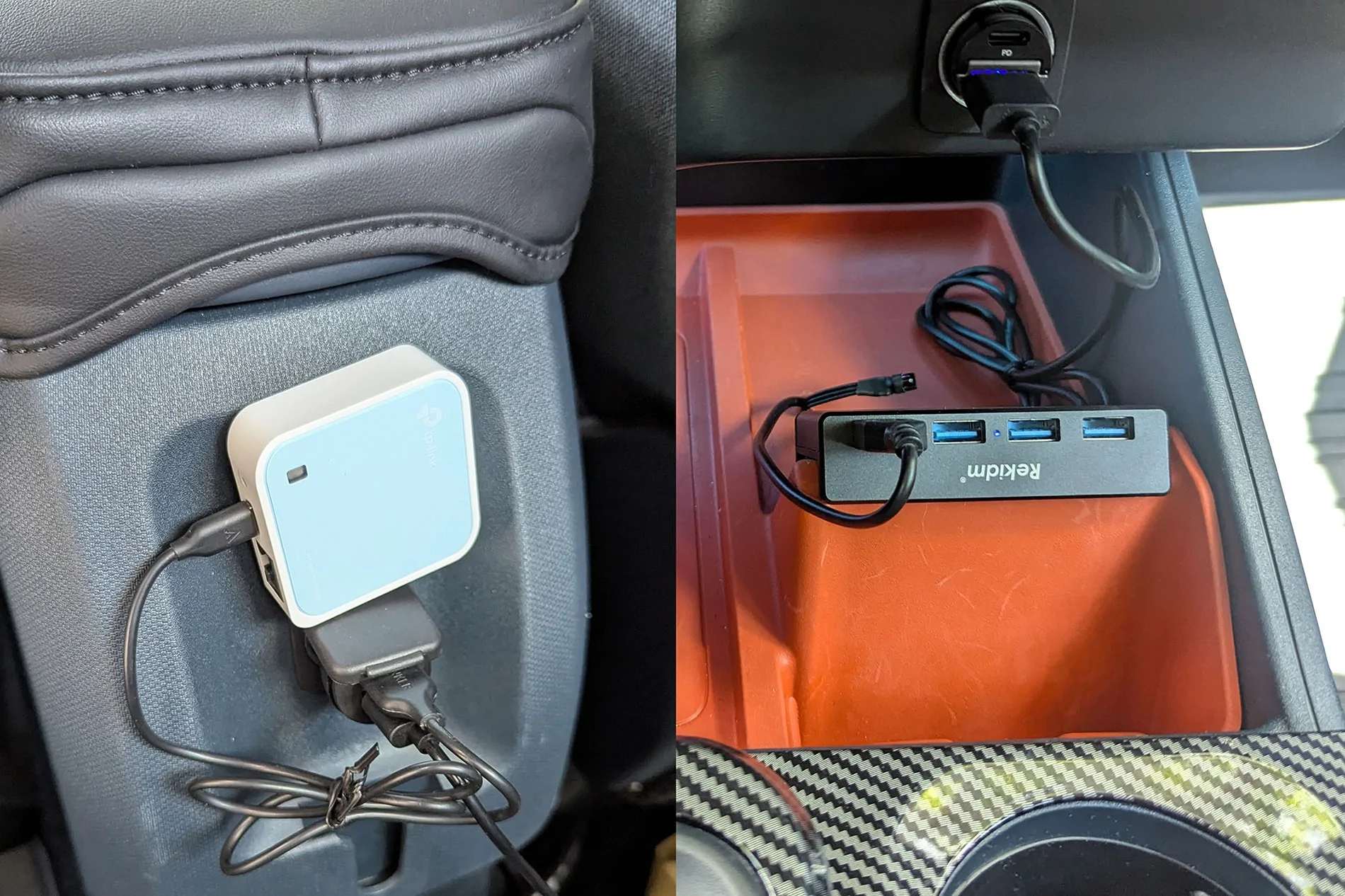
I initially had the router plugged into the rear 12v because I was out of ports in the front, but just added a USB hub so have enough ports that I moved it to the front. I don't have a photo of it but I put it under the hub, in the angled slot where your phone goes. It nestled in there nicely and the USB cable is mostly hidden beneath it.
Here are both cameras in the Tapo app.
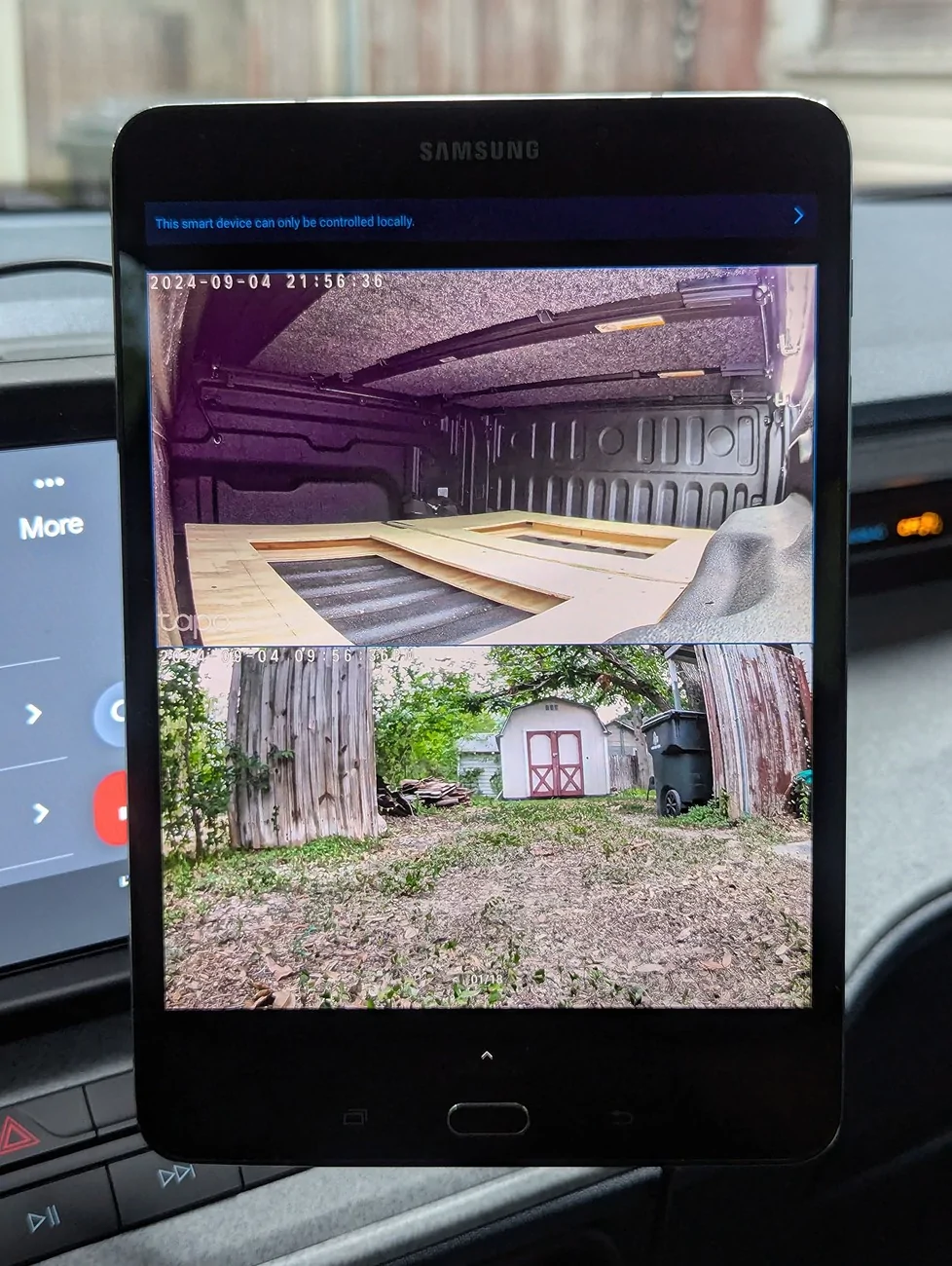
Remember about 1,307 words back when I mentioned wanting cameras that supported RTSP / ONVIF? That was in part because with most cameras like this the manufacturers app requires an internet connection, sending the video from the camera to the manufacturers servers and then back down to your phone or tablet, which was part of why I was planning on using a 3rd party NVR app that could connect directly to the cameras. If you stopped to read the blue text in the photo above you might have already figured something out...the Tapo app DOESN'T require an internet connection to work! The app connects directly to the cameras which means it works just fine offline, albeit with a few less features that I have no interest in using anyway (no cloud storage, can't share the cameras with others via a link, the date and time are always wrong - that one kind of sucks but I just turned the date / time display off). So that was a nice bonus as it meant I don't need to buy (or subscribe to) another app. And the cameras have a micro SD slot, so recordings can be saved directly to that card in the camera and still accessed through the app without an internet connection.
If you clicked on the spoiler above you already have some idea of what I think about this setup. There are things that work great such as the cameras and router are all self contained so don't need to be manually booted up or powered down to work properly, and they reconnect without any interaction from me. I can just start up the truck, load the Tapo app, and (after a couple of minutes for the router / cameras to boot up) everything works. I've gone through a carwash that has high pressure jets and those giant flappy rollers that "scrub" everywhere and the camera in the grille survived without issue.
But there are also some severe limitations. I was hoping to be able to use the front camera as a second dash cam but the bitrate on these cameras is very low and can't be set to constant, they only support variable bitrates. This means they don't handle motion very well, especially faster motion such as when driving. A second issue I ran into that I think might also have to do with the low bitrates is that there is stuttering (brief freezing of the video) when driving, both in the live view and in the recorded video. At low speeds there is very little stuttering and the lag is minimal (I'd estimate under 1/4 second), but over about 5mph and it's not that good. Being inexpensive WIFI cameras they won't be as reliable as wired cameras when it comes to connecting to the live view, which is also a likely factor in the lag. Once everything's up and running I haven't noticed any total disconnections, but it's always a possibility with WIFI. All of this is why I will eventually end up with a purpose made kit, and I will get side view cameras as well to have full coverage. But the two main reasons I wanted to do this were to monitor the bed and to help with parking, and despite their limitations the cameras work well enough for that. I just have to be sure the video has mostly caught up to real time as I crawl into parking spaces and won't rely on them for recording video. And for the record, I don't plan on leaving the tablet mounted where it is in the last photo. I haven't decided yet where it will end up but I will put it somewhere so it's less of a distraction while driving but still viewable when parking.
:: I have a 2024 XLT which only has the backup camera, and while I did add a front and rear dashcam, that has a tiny screen that shuts off after about 5 minutes and the cameras are inside the truck. I know the Maverick is a small truck but it's almost two feet longer than my previous vehicle! That combined with the more boxy shape / very different site lines than what I'm used to has had me wanting a front camera since shortly after getting the truck in April. And since putting the tonneau cover on I've wanted to put a camera in the bed to help remind me when I leave things back there (which I have a habit of doing).
My first thought was to use a Raspberry Pi as an NVR to connect the cameras to and handle recording video, and use a tablet to connect to the Pi. There is software for doing this but I'm not the best with the Pi OS / Linus and the software isn't the most straightforward to make it all work. So after messing with that for a bit I had another thought, I have a Windows micro PC I could use. It's a lot bigger than the Pi but still only about the size of a CD case (but thicker), so small enough to hide easily. But now the problem is that runs off 19 volts via a power brick, and I don't have an inverter in my truck. There are other ways to make the power work, but despite being a compact PC it still draws 80 - 100 watts under load. Not terrible, but the other issue is since it's a PC it would need to be booted up and shut down with every trip.
Then I remembered I have a nano router that runs off of 5 volts. It's a TP-Link N300 that I bought when I was travelling regularly so I could more securely connect to hotel WIFI, but I haven't used it for a couple of years. At most it is supposed to only draw 5 watts, and the cameras I found also draw less than 5 watts each.
I spent a lot of time searching for the right cameras which has been the biggest challenge. I wanted to do this on the smallest budget possible and there are very few small WIFI cameras that are outdoor rated, support RTSP / ONVIF (necessary for using 3rd party IP camera / NVR software), and are affordable. If I was going to spend $200+ I'd just get an RV / Big Rig camera kit that works out of the box (spoiler: probably will eventually get one of those kits). Anyway, the smallest camera I found that checked all the boxes is the TP-Link Tapo C121 which costs only about $30.
While they are fairly small, they aren't as small as I'd hoped to find which did prove to be a minor issue in the front. There's actually an older model that has a slightly lower resolution and costs about $10 less, but the two main things that drew me to the C121 were the flat magnetic base and the older model is only available in white. The older camera has a domed base that requires screws to mount and I was hopeful I could use the magnetic base and metal plate to attach these, at least in the bed. That did end up working well enough in the bed, and while I was able to get the metal plate in a spot behind the fit is very tight and there is uneven pressure on the magnet base and camera so it doesn't hold as well as I'd like it, and I ended up using some zip ties to secure it (which was my backup plan and would have been a lot harder with the dome shaped base on the older camera).
(now that I've adjusted the fit some more and zip tied it in, the camera doesn't stick out as much as in this photo)
The camera literally only just fits in the gap between the two lower parts of the grille: the top and bottom of the camera are pushing against the grille and if it wasn't plastic with a little bit of flex, I'm not sure the camera would have fit. The one part that didn't fit was the mount / screw on the camera, the camera would fit sideways but that piece on the camera added too much height. I didn't want a vertical image so made a small cut in the second to lowest grille plastic, on the bottom so that it isn't visible unless you're under the truck. It's still a snug fit but wedges in there nicely.
One of the reasons I wanted to go with WIFI was so I didn't have to run wires into the cab, but that was the next challenge I ran into. The cameras run on 5 volts and I couldn't find any solid info on if they would work on 12 volts or go pop, so powering them from the nearest hot wire wouldn't work. At least, not without a buck converter, which I actually have a couple of from my RC hobby days. So I could have still powered these from outside the cab but since I wasn't sure how well any of this would even work, I decided to run the included USB cables into the cab.
For the camera in the bed I used one of the floor drain holes to feed the cable through, popped a few rivets off the wheel well plastic to get my arm in there, and fed it through one of the small openings of the filter behind the rear seats. There are three of those filters, one in the middle and one on each side of the truck. The one on the side was easy to reach from the wheel well but a little more of a challenge inside the truck, since it was behind some plastic molding that I didn't feel like going to the effort to remove. So I used a wire snake to help me get it through more easily. From there I ran the cable under the seat, under the floor mat, and plugged it into the rear 12v (with a 5v USB adapter).
The wire for the front camera was harder because I wanted it to be as clean as possible under the hood and tried to keep it away from anything that might get too hot (I'm probably going to get some cloth tape for extra protection). The USB C connector is 90 degrees making it a little bulkier than if it were straight, but I found a spot I could feed it through that worked. Getting it all the way to the bottom of the grille was also a challenge since there's some solid components between the upper and lower grilles, but again with the help of a wire snake I was able to get it through.
I initially had the router plugged into the rear 12v because I was out of ports in the front, but just added a USB hub so have enough ports that I moved it to the front. I don't have a photo of it but I put it under the hub, in the angled slot where your phone goes. It nestled in there nicely and the USB cable is mostly hidden beneath it.
Here are both cameras in the Tapo app.
Remember about 1,307 words back when I mentioned wanting cameras that supported RTSP / ONVIF? That was in part because with most cameras like this the manufacturers app requires an internet connection, sending the video from the camera to the manufacturers servers and then back down to your phone or tablet, which was part of why I was planning on using a 3rd party NVR app that could connect directly to the cameras. If you stopped to read the blue text in the photo above you might have already figured something out...the Tapo app DOESN'T require an internet connection to work! The app connects directly to the cameras which means it works just fine offline, albeit with a few less features that I have no interest in using anyway (no cloud storage, can't share the cameras with others via a link, the date and time are always wrong - that one kind of sucks but I just turned the date / time display off). So that was a nice bonus as it meant I don't need to buy (or subscribe to) another app. And the cameras have a micro SD slot, so recordings can be saved directly to that card in the camera and still accessed through the app without an internet connection.
If you clicked on the spoiler above you already have some idea of what I think about this setup. There are things that work great such as the cameras and router are all self contained so don't need to be manually booted up or powered down to work properly, and they reconnect without any interaction from me. I can just start up the truck, load the Tapo app, and (after a couple of minutes for the router / cameras to boot up) everything works. I've gone through a carwash that has high pressure jets and those giant flappy rollers that "scrub" everywhere and the camera in the grille survived without issue.
But there are also some severe limitations. I was hoping to be able to use the front camera as a second dash cam but the bitrate on these cameras is very low and can't be set to constant, they only support variable bitrates. This means they don't handle motion very well, especially faster motion such as when driving. A second issue I ran into that I think might also have to do with the low bitrates is that there is stuttering (brief freezing of the video) when driving, both in the live view and in the recorded video. At low speeds there is very little stuttering and the lag is minimal (I'd estimate under 1/4 second), but over about 5mph and it's not that good. Being inexpensive WIFI cameras they won't be as reliable as wired cameras when it comes to connecting to the live view, which is also a likely factor in the lag. Once everything's up and running I haven't noticed any total disconnections, but it's always a possibility with WIFI. All of this is why I will eventually end up with a purpose made kit, and I will get side view cameras as well to have full coverage. But the two main reasons I wanted to do this were to monitor the bed and to help with parking, and despite their limitations the cameras work well enough for that. I just have to be sure the video has mostly caught up to real time as I crawl into parking spaces and won't rely on them for recording video. And for the record, I don't plan on leaving the tablet mounted where it is in the last photo. I haven't decided yet where it will end up but I will put it somewhere so it's less of a distraction while driving but still viewable when parking.
Sponsored