Sponsored

Stuck screen on infotainment screen

lanceoak

2.5L Hybrid
Active member
First Name
Lance
Joined
Jul 18, 2025
Threads
7
Messages
39
Reaction score
43
Location
Canada
Vehicle(s)
2025 XLT Hybrid
Engine
2.5L Hybrid
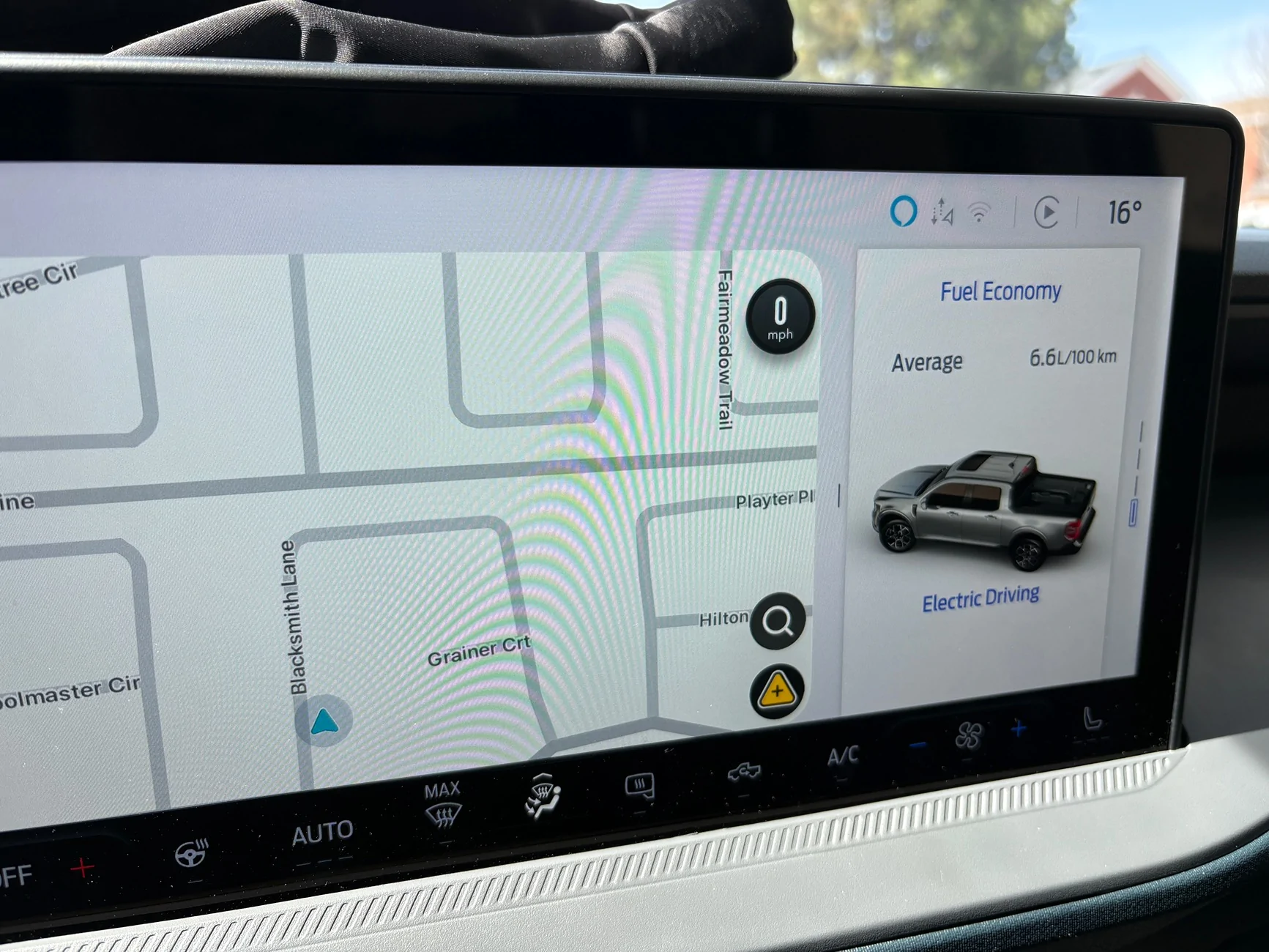
Hello: I have a 2025 XLT AWD hybrid. I notice that my screen seems to be stuck with two screens open. On the left I have my GPS screen - larger of the two and on the right I have a screen that shows gas mileage and whether or not I am on electric or gas. This screen popped up and I cannot find away together rid of it. I prefer to drive with the GPS occupying the entire screen. Any thoughts on how to get rid of this small screen. Thank you...
Sponsored
 

El Kabong

2.5L Hybrid
Well-known member
Joined
Apr 1, 2026
Threads
10
Messages
183
Reaction score
332
Location
Carnation, WA
Vehicle(s)
2026 Maverick Lariat Hybrid AWD, 2017 VW Golf Wolfsburg
Engine
2.5L Hybrid
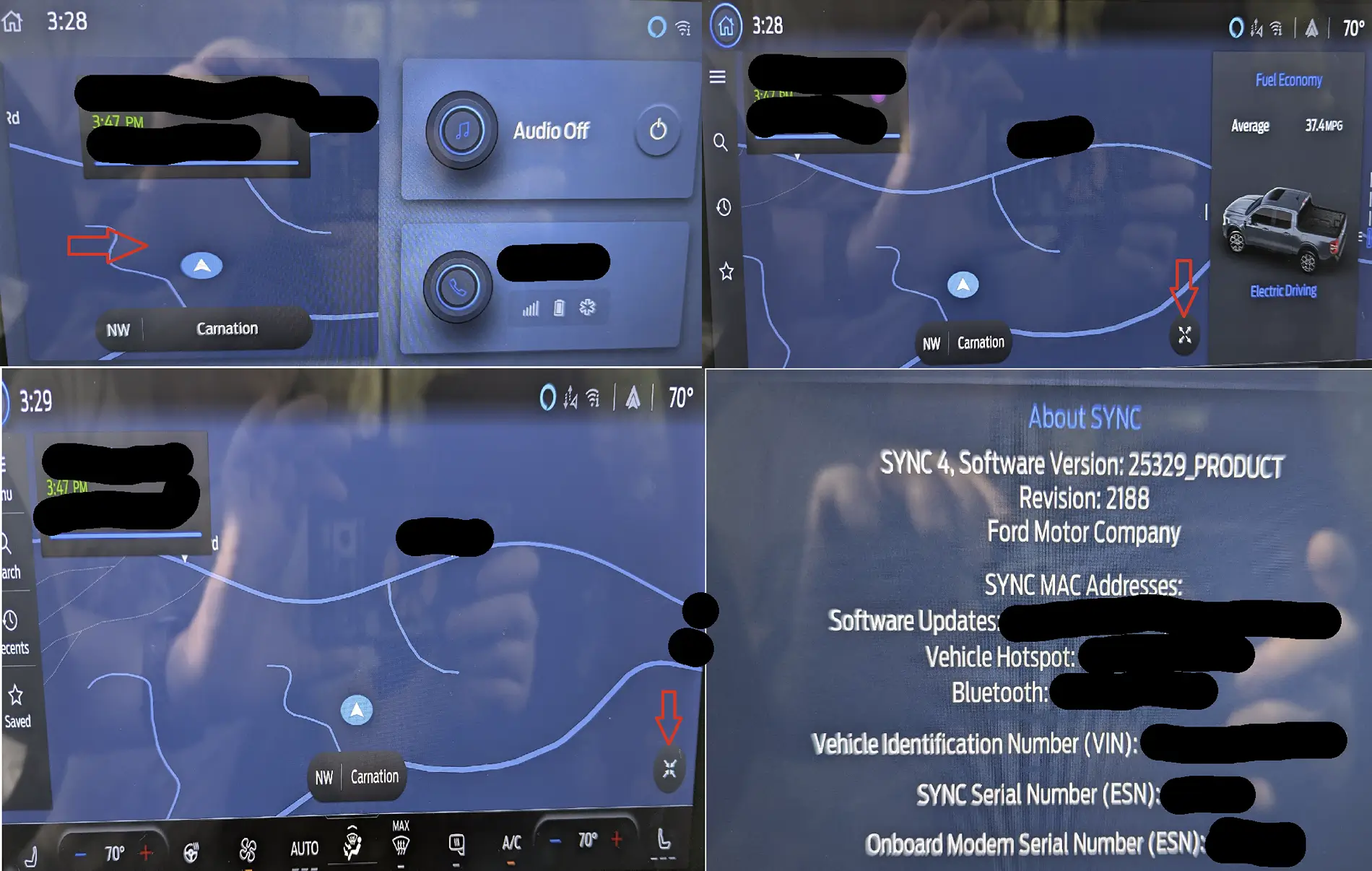
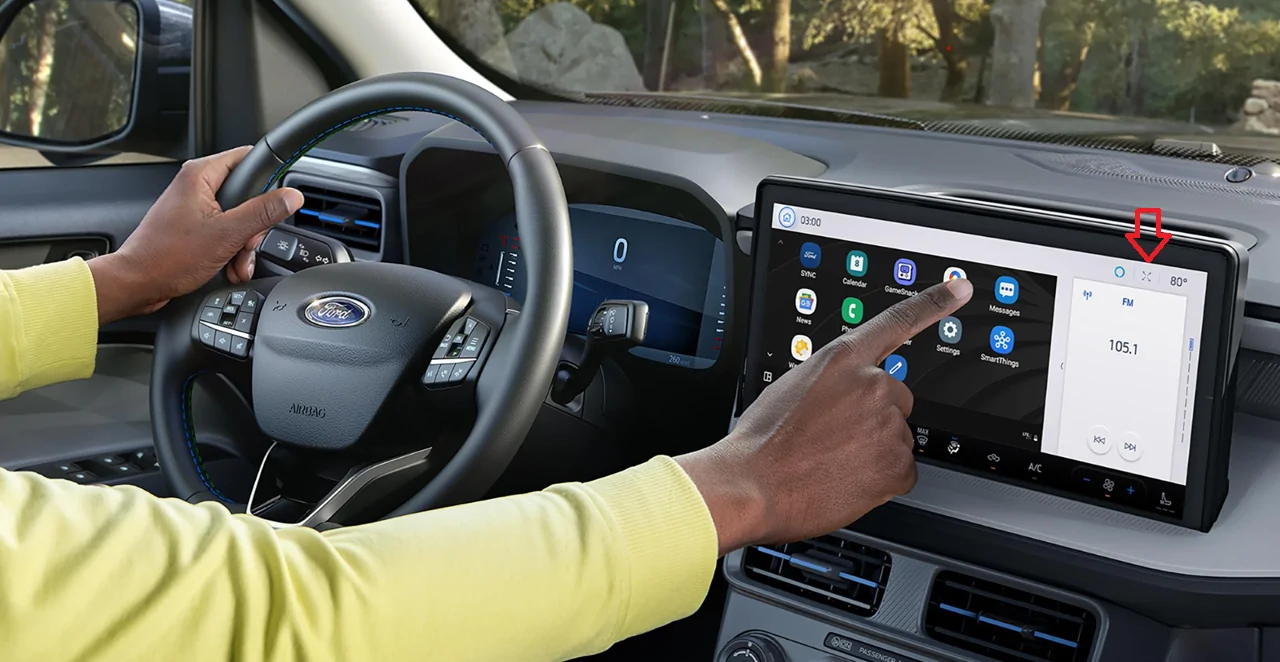
In the upper right of the screen do you have an icon that sort of looks like an "X"? On mine when I press that it toggles the extra information display.

(I think, did not go outside to check, still in my pajamas).

Edit: arrow in image

Ford Maverick Stuck screen on infotainment screen info
 
Last edited:
OP
OP

lanceoak

2.5L Hybrid
Active member
First Name
Lance
Joined
Jul 18, 2025
Threads
7
Messages
39
Reaction score
43
Location
Canada
Vehicle(s)
2025 XLT Hybrid
Engine
2.5L Hybrid
Appreciate the info. Just took a pic of the screen - no luck on having the X.... But, thank you..

Ford Maverick Stuck screen on infotainment screen IMG_2291
 

MaverickDragon

2.5L Hybrid
Well-known member
First Name
Gary
Joined
Nov 9, 2025
Threads
4
Messages
1,108
Reaction score
1,804
Location
Grand Canyon, AZ
Vehicle(s)
2025 Maverick XL Hybrid AWD 4K Tow Package
Engine
2.5L Hybrid
It may be different on the Lariat and/or a MY26 difference that @El Kabong has vs the MY 25 XLT/XL.

I don't have the option to disable the right info screen either, but like yours, I can scroll through the options that are displayed phone/mileage/trip etc.

There is nothing in the manual I have found, and I've exhausted all of the settings options as well in the attempt to get the full screen of interest displayed, but I'd about given up.

Maybe someone else has found a way, maybe Forscan? or maybe that's just the way it is...
 

El Kabong

2.5L Hybrid
Well-known member
Joined
Apr 1, 2026
Threads
10
Messages
183
Reaction score
332
Location
Carnation, WA
Vehicle(s)
2026 Maverick Lariat Hybrid AWD, 2017 VW Golf Wolfsburg
Engine
2.5L Hybrid
The IT nerd in me wants to know if this can be solved for lanceoak!

In my car ('26 Lariat):
1. Built-in nav screen - touch the map. Map expands with additional screen.
2. There is now a small round button with an "x" in it. Press the x - small screen goes away. Press the x again, small screen comes back.
Ford Maverick Stuck screen on infotainment screen extra_screen

*phone name redacted because it's RUDE.
 

Sponsored

MaverickDragon

2.5L Hybrid
Well-known member
First Name
Gary
Joined
Nov 9, 2025
Threads
4
Messages
1,108
Reaction score
1,804
Location
Grand Canyon, AZ
Vehicle(s)
2025 Maverick XL Hybrid AWD 4K Tow Package
Engine
2.5L Hybrid
@El Kabong
The 25 XL (mine) and 25 XLT (@lanceoak 's) do not have a built in NAV screen option available.
Only the Lobo and Lariat 2025 Ford Maverick trims have built-in navigation.
Navigation can be done via Android or Apple navigation options, but there is no way to remove the small screen on the right (there is no "X" to press to remove it.
 

El Kabong

2.5L Hybrid
Well-known member
Joined
Apr 1, 2026
Threads
10
Messages
183
Reaction score
332
Location
Carnation, WA
Vehicle(s)
2026 Maverick Lariat Hybrid AWD, 2017 VW Golf Wolfsburg
Engine
2.5L Hybrid
@El Kabong
The 25 XL (mine) and 25 XLT (@lanceoak 's) do not have a built in NAV screen option available.
Only the Lobo and Lariat 2025 Ford Maverick trims have built-in navigation.
Navigation can be done via Android or Apple navigation options, but there is no way to remove the small screen on the right (there is no "X" to press to remove it.
Thanks for the information. Another weird miss from the design teams, I guess. I went back to the truck and tested with radio as the source and it's the same - in radio mode the info screen is "stuck".
 

MaverickDragon

2.5L Hybrid
Well-known member
First Name
Gary
Joined
Nov 9, 2025
Threads
4
Messages
1,108
Reaction score
1,804
Location
Grand Canyon, AZ
Vehicle(s)
2025 Maverick XL Hybrid AWD 4K Tow Package
Engine
2.5L Hybrid
@El Kabong that makes sense.
The left portion of the screen is the "application area" that the external nav populates.
I was looking for a long time for a way to use the whole screen as the status section on the right blocks visibility to the presets.. I still wonder if there is a Forscan option, but I have no idea.
I kinda doubt it...
 
OP
OP

lanceoak

2.5L Hybrid
Active member
First Name
Lance
Joined
Jul 18, 2025
Threads
7
Messages
39
Reaction score
43
Location
Canada
Vehicle(s)
2025 XLT Hybrid
Engine
2.5L Hybrid
It may be different on the Lariat and/or a MY26 difference that @El Kabong has vs the MY 25 XLT/XL.

I don't have the option to disable the right info screen either, but like yours, I can scroll through the options that are displayed phone/mileage/trip etc.

There is nothing in the manual I have found, and I've exhausted all of the settings options as well in the attempt to get the full screen of interest displayed, but I'd about given up.

Maybe someone else has found a way, maybe Forscan? or maybe that's just the way it is...
Appreciate the info….
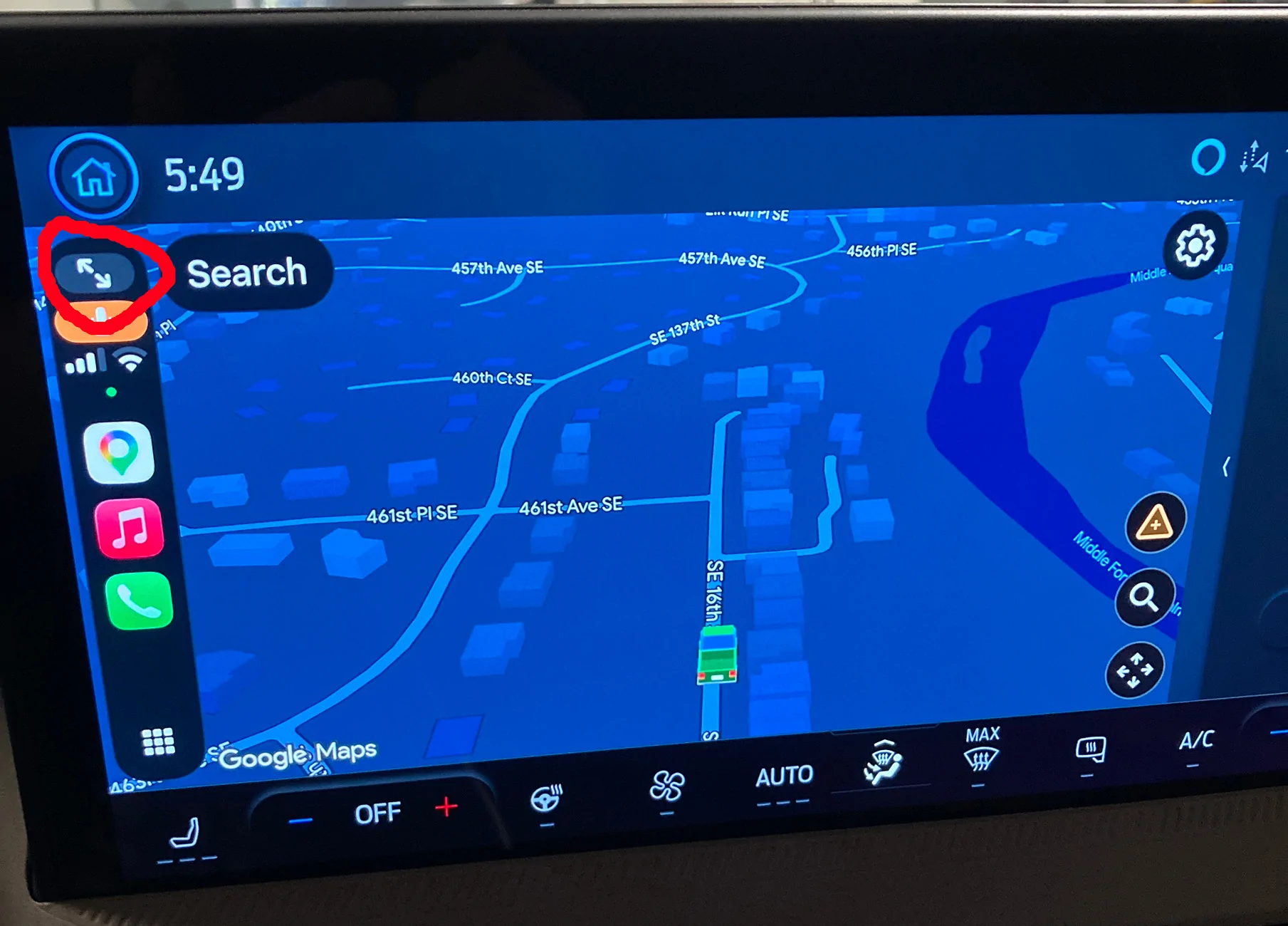
Do you have the double arrow icon that is circled in read seen on my screen while running Google Maps? If so, then click on it.

IMG_6533.webp
SOLVED. I'd like to thank everyone who put in their ideas. This one re the Double Arrows worked. Up until now, I would just push the square at the bottom left and then then the WAZE symbol higher up. For some reason that stopped working but,k hitting the two arrows as suggested solved the issue.
Again, thanks everyone for the input...
 
Sponsored

MaverickDragon

2.5L Hybrid
Well-known member
First Name
Gary
Joined
Nov 9, 2025
Threads
4
Messages
1,108
Reaction score
1,804
Location
Grand Canyon, AZ
Vehicle(s)
2025 Maverick XL Hybrid AWD 4K Tow Package
Engine
2.5L Hybrid
So it works for google maps.. I wish it would work for the built ins....
 

Mavman1

2.5L Hybrid
Well-known member
First Name
Jeff
Joined
Jul 18, 2024
Threads
6
Messages
195
Reaction score
247
Location
S/E Pennsylvania
Vehicle(s)
2025 Maverick XLT Hybrid AWD 4K Luxury Trim Oxford White
Engine
2.5L Hybrid
Clubs
 
From reading the posts, it looks like nbmav wins the grand prize today for solving the issue for lanceoak. This shows how great this forum can be for help in answering questions. Great work !
 

MikeS1942

2.5L Hybrid
Well-known member
First Name
Mike
Joined
Nov 27, 2024
Threads
1
Messages
304
Reaction score
354
Location
Windsor Ontario
Vehicle(s)
24 Maverick Lariat
Engine
2.5L Hybrid
Hello: I have a 2025 XLT AWD hybrid. I notice that my screen seems to be stuck with two screens open. On the left I have my GPS screen - larger of the two and on the right I have a screen that shows gas mileage and whether or not I am on electric or gas. This screen popped up and I cannot find away together rid of it. I prefer to drive with the GPS occupying the entire screen. Any thoughts on how to get rid of this small screen. Thank you...
If I go to the home screen on my 24 Lariat. It is a split screen all the time. The nav on the left half, and audio on the right.
 
OP
OP

lanceoak

2.5L Hybrid
Active member
First Name
Lance
Joined
Jul 18, 2025
Threads
7
Messages
39
Reaction score
43
Location
Canada
Vehicle(s)
2025 XLT Hybrid
Engine
2.5L Hybrid
So it works for google maps.. I wish it would work for the built ins....
[/QUOTE
If I go to the home screen on my 24 Lariat. It is a split screen all the time. The nav on the left half, and audio on the right.
I have always had the ability to actually split it into three. I usually like to drive with the navigation as a full screen. On the far right screen I can have the radio or other information which is nice to have sometimes. But when I’m navigating I prefer to have the large screen just as it’s easier to see. Sometimes technology is really frustrating but I’ve come to find when you make enough mistakes with it hopefully you find the right answer.
Sponsored


Top