
Sponsored

Auto heat for seat and steering wheel.

Nw_adventure

2.0L EcoBoost
Well-known member
Joined
Aug 3, 2021
Threads
101
Messages
3,142
Reaction score
2,941
Location
Salt Lake city
Vehicle(s)
Honda Element/ Toyota Highlander
Engine
2.0L EcoBoost
22 FX/4 Lariat/Lux- Latest Ford Pass version 1/20/25- No connected services available- Are the specific heat settings only for MY 2025 ? Looks like that functionally is only an option with Premium Connectivity and I have no idea what this is or how -
Sponsored

 
Last edited:

HeyBales

2.5L Hybrid
Well-known member
First Name
Mike
Joined
May 3, 2024
Threads
4
Messages
4,973
Reaction score
4,593
Location
KC Metro area
Vehicle(s)
2005 Toyota RAV4, 2024 XLT Hybrid
Engine
2.5L Hybrid
I scanned every post - I don't think I saw much if any comment on the truck settings that go along with remote start, and are a part of the equation probably - even if the app added some features for some.

Not sure on 25MY, but the others:
With new app, appears the manual not totally correct - or it depends on the truck settings.

REMOTE START SETTINGS

Switching Climate Control Auto Mode On and Off
  1. Using the instrument cluster display controls on the steering wheel, select Settings.
  1. Select Vehicle.
  1. Select Remote Start.
  1. Select Climate Control.
  1. Select Auto or Last settings.
Note: If you switch the auto mode on, the system attempts to heat or cool the interior to 72 °F (22 °C). When you switch the vehicle on, the climate control system returns to the last used settings.
Note: If you switch the last settings on, the system remembers the last used settings.

Heated Seat Settings
  1. Using the instrument cluster display controls on the steering wheel, select Settings.
  1. Select Vehicle.
  1. Select Remote Start.
  1. Select Seats.
  1. Select Auto or Off.
Note: If you switch the heated seat settings on, the heated seats turn on during cold weather.
Note: You cannot adjust the heated seat settings when you remotely start your vehicle.

Heated Steering Wheel Settings
  1. Using the instrument cluster display controls on the steering wheel, select Settings.
  1. Select Vehicle.
  1. Select Remote Start.
  1. Select Seats and Wheel.
  1. Select Auto or Off.
Note: If you switch the heated steering wheel settings on, the heated steering wheel turns on during cold weather.
Note: You cannot adjust the heated steering wheel settings when you remotely start your vehicle.
 

ClemsonU88

2.5L Hybrid
Well-known member
First Name
Mike
Joined
Feb 19, 2022
Threads
30
Messages
930
Reaction score
1,440
Location
NC
Vehicle(s)
2022 Ford Maverick; 2022 Ford Bronco Sport
Engine
2.5L Hybrid
I scanned every post - I don't think I saw much if any comment on the truck settings that go along with remote start, and are a part of the equation probably - even if the app added some features for some.

Not sure on 25MY, but the others:
With new app, appears the manual not totally correct - or it depends on the truck settings.

REMOTE START SETTINGS

Switching Climate Control Auto Mode On and Off
  1. Using the instrument cluster display controls on the steering wheel, select Settings.
  2. Select Vehicle.
  3. Select Remote Start.
  4. Select Climate Control.
  5. Select Auto or Last settings.
Note: If you switch the auto mode on, the system attempts to heat or cool the interior to 72 °F (22 °C). When you switch the vehicle on, the climate control system returns to the last used settings.
Note: If you switch the last settings on, the system remembers the last used settings.

Heated Seat Settings
  1. Using the instrument cluster display controls on the steering wheel, select Settings.
  2. Select Vehicle.
  3. Select Remote Start.
  4. Select Seats.
  5. Select Auto or Off.
Note: If you switch the heated seat settings on, the heated seats turn on during cold weather.
Note: You cannot adjust the heated seat settings when you remotely start your vehicle.

Heated Steering Wheel Settings
  1. Using the instrument cluster display controls on the steering wheel, select Settings.
  2. Select Vehicle.
  3. Select Remote Start.
  4. Select Seats and Wheel.
  5. Select Auto or Off.
Note: If you switch the heated steering wheel settings on, the heated steering wheel turns on during cold weather.
Note: You cannot adjust the heated steering wheel settings when you remotely start your vehicle.
Interesting. When I select "Vehicle", all I get is a grayed out "Towing" option I can't select. I don't get "Remote Start" or any other options. I have an XLT with the Luxury package. I wonder if that doesn't get me the "Remote Start" option to modify.
 

Nw_adventure

2.0L EcoBoost
Well-known member
Joined
Aug 3, 2021
Threads
101
Messages
3,142
Reaction score
2,941
Location
Salt Lake city
Vehicle(s)
Honda Element/ Toyota Highlander
Engine
2.0L EcoBoost
If you are using manually adjusted HVAC settings and NOT Auto- But then select Auto for Heated seats/wheel - What happens ? Meaning you get to choose Auto or Off- Assuming off means regardless if HVAC or manual (last settings) they just wont heat at all ?
 

HeyBales

2.5L Hybrid
Well-known member
First Name
Mike
Joined
May 3, 2024
Threads
4
Messages
4,973
Reaction score
4,593
Location
KC Metro area
Vehicle(s)
2005 Toyota RAV4, 2024 XLT Hybrid
Engine
2.5L Hybrid
If you are using manually adjusted HVAC settings and NOT Auto- But then select Auto for Heated seats/wheel - What happens ? Meaning you get to choose Auto or Off- Assuming off means regardless if HVAC or manual (last settings) they just wont heat at all ?
So selecting Last used option for climate control, but Auto for seats/wheel.

Curious if you select Last used - are the options for seats/wheel still available to select Auto on?

I could see the seats/wheel not being part of the Climate control strictly speaking, so not really involved in the Auto or Last used settings.

The options on truck seem like they should be available then no matter what climate mode selected. Same as the app some are getting.

Wondering if the difference between setting a temp, and those options, means the truck is set to Auto or Last used?

Or the ability in app is given to override either?
Or only if you have a certain trim/package?
 

Sponsored

HeyBales

2.5L Hybrid
Well-known member
First Name
Mike
Joined
May 3, 2024
Threads
4
Messages
4,973
Reaction score
4,593
Location
KC Metro area
Vehicle(s)
2005 Toyota RAV4, 2024 XLT Hybrid
Engine
2.5L Hybrid
Interesting. When I select "Vehicle", all I get is a grayed out "Towing" option I can't select. I don't get "Remote Start" or any other options. I have an XLT with the Luxury package. I wonder if that doesn't get me the "Remote Start" option to modify.
You do have truck setup for Fordpass access?
So many have pulled the fuse or inlinked the account they should probably be missing options if they are meaningless.
 

Jeff D.

2.0L EcoBoost
Well-known member
First Name
Jeff
Joined
Oct 22, 2023
Threads
17
Messages
641
Reaction score
736
Location
Duluth, MN.
Vehicle(s)
'24 Maverick Lariat & '25 Chevy Equinox LT
Engine
2.0L EcoBoost
I scanned every post - I don't think I saw much if any comment on the truck settings that go along with remote start, and are a part of the equation probably - even if the app added some features for some.

Not sure on 25MY, but the others:
With new app, appears the manual not totally correct - or it depends on the truck settings.

REMOTE START SETTINGS
.................................
What was shared here is what the settings on my '24 Lariat appear to be like. I've always had mine set to "Auto" for climate control, heated seats and heated steering wheel. The wheel is always warm with a remote start, the seat is not.
I just switched Climate to Last setting, and tried. No change. Obviosuly switching the steering wheel or seats from auto to off isn't going to help my situation.

As far as the app, I've no options that pop up. I did have the option to display over other apps "not allowed", but change it to "Allowed", but still no change.

Perhaps the app thing is related to certain phones, or display sizes, I just don't know? But I do know when I'm beat. ;)

I guess it's just gonna be a cold touche' for me, atleast for a couple blocks each morning! 🥶
ON EDIT: Unless, I steered with my butt?! :unsure:
 

HeyBales

2.5L Hybrid
Well-known member
First Name
Mike
Joined
May 3, 2024
Threads
4
Messages
4,973
Reaction score
4,593
Location
KC Metro area
Vehicle(s)
2005 Toyota RAV4, 2024 XLT Hybrid
Engine
2.5L Hybrid
What was shared here is what the settings on my '24 Lariat appear to be like. I've always had mine set to "Auto" for climate control, heated seats and heated steering wheel. The wheel is always warm with a remote start, the seat is not.
I just switched Climate to Last setting, and tried. No change. Obviosuly switching the steering wheel or seats from auto to off isn't going to help my situation.

As far as the app, I've no options that pop up. I did have the option to display over other apps "not allowed", but change it to "Allowed", but still no change.

Perhaps the app thing is related to certain phones, or display sizes, I just don't know? But I do know when I'm beat. ;)

I guess it's just gonna be a cold touche' for me, atleast for a couple blocks each morning! 🥶
ON EDIT: Unless, I steered with my butt?! :unsure:
At least good to know you can use Last Used setting, and still set the steering/seat to Auto on.
Like if you want defrost on and certain speed to help with normal frost melt, rather than just the cabin to 72 F, which may never get there for a short 5 min run time.

Wondering if the seat issue is because there is no weight on it - heat transfer could be rather bad unless weight is there, and the foam is just absorbing it all?

In the app - you did start the truck 1st right?
Since ability to control wheel/seats seems to still follow

SWITCHING THE HEATED SEATS ON AND OFF

The vehicle must be running to use this feature.
Ford Maverick Auto heat for seat and steering wheel. {filename}

Press the heated seat symbol to cycle through the various heat settings and off. The more indicators that display, the warmer the temperature of the seat.
Note: The heated seats may remain on after you remote start your vehicle, based on your remote start settings. The heated seats may also turn on when you start your vehicle if they were on when you switched your vehicle off.
 

Jeff D.

2.0L EcoBoost
Well-known member
First Name
Jeff
Joined
Oct 22, 2023
Threads
17
Messages
641
Reaction score
736
Location
Duluth, MN.
Vehicle(s)
'24 Maverick Lariat & '25 Chevy Equinox LT
Engine
2.0L EcoBoost
.......Wondering if the seat issue is because there is no weight on it - heat transfer could be rather bad unless weight is there, and the foam is just absorbing it all?

In the app - you did start the truck 1st right?
Since ability to control wheel/seats seems to still follow
..........
It's possible the "no weight" could make a difference. Others say it's warm with a remote start, so I expected something more noticeable? Also, my seat heater lights are all "off" in the climate control after a remote start but before I press the start button. I thought some said two lights would be lit? I press the start button and they go to full, the same as when I shut the truck off.

I did start the truck via the app, but nothing pops up. I scroll up and down and nothing has changed from before the start?

It's broken! I need a 2025 now! 😉 My wife said no, but with this new reason I can accuse her of being a bad wife, and guilt her into submission. 😜
 

Burger2

2.5L Hybrid
Member
First Name
Thomas
Joined
Jan 17, 2025
Threads
1
Messages
11
Reaction score
4
Location
Fort Wayne
Vehicle(s)
2025 Maverick AWD Hybrid Larriat
Engine
2.5L Hybrid
Here is how so far I got the seats and steering wheel to start when using the remote start on your FOB: 1) Use the Ford Pass to start your car at least one time and then on the app turn on the steering wheel and seat heat. 2) Now your car should remember the heated seat and steering wheel as long as you do not turn the seat to low or off. When you start you Maverick, it seems to look at the Ford Pass settings to determine the default. However, if you changed your seat to low or off, it will default that seat to off so you again need to use the Ford Pass to turn them both back on.
 
Sponsored

ClemsonU88

2.5L Hybrid
Well-known member
First Name
Mike
Joined
Feb 19, 2022
Threads
30
Messages
930
Reaction score
1,440
Location
NC
Vehicle(s)
2022 Ford Maverick; 2022 Ford Bronco Sport
Engine
2.5L Hybrid
If you are using manually adjusted HVAC settings and NOT Auto- But then select Auto for Heated seats/wheel - What happens ? Meaning you get to choose Auto or Off- Assuming off means regardless if HVAC or manual (last settings) they just wont heat at all ?
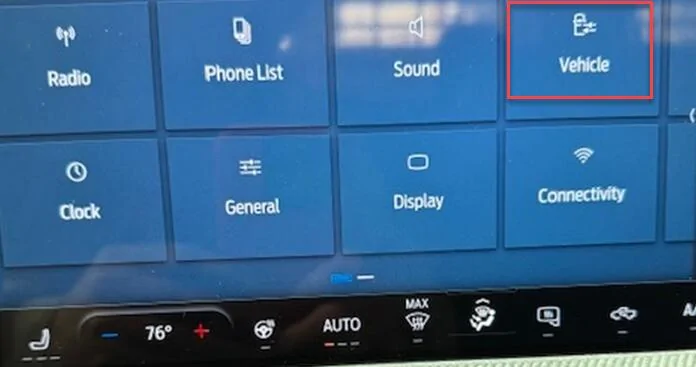
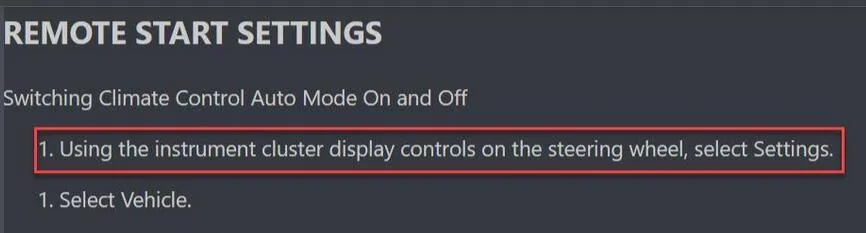
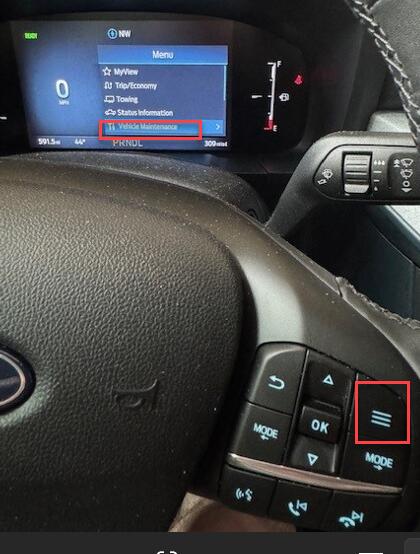
According the instructions from the manual, I'm supposed to use the instrument cluster display controls on the steering wheel to select "Settings". #Fake Instructions

Ford Maverick Auto heat for seat and steering wheel. 1737748635480-59


Ford Maverick Auto heat for seat and steering wheel. 1737751084847-83


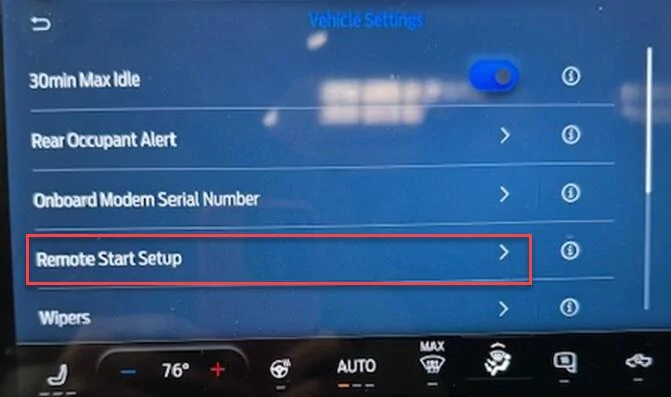
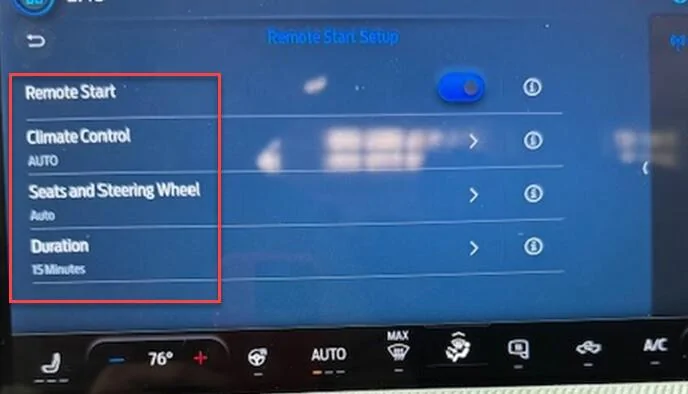
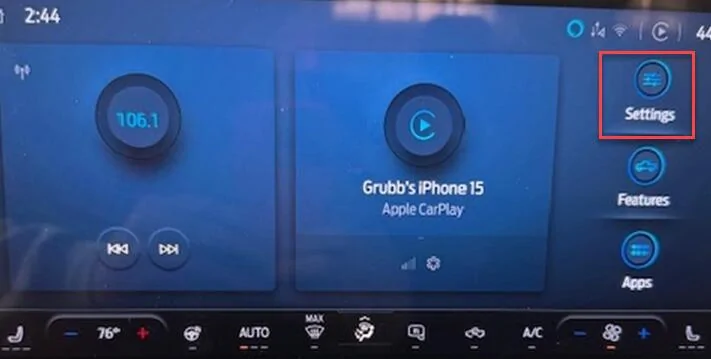
What I'm really supposed to do (FORD!!) is go to the INFOTAINMENT SCREEN (NOT the steering wheel & instrument cluster) and select "Settings", then "Vehicle", then "Remote Start Setup", and then I can see all the options that have been discussed here. I realize it's Ford's fault, not HeyBale's.

Ford Maverick Auto heat for seat and steering wheel. 1737748949125-t2
___
Ford Maverick Auto heat for seat and steering wheel. 1737748978071-ht


Ford Maverick Auto heat for seat and steering wheel. 1737749000957-n1
___
Ford Maverick Auto heat for seat and steering wheel. 1737749026962-0
 

Meeka

2.0L EcoBoost
Well-known member
First Name
Jay
Joined
Aug 9, 2024
Threads
48
Messages
1,515
Reaction score
2,128
Location
Castlegar B.C. Canada
Vehicle(s)
2024 XLT 2.0 turbo
Engine
2.0L EcoBoost
It's possible the "no weight" could make a difference. Others say it's warm with a remote start, so I expected something more noticeable? Also, my seat heater lights are all "off" in the climate control after a remote start but before I press the start button. I thought some said two lights would be lit? I press the start button and they go to full, the same as when I shut the truck off.

I did start the truck via the app, but nothing pops up. I scroll up and down and nothing has changed from before the start?

It's broken! I need a 2025 now! 😉 My wife said no, but with this new reason I can accuse her of being a bad wife, and guilt her into submission. 😜
Good luck 😏
 

ClemsonU88

2.5L Hybrid
Well-known member
First Name
Mike
Joined
Feb 19, 2022
Threads
30
Messages
930
Reaction score
1,440
Location
NC
Vehicle(s)
2022 Ford Maverick; 2022 Ford Bronco Sport
Engine
2.5L Hybrid
It's broken! I need a 2025 now! 😉 My wife said no, but with this new reason I can accuse her of being a bad wife, and guilt her into submission. 😜
You should write a book on marriage. 🤣 🤣 🤣
 

HeyBales

2.5L Hybrid
Well-known member
First Name
Mike
Joined
May 3, 2024
Threads
4
Messages
4,973
Reaction score
4,593
Location
KC Metro area
Vehicle(s)
2005 Toyota RAV4, 2024 XLT Hybrid
Engine
2.5L Hybrid
It's possible the "no weight" could make a difference. Others say it's warm with a remote start, so I expected something more noticeable? Also, my seat heater lights are all "off" in the climate control after a remote start but before I press the start button. I thought some said two lights would be lit? I press the start button and they go to full, the same as when I shut the truck off.

I did start the truck via the app, but nothing pops up. I scroll up and down and nothing has changed from before the start?

It's broken! I need a 2025 now! 😉 My wife said no, but with this new reason I can accuse her of being a bad wife, and guilt her into submission. 😜
Send her out to start the truck a few times!
(well, in kindest way possible)

I have no display of anything in truck when remote start is done, except notice to turn key to On.
In your case probably to push Start.
Betting lights off everything too, even though it's defaulting to whatever mode it will.

That manual snippet said you can't adjust it.
 

HeyBales

2.5L Hybrid
Well-known member
First Name
Mike
Joined
May 3, 2024
Threads
4
Messages
4,973
Reaction score
4,593
Location
KC Metro area
Vehicle(s)
2005 Toyota RAV4, 2024 XLT Hybrid
Engine
2.5L Hybrid
According the instructions from the manual, I'm supposed to use the instrument cluster display controls on the steering wheel to select "Settings". #Fake Instructions

Ford Maverick Auto heat for seat and steering wheel. {filename}


Ford Maverick Auto heat for seat and steering wheel. {filename}


What I'm really supposed to do (FORD!!) is go to the INFOTAINMENT SCREEN (NOT the steering wheel & instrument cluster) and select "Settings", then "Vehicle", then "Remote Start Setup", and then I can see all the options that have been discussed here. I realize it's Ford's fault, not HeyBale's.

Ford Maverick Auto heat for seat and steering wheel. {filename}
___
Ford Maverick Auto heat for seat and steering wheel. {filename}


Ford Maverick Auto heat for seat and steering wheel. {filename}
___
Ford Maverick Auto heat for seat and steering wheel. {filename}
That's why I prefaced with not sure on MY25.

Really changed though, what an easy correction in the manual, since they don't show pics anyway. Nice to show what those options are.
So does the Seat/wheel being lumped together on 1 screen line mean just 1 setting applies to both?
Or tap that and actually get 2 more options to set?

From another thread regarding GUI interfaces - yea, that's pretty bad.
Plenty of space there for another line, as the prior screen shows.
And plenty of space there for a slider option between the 2 choices, which they showed could be done with Remote Start.

Interesting how they think the Onboard Modem SN is of such importance for it's placement.
Sponsored


Top