
Sponsored

StarBug

2.5L Hybrid
Well-known member
Joined
Oct 21, 2025
Threads
3
Messages
104
Reaction score
154
Location
67202
Vehicle(s)
2025 Hybrid Lariat
Engine
2.5L Hybrid
Hey all,

I built a free dashcam viewer and wanted to share it in case anyone else here is frustrated with the software that comes with their dashcam.

I have a Wolf Box 3-channel setup (front/interior/rear) and the stock app is... not great. Buried speed controls, no real scrubbing, sluggish playback. The paid
third-party viewers are better but none of them handle three channels well. So I built my own.

Trip Viewer is a free, open-source Windows app that:

- Plays all 3 camera channels simultaneously, perfectly synced
- Shows your position on a live GPS map as the video plays
- Has a timeline with speed graph so you can jump to interesting moments
- Lets you click a side view to make it the main view, double-click for fullscreen
- Can import footage directly from your SD card with integrity verification
- Auto-detects and groups your files into trips — no manual organizing
- Is lightweight (~3 MB install) and uses hardware video decoding so it's actually smooth

You can download it here: https://github.com/chrisl8/trip-viewer

Click "Releases" on the right side, then download the _x64-setup.exe file. Just run the installer and you're good. Windows may pop up a SmartScreen warning since the
app is new — click "More info" then "Run anyway."

One thing to note: most dashcams record in HEVC format, and Windows needs a decoder for that. The app will check on startup and point you to the Microsoft Store if
you need it (it's a one-time install).

Right now it's built and tested with Wolf Box dashcams specifically, but the architecture is designed to support other brands. If you have a different dashcam (Viofo,
Thinkware, BlackVue, etc.) and want to try it, let me know what model you have and I'll see about adding support.

This is a personal project — I'm a software developer and built this with help from AI tooling (Claude Code). It's MIT licensed, totally free, no ads, no tracking. If
you run into bugs or have feature ideas, you can open an issue on GitHub or just reply here and I'll see it.

Windows only for now, but the tech supports Mac/Linux so I'm open to porting if there's interest.

Happy to answer any questions!
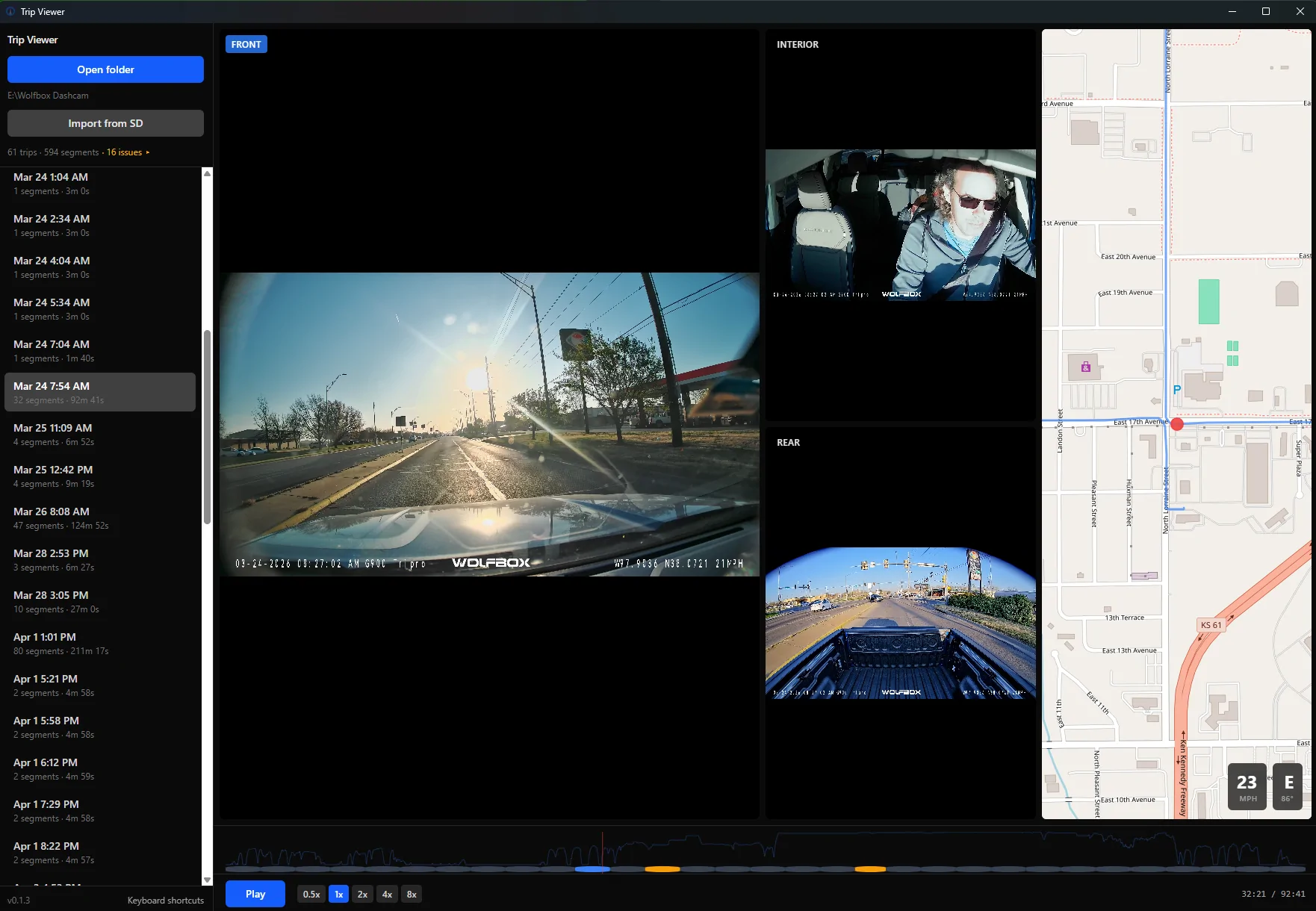
Ford Maverick Free open-source dashcam viewer I built — 3-channel sync playback with GPS map screenshot
Sponsored


Bob The Builder

2.0L EcoBoost
Well-known member
First Name
Butch
Joined
Dec 2, 2021
Threads
54
Messages
2,601
Reaction score
4,896
Location
Vermont
Vehicle(s)
2020 Jeep Cherokee ** 2023 Mav FX/4
Engine
2.0L EcoBoost
Hey all,

I built a free dashcam viewer and wanted to share it in case anyone else here is frustrated with the software that comes with their dashcam.

I have a Wolf Box 3-channel setup (front/interior/rear) and the stock app is... not great. Buried speed controls, no real scrubbing, sluggish playback. The paid
third-party viewers are better but none of them handle three channels well. So I built my own.

Trip Viewer is a free, open-source Windows app that:

- Plays all 3 camera channels simultaneously, perfectly synced
- Shows your position on a live GPS map as the video plays
- Has a timeline with speed graph so you can jump to interesting moments
- Lets you click a side view to make it the main view, double-click for fullscreen
- Can import footage directly from your SD card with integrity verification
- Auto-detects and groups your files into trips — no manual organizing
- Is lightweight (~3 MB install) and uses hardware video decoding so it's actually smooth

You can download it here: https://github.com/chrisl8/trip-viewer

Click "Releases" on the right side, then download the _x64-setup.exe file. Just run the installer and you're good. Windows may pop up a SmartScreen warning since the
app is new — click "More info" then "Run anyway."

One thing to note: most dashcams record in HEVC format, and Windows needs a decoder for that. The app will check on startup and point you to the Microsoft Store if
you need it (it's a one-time install).

Right now it's built and tested with Wolf Box dashcams specifically, but the architecture is designed to support other brands. If you have a different dashcam (Viofo,
Thinkware, BlackVue, etc.) and want to try it, let me know what model you have and I'll see about adding support.

This is a personal project — I'm a software developer and built this with help from AI tooling (Claude Code). It's MIT licensed, totally free, no ads, no tracking. If
you run into bugs or have feature ideas, you can open an issue on GitHub or just reply here and I'll see it.

Windows only for now, but the tech supports Mac/Linux so I'm open to porting if there's interest.

Happy to answer any questions!
screenshot.webp
Thanx!! My Affver A4 records in .tp format, but automatically converts the 3 minute vid to MP4 on download to my phone. One of the reasons I bought this brand. Think I will be fine with that? i have dual 2TB SSD's so storage is a non issue for me. Thanx.
 
OP
OP
StarBug

StarBug

2.5L Hybrid
Well-known member
Joined
Oct 21, 2025
Threads
3
Messages
104
Reaction score
154
Location
67202
Vehicle(s)
2025 Hybrid Lariat
Engine
2.5L Hybrid
Thanx!! My Affver A4 records in .tp format, but automatically converts the 3 minute vid to MP4 on download to my phone. One of the reasons I bought this brand. Think I will be fine with that? i have dual 2TB SSD's so storage is a non issue for me. Thanx.
Only way to find out is to try it. If it doesn't work and you can get me some sample videos I can see if adding support is doable.

My routine is to take the SD card out of my dashcam when I get home, put it in my computer and use the "Import from SD" function to move them to my computer and then put the SD back in my camera.
You don't have to do it that way though. I can just point the program at wherever your videos are if they are on your computer.
 

EffNo50

2.5L Hybrid
Well-known member
Joined
Jun 15, 2024
Threads
3
Messages
412
Reaction score
464
Location
Central California
Vehicle(s)
2024 Lariat Hybrid white on black
Engine
2.5L Hybrid
Interested, mostly in a Linux (Debian / Ubuntu / Flat Pack) version
 

Bob The Builder

2.0L EcoBoost
Well-known member
First Name
Butch
Joined
Dec 2, 2021
Threads
54
Messages
2,601
Reaction score
4,896
Location
Vermont
Vehicle(s)
2020 Jeep Cherokee ** 2023 Mav FX/4
Engine
2.0L EcoBoost
Only way to find out is to try it. If it doesn't work and you can get me some sample videos I can see if adding support is doable.

My routine is to take the SD card out of my dashcam when I get home, put it in my computer and use the "Import from SD" function to move them to my computer and then put the SD back in my camera.
You don't have to do it that way though. I can just point the program at wherever your videos are if they are on your computer.
Thanx. I usually download the video onto my phone then use phone link to transfer the video onto my PC. By that time it is MP4. Your software should see it. Thank you very much. Appreciate your efforts. Kudos.
 

Sponsored

SteveM

2.5L Hybrid
Well-known member
First Name
Steve
Joined
Sep 14, 2022
Threads
11
Messages
123
Reaction score
224
Location
Maryland USA
Vehicle(s)
2018 Silverado, 2025 Eruption Green Lariat Hybrid
Engine
2.5L Hybrid
That's awesome. Any chance it can be made to work with a 4 Channel Dash Cam?
 
OP
OP
StarBug

StarBug

2.5L Hybrid
Well-known member
Joined
Oct 21, 2025
Threads
3
Messages
104
Reaction score
154
Location
67202
Vehicle(s)
2025 Hybrid Lariat
Engine
2.5L Hybrid
Interested, mostly in a Linux (Debian / Ubuntu / Flat Pack) version
I'll give it a try when I have some time. It should be doable.
 
OP
OP
StarBug

StarBug

2.5L Hybrid
Well-known member
Joined
Oct 21, 2025
Threads
3
Messages
104
Reaction score
154
Location
67202
Vehicle(s)
2025 Hybrid Lariat
Engine
2.5L Hybrid
That's awesome. Any chance it can be made to work with a 4 Channel Dash Cam?
No reason why not. Do you have any sample video data I could try it on? Either personal or something from the manufacturer?
 

SteveM

2.5L Hybrid
Well-known member
First Name
Steve
Joined
Sep 14, 2022
Threads
11
Messages
123
Reaction score
224
Location
Maryland USA
Vehicle(s)
2018 Silverado, 2025 Eruption Green Lariat Hybrid
Engine
2.5L Hybrid
Sure, I can pull some and send to you this weekend, if that will work for you...
 

nbmav

2.5L Hybrid
Well-known member
First Name
Kevin
Joined
May 6, 2025
Threads
5
Messages
202
Reaction score
235
Location
North Bend, WA
Vehicle(s)
2026 Lariat
Engine
2.5L Hybrid
This is a great idea. I just had to use some of my dash cam vid to show how a guy drove into me and totaled my poor '25 and it has always been a pain to try and find the right file(s) by going through the long list of clips.

I'm mostly a Mac guy from way back (worked at Apple in the late 80's & 90's) so would be great to have it running on the Mac. I'll try it out on my beater windows 11 laptop which I bought for Forscan to see if it works with my older Thinkware files. If it does, maybe I'll take a crack at getting it going on the Mac although I'm more of a Java/C++ guy never played with React and the like.
 
Sponsored
OP
OP
StarBug

StarBug

2.5L Hybrid
Well-known member
Joined
Oct 21, 2025
Threads
3
Messages
104
Reaction score
154
Location
67202
Vehicle(s)
2025 Hybrid Lariat
Engine
2.5L Hybrid
This is a great idea. I just had to use some of my dash cam vid to show how a guy drove into me and totaled my poor '25 and it has always been a pain to try and find the right file(s) by going through the long list of clips.

I'm mostly a Mac guy from way back (worked at Apple in the late 80's & 90's) so would be great to have it running on the Mac. I'll try it out on my beater windows 11 laptop which I bought for Forscan to see if it works with my older Thinkware files. If it does, maybe I'll take a crack at getting it going on the Mac although I'm more of a Java/C++ guy never played with React and the like.
I'll give porting to Mac a shot too. Again, while I am a software developer, I'm mostly using AI to build this for me, so it isn't a big job, just have to plan, design, chat with it, review and test.

This is a great project to experiment with AI coding on so I'm enjoying learning about it. I figure I'm going to need to be proficient with AI for this stuff if I want to keep working in the industry.

Obviously if you have something to contribute, I'm open to that too.
 

nbmav

2.5L Hybrid
Well-known member
First Name
Kevin
Joined
May 6, 2025
Threads
5
Messages
202
Reaction score
235
Location
North Bend, WA
Vehicle(s)
2026 Lariat
Engine
2.5L Hybrid
Sounds good, I've been wondering how well the AI coding tools work but have never tried them. I'll let you take first crack at it since you know all the code already. If you decide that you don't have the time then let me know and I'll give it a go. More than happy to test it if you build it.
 

b25crew

2.0L EcoBoost
Well-known member
First Name
Tim
Joined
Mar 28, 2024
Threads
3
Messages
89
Reaction score
154
Location
St. Louis MO
Vehicle(s)
2024 Maverick, 1992 Mustang GT Convertible
Engine
2.0L EcoBoost
Clubs
 
I have a couple of old Miltona MNCD60 dashcams. From what I see it creates .MOV files.
I tried to upload an example but, they are too large...
VLC plays the videos just fine but it would be great to see the map/gps data...

Thanks!
 

nbmav

2.5L Hybrid
Well-known member
First Name
Kevin
Joined
May 6, 2025
Threads
5
Messages
202
Reaction score
235
Location
North Bend, WA
Vehicle(s)
2026 Lariat
Engine
2.5L Hybrid
My thinkware F200 Pro has different naming conventions so I was trying to change the names of some test files to get it to load them but having no luck when using the open folder button. I keep getting the "No trips found in this folder" error. From looking at the testvcode it looks like they need to be named like this:

fn triplet_shares_base_key() {
let f = parse("2026_03_15_173951_02_F.MP4").unwrap();
let i = parse("2026_03_15_173951_02_I.MP4").unwrap();
let r = parse("2026_03_15_173951_02_R.MP4").unwrap();
assert_eq!(f.base_key, i.base_key);
assert_eq!(i.base_key, r.base_key);
}

Where it would be YYYY_MM_DD_HHMMSS_XX_F.MP4 (and _R for reverse) but when I name two of my camera's MP4 files using those naming conventions and dropping them into an empty folder I get the error.

The naming convention for the regular recording files for my camera are: REC_2026_03_06_07_25_52_F.MP4

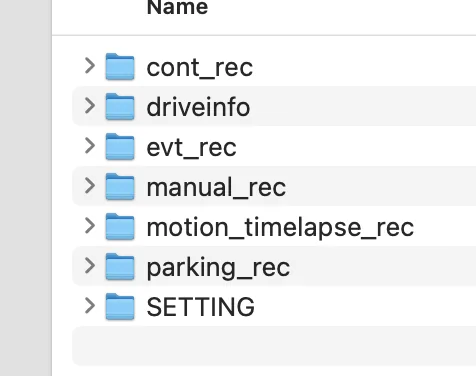
and if it matters my directory structure looks like this:
Ford Maverick Free open-source dashcam viewer I built — 3-channel sync playback with GPS map Screenshot 2026-04-14 at 5.21.50 PM


where cont_rec is the regular driving files, evt_rec is for "events" etc. But for my testing all I was doing creating a new folder and dropping in two files and naming them 2026_03_06_072552_01_F.MP4 and 2026_03_06_072552_01_R.MP4 and also tried dropping in an "I" file in case that was required by just duplicating one of the two and renaming. But keep getting the error.

Forgot to mention, this is on my Windows laptop.
 

nbmav

2.5L Hybrid
Well-known member
First Name
Kevin
Joined
May 6, 2025
Threads
5
Messages
202
Reaction score
235
Location
North Bend, WA
Vehicle(s)
2026 Lariat
Engine
2.5L Hybrid
Sheesh, after all that I noticed that when I duplicated one of the files to create an "I" file which I don't have I forgot to make the event code number match (had 00 instead of 01). I just changed that and now it loads. So I guess the first ask would be to not require 3 channels and the second to have a plugin to allow my file name format for the Thinkware.
Sponsored

 
Last edited:


Top