Sponsored
OP
OP
EONR24

EONR24

2.0L EcoBoost
Well-known member
First Name
Swag
Joined
Feb 26, 2024
Threads
44
Messages
1,442
Reaction score
1,656
Location
United States
Vehicle(s)
2024 Ford Maverick XL
Engine
2.0L EcoBoost
@EONR24
Simpler question do you know the 22xl OE left steering switch number in SCCM? I’m just going to put it back in and maybe order the correct switch next time. I didn’t read about it throughly and got the wrong switch and it looks like most people change the right side too but I’m not sure that’s necessary.
are you looking for your original coding? also what are you trying to do? add Cruise control?
Sponsored

 
OP
OP
EONR24

EONR24

2.0L EcoBoost
Well-known member
First Name
Swag
Joined
Feb 26, 2024
Threads
44
Messages
1,442
Reaction score
1,656
Location
United States
Vehicle(s)
2024 Ford Maverick XL
Engine
2.0L EcoBoost
Didn’t add a stalk just the switch. I think the part number for the switch is LB5Z9C888H
Supersession(s): LB5Z-9C888-H; LB5Z9C888D
Let me look into this a bit my bad. I meant to earlier
 
OP
OP
EONR24

EONR24

2.0L EcoBoost
Well-known member
First Name
Swag
Joined
Feb 26, 2024
Threads
44
Messages
1,442
Reaction score
1,656
Location
United States
Vehicle(s)
2024 Ford Maverick XL
Engine
2.0L EcoBoost
Didn’t add a stalk just the switch. I think the part number for the switch is LB5Z9C888H
Supersession(s): LB5Z-9C888-H; LB5Z9C888D
So I can have you try my stock steering wheel coding for my 2024 XL with cruise control and see if that works for you! Also if you provide me with your vin in a direct message, I can get your factory codings to revert back to if that's what you're trying to do! Let me know how I can help!!
 
OP
OP
EONR24

EONR24

2.0L EcoBoost
Well-known member
First Name
Swag
Joined
Feb 26, 2024
Threads
44
Messages
1,442
Reaction score
1,656
Location
United States
Vehicle(s)
2024 Ford Maverick XL
Engine
2.0L EcoBoost
So I can have you try my stock steering wheel coding for my 2024 XL with cruise control and see if that works for you! Also if you provide me with your vin in a direct message, I can get your factory codings to revert back to if that's what you're trying to do! Let me know how I can help!!
So many options for this line of coding!!
Ford Maverick ULTIMATE FORSCAN Ford Maverick Spreadsheet (MASTERLIST) 🗒️ Screenshot 2024-04-21 at 9.42.02 PM
 

nicobonis

2.0L EcoBoost
Well-known member
First Name
Nicolás
Joined
Oct 1, 2022
Threads
6
Messages
107
Reaction score
115
Location
Banfield - Buenos Aires - Argentina
Vehicle(s)
Ford Maverick Tremor 2025
Engine
2.0L EcoBoost
Hey Everyone,

I have compiled all of the known/working Forscan Modifications onto one spreadsheet. Thank you to all of the Forum Members that helped make this possible! I will be updating this spreadsheet periodically if more coding changes are found! Let me know what changes or fixes I can make! Please pin/sticky this Thread or the Link below to the Forscan Section of these Forums!

LINK BELOW!
Forscan 2022-2024 Ford Maverick


Dear EONR24, I have a few contributions to make:

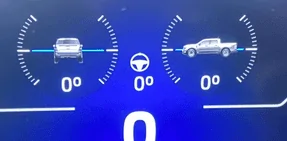
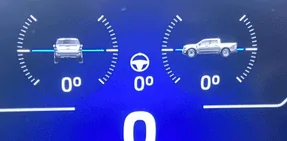
1- Off-Road Display on a 6-inch Display:
This feature will also work on hybrids and non-FX trucks, both FWD and AWD.
In the IPC Module (In the as-built):
720-07-02 X7XX-XXXX (Change the 2nd digit to a 7). Please make a backup before writing.
This was also tested on a 4-inch display and it does not work at all.
I discovered this information on the Forscan Forums.
Ford Maverick ULTIMATE FORSCAN Ford Maverick Spreadsheet (MASTERLIST) 🗒️ 1713832214722-y


2- The option of TSR menu (enabled vs disabled) in some 6-inch and 4-inch displays is buggy. Sometimes you have to set it to Disabled, and other times to Enabled in order to get it to work. I think it's a bug in Forscan.
Be aware that TSR activated on a 4-inch cluster may knock down Pre-Collision Assist. I strongly recommend adding this comment to your masterlist to inform 4-inch cluster users. In Argentina, 2 XLT Mavericks have the exact same issue, trying a lot of methods to activate this function.


3- The Canadian mode for Daytime Running Lights works even better on XL and XLT models, but in your masterlist, you only mention the change on the IPC.
Go to IPC module.
Change the Daytime Running Lamps Menu (Additional changes required in BCM) from Disabled to ENABLED.
Then, go to the BdyCM Module Configuration:
Change DRL include park lamps from Disabled to Enabled.
So, you will protect your headlamps.
You will have plenty of control over your lights.
The auto function will work perfectly (they will turn on when it's dark).
If you are living in the middle of nowhere, there's no point in having lights on during the day.

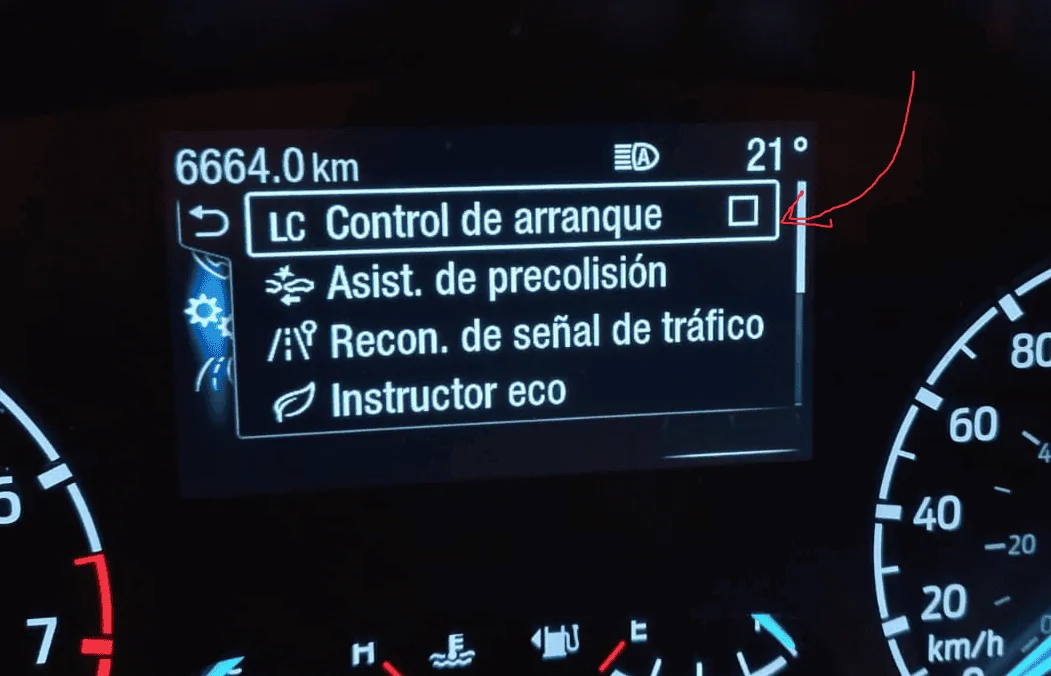
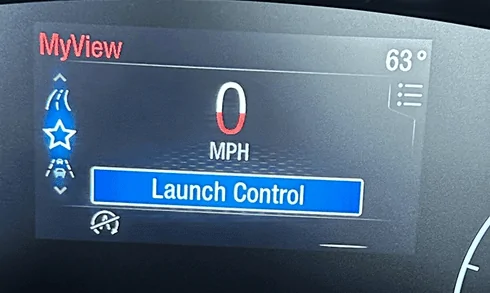
4- Launch control option, works pretty well on XLT, but add an option in the menu to "check" but there is no way to check it, This options apeares in pure white, but is imposible to "check it".
Ford Maverick ULTIMATE FORSCAN Ford Maverick Spreadsheet (MASTERLIST) 🗒️ 1713833668401-rh


But FordPerformance screen works well and "launch button" also works perfects.
Ford Maverick ULTIMATE FORSCAN Ford Maverick Spreadsheet (MASTERLIST) 🗒️ 1713832430637-m


Have a great day.
Best Regards.

Ford Maverick ULTIMATE FORSCAN Ford Maverick Spreadsheet (MASTERLIST) 🗒️ 1713832210158-p5
 
Last edited:

Sponsored

OP
OP
EONR24

EONR24

2.0L EcoBoost
Well-known member
First Name
Swag
Joined
Feb 26, 2024
Threads
44
Messages
1,442
Reaction score
1,656
Location
United States
Vehicle(s)
2024 Ford Maverick XL
Engine
2.0L EcoBoost
Dear EONR24, I have a few contributions to make:

1- Off-Road Display on a 6-inch Display:
This feature will also work on hybrids and non-FX trucks, both FWD and AWD.
In the IPC Module (In the as-built):
720-07-02 X7XX-XXXX (Change the 2nd digit to a 7). Please make a backup before writing.
This was also tested on a 4-inch display and it does not work at all.
I discovered this information on the Forscan Forums.
1713832214722-ye.png


2- The option of TSR menu (enabled vs disabled) in some 6-inch and 4-inch displays is buggy. Sometimes you have to set it to Disabled, and other times to Enabled in order to get it to work. I think it's a bug in Forscan.
Be aware that TSR activated on a 4-inch cluster may knock down Pre-Collision Assist. I strongly recommend adding this comment to your masterlist to inform 4-inch cluster users. In Argentina, 2 XLT Mavericks have the exact same issue, trying a lot of methods to activate this function.


3- The Canadian mode for Daytime Running Lights works even better on XL and XLT models, but in your masterlist, you only mention the change on the IPC.
Go to IPC module.
Change the Daytime Running Lamps Menu (Additional changes required in BCM) from Disabled to ENABLED.
Then, go to the BdyCM Module Configuration:
Change DRL include park lamps from Disabled to Enabled.
So, you will protect your headlamps.
You will have plenty of control over your lights.
The auto function will work perfectly (they will turn on when it's dark).
If you are living in the middle of nowhere, there's no point in having lights on during the day.

4- Launch control option, works pretty well on XLT, but add an option in the menu to "check" but there is no way to check it, This options apeares in pure white, but is imposible to "check it".
1713833668401-rh.png


But FordPerformance screen works well and "launch button" also works perfects.
1713832430637-me.png


Have a great day.
Best Regards.

1713832210158-p5.png
I have 1. off road screen listed already!. I will change 2. and 3. right now. I noted and moved 4.launch control. So right now I'll work on updating 2 and 3. THANK YOU!
 

nicobonis

2.0L EcoBoost
Well-known member
First Name
Nicolás
Joined
Oct 1, 2022
Threads
6
Messages
107
Reaction score
115
Location
Banfield - Buenos Aires - Argentina
Vehicle(s)
Ford Maverick Tremor 2025
Engine
2.0L EcoBoost
You are Welcome, Sorry did not notice the Off road screen. I´ll be working to give you more data.

Regards.
 

First Sergeant

2.5L Hybrid
Well-known member
First Name
Dave
Joined
Jan 2, 2024
Threads
16
Messages
836
Reaction score
1,056
Location
Fruitland Idaho
Vehicle(s)
2023 XLT Hybrid pushing a 40 foot diesel motorhome 2014 Toyota 4Runner Limited
Engine
2.5L Hybrid
Clubs
 
Hey Ian, nicobonis was correct about the TSR issue. Mine would not work until I enabled TSR Recognition. (I have 23 XLT 360 Lux package Hybrid.) Also I have ben experimenting with the tailgate ajar coding, but a no go for me. Tried it several times. Nothing happens. I would like to see that one get solved, but hey, I am thrilled at the many things that ARE working. Another big one would be to get the mode to come on at startup at "Eco" or any other selected choice, but seems I remember you (or someone) saying that is something that can't be changed? Thanks for all yours (and others) hard work!
 

AVC

2.5L Hybrid
Well-known member
Joined
Feb 27, 2024
Threads
6
Messages
231
Reaction score
189
Location
North Texas
Vehicle(s)
'23 Maverick Hybrid XLT, '02 Ranger, '20 Pilot
Engine
2.5L Hybrid
I found out where to make the change at after doing some research! Here is where the change needs to be made in the BCM. You have to use a HEX TO DEC Converter which I can do real quick and get you the correct coding for 26 PSI.
Screenshot 2024-04-20 at 10.50.28 PM.png
Sweet--I'll give it a try this weekend!
 
OP
OP
EONR24

EONR24

2.0L EcoBoost
Well-known member
First Name
Swag
Joined
Feb 26, 2024
Threads
44
Messages
1,442
Reaction score
1,656
Location
United States
Vehicle(s)
2024 Ford Maverick XL
Engine
2.0L EcoBoost
Hey Ian, nicobonis was correct about the TSR issue. Mine would not work until I enabled TSR Recognition. (I have 23 XLT 360 Lux package Hybrid.) Also I have ben experimenting with the tailgate ajar coding, but a no go for me. Tried it several times. Nothing happens. I would like to see that one get solved, but hey, I am thrilled at the many things that ARE working. Another big one would be to get the mode to come on at startup at "Eco" or any other selected choice, but seems I remember you (or someone) saying that is something that can't be changed? Thanks for all yours (and others) hard work!
You are Welcome, Sorry did not notice the Off road screen. I´ll be working to give you more data.

Regards.
FIXED!. Except I did not add that TSR could interfere with pre collision assist. Is there any evidence of this? I have an XL with the 4 inch cluster and I have had my pre collision assist kick in after I had enabled TSR. The codings seem completely separate after looking. I can add to make sure pre collision assist is enabled afterwards !
 
Sponsored
OP
OP
EONR24

EONR24

2.0L EcoBoost
Well-known member
First Name
Swag
Joined
Feb 26, 2024
Threads
44
Messages
1,442
Reaction score
1,656
Location
United States
Vehicle(s)
2024 Ford Maverick XL
Engine
2.0L EcoBoost
Hey Ian, nicobonis was correct about the TSR issue. Mine would not work until I enabled TSR Recognition. (I have 23 XLT 360 Lux package Hybrid.) Also I have ben experimenting with the tailgate ajar coding, but a no go for me. Tried it several times. Nothing happens. I would like to see that one get solved, but hey, I am thrilled at the many things that ARE working. Another big one would be to get the mode to come on at startup at "Eco" or any other selected choice, but seems I remember you (or someone) saying that is something that can't be changed? Thanks for all yours (and others) hard work!
Thanks for testing them out. I made some corrections and will remove the tailgate ajar warning. I have searched a lot in the coding and I do believe starting up in a desired mode other than normal is impossible using Forscan HOWEVER, Another Forum member here makes a device that is relatively easy to install and lets you start up in any mode you desire. The product is called MYMAVMODE. Here's the link below.

https://www.mymavmode.com/shop
 
Last edited:

First Sergeant

2.5L Hybrid
Well-known member
First Name
Dave
Joined
Jan 2, 2024
Threads
16
Messages
836
Reaction score
1,056
Location
Fruitland Idaho
Vehicle(s)
2023 XLT Hybrid pushing a 40 foot diesel motorhome 2014 Toyota 4Runner Limited
Engine
2.5L Hybrid
Clubs
 
I had seen that about six months ago and lost that link! Thanks, may check into doing that mod.
 

nicobonis

2.0L EcoBoost
Well-known member
First Name
Nicolás
Joined
Oct 1, 2022
Threads
6
Messages
107
Reaction score
115
Location
Banfield - Buenos Aires - Argentina
Vehicle(s)
Ford Maverick Tremor 2025
Engine
2.0L EcoBoost
FIXED!. Except I did not add that TSR could interfere with pre collision assist. Is there any evidence of this? I have an XL with the 4 inch cluster and I have had my pre collision assist kick in after I had enabled TSR. The codings seem completely separate after looking. I can add to make sure pre collision assist is enabled afterwards !

I can gather the evidence, but I should make a video, and it could be lengthy.
When my TSR is off, I receive Pre-Collision warnings when I accelerate behind a car. When my TSR is ON, there is no way to make it appear. I haven't tried to make the Auto-Braking function work, but I no longer receive the alert.

I am one of the individuals in this video, so believe me, I really know how to make the alert appear.

On the other hand, I would love to know what's happening in my truck and my friend's truck. One is a 2022 XLT (4" cluster), and mine is a 2023 XLT (4" cluster). In my other friends' trucks, three more Mavericks 2022 Lariat (6.5" cluster) and two more 2023 Lariat (6.5" cluster) worked perfectly. (We have a small club here in Argentina, so I have LOTS of friends with Mavericks. Also, last Sunday, I programmed the TSR on a Hybrid (6" Cluster).

I Would love to know wich firmware you have in your IPC and IPMA, and also specifically wich options are checked in your Mav, Because maybe... Square signals work different than rounded ones. (But once agian, in my friends 6" this works perfect, in my other friends with 4" pre-collision is alert is not working, no matter if you re-enable it, or if you change sensivity).

Comment, In argentina Overpass signs does not work, becuase in the streets we have a slightly different signs, We tested printing European signs and putting them on the streets, and then Overpass icon appears on IPC. :cwl:

Have a great Day.
 
OP
OP
EONR24

EONR24

2.0L EcoBoost
Well-known member
First Name
Swag
Joined
Feb 26, 2024
Threads
44
Messages
1,442
Reaction score
1,656
Location
United States
Vehicle(s)
2024 Ford Maverick XL
Engine
2.0L EcoBoost
I can gather the evidence, but I should make a video, and it could be lengthy.
When my TSR is off, I receive Pre-Collision warnings when I accelerate behind a car. When my TSR is ON, there is no way to make it appear. I haven't tried to make the Auto-Braking function work, but I no longer receive the alert.

I am one of the individuals in this video, so believe me, I really know how to make the alert appear.

On the other hand, I would love to know what's happening in my truck and my friend's truck. One is a 2022 XLT (4" cluster), and mine is a 2023 XLT (4" cluster). In my other friends' trucks, three more Mavericks 2022 Lariat (6.5" cluster) and two more 2023 Lariat (6.5" cluster) worked perfectly. (We have a small club here in Argentina, so I have LOTS of friends with Mavericks. Also, last Sunday, I programmed the TSR on a Hybrid (6" Cluster).

I Would love to know wich firmware you have in your IPC and IPMA, and also specifically wich options are checked in your Mav, Because maybe... Square signals work different than rounded ones. (But once agian, in my friends 6" this works perfect, in my other friends with 4" pre-collision is alert is not working, no matter if you re-enable it, or if you change sensivity).

Comment, In argentina Overpass signs does not work, becuase in the streets we have a slightly different signs, We tested printing European signs and putting them on the streets, and then Overpass icon appears on IPC. :cwl:

Have a great Day.
Good information! Thank You. I will add a disclaimer to the spreadsheet about pre collision !
 
OP
OP
EONR24

EONR24

2.0L EcoBoost
Well-known member
First Name
Swag
Joined
Feb 26, 2024
Threads
44
Messages
1,442
Reaction score
1,656
Location
United States
Vehicle(s)
2024 Ford Maverick XL
Engine
2.0L EcoBoost
I can gather the evidence, but I should make a video, and it could be lengthy.
When my TSR is off, I receive Pre-Collision warnings when I accelerate behind a car. When my TSR is ON, there is no way to make it appear. I haven't tried to make the Auto-Braking function work, but I no longer receive the alert.

I am one of the individuals in this video, so believe me, I really know how to make the alert appear.

On the other hand, I would love to know what's happening in my truck and my friend's truck. One is a 2022 XLT (4" cluster), and mine is a 2023 XLT (4" cluster). In my other friends' trucks, three more Mavericks 2022 Lariat (6.5" cluster) and two more 2023 Lariat (6.5" cluster) worked perfectly. (We have a small club here in Argentina, so I have LOTS of friends with Mavericks. Also, last Sunday, I programmed the TSR on a Hybrid (6" Cluster).

I Would love to know wich firmware you have in your IPC and IPMA, and also specifically wich options are checked in your Mav, Because maybe... Square signals work different than rounded ones. (But once agian, in my friends 6" this works perfect, in my other friends with 4" pre-collision is alert is not working, no matter if you re-enable it, or if you change sensivity).

Comment, In argentina Overpass signs does not work, becuase in the streets we have a slightly different signs, We tested printing European signs and putting them on the streets, and then Overpass icon appears on IPC. :cwl:

Have a great Day.
Im going to look into the coding more to see if this can be fixed and I can figure out what may be causing this..
Sponsored


Top