
Sponsored

Touch screen is blank and won't turn on after restarting

Ferroplasm

2.5L Hybrid
Well-known member
First Name
M
Joined
Oct 4, 2021
Threads
23
Messages
179
Reaction score
186
Location
North Carolina
Vehicle(s)
Subaru Outback Onyx XT
Engine
2.5L Hybrid
My touchscreen won't display the radio controls at all. If I turn off and restart the truck then the Ford logo will display, disappear, and the screen remains blank. The volume knob and power button work, but that's it. Anyone eelse have this issue?
Sponsored


 

jeffrol48197

2.5L Hybrid
Well-known member
First Name
Jeff
Joined
Jan 6, 2022
Threads
13
Messages
305
Reaction score
682
Location
Michigan
Vehicle(s)
2007 Explorer, 2009 Focus, 2019 Explorer
Engine
2.5L Hybrid
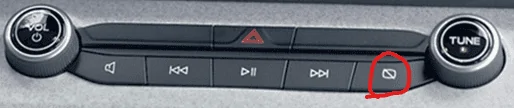
There is a button on the far right of the radio controls that can make it a blank/dark screen - did you try that button?
 

OleFordGuy

2.0L EcoBoost
Well-known member
First Name
Craig
Joined
Dec 5, 2021
Threads
38
Messages
3,804
Reaction score
6,001
Location
Alabama
Vehicle(s)
11 F150 Lariat, 24 Expedition Limited, 22 Mav Lariat AWD
Engine
2.0L EcoBoost
Might try resetting it by pressing/holding down the power button + skip forward buttons for like 15 seconds then release
 

Sponsored

RonFLA

2.5L Hybrid
Well-known member
First Name
Ron
Joined
Nov 23, 2021
Threads
12
Messages
741
Reaction score
1,125
Location
O-Town
Vehicle(s)
Maverick
Engine
2.5L Hybrid
Clubs
 
The radio is in a boot loop. Try exiting the truck and let it sit for an hour and then try again. Maybe consider updating the firmware to the latest version.
 

Ford Motor Company

Well-known member
Official Ford Account
Joined
Jan 6, 2022
Threads
7
Messages
3,789
Reaction score
3,916
Location
Dearborn, mi
Vehicle(s)
Maverick
Engine
Undecided
My touchscreen won't display the radio controls at all. If I turn off and restart the truck then the Ford logo will display, disappear, and the screen remains blank. The volume knob and power button work, but that's it. Anyone eelse have this issue?
Hello! Send us a private message with your VIN and the name and location of your local Ford dealer. I’d be happy to see what I can do to assist with this screen concern. Thanks!
 

jsus

2.5L Hybrid
Well-known member
Joined
Dec 20, 2021
Threads
0
Messages
2,873
Reaction score
3,859
Location
USA
Vehicle(s)
2022 Ford Escape Hybrid AWD
Engine
2.5L Hybrid
I'll give that a shot. Is that the command for a soft reset?
Hard reset/reboot, force reboot, call it what you want. Basically, it forces the computer to reboot and is supposed to clear some caches in the process that should keep it from acting up again. It doesn't clear any of your settings/preferences, it doesn't delete paired devices or anything like that.

In other words, the suggestion is to try turning it off and back on again. ;) It's always a good place to start when the system isn't working properly.


Note that the vehicle must be in Accessory or Run in order to complete the procedure. Otherwise it just turns off. Technically you should be able to then turn it back on, but...
 

Edge Haley

2.5L Hybrid
Well-known member
First Name
Edge
Joined
Jul 17, 2021
Threads
5
Messages
1,352
Reaction score
1,827
Location
CARBONDALE-Atlanta
Vehicle(s)
PORSCHE
Engine
2.5L Hybrid
Had identical symptom. Would crank, but once put in gear screen went blank, turn off and back on and screen went blank. Slightly corroded cable, but Dealer had to remove dash area behind steering wheel to clean off cable.

Maverick drove fine. I was so used to looking at the display and felt weird driving with no display and speedometer.
 
Last edited:

Metro12

2.5L Hybrid
Member
First Name
Mike
Joined
Feb 26, 2023
Threads
1
Messages
14
Reaction score
2
Location
Ohio
Vehicle(s)
2023 Maverick XLT Hybrid
Engine
2.5L Hybrid
Had the same thing this morning. Reboot/reset procedure seems to have fixed it
 
Sponsored

NJBob

2.0L EcoBoost
Well-known member
First Name
Bob
Joined
Dec 25, 2021
Threads
139
Messages
2,391
Reaction score
1,579
Location
New Jersey
Vehicle(s)
2022 Maverick, 2003 MR2, 2019 Forrester, 1969 Z/28
Engine
2.0L EcoBoost
Hello! Send us a private message with your VIN and the name and location of your local Ford dealer. I’d be happy to see what I can do to assist with this screen concern. Thanks!
IL
There is a button on the far right of the radio controls that can make it a blank/dark screen - did you try that button?
I know this is an old post but where is this button exactly? This happened to me but could not find the button you are referring too.
 

NJBob

2.0L EcoBoost
Well-known member
First Name
Bob
Joined
Dec 25, 2021
Threads
139
Messages
2,391
Reaction score
1,579
Location
New Jersey
Vehicle(s)
2022 Maverick, 2003 MR2, 2019 Forrester, 1969 Z/28
Engine
2.0L EcoBoost
Damn, Thanks After I posted this I went to the car and found it right away. When the screen went blank I could not find it. It was staring me in the face. I am losing it I think.
 

Timothyd

2.5L Hybrid
Well-known member
First Name
Tim
Joined
Nov 10, 2021
Threads
52
Messages
4,130
Reaction score
3,523
Location
Illinois
Vehicle(s)
Buick Encore, Miata, motorcycles
Engine
2.5L Hybrid
Clubs
 
Hello! Send us a private message with your VIN and the name and location of your local Ford dealer. I’d be happy to see what I can do to assist with this screen concern. Thanks!
I have that same issue! Did you get a fix? That button had no effect.

Thanks,, Tim
 
Last edited:

Dmthomp32

2.0L EcoBoost
Well-known member
First Name
Doug
Joined
Jan 24, 2023
Threads
19
Messages
474
Reaction score
617
Location
Charlotte
Vehicle(s)
2023 Ford Maverick
Engine
2.0L EcoBoost
Reset of the display worked for me when this happened. Hasn’t happened since thankfully
Sponsored


Top