
Sponsored

Alpine Optim8 DSP/Amp - Lane's Review, Thoughts, Results...

Lane

2.5L Hybrid
Well-known member
First Name
Lane
Joined
Jul 20, 2023
Threads
15
Messages
407
Reaction score
979
Location
Central Wisconsin
Website
photos.app.goo.gl
Vehicle(s)
2023 Area 51 Hybrid XL, 2006 VW Jetta Smyth UTE
Engine
2.5L Hybrid
I have a build thread where I've detailed all my work on my Mav (full thread starts here, just the audio system starts here), but this is sort of specialized so I thought a separate detailed thread might fit better in this forum.

A bit of context - I've been working on audio systems since before I had a driver's license. For decades. Some have been simple, one or two have been extra special. "Back in the day", I spent two years competing in IASCA and USAC competitions with a car built for sound quality, before DSPs existed, and did very well at it. Other than my Mav, I do have another vehicle with an earlier Alpine DSP. It's not the newest, but it still sounds killer.

The system in the Mav has Polk Audio separates in front, Polk Audio coaxials in the rear, and a 12" Pioneer low profile sub in a fiberglass enclosure behind the rear seat back. See my build thread referenced above for details. I just finished up an installation of the amp/dsp which is worthy of some discussion. I'm not going to cover every feature in detail, so this probably isn't a great "review", but I did want to share some thoughts and my experience with the unit.

Surprisingly, not much for talk/reviews/impressions of it that I was able to find online when I was doing research prior to purchase. So here we go.
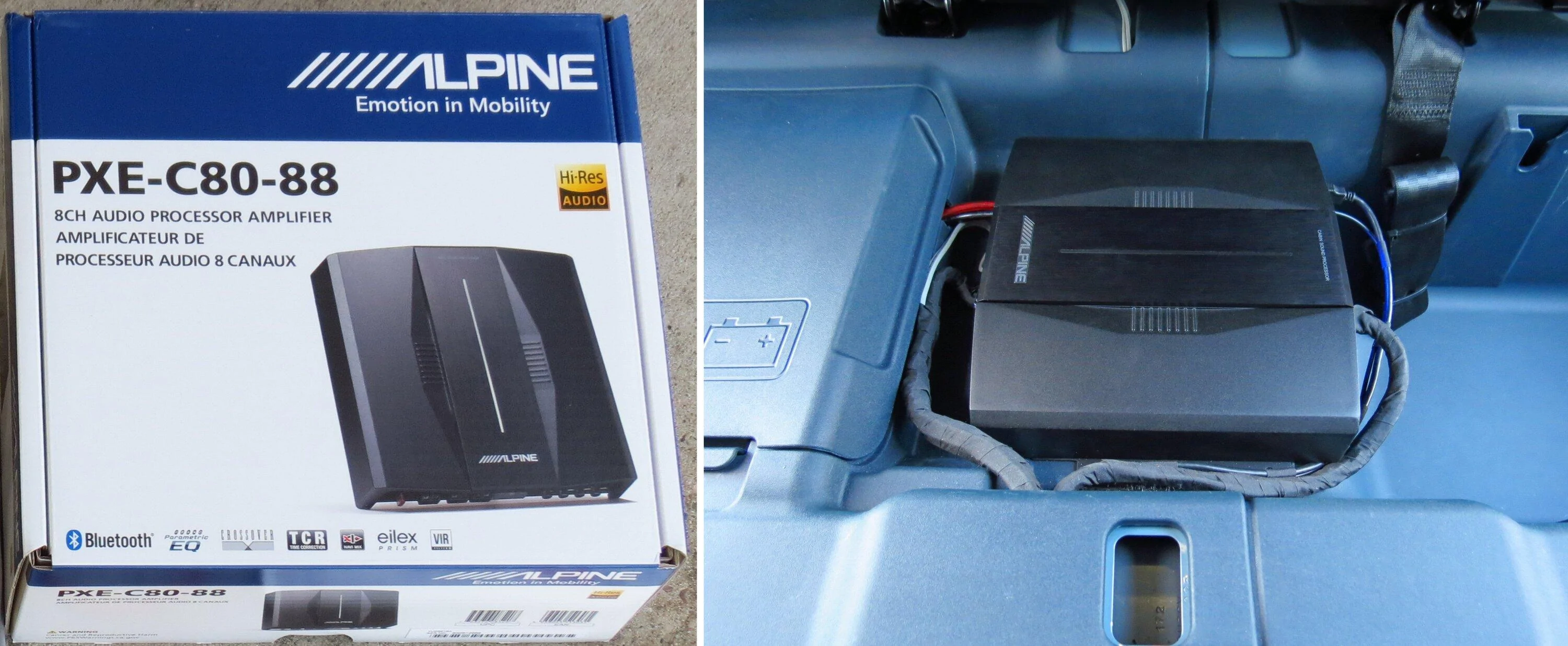
Ford Maverick Alpine Optim8 DSP/Amp - Lane's Review, Thoughts, Results... unit


In researching DSP options prior to purchase, there were a few features I really wanted that a lot of DSPs didn't advertise that they offered, and that put Alpine's offerings at the top of my list. I wanted time correction, a decent PC-based app & UI, anti equalization to identify & undo built-in factory radio equalization, auto EQ using a mic & RTA, and 31-band/ch manual control (wanted more than just a few parametric bands).

I'd first considered the Optim6, which is a DSP with no built-in amplification. I had a 5-ch amp from a prior car I'd intended on using, but it would have been a challenge to find a place to mount the two components. My sub box is behind the rear seat and uses up every bit of the space that's there. I didn't want to give up the sizable cubby space under the rear seat bottom. It's a truck and that's where I keep the truck things. Under the front seats was an option, but due to the location of the heating vent under each seat, these components would have stuck out a bit and gotten kicked by backseat passenger feet so that wasn't going to work well either.

The dimensions of the Optim8 with its built-in amplification were only slightly larger than the 6, and it would fit perfectly on the small raised shelf area under the rear seat bottom. So my old amp went on eBay and I bit the bullet and ordered the Optim8. It's not cheap but since I usually keep & enjoy my vehicles for a very long time, it would be worth it over that time.

Along with the processor / amp main unit, also included are input and output harnesses, mounting brackets, a Bluetooth dongle which hangs off the unit, a USB cable, and a remote display/controller (BASS KNOB! among other things...) to be mounted upfront within easy reach.
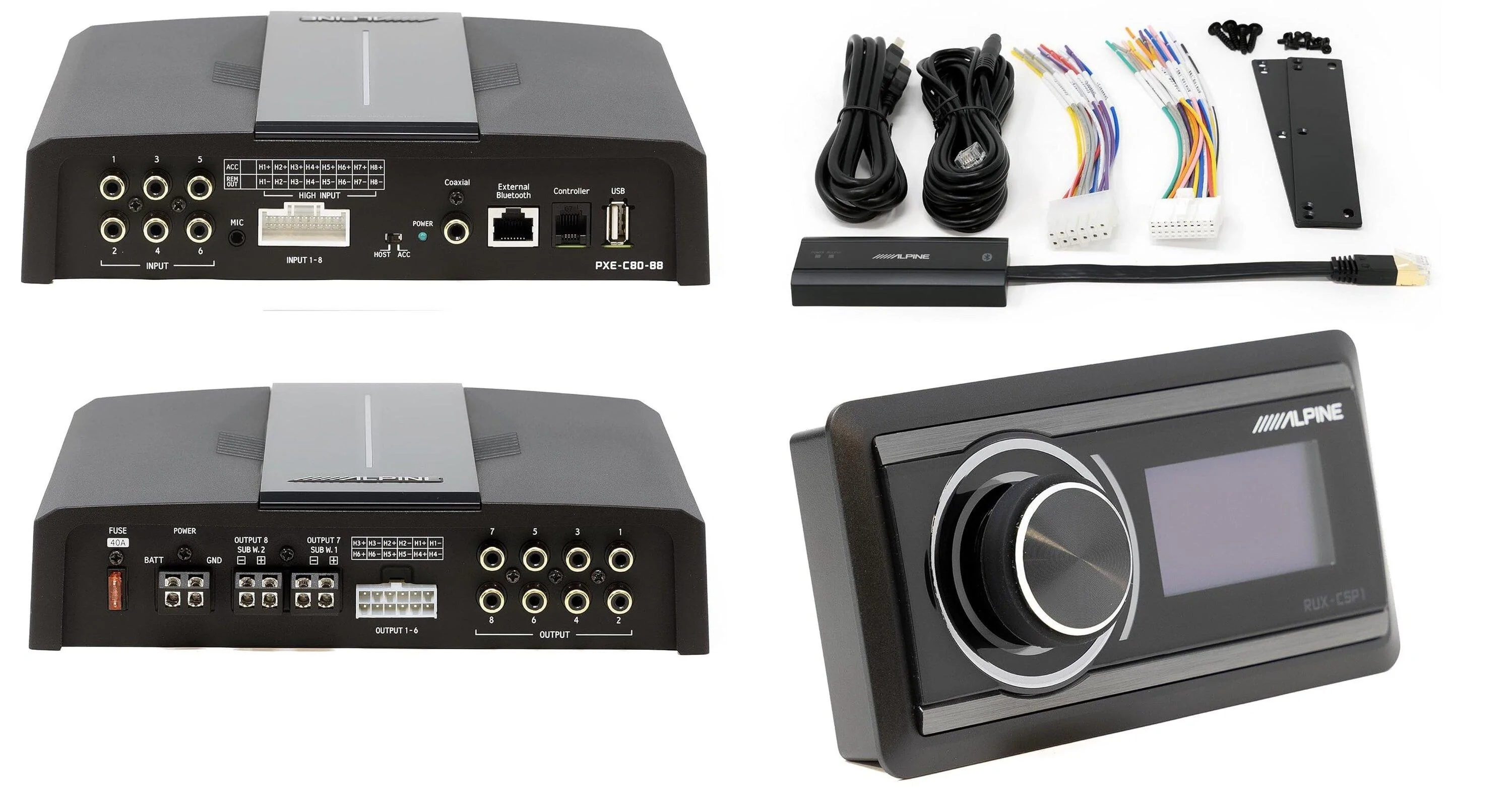
Ford Maverick Alpine Optim8 DSP/Amp - Lane's Review, Thoughts, Results... pieces


In addition to RCA input jacks, it has the all-important high-level inputs to connect to the factory radio.

Its Bluetooth ability allows you to beam music from a phone or tablet directly to the DSP, allowing you to bypass the factory radio if you want to. I expect that the best sound quality would probably come via this method. The knob on the Alpine controller allows system volume control in its default mode and that would need to be used for music over Bluetooth. But, listening without the factory radio as the source will take away use of the steering wheel controls for volume and track adjustments. Because of that, I don't know that it's something I'd choose to use.

Along with a few brief comments found on Amazon & Crutchfield's sites by people who'd purchased it, this YouTube video put out by Alpine was useful in showing its features and what's involved with initial set up & configuration. Also found some good test info & measurements on this forum.

Although my front Polk components have a passive crossover, I'm instead using 4 channels of the Optim8 along with its active crossover functionality for those front components. Having flexibility over crossover point, type, and slope is nice. There are Polk 4" in the rear as well as the 12" sub. In hooking it all up, I did find out that I had to use a remote turn on lead to an accessory fuse in the fusebox. If left in "host" mode where it watches the high-level signal to detect if the factory radio is on, I found that the processor was staying on even when the radio was not. FYI.
Sponsored

 
Last edited:
OP
OP
Lane

Lane

2.5L Hybrid
Well-known member
First Name
Lane
Joined
Jul 20, 2023
Threads
15
Messages
407
Reaction score
979
Location
Central Wisconsin
Website
photos.app.goo.gl
Vehicle(s)
2023 Area 51 Hybrid XL, 2006 VW Jetta Smyth UTE
Engine
2.5L Hybrid
Initial Set Up

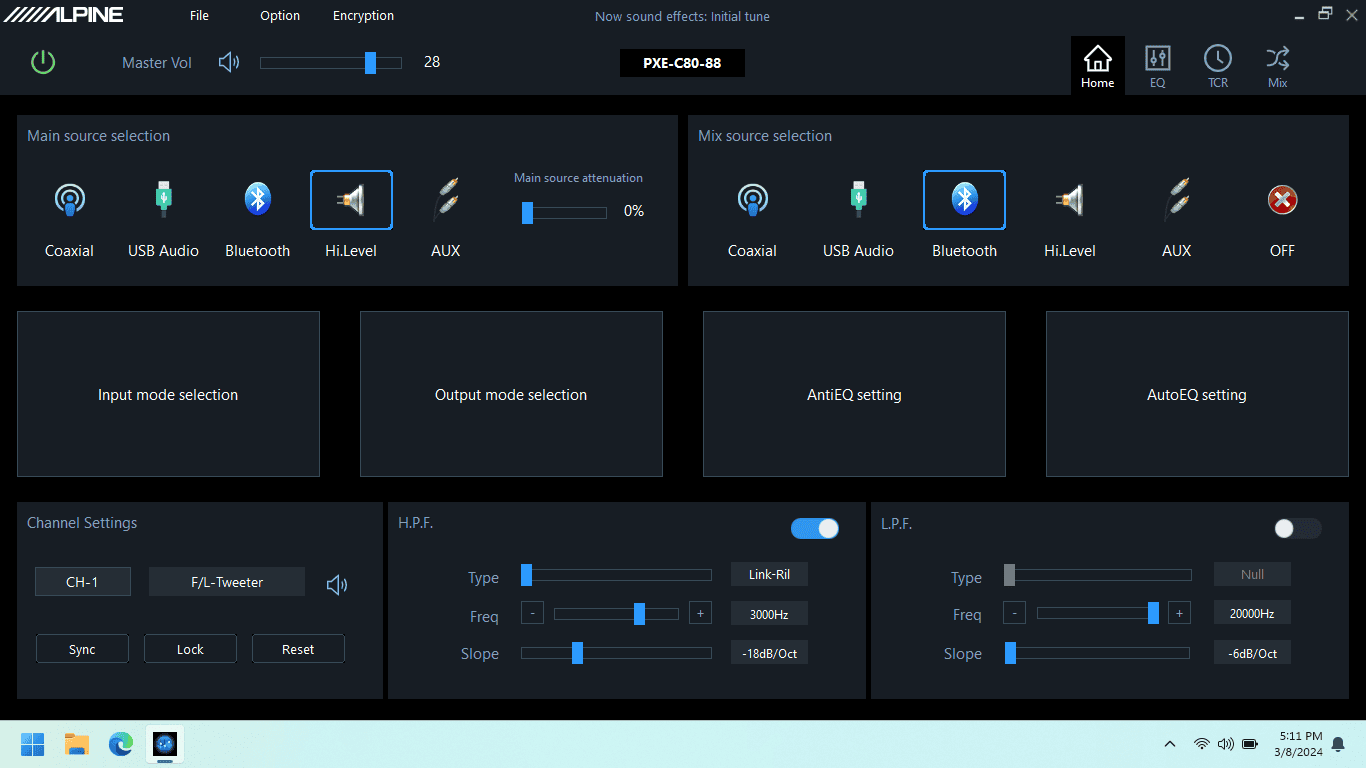
Once I finished up the physical installation, the Alpine software was installed on the laptop and the laptop plugged into the DSP via USB cable. The software sees the processor and establishes a connection.

Ford Maverick Alpine Optim8 DSP/Amp - Lane's Review, Thoughts, Results... Main Scree

Here's the main screen. I selected the high-level inputs as the main source, and enabled Bluetooth as the secondary source.

Ford Maverick Alpine Optim8 DSP/Amp - Lane's Review, Thoughts, Results... Input Mode Sel

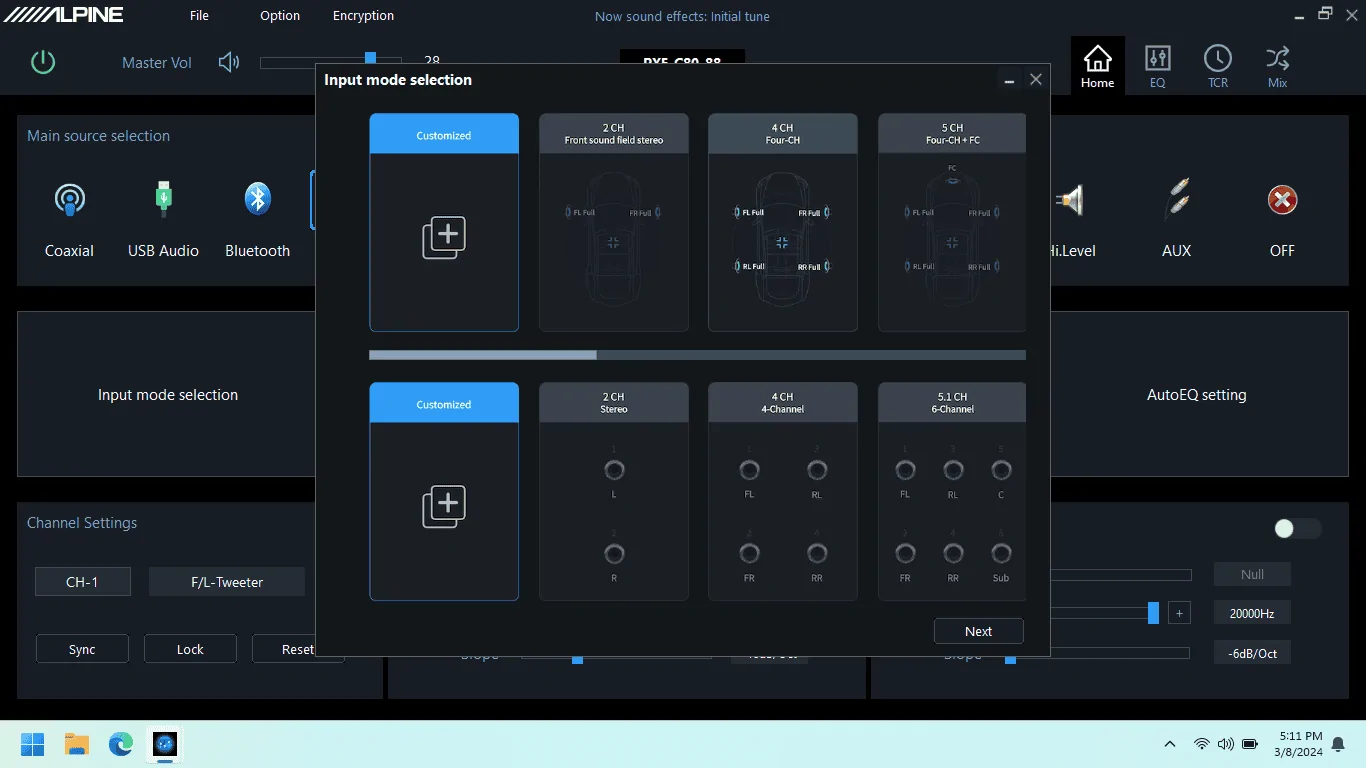
There are a bunch of configurations already in the software for typical input set ups. Select one of those, or create your own. This was easy - I selected 4-channel input which corresponds to the factory radio high-level output.

Ford Maverick Alpine Optim8 DSP/Amp - Lane's Review, Thoughts, Results... output mode sel

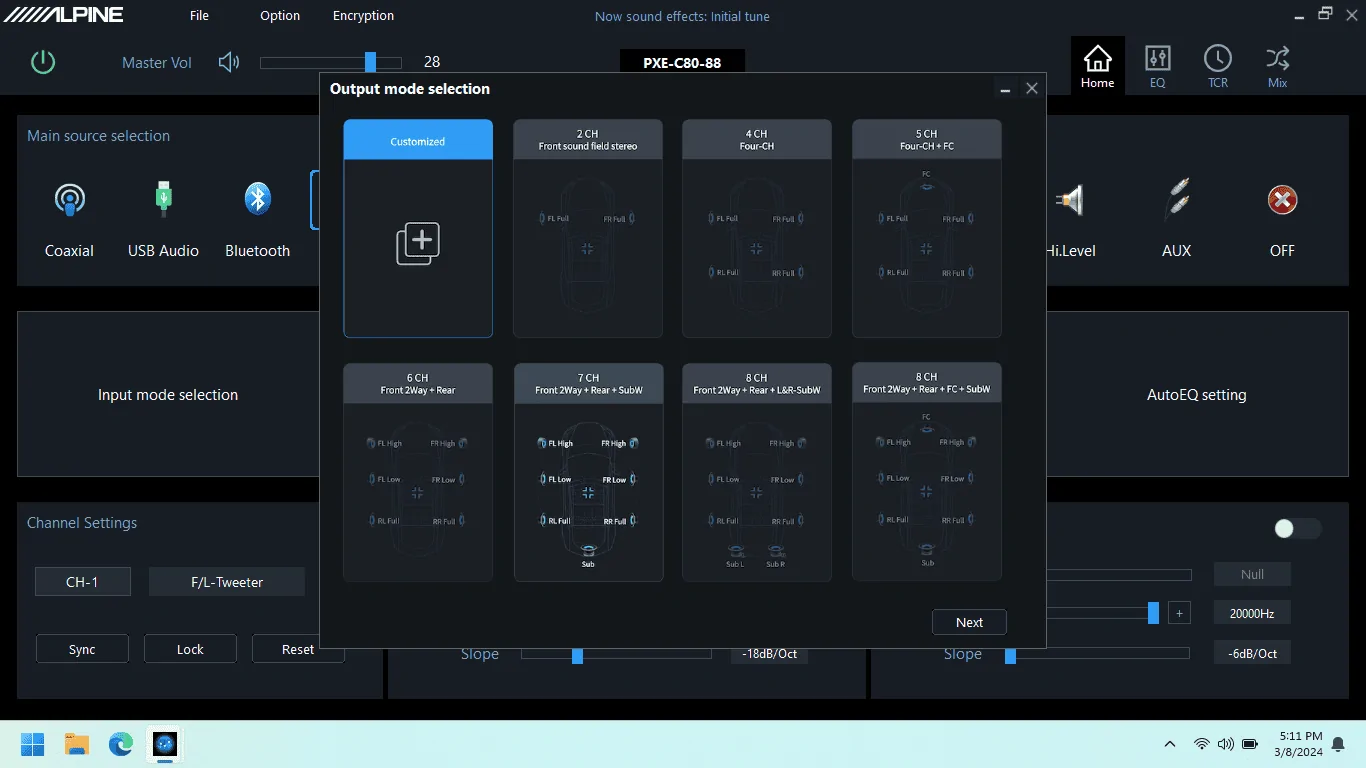
Output mode selection is similar, I selected Front 2-way + Rear + Sub since I'll be using separate amp channels for dash tweeters and front door woofers.


Ford Maverick Alpine Optim8 DSP/Amp - Lane's Review, Thoughts, Results... Output Mode Mapping)

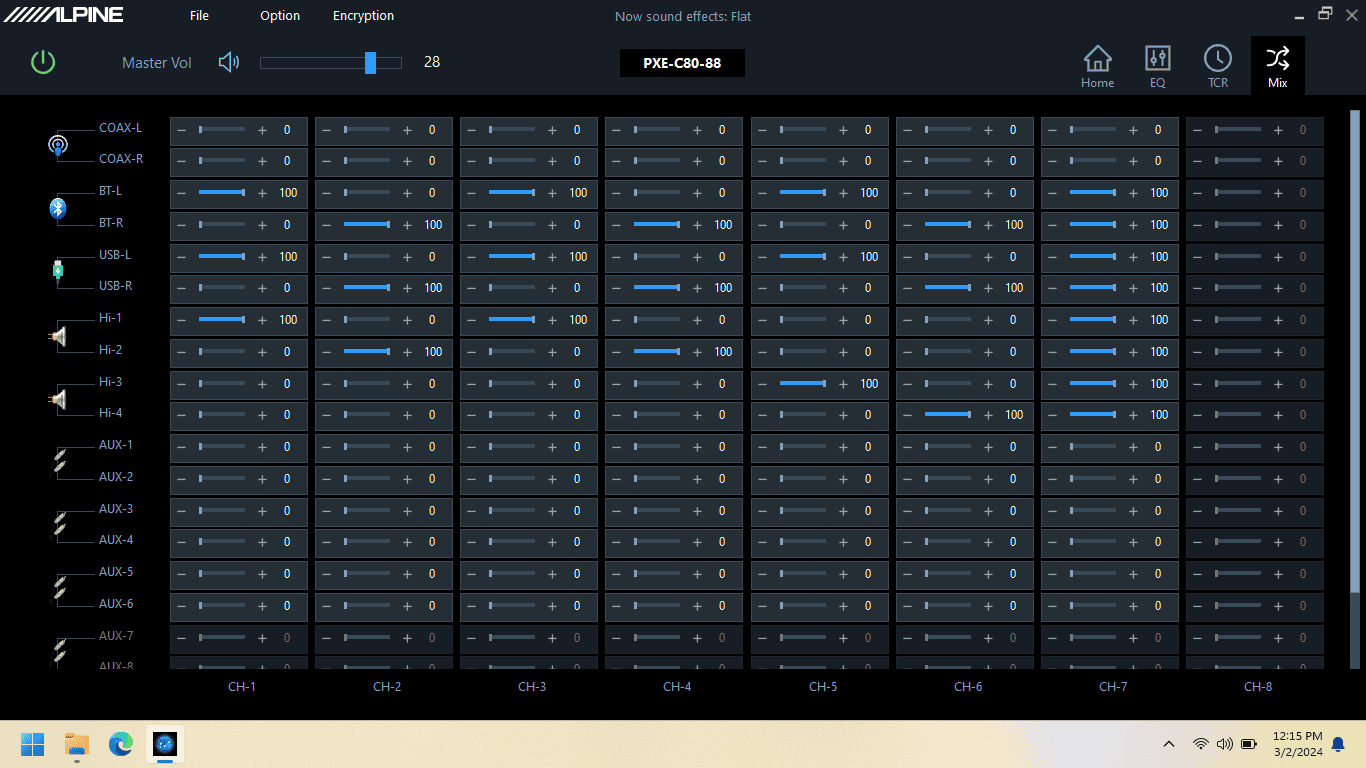
Next, the Mix screen lets you map each of your input source channels to each DSP/amp channel. It looks complex because that's a LOT of sliders, but it is really straightforward. You're essentially telling it which signal goes where.


Ford Maverick Alpine Optim8 DSP/Amp - Lane's Review, Thoughts, Results... anti-eq

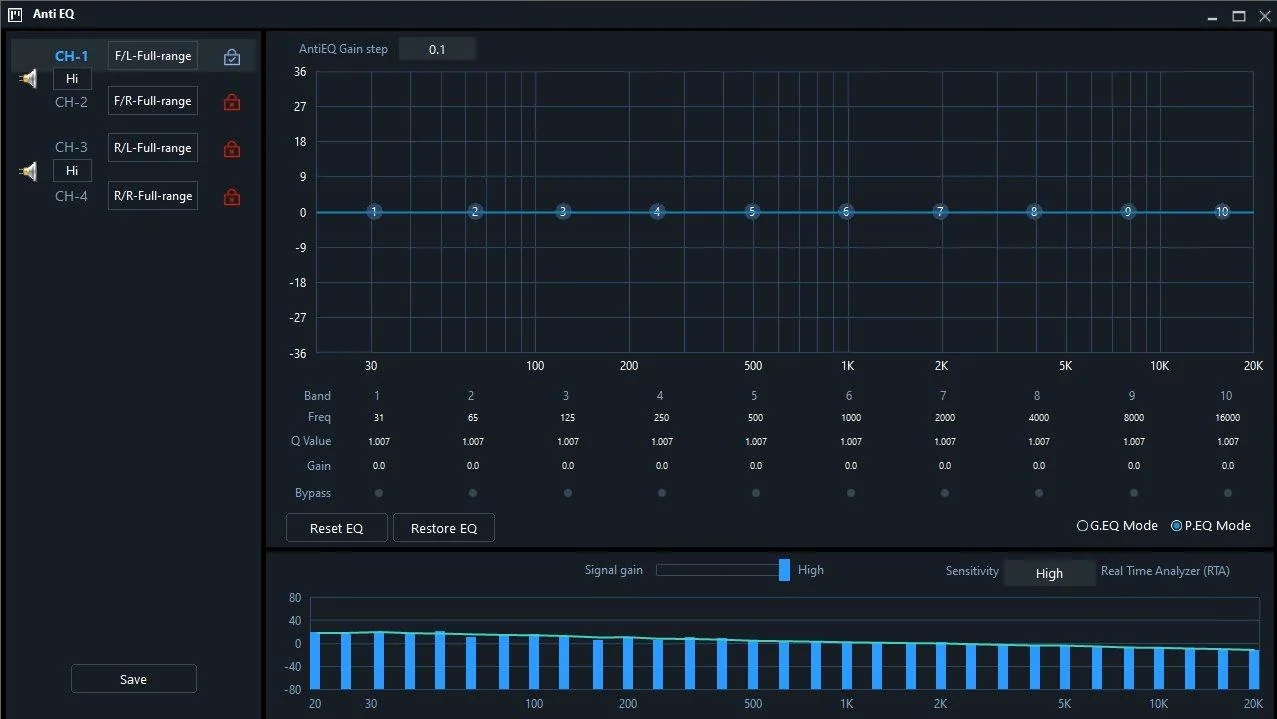
The Anti-EQ screen allows you to see and correct anything odd in the output frequency response of the factory radio. Put on a pink noise track, and the DSP shows you a frequency response graph in the RTA section at the bottom of the screen. Before I went through this, I had enabled Flat EQ via ForScan, and turned off Speed Compensated Volume in the factory radio. I had also set Occupancy Mode to All Seats.

The response graph shows a gradual decline across the whole frequency spectrum, but does not show any significant dips/peaks/holes in the response. That was outstanding. It does look like the DSP analyzes each input channel independently and shows you the graph for one channel at a time (see the blue lock with the checkmark in it in the upper left pane above).

If an issue shows up, you can make corrections on the EQ in the top pane, and you can do it in either graphic or parametric mode. Any corrections made are saved into the unit's memory and I believe they are applied to the signal first, before freq changes through the Auto-EQ or manual EQ functionality. One oddity though - it looks as though any manual corrections you make would need to be made to each input channel separately. I couldn't find any way to make a change to the graph and have the DSP apply it to all 4 channels.


Ford Maverick Alpine Optim8 DSP/Amp - Lane's Review, Thoughts, Results... auto eq meas

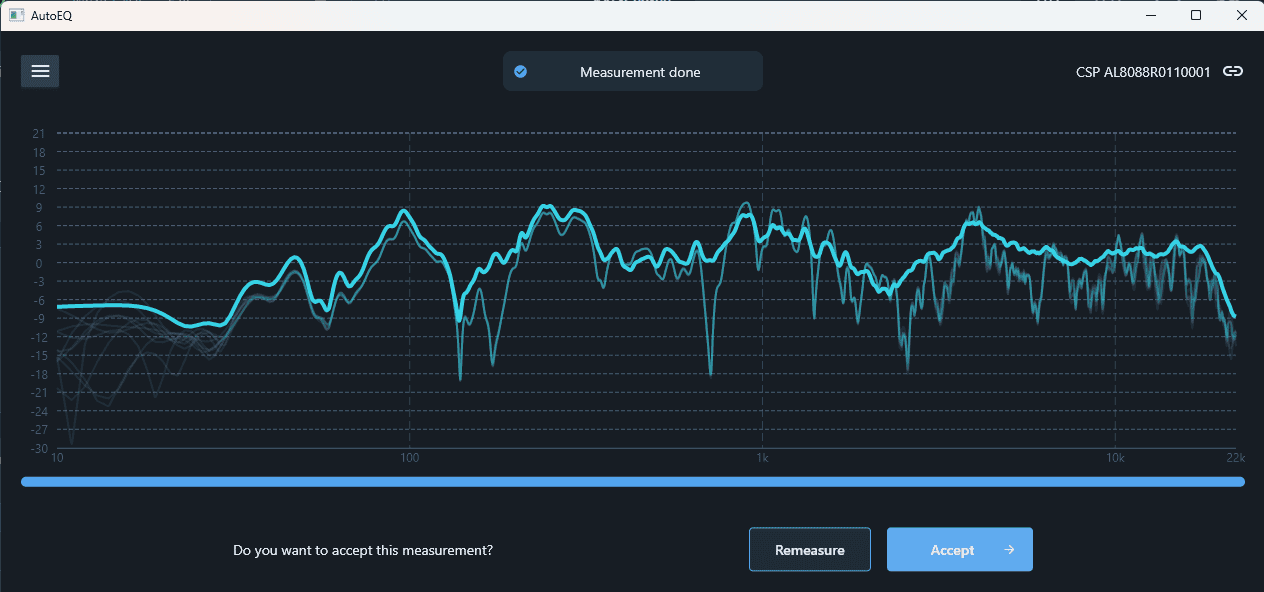
Next up was measurement by the AutoEQ functionality. You can install an app on your iPhone (no Android) and use its internal mic to do this wirelessly. Or, you can use a mic & cable plugged into the processor. Alpine sells the mic/cable kit for an additional cost, or a Dayton calibrated mic & generic TRRS cable can be purchased for half of what the Alpine kit goes for. I used the mic & cable connected directly to the DSP.

The processor plays a bunch of sweep chirps over maybe a minute or so and asks that you move the microphone around as it measures. I expect that's to give it a better sampling. The graph above is mine, but keep in mind this will vary greatly, even if you have the "same" vehicle. While the Mav will have peaks/valleys common between everyone's trucks (glass/plastic reflections, carpet absorption), a lot of other things cause variation (cloth seats vs. vinyl is one example, but it'll mainly be everyone's different choice of speakers). In a nutshell, peaks & valleys are bad, straighter/smoother lines are good.

Ford Maverick Alpine Optim8 DSP/Amp - Lane's Review, Thoughts, Results... Auto EQ - reduced bass boost

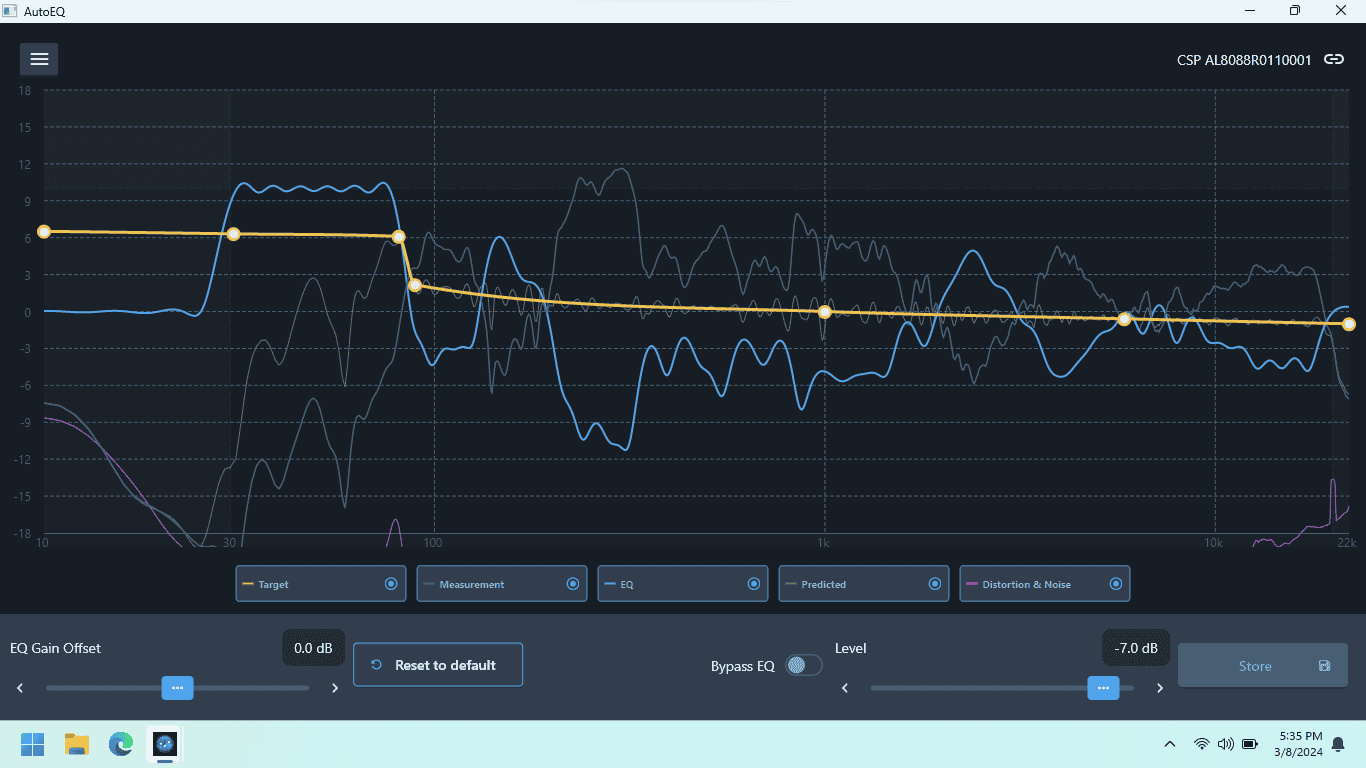
Once you have that response graph, the DSP calculates what it needs to do in order to correct it. The tan line in the graph shows the curve it wants to acheive, and the blue line shows the correction it applies to acheive it. The correction is roughly opposite of the issues that it measured. Before the DSP applies this correction, the user has the ability to drag that yellow line to manually tweak the target response. It's a hell of a thing to watch the real-time changes to the other lines (EQ and predicted) as this is done.

The upward jog in the yellow line as the frequency enters subwoofer range is put there by the software and is easy enough to change to your tastes. I expect it does this so that there is some headroom for adjusting the sub level from the remote display panel.


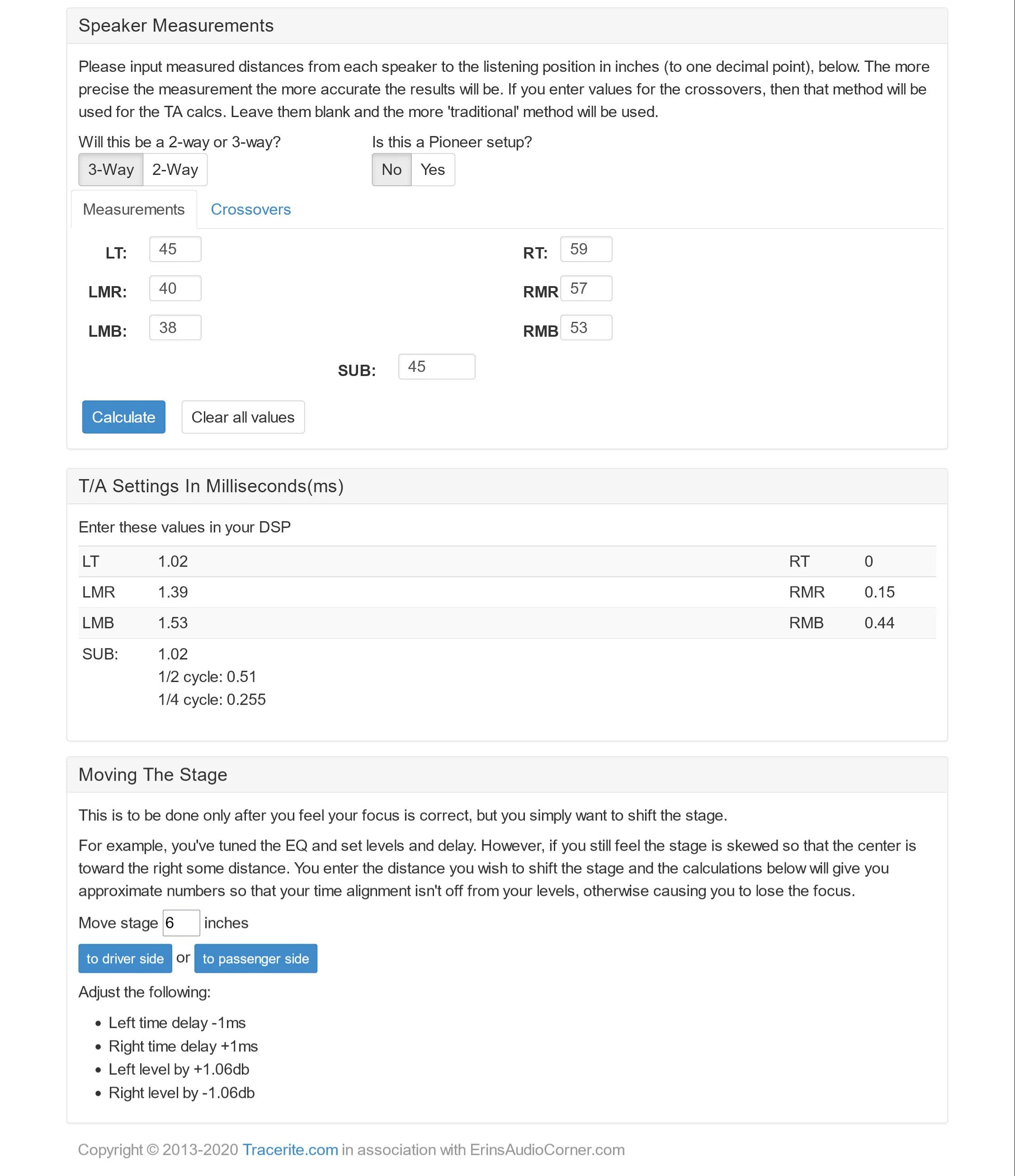
Next up is time correction. The YouTube set up video from Alpine references Tracerite.com. Measure the distance from your head to each speaker and enter them on the form. It will then calculate the millisecond delay for each driver.

Ford Maverick Alpine Optim8 DSP/Amp - Lane's Review, Thoughts, Results... Speaker Measurements #3

These were my actual measurements. The tweeter distances do take into account the path length from the tweeter up to the window glass and then a 90 degree angle toward the driver's seat since they have reflected instead of direct output.

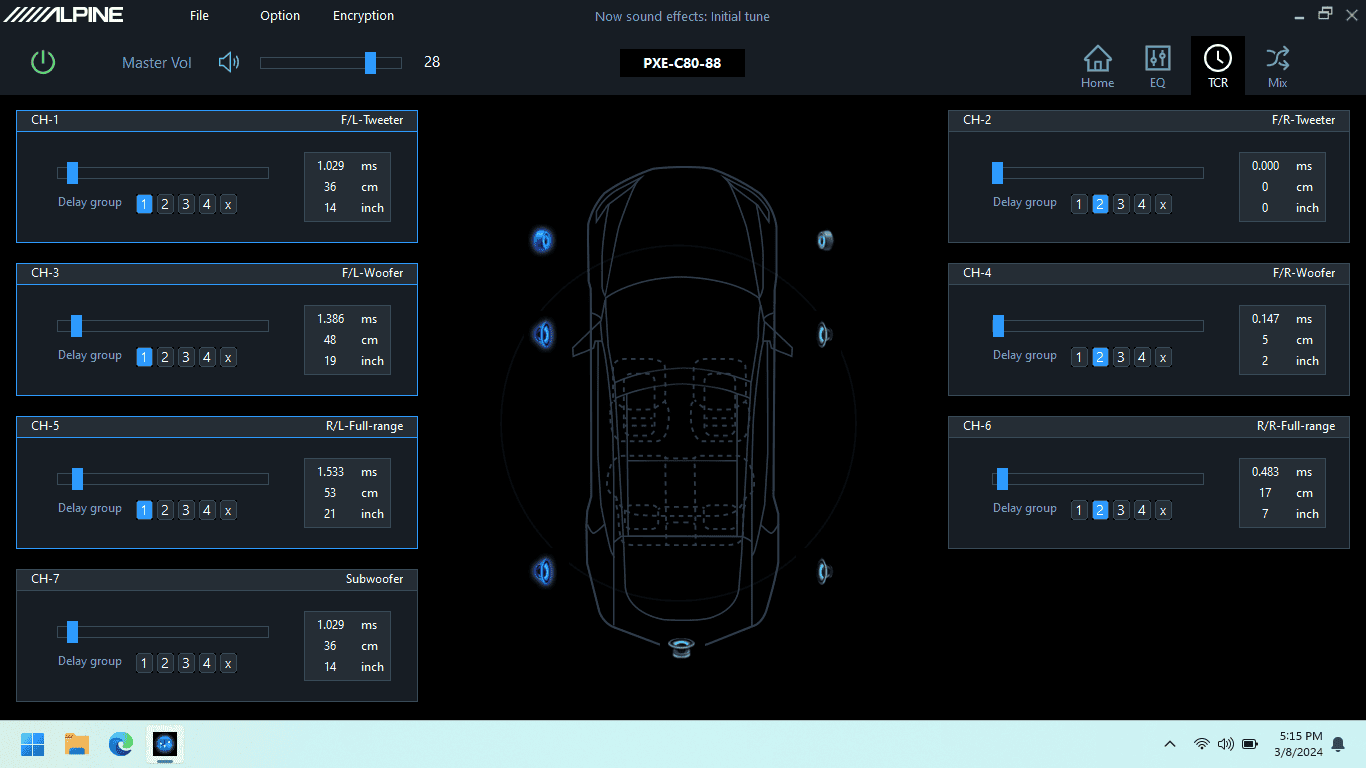
Ford Maverick Alpine Optim8 DSP/Amp - Lane's Review, Thoughts, Results... Time Corr

Each delay time is entered into the software. Ignore the distance shown on the screen as it isn't accurate and doesn't seem to apply. I have no idea why. Just like all the other settings that can be modified in this software, you are able to hear the effect of each change real-time which is outstanding.

I assigned different delay groups to all the left speakers vs. right. I've been playing around with trying to subtly shift where the image center is. By default, it sounds a bit toward the center of the vehicle and I'd like to hear how it sounds directly in front of the driver. The Tracerite site gives instructions for that shift, but I'm seeing if the delay group functionality will do it. When the drivers are in a group, any manual change you make to the delay for one driver applies a similar change to the other drivers automatically, but on a percentage basis. That's seriously cool. Not sure if that will do what I'm looking for yet and I'll need more tuning time to experiment with that.

I think this is pretty much it for initial set up. Next up, adjusting the sound to personal taste.
 
Last edited:
OP
OP
Lane

Lane

2.5L Hybrid
Well-known member
First Name
Lane
Joined
Jul 20, 2023
Threads
15
Messages
407
Reaction score
979
Location
Central Wisconsin
Website
photos.app.goo.gl
Vehicle(s)
2023 Area 51 Hybrid XL, 2006 VW Jetta Smyth UTE
Engine
2.5L Hybrid
EQ Screen

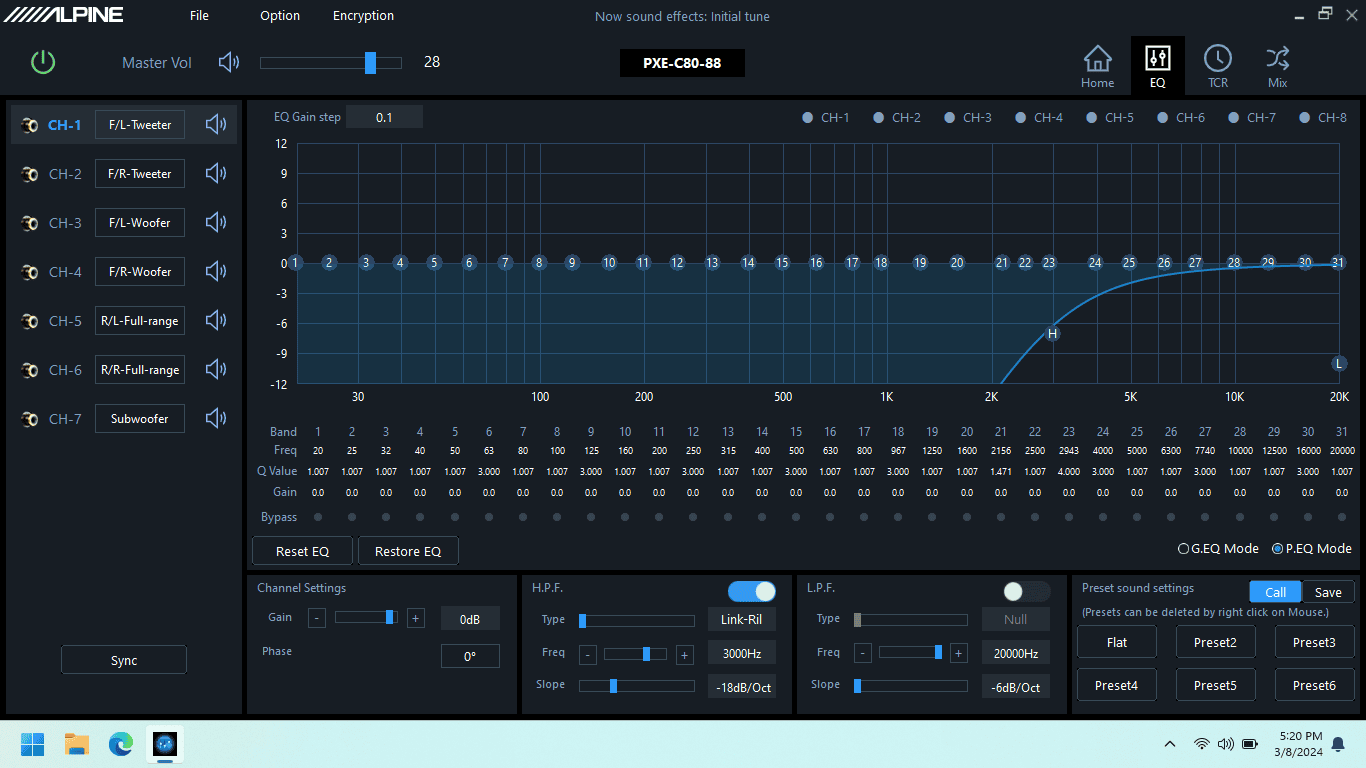
Next up is the main EQ screen. As the last part of initial set up, this screen is the best place to set up your crossover points. In the left pane, you'll see your driver configuration. Click any individual driver and you can adjust its frequency response curve, low- or high-pass filters, its crossover point, crossover type, crossover slope, and phase (if it's the sub). The Sync button lets you copy an applied change (change LF tweeter, then copy to RF tweeter). It also lets you tie two opposite-side drivers together to apply a single change to both if you'd prefer to do it that way.


After the initial configuration has been done, I'd expect that 90% of all other changes for personal listening tastes will be made on this screen.

Ford Maverick Alpine Optim8 DSP/Amp - Lane's Review, Thoughts, Results... EQ - One Cha

Making EQ adjustments is done similarly to how the crossover settings above are made. Click any individual driver in that left pane and you can adjust its frequency response curve. The Sync button lets you copy an applied change and it also lets you tie two drivers (L and R) together to apply a single change to both.

The frequency response graph pane can be used in standard graphic EQ mode, or you can use it in parametric mode to have control over the Q (the width) of frequency band and the center of frequency band you're adjusting.

One surprise, and some functionality I didn't expect - there are a HUGE number of parametric bands available on this EQ screen, 31 actually. That's not typical. Ususally if a unit offers parametric control, you have to make do with a lesser number of bands. Not here. It has huge flexibility. But with that comes something odd. Use the standard (non-parametric) functionality and you'd expect that the band width (Q) would be very narrow and would minimally affect the level of adjacent bands. Well, it's not narrow. It's really wide, on each band. So wide that I doubt I'll use it, even though I specifically wanted this functionality. Maybe I'll get some screen captures at some point to show a comparison.

Below each band is a bypass button so you can enable/disable the change and easily hear the audible effect. By default, the main pane on this screen will show you an outline in it to represent the frequency range that the selected driver (upper left pane) is reproducing.

At that point, it seems like I'm limited to making changes to the EQ for that specific driver only. Example: if you have the CH-1 selected in the upper left pane (my LF tweeter), you can't drag the curve to increase the level at 70hz. To do that, I'd have to click CH-7 (my sub) in that left pane first.

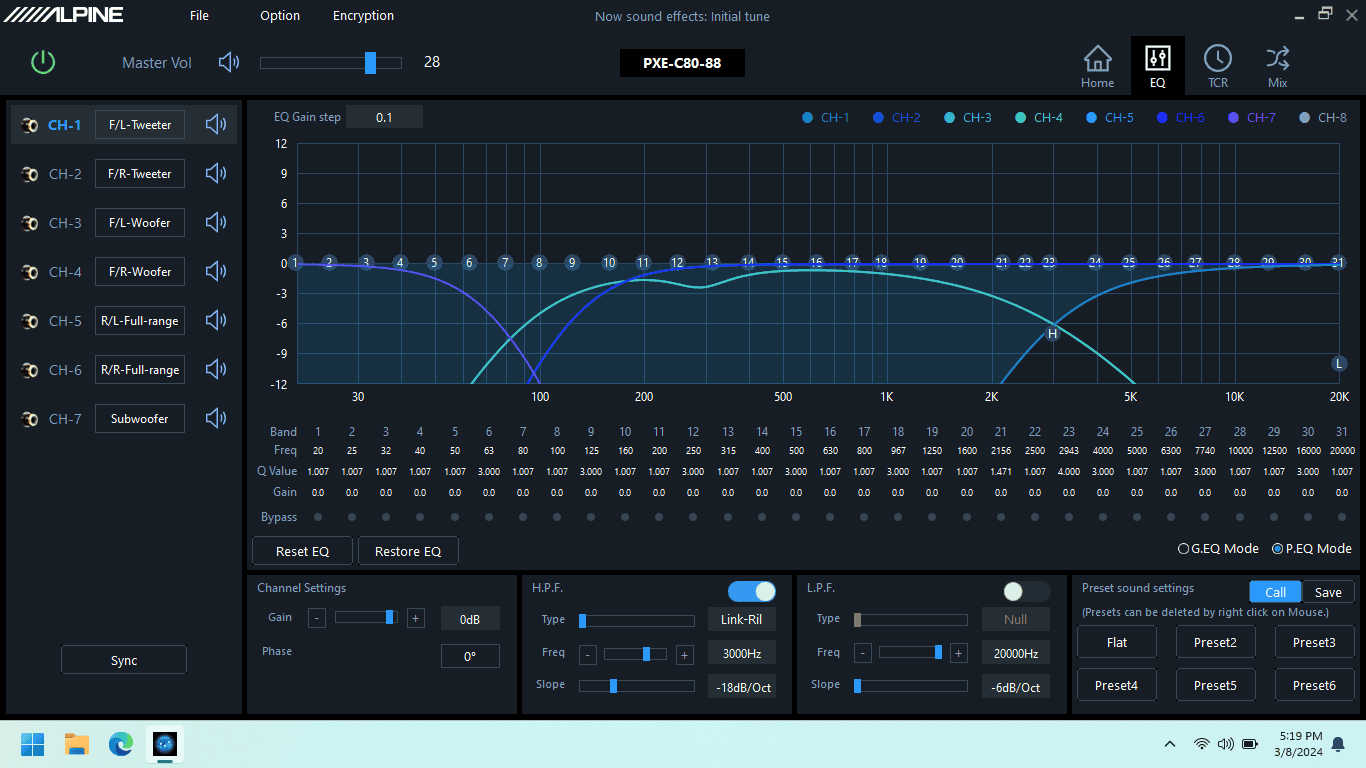
Ford Maverick Alpine Optim8 DSP/Amp - Lane's Review, Thoughts, Results... EQ - All Channels

Click the buttons for multiple drivers across the top right (that say CH-1, CH-2, etc), and it will overlay different colored outlines to the display showing you their frequency range being reproduced.

I have not been able to find a way to drag the curve to adjust a frequency's level and have it be applied to two different drivers. For example, my tweeter/woofer crossover point is at 3000hz. If I want to add a few db at 3000hz, I can't drag the curve and have the DSP apply it to both drivers even though both are technically reproducing that frequency (although at a lower level due to the crossover roll-off slope at that freq). I've had to make the change to each driver independently, or, I've had to make the change to the overall system correction on either the Anti-EQ or Auto-EQ screens which doesn't feel like the best way to do this.

On the bottom right pane of this screen is where settings are either saved to the DSP or loaded from the DSP's memory. While you can hear any change that you make real-time, you do have to specifically save to the processor's memory. Presets can be named, and once they're saved to the processor, they are selectable from the unit's control panel installed upfront. And it's absolutely outstanding that a preset seems to encompass every setting this software allows you to change.

Next up - how does it sound?
 
Last edited:

rallyshark

2.5L Hybrid
Well-known member
First Name
Donny
Joined
Jan 14, 2023
Threads
4
Messages
324
Reaction score
360
Location
GA
Vehicle(s)
2023 Maverick Hybrid
Engine
2.5L Hybrid
Great write up Lane! It looks like that Alpine does a great job on the auto calibration. Much better than my DSP did, and I think that's why I had to fight with mine so much. When my DSP(Audio Dynamics) did the autotune, it would switch to PEQ mode to correct(31 band PEQ), and I found myself playing with that a lot prior to going back to non parametric. Mine wanted the tune to be far too bright for my tastes, even with me selecting the less bright target curve. Unfortunately, my doesn't allow the target curves to be adjusted, and you just have to pic one. I do a lot of driving, so I listen for long periods, which means bright gets old. It's neat having a super detailed tune, until it isn't.

I wonder if there is a way to link channels for setting the EQ, without having to jump to that channel? I can on mine, but I'm not running full active on my components like you are. Most DSPs I've had allowed channel linking while adjusting the EQ, but the Alpine certainly could be different. I know all the features of your unit really jumped out at me when they first came out a little while back(in a good way).

The time alignment adjustments you have are pretty cool, and I like the idea of moving the image a certain amount collectively. I look forward to hearing about the end results and sound testing! I have no doubt you're going to end up with a very enjoyable stereo when its all said and done.
 

Montana

2.0L EcoBoost
Banned
Banned
Joined
Jun 13, 2023
Threads
24
Messages
4,094
Reaction score
6,348
Location
USA
Vehicle(s)
.
Engine
2.0L EcoBoost
This is awesome. I don't understand any of it, but I know I want it for my audio system :ROFLMAO:

Well done and well written write up (y)

So... How does it sound?
 

Sponsored

colinl

2.0L EcoBoost
Well-known member
First Name
Colin
Joined
Jun 21, 2022
Threads
32
Messages
5,440
Reaction score
6,179
Location
ICT
Vehicle(s)
'22 Maverick Lariat AWD, '22 Bronco OBX 2-Door
Engine
2.0L EcoBoost
Clubs
 
Cliffhanger! Gah. 😆

Regarding the narrow Q my guess would be that they want to reduce the effect of someone spoiling the sound with a large correction.

If you've already tuned the DSP that should have smoothed out very undesirable things like resonance so I think a gentle hand with the EQ is a good idea.
 
OP
OP
Lane

Lane

2.5L Hybrid
Well-known member
First Name
Lane
Joined
Jul 20, 2023
Threads
15
Messages
407
Reaction score
979
Location
Central Wisconsin
Website
photos.app.goo.gl
Vehicle(s)
2023 Area 51 Hybrid XL, 2006 VW Jetta Smyth UTE
Engine
2.5L Hybrid
Great write up Lane! It looks like that Alpine does a great job on the auto calibration. Much better than my DSP did, and I think that's why I had to fight with mine so much. When my DSP(Audio Dynamics) did the autotune, it would switch to PEQ mode to correct(31 band PEQ), and I found myself playing with that a lot prior to going back to non parametric. Mine wanted the tune to be far too bright for my tastes, even with me selecting the less bright target curve. Unfortunately, my doesn't allow the target curves to be adjusted, and you just have to pic one. I do a lot of driving, so I listen for long periods, which means bright gets old. It's neat having a super detailed tune, until it isn't.

I wonder if there is a way to link channels for setting the EQ, without having to jump to that channel? I can on mine, but I'm not running full active on my components like you are. Most DSPs I've had allowed channel linking while adjusting the EQ, but the Alpine certainly could be different. I know all the features of your unit really jumped out at me when they first came out a little while back(in a good way).

The time alignment adjustments you have are pretty cool, and I like the idea of moving the image a certain amount collectively. I look forward to hearing about the end results and sound testing! I have no doubt you're going to end up with a very enjoyable stereo when its all said and done.
Thanks! I also have a similar issue. Curve can be "flat" but why does it sound so damn bright? Had a perceptual psych class in college that put me onto this which is fascinating. Regardless, yeah - long listening periods cause fatigue and I think my issue lies in the upper midrange that seems to be right at the tweet/woof crossover point, yay. I had to pull the level down way too much in that area in order to make it acceptable so I'm playing around with the crossover point freq, slope, and filter type to see if that might be a better way to address it.

On the ability to link channels, yeah, I'm hoping more time spent tuning will help me realize what I'm doing wrong or how to accomplish certain things that are less obvious. Alpine's manual is very thin on how to do specific things. It feels like they expect a professional installer with experience & their product training to be the one doing the tuning.
 
Last edited:
OP
OP
Lane

Lane

2.5L Hybrid
Well-known member
First Name
Lane
Joined
Jul 20, 2023
Threads
15
Messages
407
Reaction score
979
Location
Central Wisconsin
Website
photos.app.goo.gl
Vehicle(s)
2023 Area 51 Hybrid XL, 2006 VW Jetta Smyth UTE
Engine
2.5L Hybrid
Cliffhanger! Gah. 😆

Regarding the narrow Q my guess would be that they want to reduce the effect of someone spoiling the sound with a large correction.

If you've already tuned the DSP that should have smoothed out very undesirable things like resonance so I think a gentle hand with the EQ is a good idea.
Agreed. So far, no significant issues that the DSP has had to fix, or that I've had to manually adjust for. I'm giving the Mav interior space some credit for that. Or it could be just luck.
 
OP
OP
Lane

Lane

2.5L Hybrid
Well-known member
First Name
Lane
Joined
Jul 20, 2023
Threads
15
Messages
407
Reaction score
979
Location
Central Wisconsin
Website
photos.app.goo.gl
Vehicle(s)
2023 Area 51 Hybrid XL, 2006 VW Jetta Smyth UTE
Engine
2.5L Hybrid
Well done and well written write up (y)
Thanks!

This is awesome. I don't understand any of it, but I know I want it for my audio system :ROFLMAO:
Yes!

Over the years, I've had friends and family think there was something wrong with anyone who spent a lot of time and energy, not to mention money, on an audio system. I put each one them in the vehicle driver's seat for 5 minutes of listening, and their perspective changes completely.

We all love our vehicles. We spend money on accessories. I haven't found any other modification that I'm going to enjoy more. I'm listening to music and appreciating that addition every moment I'm in the vehicle. I look forward to a long drive anytime I get new music. I'm not going to get that from a lift kit or rolling tonneau cover. Not even close.

The leather steering wheel does come in 2nd, but it's distant. You do have your hands on it every moment you're in the vehicle. :)

So... How does it sound?
Soon.
 

rallyshark

2.5L Hybrid
Well-known member
First Name
Donny
Joined
Jan 14, 2023
Threads
4
Messages
324
Reaction score
360
Location
GA
Vehicle(s)
2023 Maverick Hybrid
Engine
2.5L Hybrid
Thanks! I also have a similar issue. Curve can be "flat" but why does it sound so damn bright? Had a perceptual psych class in college that put me onto this which is fascinating. Regardless, yeah - long listening periods cause fatigue and I think my issue lies in the upper midrange that seems to be right at the tweet/woof crossover point, yay. I had to pull the level down way too much in that area in order to make it acceptable so I'm playing around with the crossover point freq, slope, and filter type to see if that might be a better way to address it.

On the ability to link channels, yeah, I'm hoping more time spent tuning will help me realize what I'm doing wrong or how to accomplish certain things that are less obvious. Alpine's manual is very thin on how to do specific things. It feels like they expect a professional installer with experience & their product training to be the one doing the tuning.
Yep, that's why a flat frequency response actually sounds horrible to us. I kept having to pull the levels on the upper midrange to the point of where I was questioning myself. I've got a pretty significant dip from 1k to 6.3K on mine(with some minor ups and downs in between). I have it cut a bit from 6.3K up, but not as significantly. I was shocked by how much I had to pull 6.3K down too, since it is getting up there. I finally just trusted my ears, and now I've VERY happy with my sound, and it is a joy to listen too. On the bright side, it is better to pull gain than to have to add it, so there's that. I played with everything, but kept coming back to pulling those frequencies more than I thought I should have to. Just trust your ears man, and do what sounds good. In the end, it doesn't matter what that EQ looks like, as long as it sounds the way you want. You wouldn't believe what my EQ looks like if you heard my stereo, lol.
 
Sponsored

Cromag

2.5L Hybrid
Active member
First Name
Al
Joined
Jan 11, 2024
Threads
5
Messages
43
Reaction score
34
Location
Lago Vista
Vehicle(s)
2022 Lariet Hybrid Area 51
Engine
2.5L Hybrid
Clubs
 
Question for an expert! Is there a way to improve the sound of the Bang Olefsun system in my Lariat. Maybe an after market amp equalizer?
 

MikeyG

2.0L EcoBoost
Well-known member
Joined
Jan 23, 2022
Threads
12
Messages
338
Reaction score
190
Location
phila
Vehicle(s)
Ford Maverick
Engine
2.0L EcoBoost
Nice info! What kind of wattage do you have going to your speakers and sub?
 

rallyshark

2.5L Hybrid
Well-known member
First Name
Donny
Joined
Jan 14, 2023
Threads
4
Messages
324
Reaction score
360
Location
GA
Vehicle(s)
2023 Maverick Hybrid
Engine
2.5L Hybrid
If this really can handle summing 8-channels of inputs then this amp could work for the B&O as well. 🤔
I'm not positive, but I don't think the B&O truly is dealing with 8 channels. I think the front door speakers and dash tweeters are on the same channels, so maybe more like 6 channels?
 
OP
OP
Lane

Lane

2.5L Hybrid
Well-known member
First Name
Lane
Joined
Jul 20, 2023
Threads
15
Messages
407
Reaction score
979
Location
Central Wisconsin
Website
photos.app.goo.gl
Vehicle(s)
2023 Area 51 Hybrid XL, 2006 VW Jetta Smyth UTE
Engine
2.5L Hybrid
Oops, I'd missed including the software's Mix screen. It's the screen with hundreds of sliders. I added it in the post above.

Nice info! What kind of wattage do you have going to your speakers and sub?
The Alpine has 50w x 6 plus 150w x 2. My impression so far is that it's strong.
Sponsored


Top