
Sponsored

How To: Sync 3/4 swap for non Sync 3 XL/XLT

jRedondox

2.5L Hybrid
Active member
Joined
Jan 2, 2023
Threads
1
Messages
37
Reaction score
6
Location
San Diego, CA
Vehicle(s)
Ford Maverick
Engine
2.5L Hybrid
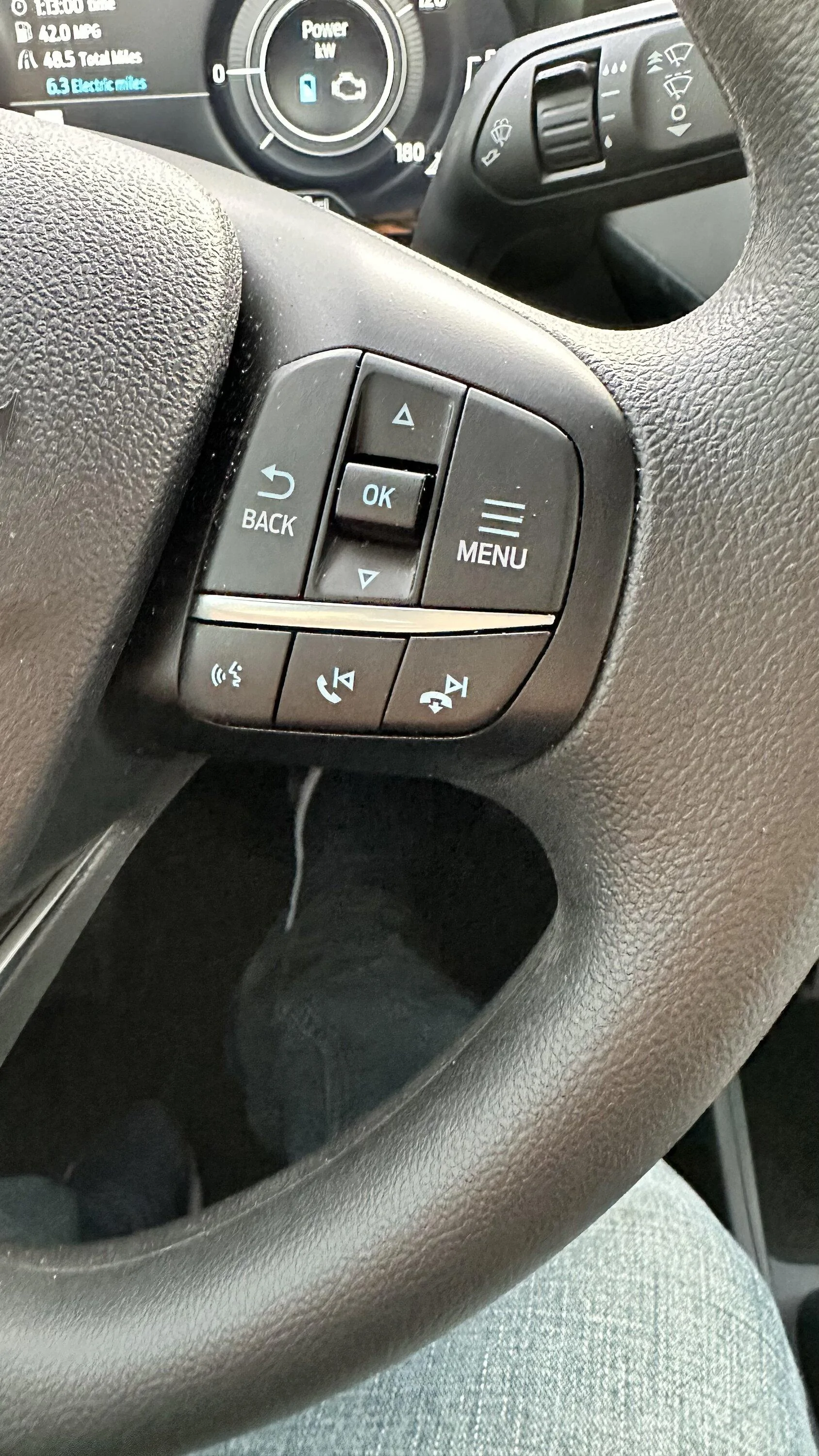
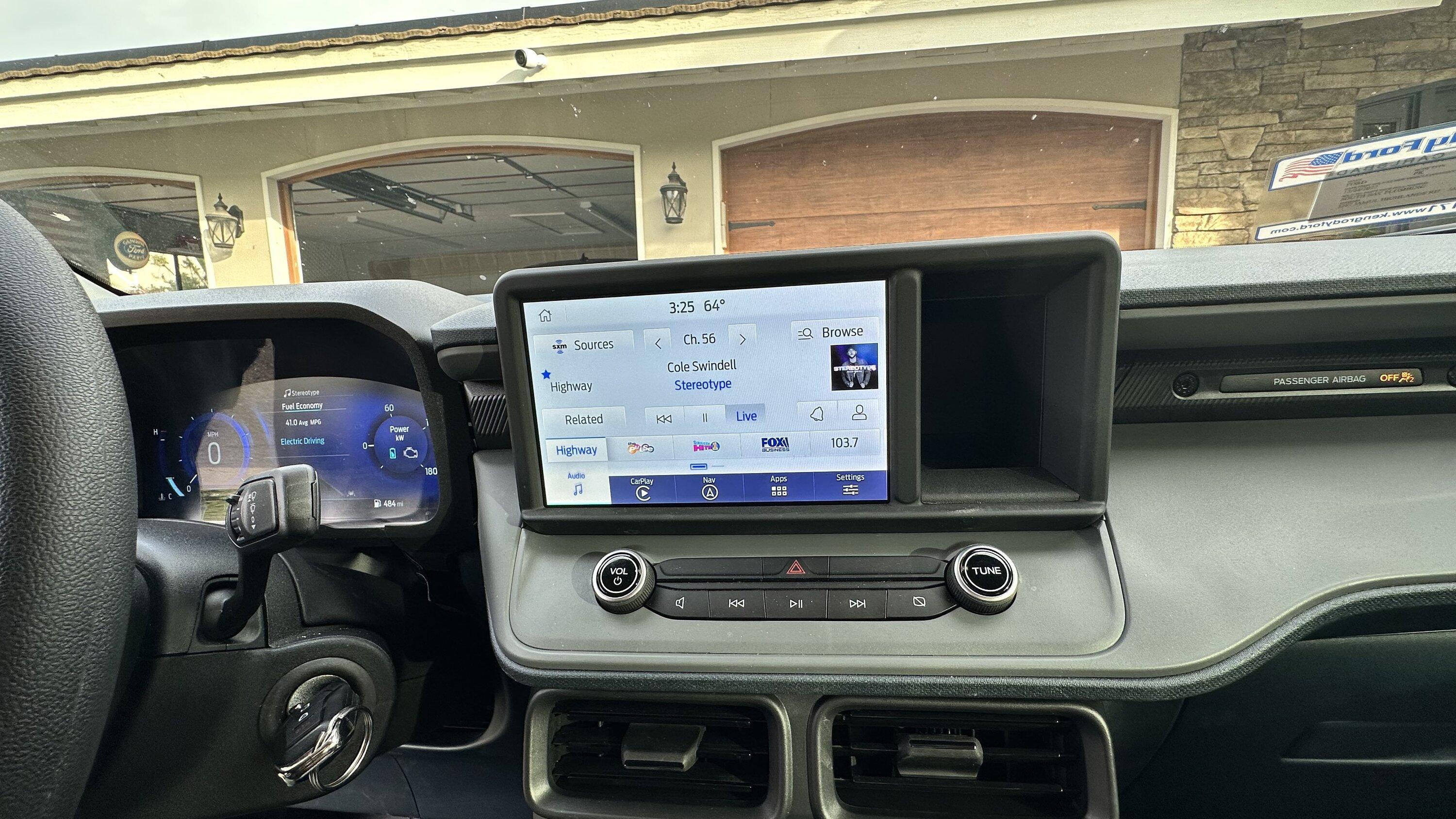
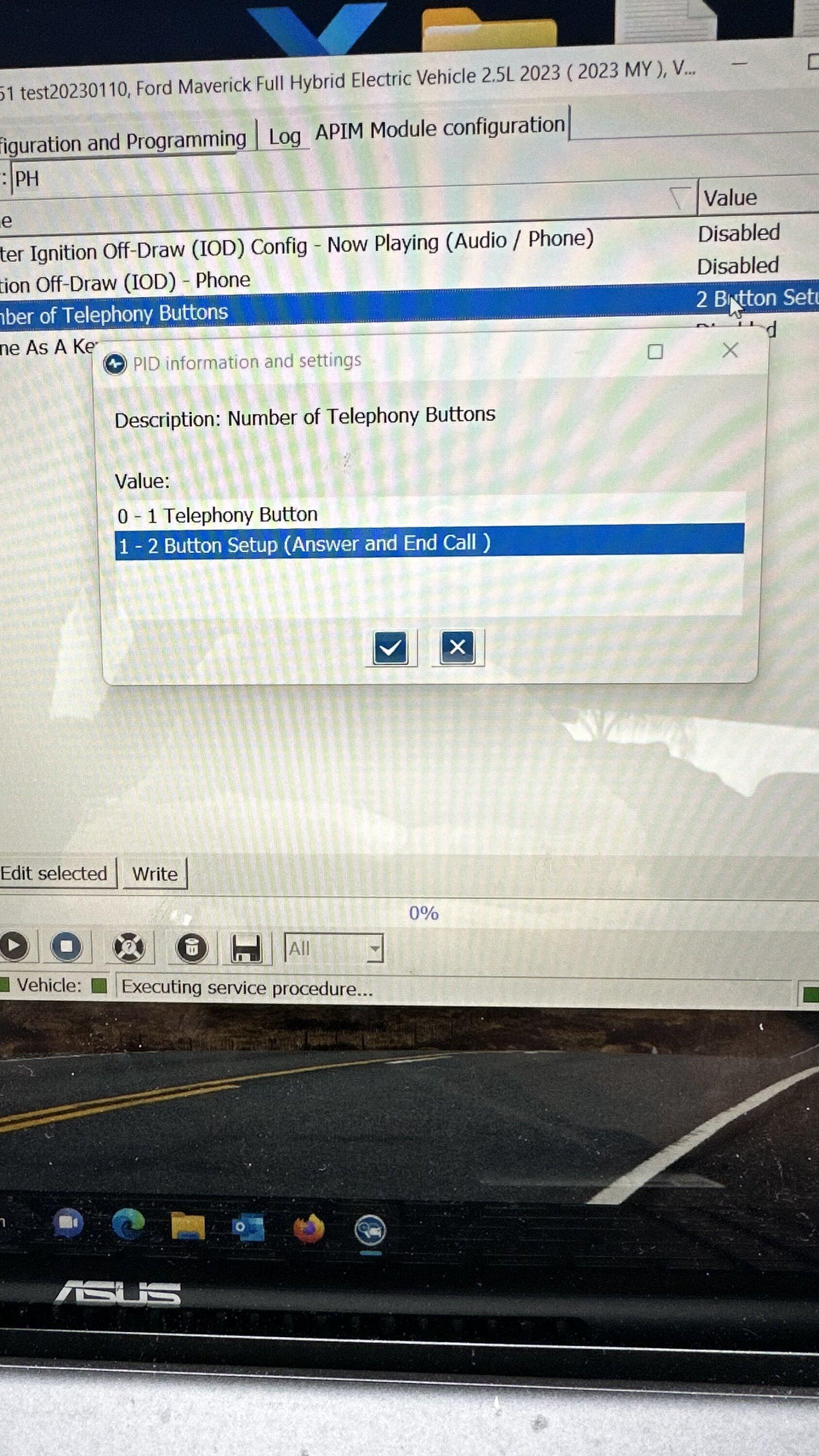
One more thing I noticed. The next buttons work for music but not to answer the phone or hang up. Siri button works as well. Any ideas?

Ford Maverick How To: Sync 3/4 swap for non Sync 3 XL/XLT 5BC72A83-FD96-4507-AC7B-B4B491A03A57
 

Sponsored

blackb13

2.5L Hybrid
Well-known member
Joined
Nov 22, 2022
Threads
15
Messages
200
Reaction score
227
Location
Illinois
Vehicle(s)
Maverick
Engine
2.5L Hybrid
Couple of newb questions if someone could assist. I don't care about satellite radio or navigation, I'm just looking for the easiest (and cheapest) way to get HD radio.

Do Sync 3 and 4 both include HD radio?

Based on the earlier posts, it appears as though going with Sync 4 might be easier to install as there is less (?) wiring involved. What about Forscan programming? Is one easier to integrate vs the other?

What if you had access to the Lariat's Sync 3, would that make things easier?

Has anyone considered making a plug/play harness for such a conversion?

Thanks!
 

jsus

2.5L Hybrid
Well-known member
Joined
Dec 20, 2021
Threads
0
Messages
2,873
Reaction score
3,859
Location
USA
Vehicle(s)
2022 Ford Escape Hybrid AWD
Engine
2.5L Hybrid
Do Sync 3 and 4 both include HD radio?
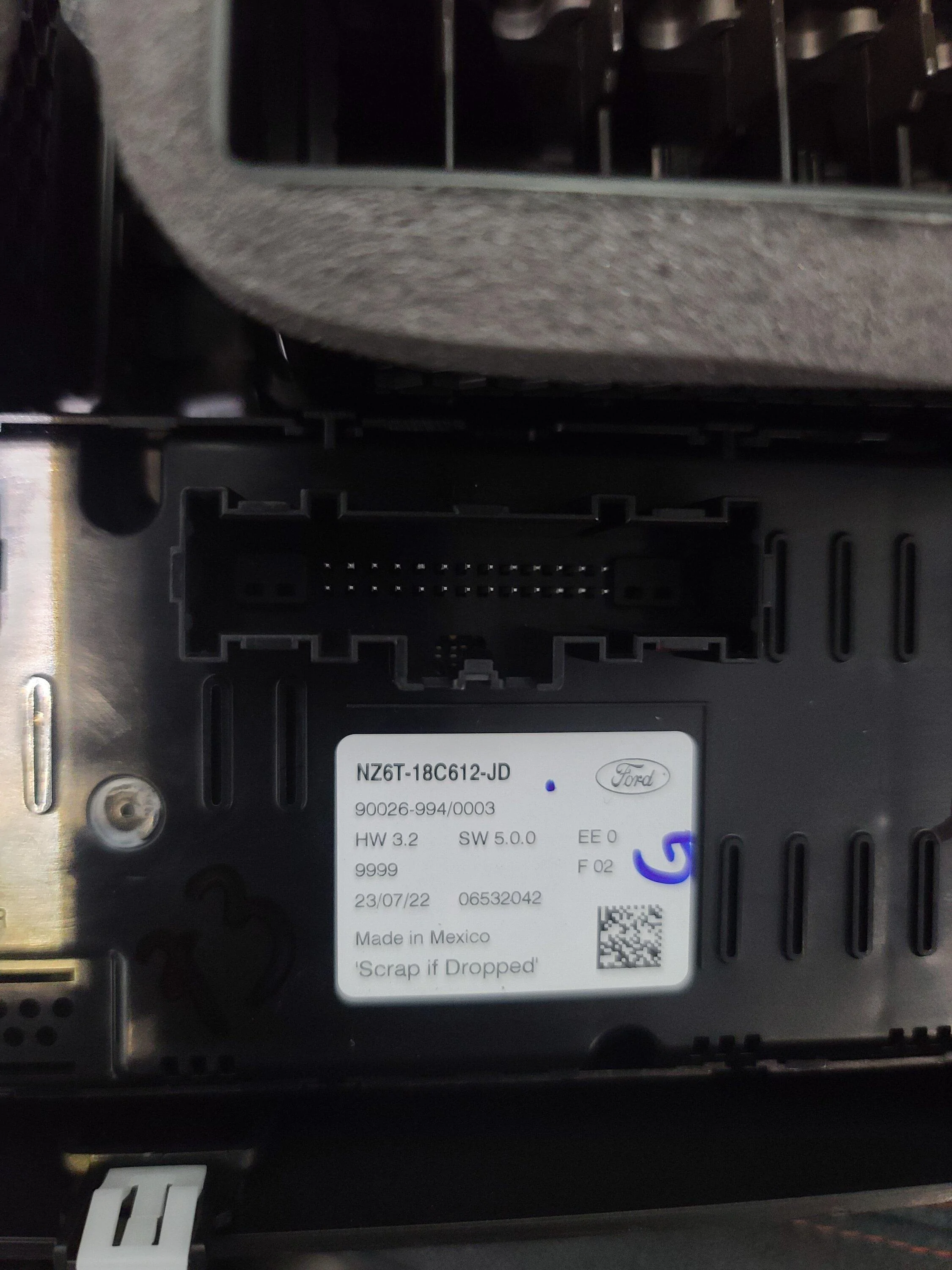
Can't comment on the rest but both Sync 3 and Sync 4 are available with and without HD Radio. It's not the APIM (module with the touchscreen) that needs to support it. Rather, it's in the ACM (Audio Control Module, the box that gets tucked away behind the screen). For the swap, you'll want to find both the Sync 3 or 4 APIM, as well as an ACM that specifically supports HD Radio.

Hopefully someone can confirm if the model they've used for this swap supports HD Radio for you. Maybe they already mentioned it in this thread. ;)

https://www.f150gen14.com/forum/threads/active-hd-radio-using-forscan.8050/
 

blackb13

2.5L Hybrid
Well-known member
Joined
Nov 22, 2022
Threads
15
Messages
200
Reaction score
227
Location
Illinois
Vehicle(s)
Maverick
Engine
2.5L Hybrid
Can't comment on the rest but both Sync 3 and Sync 4 are available with and without HD Radio. It's not the APIM (module with the touchscreen) that needs to support it. Rather, it's in the ACM (Audio Control Module, the box that gets tucked away behind the screen). For the swap, you'll want to find both the Sync 3 or 4 APIM, as well as an ACM that specifically supports HD Radio.

Hopefully someone can confirm if the model they've used for this swap supports HD Radio for you. Maybe they already mentioned it in this thread. ;)

https://www.f150gen14.com/forum/threads/active-hd-radio-using-forscan.8050/
Ok, I'm still analyzing this, so bear with me...

Are you saying it might be possible to just get an ACM that supports HD radio, like the f150 guys did and then use Forscan to turn it on? Or will that not work with the Sync 2.5/3 that is on the XL/XLT since it requires the Sync 3/4 APIM that Forscan can actually program?

What the f150 guys did is exactly what I want to do. It would be so cool if that were possible without messing with an APIM and wiring.

Thanks!
 

jsus

2.5L Hybrid
Well-known member
Joined
Dec 20, 2021
Threads
0
Messages
2,873
Reaction score
3,859
Location
USA
Vehicle(s)
2022 Ford Escape Hybrid AWD
Engine
2.5L Hybrid
Ok, I'm still analyzing this, so bear with me...

Are you saying it might be possible to just get an ACM that supports HD radio, like the f150 guys did and then use Forscan to turn it on? Or will that not work with the Sync 2.5/3 that is on the XL/XLT since it requires the Sync 3/4 APIM that Forscan can actually program?

What the f150 guys did is exactly what I want to do. It would be so cool if that were possible without messing with an APIM and wiring.

Thanks!
Unfortunately, no.

My understanding is "Sync 2.5"/"Sync Lite"/"Connected Touch Radio" that is standard on Maverick does not use an ACM, which is why this mod requires you to add one. Since your system does not have an ACM, you can't just add one on. Your current system has no use for an ACM.

If you had a Lariat with Lariat Luxury Package (and thus Sync 3 already), you would only need the ACM that supports HD Radio. That's what the F-150 thread is talking about - making sure you get an ACM that supports HD Radio, as not all of them do.

However, you don't have that so you'll need to add the ACM in the process of swapping in a Sync 3 or Sync 4 APIM as well.

The system that's currently in your car was basically brought over from lower end cars overseas (e.g. Europe). It's not used on other US models that I'm aware of. HD Radio is largely a US-only system so you're not likely to find a drop-in replacement version for your car. Gotta go through the whole process below to get it if that's what you really want.

1) Add Sync 3 or Sync 4 APIM
2) Add ACM that supports HD Radio
3) All the associated wiring and configuration changes listed above
4) and potentially enabling HD Radio separately in FORScan.
 
Last edited:
Sponsored

red_xlt_5

2.5L Hybrid
New member
First Name
Albert
Joined
Jan 16, 2023
Threads
1
Messages
4
Reaction score
5
Location
78225
Vehicle(s)
2022 Ford Maverick XLT
Engine
2.5L Hybrid
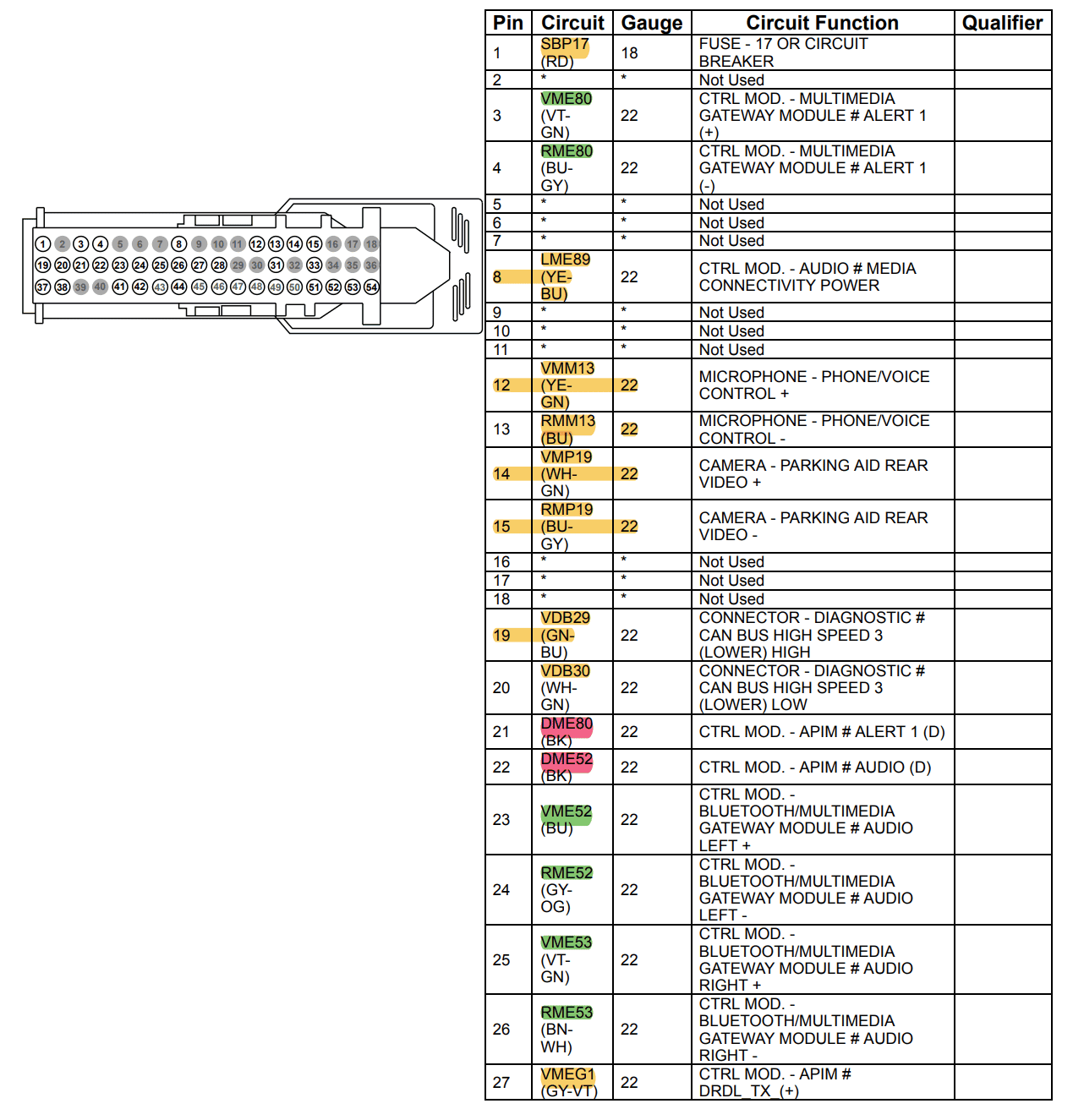
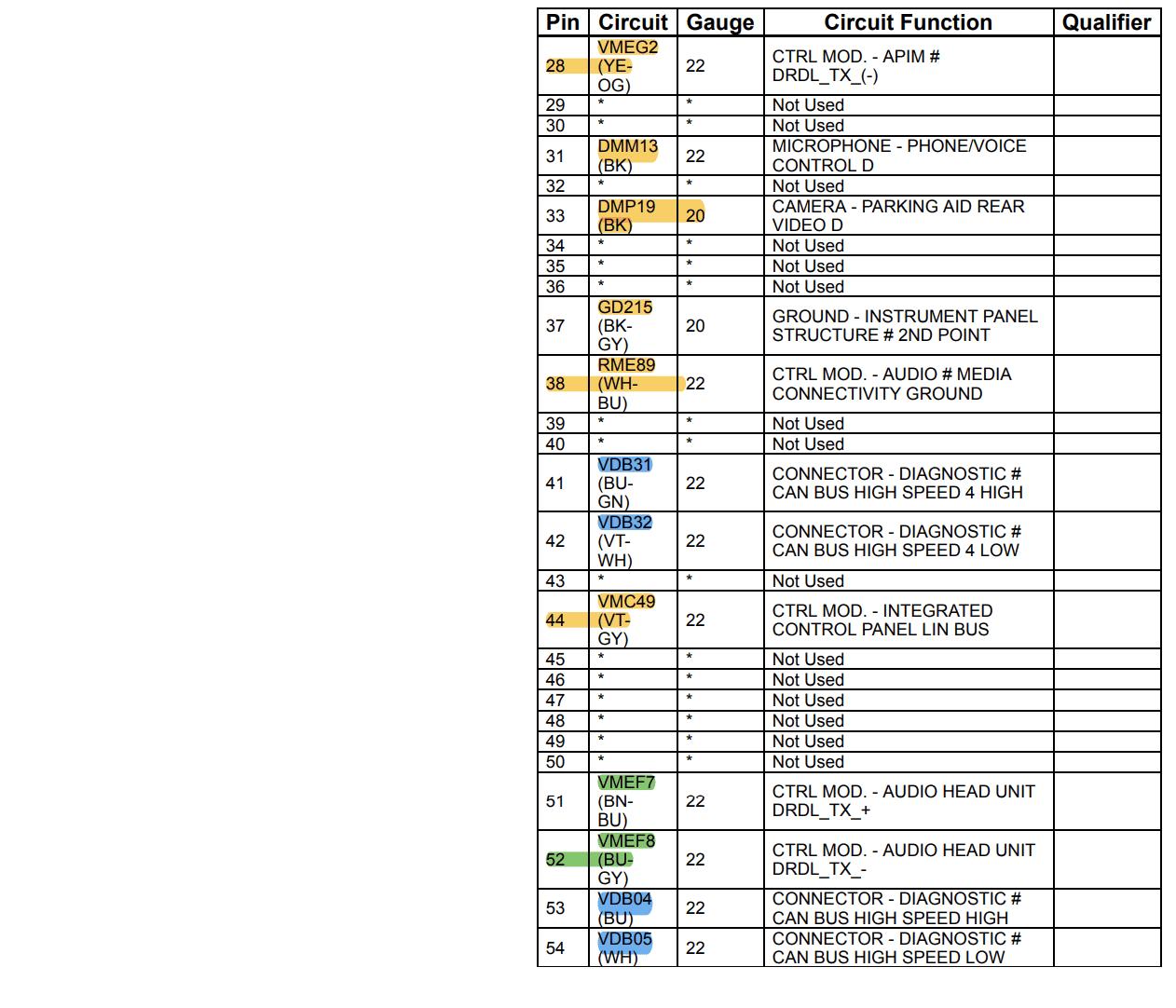
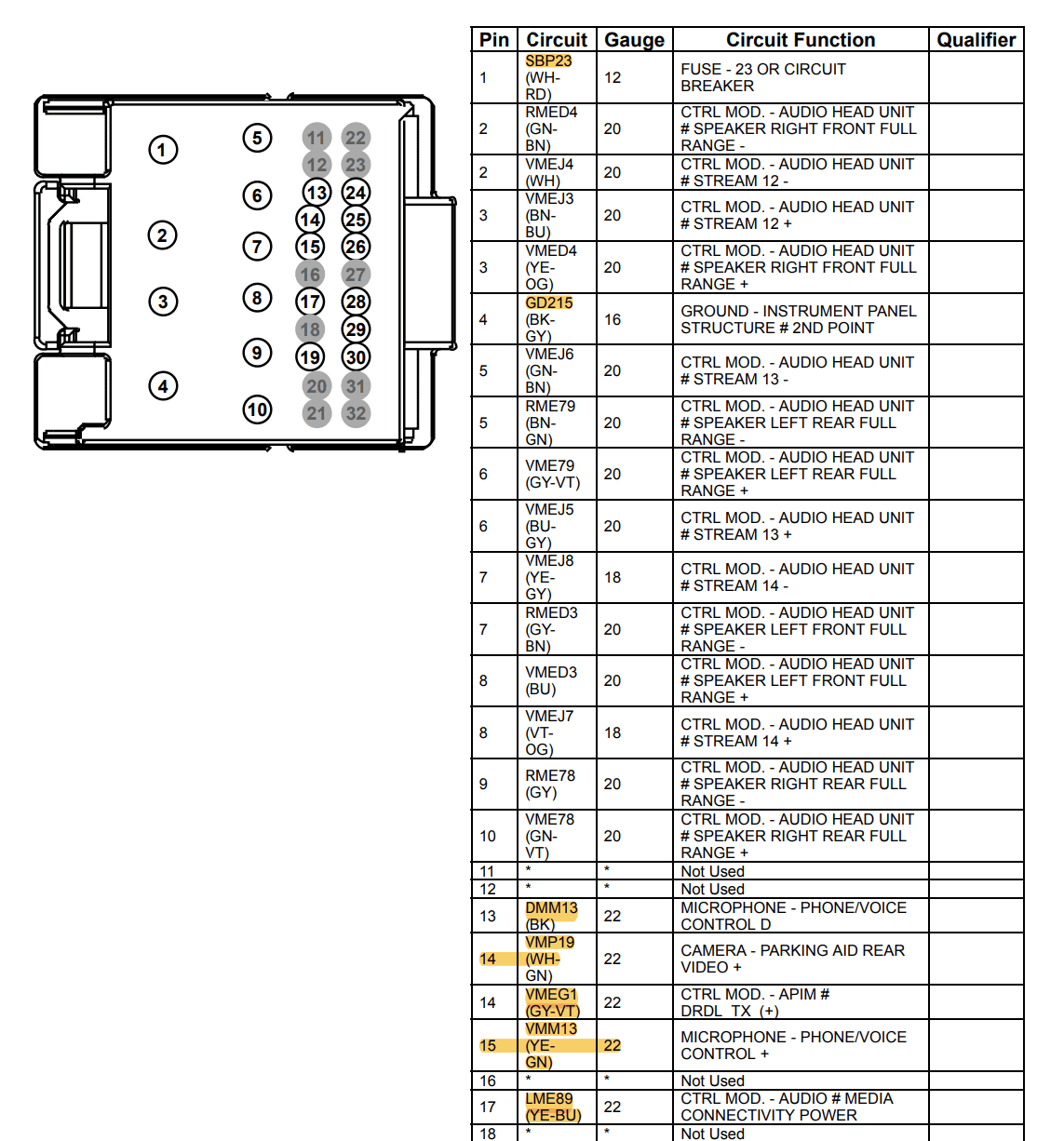
Attached are the wiring diagrams required to create the adapter harness...

APIM Connector

APIM 1.png

APIM 2.png


ACM Connector 1 (Existing ACM connector, Black)

ACM 1.png

ACM 2.png


ACM Connector 2 (Additional ACM connector for APIM to ACM communication, Grey)

Grey ACM.png


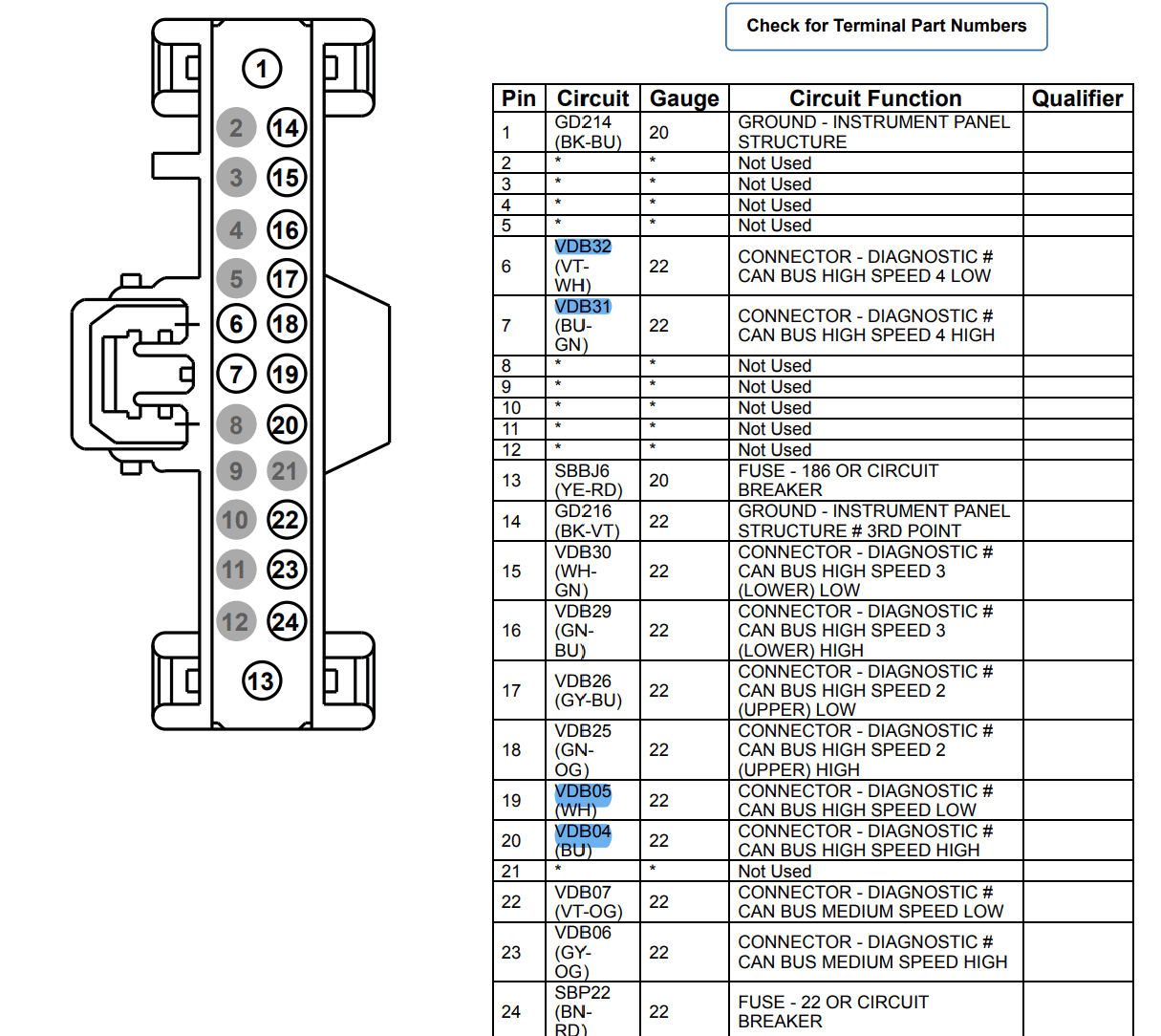
The color coded highlights depict where each circuit can be found/is needed. Green highlights are between the APIM and ACM Connector 2 only. Yellow highlights are between ACM Connector 1 and the APIM. Blue highlights are only required for Sync 3 installs and need to be traced back and tied into the Gateway (OBD II) module. The OBD II module connector diagram is below.

OBD II Module Connector (Sync 3 only)

OBD.png


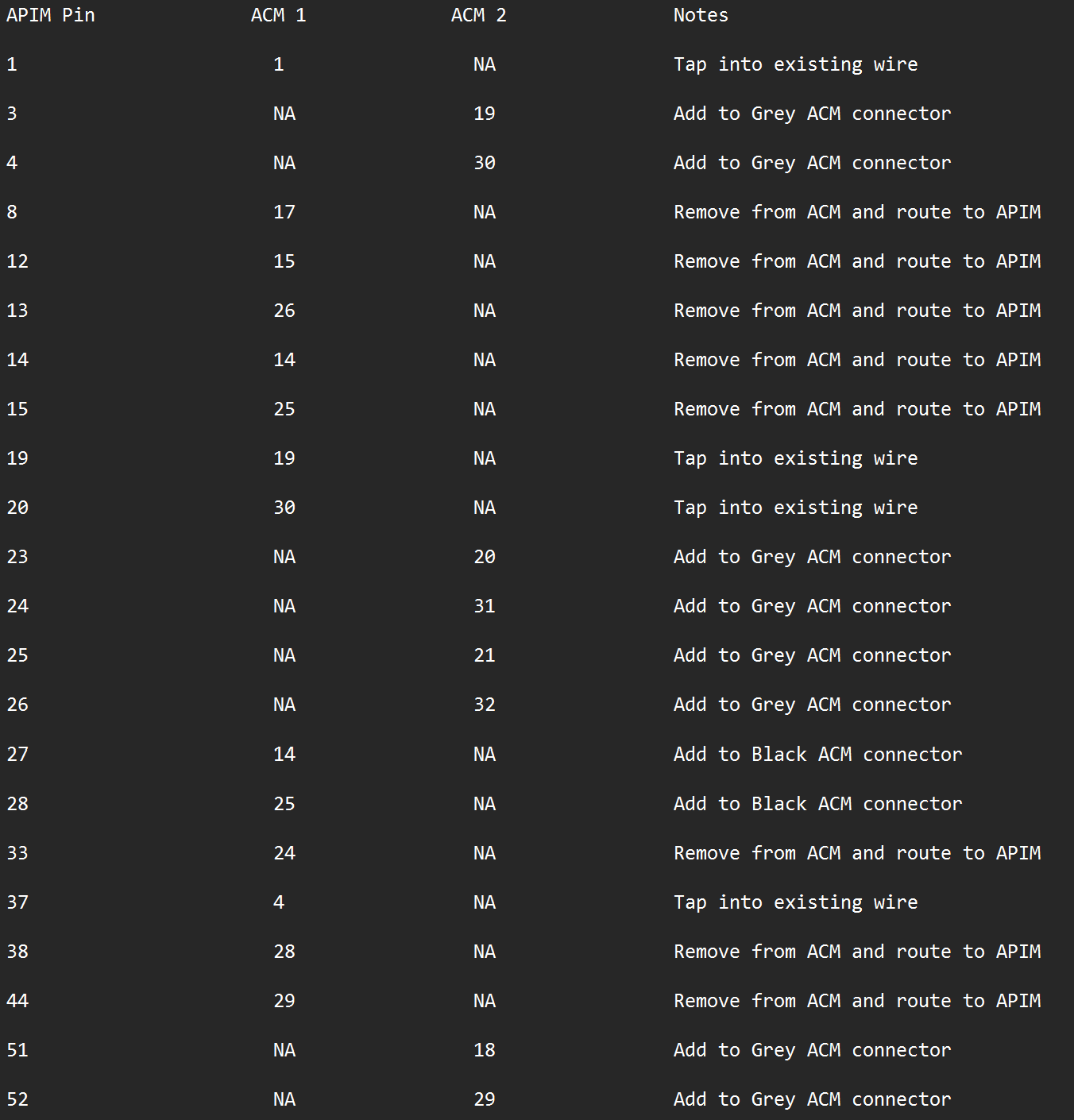
To more easily lay out the harness, below is a pin to pin trace from the APIM connector to ACM connectors 1 and 2 for a Sync 4 swap. Any pins I do not mention on the APIM side are not required for a functional system.

Pin connections.png


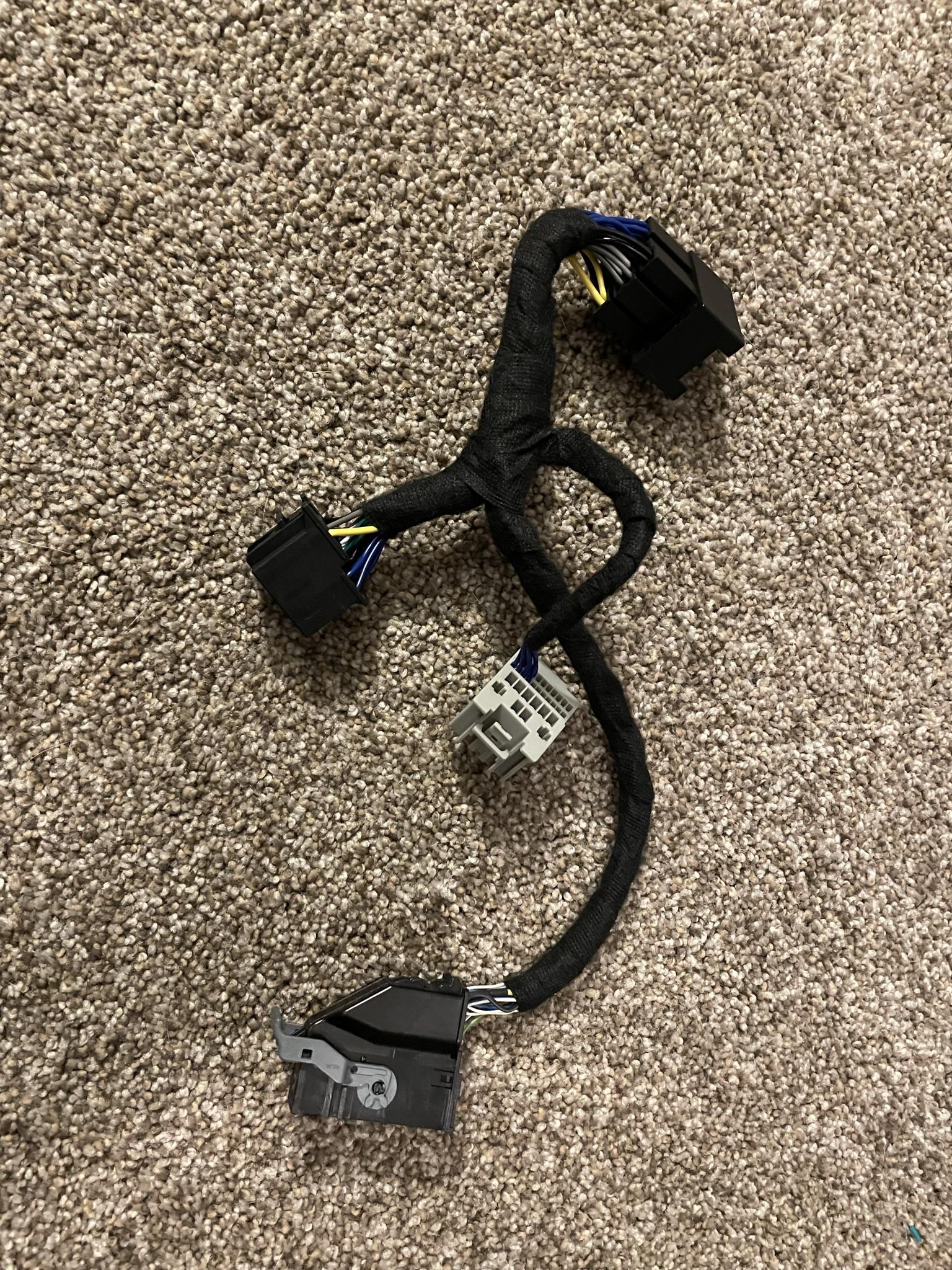
When complete you should have something similar to the below. You want at least 12" of wire length between the APIM connector and ACM connectors. The fabric tape use here is Tesa Tape and can be found on Amazon.

Amazon.com: Tesa Black Fuzzy Fleece Interior Wire Loom Harness Tape for VW, Audi, Mercedes, BMW 19 mm X 15 Meters (5 Rolls) : Automotive

IMG_1357.jpeg


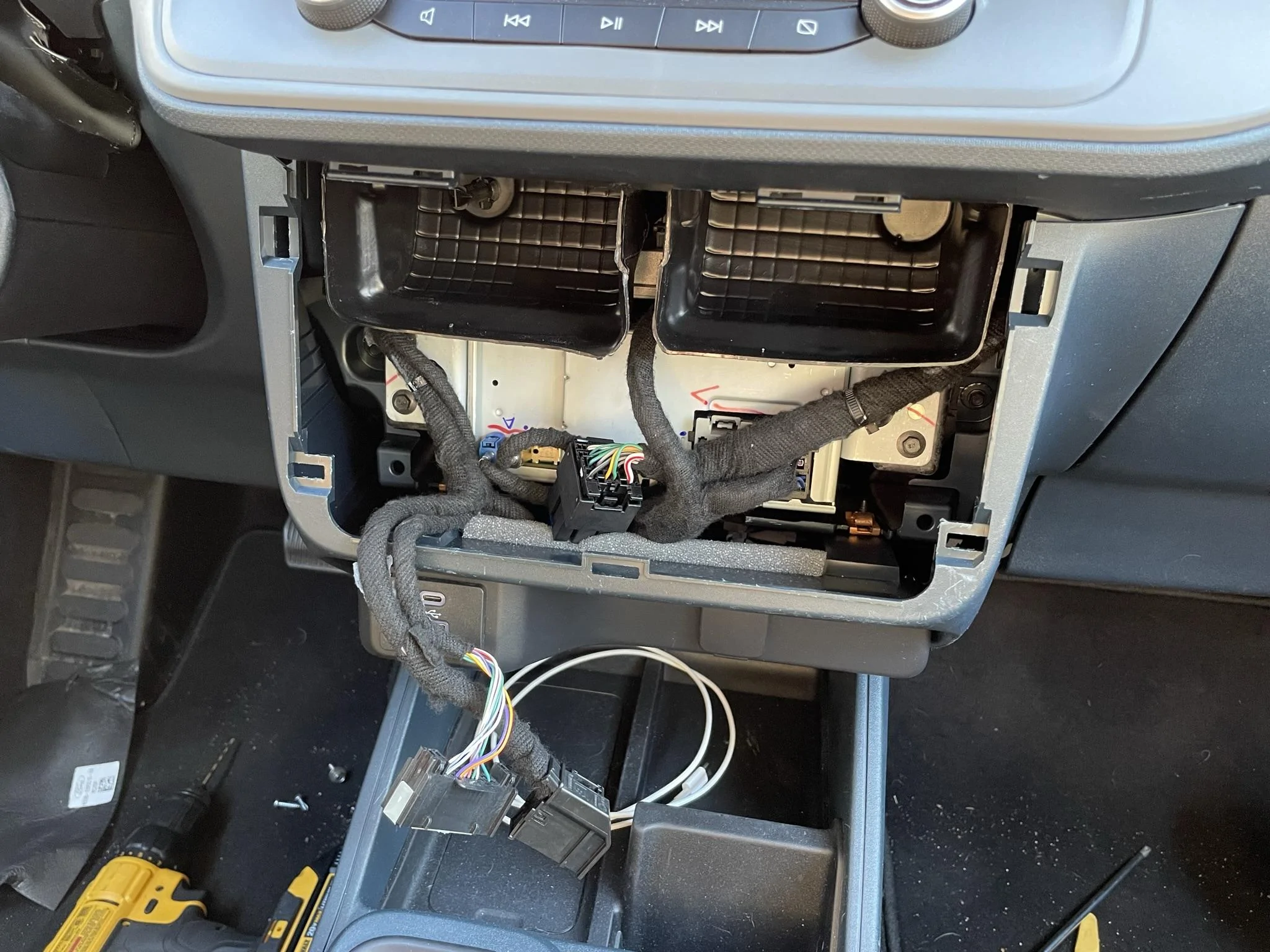
Once the harness is complete you can plug everything in like so.

IMG_1423.jpeg


The antenna extension plugs into the existing small blue connector and is routed to the small blue connector on the APIM. The new Satellite antenna plugs into the yellow port on the ACM and the existing small black connector plugs into the black port on the ACM.
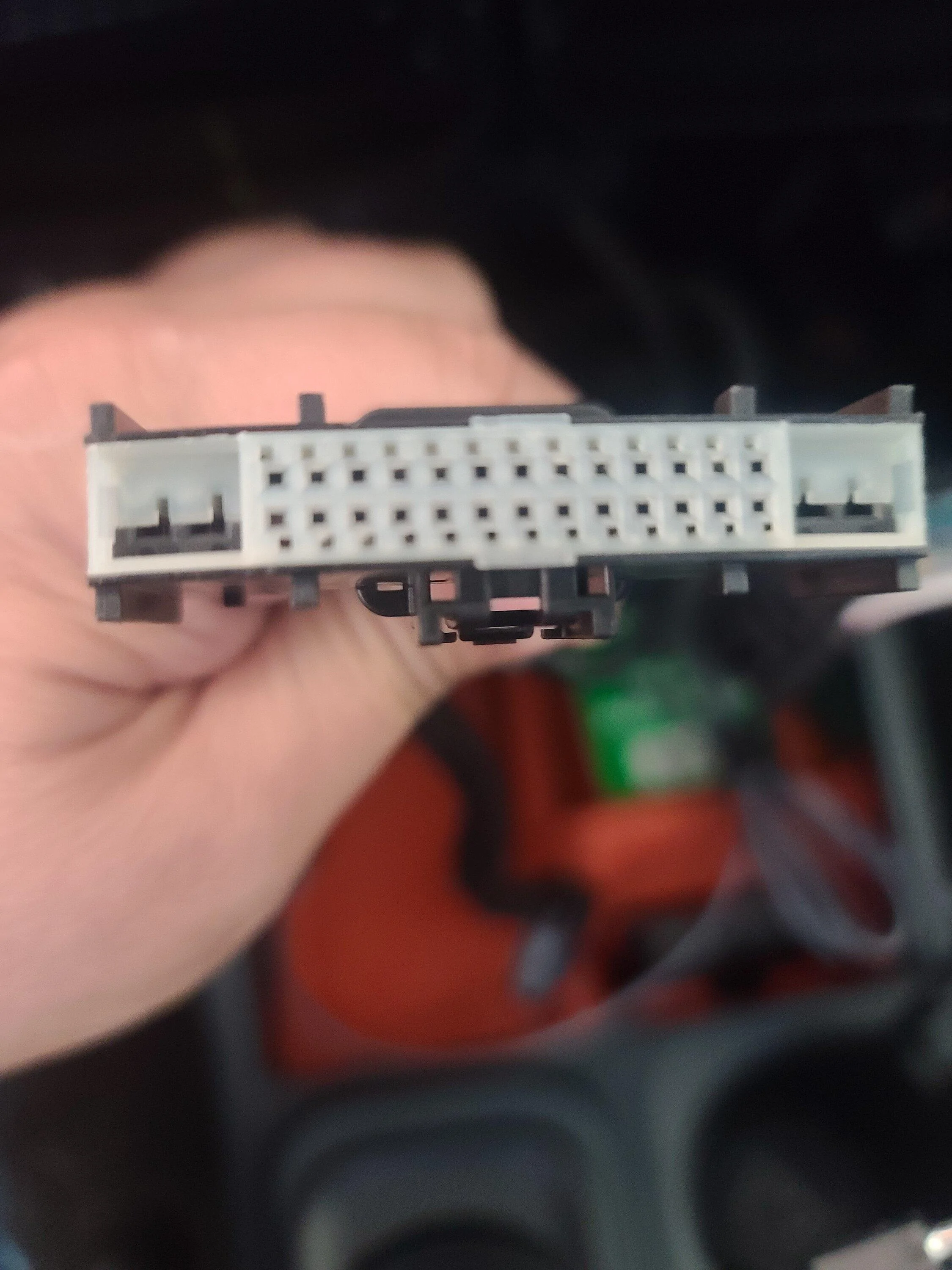
I created the harness with the intent of upgrading to Sync 3 but am confused about he OBD II connector. Is the OBD II Module Connector in the last picture? I was assuming that it was the connector on the left hanging over the phone holder. I ask because the connector in my Ford Maverick XLT has a different pin arrangement than diagrammed above. If neither of these connectors is the OBD II, where is it located? I attached a couple of pictures of the connector I thought was the OBD II. If this is the correct connector, can you suggest a source for finding the pin diagram?

Ford Maverick How To: Sync 3/4 swap for non Sync 3 XL/XLT 20230114_092830


Ford Maverick How To: Sync 3/4 swap for non Sync 3 XL/XLT 20230116_100115
 
OP
OP

zackmd1

2.0L EcoBoost
Well-known member
First Name
Zack
Joined
Jun 12, 2021
Threads
4
Messages
216
Reaction score
501
Location
Maryland
Vehicle(s)
1970 Mustang 429BB / 2019 Tesla Model 3
Engine
2.0L EcoBoost
I created the harness with the intent of upgrading to Sync 3 but am confused about he OBD II connector. Is the OBD II Module Connector in the last picture? I was assuming that it was the connector on the left hanging over the phone holder. I ask because the connector in my Ford Maverick XLT has a different pin arrangement than diagrammed above. If neither of these connectors is the OBD II, where is it located? I attached a couple of pictures of the connector I thought was the OBD II. If this is the correct connector, can you suggest a source for finding the pin diagram?

20230114_092830.jpg


20230116_100115.jpg
That does appear to be the OBDII connector. My suggestion would be to go to motorcraft service and purchase a pass for the wiring diagrams. Use your VIN and pull the connector diagram for your exact vehicle.
 

red_xlt_5

2.5L Hybrid
New member
First Name
Albert
Joined
Jan 16, 2023
Threads
1
Messages
4
Reaction score
5
Location
78225
Vehicle(s)
2022 Ford Maverick XLT
Engine
2.5L Hybrid
That does appear to be the OBDII connector. My suggestion would be to go to motorcraft service and purchase a pass for the wiring diagrams. Use your VIN and pull the connector diagram for your exact vehicle.
Thanks for the advice! I looked up the wiring and repair manuals for my VIN and found the correct connector, which was located at the far left (driver's side) of the interior. It is the same connector from your original thread.
 

Attachments

propp2531

2.0L EcoBoost
Well-known member
Joined
Aug 23, 2021
Threads
4
Messages
142
Reaction score
296
Location
Philadelphia
Vehicle(s)
Maverick XLT FX-4
Engine
2.0L EcoBoost
Can't comment on the rest but both Sync 3 and Sync 4 are available with and without HD Radio. It's not the APIM (module with the touchscreen) that needs to support it. Rather, it's in the ACM (Audio Control Module, the box that gets tucked away behind the screen). For the swap, you'll want to find both the Sync 3 or 4 APIM, as well as an ACM that specifically supports HD Radio.

Hopefully someone can confirm if the model they've used for this swap supports HD Radio for you. Maybe they already mentioned it in this thread. ;)

https://www.f150gen14.com/forum/threads/active-hd-radio-using-forscan.8050/
The problem with just swapping the ACM is that the Maverick uses an ACM which does everything. If you just put an HD ACM in you wont have anything to drive the screen. If you want HD radio which Im thinking of upgrading my ACM to you will need to do the APIM addition as well
Sponsored


Top