
Sponsored

FORD MOBILE APP IS NO LONGER SUPPORTED!

KHAB

2.5L Hybrid
New member
First Name
Kevin
Joined
Oct 1, 2025
Threads
2
Messages
4
Reaction score
18
Location
La Conner, Washington, USA
Vehicle(s)
2025 Ford Maverick
Engine
2.5L Hybrid
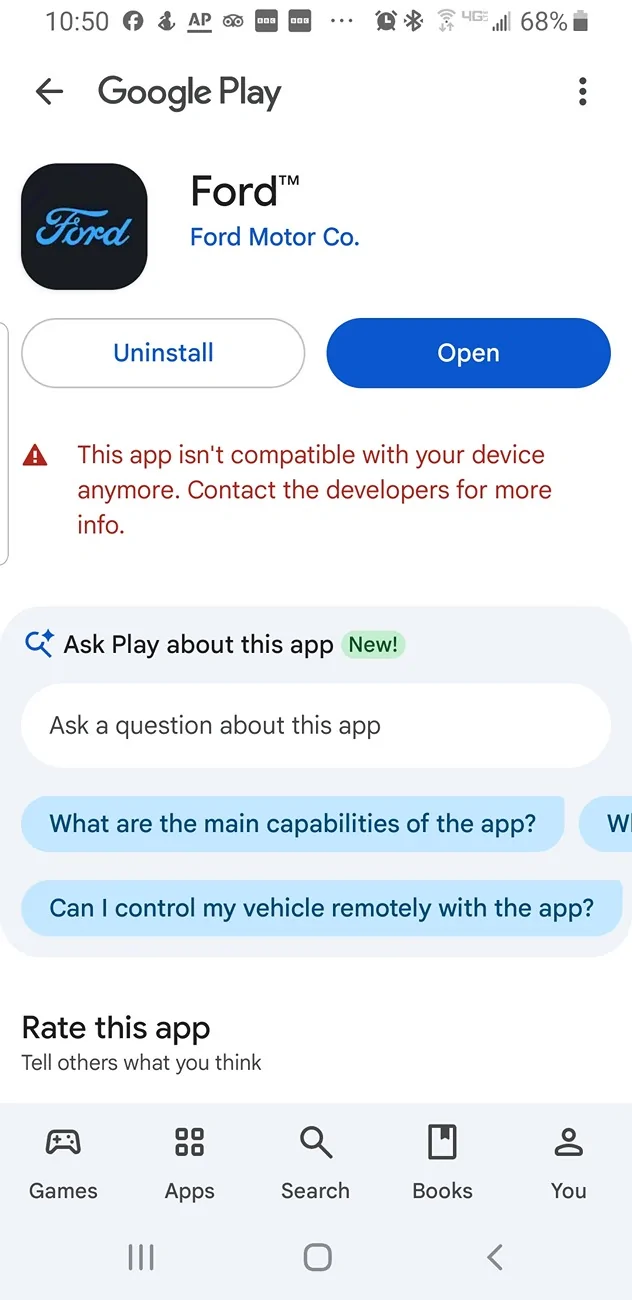
As of August 17 my trusty mobile app is no longer working so I have lost all those handy features for remote start, remote locking and checking the status of our 2025 Maverick. Ford says the "mobile app is no longer supported. Update to the latest version to continue using connected features." Google Play says "This app isn't compatible with your device anymore. Contact the developers for more info."

Short of being forced to buy a new phone, has anyone found a work around for this tragic turn of events?
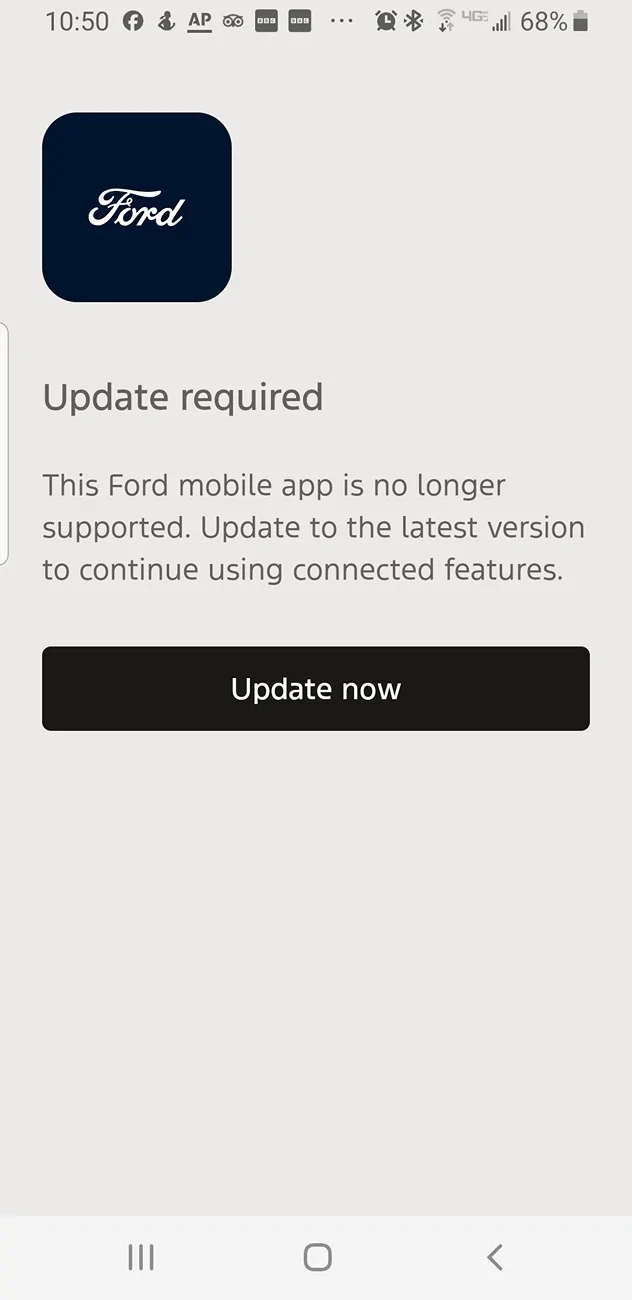
Ford Maverick FORD MOBILE APP IS NO LONGER SUPPORTED! Screenshot_20260819-105046_Ford


Ford Maverick FORD MOBILE APP IS NO LONGER SUPPORTED! Screenshot_20260819-105056_Google Play Stor
Sponsored


Ecorydr

2.5L Hybrid
Well-known member
First Name
Jim
Joined
Mar 16, 2026
Threads
0
Messages
233
Reaction score
316
Location
MO (Missery - home to those who voted for it!)
Vehicle(s)
2026 Maverick Lariat AWD
Engine
2.5L Hybrid
You might look into this....


"Virtual environment apps and cloud-based emulators can run a newer version of an operating system on an older device, though running an older app on a newer phone is much more common than the reverse.
If you are trying to run an app that requires a newer phone or a higher OS version than your current device supports, consider these options:
    • Virtual Machine Apps: On Android, apps like VPhoneOS or VMOS create a virtual Android operating system inside your current phone. They let you run a secondary, separate version of Android inside an app window, though performance can lag depending on your hardware.
    • Cloud Phones: Services like Redfinger -Android Cloud Phone host a virtual phone running a modern Android version on a remote server, streaming the interface to your physical device.
    • Developer Emulators: If you have a computer, tools like the official Android Studio Emulator or Apple's Xcode Simulator let you simulate almost any modern phone environment on your desktop for testing purposes."
 

rusty_shackleford

2.5L Hybrid
Well-known member
First Name
Dale
Joined
Jun 12, 2025
Threads
4
Messages
131
Reaction score
114
Location
texas
Vehicle(s)
2025 XL
Engine
2.5L Hybrid
Clubs
 
What phone do you have? Is it updated to the latest version of android released by the manufacturer? If it is, blame the manufacturer for not putting out updates to their devices, or your phone is over 5 years old and its time for an upgrade... there's nasty bugs on old software that simply visiting a compromised trusted website can give attackers access to the tiny computer in your pocket with all your credit cards and passwords saved to it.

Its been a while since I owned an android phone, not sure the state of the community right now, but you ought to be able to root the phone, install the latest version of android that way to get the play store to allow the download.
 
OP
OP
KHAB

KHAB

2.5L Hybrid
New member
First Name
Kevin
Joined
Oct 1, 2025
Threads
2
Messages
4
Reaction score
18
Location
La Conner, Washington, USA
Vehicle(s)
2025 Ford Maverick
Engine
2.5L Hybrid
What phone do you have? Is it updated to the latest version of android released by the manufacturer? If it is, blame the manufacturer for not putting out updates to their devices, or your phone is over 5 years old and its time for an upgrade... there's nasty bugs on old software that simply visiting a compromised trusted website can give attackers access to the tiny computer in your pocket with all your credit cards and passwords saved to it.

Its been a while since I owned an android phone, not sure the state of the community right now, but you ought to be able to root the phone, install the latest version of android that way to get the play store to allow the download.
Good question. My phone is a Samsung Galaxy 8 with the 9.0 Operating System. Ford has gone to the 10 OS, which has effectively made my phone obsolete. Samsung's official software support for the Galaxy S8 ended at Android 9.0, so the standard system updater will not offer Android 10.
 

zen_

2.5L Hybrid
Well-known member
Joined
Oct 27, 2024
Threads
3
Messages
479
Reaction score
966
Location
USA
Vehicle(s)
24' XLT
Engine
2.5L Hybrid
I'm not for thowaway tech, but your phone is nearly 9 years old. Besides not supporting most of the current app versions in the Play store, your device has not been getting security updates for something like 7 years.

At least on the newer Android devices, long term updates have got a lot better, closer to what Apple does supporting hardware /w OS updates and security patches as long as it legitimately can be.
 

Sponsored

rusty_shackleford

2.5L Hybrid
Well-known member
First Name
Dale
Joined
Jun 12, 2025
Threads
4
Messages
131
Reaction score
114
Location
texas
Vehicle(s)
2025 XL
Engine
2.5L Hybrid
Clubs
 
Good question. My phone is a Samsung Galaxy 8 with the 9.0 Operating System. Ford has gone to the 10 OS, which has effectively made my phone obsolete. Samsung's official software support for the Galaxy S8 ended at Android 9.0, so the standard system updater will not offer Android 10.
That is 9 year old hardware, makes sense they dropped software support.
If you have an international model, rooting is still viable. If you bought it from a US carrier store, no go. Its technically possible but buggy and breaks important features.

AI Overview


Rooting a North American Snapdragon
Samsung Galaxy S8
(models like
SM-G950U
or
SM-G955U
) is extremely difficult, risky, and limited. US carrier models feature permanently locked bootloaders. Traditional custom recoveries like TWRP do not work, and attempts rely on complex, outdated engineering boot-image exploits that often cause unstable performance, broken features, or permanent bricks.

Limitations and Risks
    • Locked Bootloader: US Snapdragon variants cannot unlock their bootloaders officially.
    • Unstable Exploits: Root methods rely on old engineering firmware (ENG S/IMG) which can cause random reboots, severe battery drain, and performance lag.
    • Permanently Broken Features: Features like Samsung Pay, Secure Folder, and sometimes cellular or Wi-Fi calling will stop working permanently.
    • Most users on the XDA Forums agree that rooting the
      Snapdragon S8
      is unstable and generally not recommended for daily-use devices.
 

commadorebob

2.0L EcoBoost
Well-known member
First Name
Bob
Joined
Sep 17, 2022
Threads
62
Messages
5,017
Reaction score
10,771
Location
Alabama
Vehicle(s)
2025 Expedition Max Platinum; 2023 Maverick Lariat
Engine
2.0L EcoBoost
Amazon has some refurbished Galaxy phones you can get fairly cheap. I would not go any lower than S22. You can also visit your carrier. Sometimes they have decent deals for upgrading. I know AT&T will sometimes do an "any condition" trade.
 

rugedraw

Well-known member
First Name
Javier
Joined
Jan 21, 2026
Threads
0
Messages
70
Reaction score
75
Location
Miami, FL
Vehicle(s)
2021 Ford F150; 2023 Bronco Sport Badlands; 1991 Mustang 5.0 coupe.
Engine
Undecided
Wow....4G LTE takes me back quite a bit. Time for an upgrade......your S8 has served you well. You could gain root access and flash a custom ROM that will support the Ford app, but not worth the trouble to do so, IMO. The older chipset and low RAM on your phone may struggle to run it properly.
 

Mudduck

2.0L EcoBoost
Well-known member
First Name
JD
Joined
Dec 13, 2025
Threads
7
Messages
587
Reaction score
1,118
Location
Utah
Vehicle(s)
24 Maverick FX4. 21 Wrangler Rubicon. 72 VW Ghia. 88 Suzuki Samurai. 23 FOZY
Engine
2.0L EcoBoost
Pre-requirements:
- Samsung Drivers.
- Odin 3.13.1 (exactly this version for s8/s8+).
- PC with USB-C cable.

Flash latest Firmware, stock. - Sammobile Downloaded.

Using Odin 3.13.1 (required for s8/s8+) flash first 4 options.

During first boot:
- Skip all options to connect to stuff.
- Set time months in the past.

Once first booted/setup completed:
- USB Debugging ON (always trust).

Reboot.

Connect to WiFi / Internet.

Reboot.

OEM Unlock ON (won't have to wait as auto-unlocks).

CMD Terminal - adb reboot bootloader

Odin AP - TWRP - Turn auto-reboot off under options.

Hold Volume Down and Power to reboot.

Once off, Hold Power, Volume Up and Bixby till vibration, let go and wait to TWRP Recovery.

In TWRP, Read Only mode.

Go to Wipe > Format Data.

Hit back in menu, Reboot to Recovery.

In TWRP, Read Only mode.

TWRP Folder will now be accessable by connecting to PC.

Place RMM Bypass v3 and Disable_Dm-Verity_ForceEncrypt_11.02.2020 (at time of guide) onto the phone.

Install RMM Bypass v3.

Install Disable_Dm-Verity_ForceEncrypt_11.02.2020.

Reboot to System.

At this stage, 2 things can go wrong:
- No boot at all. In which case begin from beginning. Phone isn't bricked if boot looping. Hold Power and Volume Down during one of the loops and enter into Recovery mode. You can then start the process again to stock always.
- First boot will work. Setup the phone, on restart however it will say only official binaries are supported. Do above again. This is referenced below.

During setup, set the date backwards once again. Skip all other options.

Reboot the phone to check all is functional, follow above if fails to boot, else continue.

TWRP is now fully installed. With RMM disabled.

Installing Magisk is done via transfering the Magisk file, use preferred method. If you need a way transfer it over via TWRP as we did above for KMM zip. This guide will show this method.

From the booted phone, unlocked, CMD Terminal - adb reboot recovery

Once TWRP has booted and the phone appears in PC, transfer Magisk APK over to phone.

In TWRP, navigate to Install and install Magisk.

Reboot System.

You should now have a rooted (with Magisk if needed) Samsung S8/S8+ !

Now find a stock android/Vanilla ROM and istall it along with your preferred GAPs.

It wont be buggy if correctly done, but its a PITA for a really old phone.
 
Sponsored

Hot Runr Guy

2.0L EcoBoost
Well-known member
First Name
Terry
Joined
Apr 27, 2021
Threads
108
Messages
4,567
Reaction score
8,702
Location
West Chicago, IL
Vehicle(s)
2024 Edge SEL, 2024 Lariat Tremor
Engine
2.0L EcoBoost
Clubs
 
As of August 17 my trusty mobile app is no longer working so I have lost all those handy features for remote start, remote locking and checking the status of our 2025 Maverick. Ford says the "mobile app is no longer supported. Update to the latest version to continue using connected features." Google Play says "This app isn't compatible with your device anymore. Contact the developers for more info."

Short of being forced to buy a new phone, has anyone found a work around for this tragic turn of events?
This happened to me within 2 weeks of getting my 2023 Maverick. Once I researched that Androids can't have the OS updated, and iPhones can, I switched to an iPhone and never looked back.

HRG
 

MattTX

2.5L Hybrid
Well-known member
First Name
Matt
Joined
Apr 24, 2025
Threads
5
Messages
131
Reaction score
222
Location
Texas
Vehicle(s)
2024 Maverick Hybrid XLT
Engine
2.5L Hybrid
Clubs
 
This happened to me within 2 weeks of getting my 2023 Maverick. Once I researched that Androids can't have the OS updated, and iPhones can, I switched to an iPhone and never looked back.

HRG
I'm not entirely sure what you mean but Android phones can definitely be updated and have a similar, albeit slightly shorter and more complicated, support life from Google / Android.

Apple states they support phones for up to 5 - 7 years with iOS updates and up to 8 years of security patches, which is great but even that means a phone from 2018 or prior is probably no longer getting iOS updates (but should still get security updates). They are the only manufacturer of iPhones so are the only one's who can send out updates to their OS, which makes things a lot simpler. They also consider phones older than 7 years to be obsolete.

Android is more complicated because while Google does make some phones and supports Android OS and security updates for 5 years on those phones, there are many other manufactures making Android phones and they are responsible for updating the devices they sell. Those manufacturers also get to decide how long they will send out updates to every device they make, with some being as short as 2 years and others up to 6 years.

An added bonus to Android devices is that even after a manufacturer stops sending out OS and security updates, there is a very large devoted group of programmers who continue to create custom free versions of Android that support older devices for as long as possible. I have a couple of Samsung tablets that haven't gotten an update from Samsung in a long time, I think the last officially supported version of Android was about 5 generations ago. But I'm running a version of Android that is only a couple of generations old thanks to those programmers. There are of course limits to this, since old hardware can't always keep up with the newest software, eventually the custom Android versions will stop supporting older phones too.
Sponsored


Top