
Sponsored

USB extension cord doesn't work

Caper

2.0L EcoBoost
Well-known member
Joined
Nov 16, 2021
Threads
5
Messages
74
Reaction score
85
Location
Nova Scotia
Vehicle(s)
Maverick FX4
Engine
2.0L EcoBoost
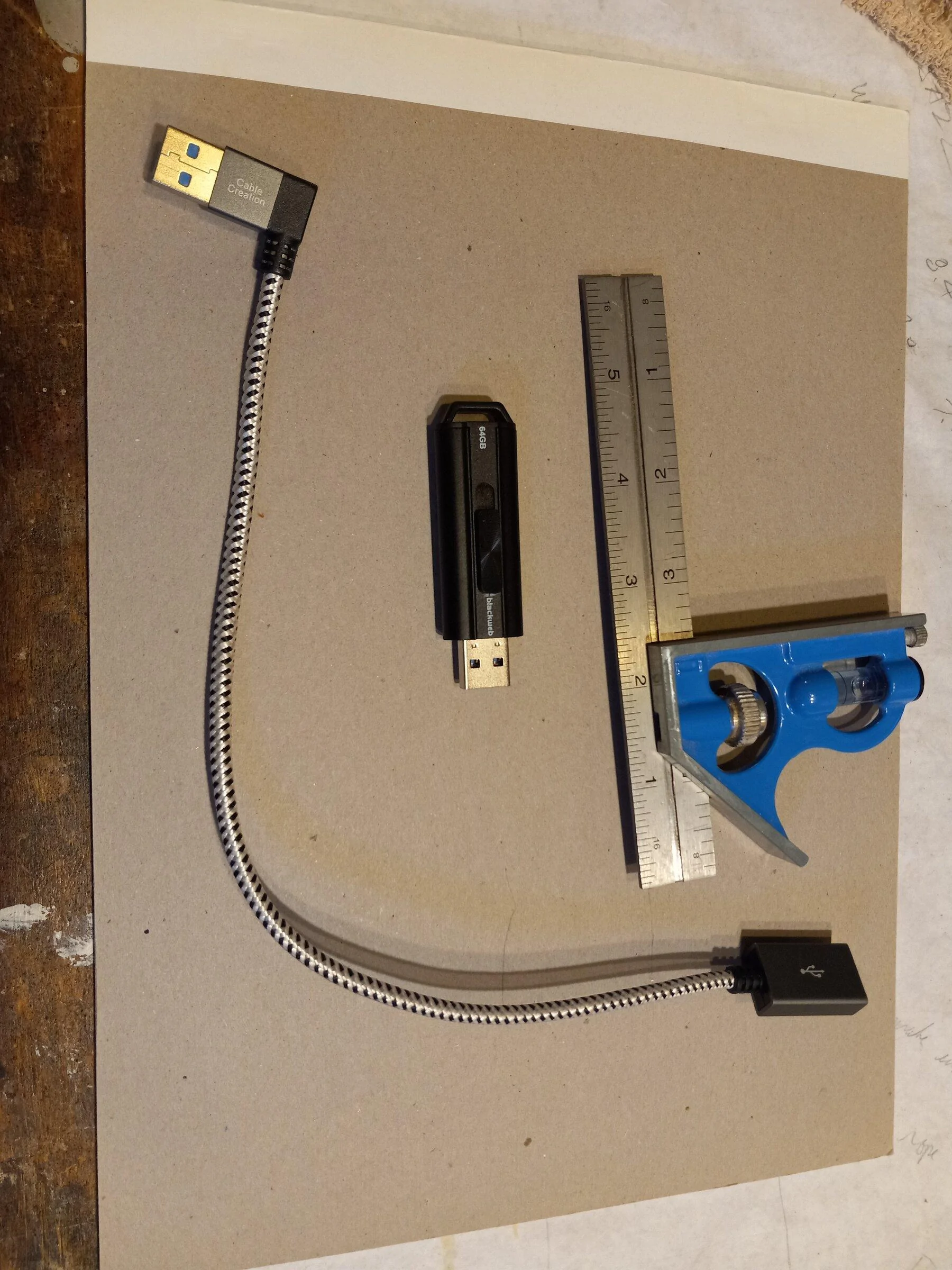
I use the USB flashdrive in the picture connected to the Maverick to play music. When installed it sticks out quite a bit and I am concerned it will get bumped at some time and damage the socket permanently.

I bought the 12" long cord in the picture so that I could place the USB flashdrive out of harms way. The flash drive works fine on its own when connected to the Maverick and the cable and flashdrive also work fine when connected to my laptop. When the two are connected to the Maverick it doesn't recognize it. My understanding is that the cable and flash drive are both USB 3.0.

Anyone know why this isn't working?
Ford Maverick USB extension cord doesn't work 20211230_140447
Sponsored


LDProductions

2.5L Hybrid
Well-known member
Joined
Jul 27, 2021
Threads
3
Messages
81
Reaction score
129
Location
Springfield, MA Area
Vehicle(s)
'17 Ford Escape
Engine
2.5L Hybrid
It's probably a cheap cable that isn't capable of transferring data at the necessary speed and/or not making perfect contact with the flash drive or the port. We went through probably four cables in my wife's Escape before finding one that worked. I'd check to see what's available from the hobby/professional level electronics retailers like B&H Photo.
 
OP
OP
Caper

Caper

2.0L EcoBoost
Well-known member
Joined
Nov 16, 2021
Threads
5
Messages
74
Reaction score
85
Location
Nova Scotia
Vehicle(s)
Maverick FX4
Engine
2.0L EcoBoost
It's probably a cheap cable that isn't capable of transferring data at the necessary speed and/or not making perfect contact with the flash drive or the port. We went through probably four cables in my wife's Escape before finding one that worked. I'd check to see what's available from the hobby/professional level electronics retailers like B&H Photo.
It all works when connected to sources other than the truck. It would seem there is something on the truck side of things.
 

TacoHolder

Well-known member
Joined
Nov 13, 2021
Threads
9
Messages
522
Reaction score
1,147
Location
Phoenix AZ
Vehicle(s)
Not Mav
There isn't enough power being sent to your flash drive when using the extension cable. Likely a combination of the total power available from the USB port and the drop off caused by the cable. USB connections can be sensitive to cable length.
 

LDProductions

2.5L Hybrid
Well-known member
Joined
Jul 27, 2021
Threads
3
Messages
81
Reaction score
129
Location
Springfield, MA Area
Vehicle(s)
'17 Ford Escape
Engine
2.5L Hybrid
It all works when connected to sources other than the truck. It would seem there is something on the truck side of things.
That's what I thought when we were trialing different cables in the Escape. Everything would work when connected to a laptop, but not when connected to the vehicle. The cable that ended up working had a much tighter fit in the port in the vehicle than the others did. Seems that there's a fairly wide tolerance range on the cables that causes some issues. Not sure if it's strictly that the metal on metal connection is more secure, or if the contacts are higher quality, but I would try a couple more cables.

There isn't enough power being sent to your flash drive when using the extension cable. Likely a combination of the total power available from the USB port and the drop off caused by the cable.
Right, and that could be a result of cheaper materials in the cable itself and a more expensive cable may have better power/data transfer capability.

Essentially not all USB cables are created equally.
 

Sponsored

Brian_J

2.0L EcoBoost
Well-known member
First Name
Brian
Joined
Jul 2, 2021
Threads
46
Messages
863
Reaction score
1,128
Location
Akron, Ohio
Vehicle(s)
'22 HPR Maverick AWD 4K LUX
Engine
2.0L EcoBoost
Did I miss it? We’re you plugged into the front seat or back seat USB ports?
 
OP
OP
Caper

Caper

2.0L EcoBoost
Well-known member
Joined
Nov 16, 2021
Threads
5
Messages
74
Reaction score
85
Location
Nova Scotia
Vehicle(s)
Maverick FX4
Engine
2.0L EcoBoost
I was using the the front port. I should have made that more clear. You are correct in that the rear port is only for charging.
 

Mabcim

2.0L EcoBoost
Well-known member
First Name
Mark
Joined
Oct 4, 2021
Threads
3
Messages
1,225
Reaction score
1,086
Location
Rochester, NY
Vehicle(s)
25 Maverick Lariat 2.0 AWD; 23 Escape ST Line Select 2.0 AWD
Engine
2.0L EcoBoost
Clubs
 
Try a USB 2.0 cable.
You do not need 3.0 speeds for audio, only transferring large files quickly.
3.0 is still problematic on some PCs. When we have customers with this kind of issue (we make USB scanners), we have them use a 2.0 cable. Works every time.
While your USB drive has a 3.0 port, it is fully compatible with 2.0
 

Rojo

2.0L EcoBoost
Well-known member
Joined
Nov 15, 2021
Threads
16
Messages
348
Reaction score
415
Location
NW, Louisiana
Vehicle(s)
XLT, Alto Blue, AWD Eco-Boost, Lux
Engine
2.0L EcoBoost
They make a lot of USB C accessories now, I've so far ran into a few issues where data only flows one way with some USB C cables, so make sure to read the description well if you go that route. Also, might I suggest one of these USB C Flash Drive. It's really small, to the point I attached a lanyard to it because I was afraid of losing it. It has normal USB 3.0 on one end and USB C on the other end. The USB C end also transfers data super fast.
 
Sponsored

scyntaxx

2.0L EcoBoost
Well-known member
Joined
Jan 6, 2022
Threads
10
Messages
52
Reaction score
70
Location
USA
Vehicle(s)
Maverick XLT
Engine
2.0L EcoBoost
Clubs
 
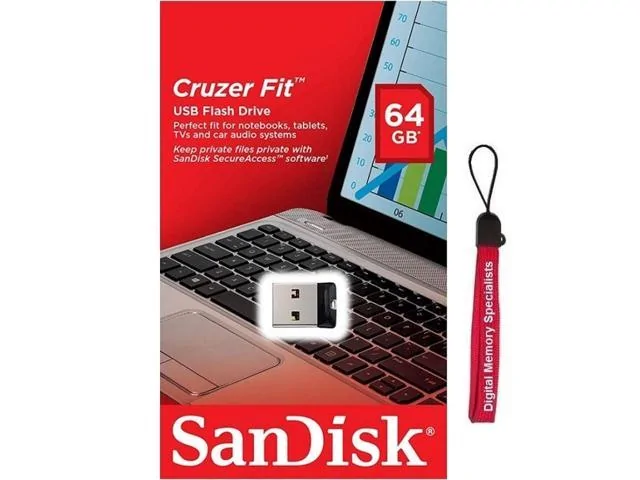
Try this. These are SUPER CHEAP now. They look like a wireless mouse dongle but they are actually usb flash drives. They sit almost flush. My suggestion is to stick with 64gb or less....and also stick with the usb 2.0 variant if possible. The usb 3.0 model heats up after extended use. The 2.0 is the one in the picture.....3.0 sandisk cruzr fit has a completely different look.

Ford Maverick USB extension cord doesn't work A12K_131951057772563852inkaYGD3f0
 

abjbrtd

2.5L Hybrid
Well-known member
Joined
Jul 9, 2021
Threads
5
Messages
245
Reaction score
295
Location
TX
Vehicle(s)
Hyundai Kona, Thor Citation
Engine
2.5L Hybrid
I use the USB flashdrive in the picture connected to the Maverick to play music. When installed it sticks out quite a bit and I am concerned it will get bumped at some time and damage the socket permanently.

I bought the 12" long cord in the picture so that I could place the USB flashdrive out of harms way. The flash drive works fine on its own when connected to the Maverick and the cable and flashdrive also work fine when connected to my laptop. When the two are connected to the Maverick it doesn't recognize it. My understanding is that the cable and flash drive are both USB 3.0.

Anyone know why this isn't working?

20211230_140447.jpg
Could you post a picture plugged into your Maverick?

Is this the cable you have?
 
OP
OP
Caper

Caper

2.0L EcoBoost
Well-known member
Joined
Nov 16, 2021
Threads
5
Messages
74
Reaction score
85
Location
Nova Scotia
Vehicle(s)
Maverick FX4
Engine
2.0L EcoBoost
Try this. These are SUPER CHEAP now. They look like a wireless mouse dongle but they are actually usb flash drives. They sit almost flush. My suggestion is to stick with 64gb or less....and also stick with the usb 2.0 variant if possible. The usb 3.0 model heats up after extended use. The 2.0 is the one in the picture.....3.0 sandisk cruzr fit has a completely different look.
This looks like the best solution. Follow old adage K.I.S.S (keep it simple stupid). I would have gone this way in the first place had I known I could get a flashdrive that small. It is also overall cheaper..

It will be on my next online order.
 
OP
OP
Caper

Caper

2.0L EcoBoost
Well-known member
Joined
Nov 16, 2021
Threads
5
Messages
74
Reaction score
85
Location
Nova Scotia
Vehicle(s)
Maverick FX4
Engine
2.0L EcoBoost
Could you post a picture plugged into your Maverick?

Is this the cable you have?
The cable and FD in the photo are what I am using.
I probably won't take a picture in the Maverick but as you can see from the measuring square that FD is about 2.5 inches long so it eventually would get bumped from the socket.

The smaller size drive discussed above is the best option going forward.
 

Snax

2.5L Hybrid
Well-known member
Joined
Jun 16, 2021
Threads
20
Messages
882
Reaction score
2,718
Location
North America
Vehicle(s)
Maverick
Engine
2.5L Hybrid
Try this. These are SUPER CHEAP now. They look like a wireless mouse dongle but they are actually usb flash drives. They sit almost flush. My suggestion is to stick with 64gb or less....and also stick with the usb 2.0 variant if possible. The usb 3.0 model heats up after extended use. The 2.0 is the one in the picture.....3.0 sandisk cruzr fit has a completely different look.

A12K_131951057772563852inkaYGD3f0.jpg
I've been using that drive in my cars for a few years. Work great in all of them, including my Maverick. It's tiny, so be careful not to lose it!
Sponsored


Top