
Sponsored

Updated FordPass app

Dad

2.5L Hybrid
Well-known member
First Name
Tom
Joined
Jan 9, 2022
Threads
58
Messages
5,307
Reaction score
5,690
Location
SoCal
Vehicle(s)
2022 Maverick, - Lariat, Hyundai Palisade
Engine
2.5L Hybrid
That update option is using WiFi, and from testing, while it may turn on once overnight to check if there is an update, the system is turned off otherwise (meaning it'll drop off the wifi network quickly). Not a likely reason for draining battery.
And WiFi is a small power-drain even when it's on the edge of the wifi signal and has to turn the radio up in power to use it barely.

The ATT cell modem though for telematics - not sure how often that is checking in to pass on data the Ford app is using, but cellular network uses a tad more power when you have bad signal, or no signal and it's constantly searching for it. That's constantly connecting so you can do your remote start or lock/unlock thru the app, besides info given.

Got good ATT network in your normal areas, especially where parked?

In manual under Vehicle Software Updates:
VEHICLE SOFTWARE UPDATES

Connecting to a Wi-Fi Network
Ford Maverick Updated FordPass app {filename}
Select the settings option on the feature bar.
  1. Select Automatic Updates.
  2. Select System Wi-Fi.
  3. Switch System Wi-Fi on.
  4. Select Available Wi-Fi Networks.
  5. Select an available Wi-Fi network.
Note: Enter the network password to connect to a secure network.
Switching Automatic System Updates On
Ford Maverick Updated FordPass app {filename}
Select the settings option on the feature bar.
  1. Select Automatic Updates.
  2. Switch Automatic System Updates on.
The system is now set to check for and receive system updates when it is connected to a Wi-Fi network.
Thanks for the detailed information. I don't have stand alone WiFi operational on the Maverick, so I would guess the vehicle relies on cellular for any updates. My AT&T signal is minimal at my house, however, I do have access to a strong WiFi signal in my driveway.
Sponsored


XHusker

2.0L EcoBoost
Active member
First Name
Mike
Joined
Jan 16, 2024
Threads
0
Messages
31
Reaction score
32
Location
Illinois
Vehicle(s)
2024 XLT AWD Maverick
Engine
2.0L EcoBoost
Clubs
 
Commadore Bob you need gas. My Android is still miles update complete.
 

HeyBales

2.5L Hybrid
Well-known member
First Name
Mike
Joined
May 3, 2024
Threads
4
Messages
4,836
Reaction score
4,392
Location
KC Metro area
Vehicle(s)
2005 Toyota RAV4, 2024 XLT Hybrid
Engine
2.5L Hybrid
Thanks for the detailed information. I don't have stand alone WiFi operational on the Maverick, so I would guess the vehicle relies on cellular for any updates. My AT&T signal is minimal at my house, however, I do have access to a strong WiFi signal in my driveway.
Cellular won't be used for those updates.
What I provided from the manual is the method to get them.

Since you have good wifi in driveway - you have ability to do setup as instructed to get updates, if desired.

Your weak ATT will probably mean some extra battery drain as truck stays connected for Fordpass to work with it. You can either disable that connectivity in settings or pull the fuse.

None of what has been discussed has anything to do with the optional vehicle wifi hotspot you may mean by stand alone wifi. You are confusing that in but not related.
 

nunucello

2.5L Hybrid
Well-known member
First Name
Marcello
Joined
Sep 3, 2021
Threads
47
Messages
883
Reaction score
731
Location
New York
Vehicle(s)
Maverick Hybrid
Engine
2.5L Hybrid
Dear Ford, please bring back the gas gauge graphic. It's nice seeing the range estimate which is worth keeping, but the gauge graphic was nice. Thank You.
 

White Thunder

2.0L EcoBoost
Well-known member
First Name
Donald
Joined
Dec 6, 2021
Threads
23
Messages
1,156
Reaction score
1,126
Location
Sapulpa, Oklahoma
Vehicle(s)
2022 Maverick XL
Engine
2.0L EcoBoost
Well the update that happened yesterday I now show percentage instead of miles. I called customer relations, all she did was apologize
 

Sponsored

Dad

2.5L Hybrid
Well-known member
First Name
Tom
Joined
Jan 9, 2022
Threads
58
Messages
5,307
Reaction score
5,690
Location
SoCal
Vehicle(s)
2022 Maverick, - Lariat, Hyundai Palisade
Engine
2.5L Hybrid
Cellular won't be used for those updates.
What I provided from the manual is the method to get them.

Since you have good wifi in driveway - you have ability to do setup as instructed to get updates, if desired.

Your weak ATT will probably mean some extra battery drain as truck stays connected for Fordpass to work with it. You can either disable that connectivity in settings or pull the fuse.

None of what has been discussed has anything to do with the optional vehicle wifi hotspot you may mean by stand alone wifi. You are confusing that in but not related.
Appreciate your time spent in educating me. Thank you.
 

NedF

2.5L Hybrid
Well-known member
Joined
Apr 13, 2023
Threads
13
Messages
566
Reaction score
623
Location
BC Canada
Vehicle(s)
Was a '23 now a '24 Lariat Lux
Engine
2.5L Hybrid
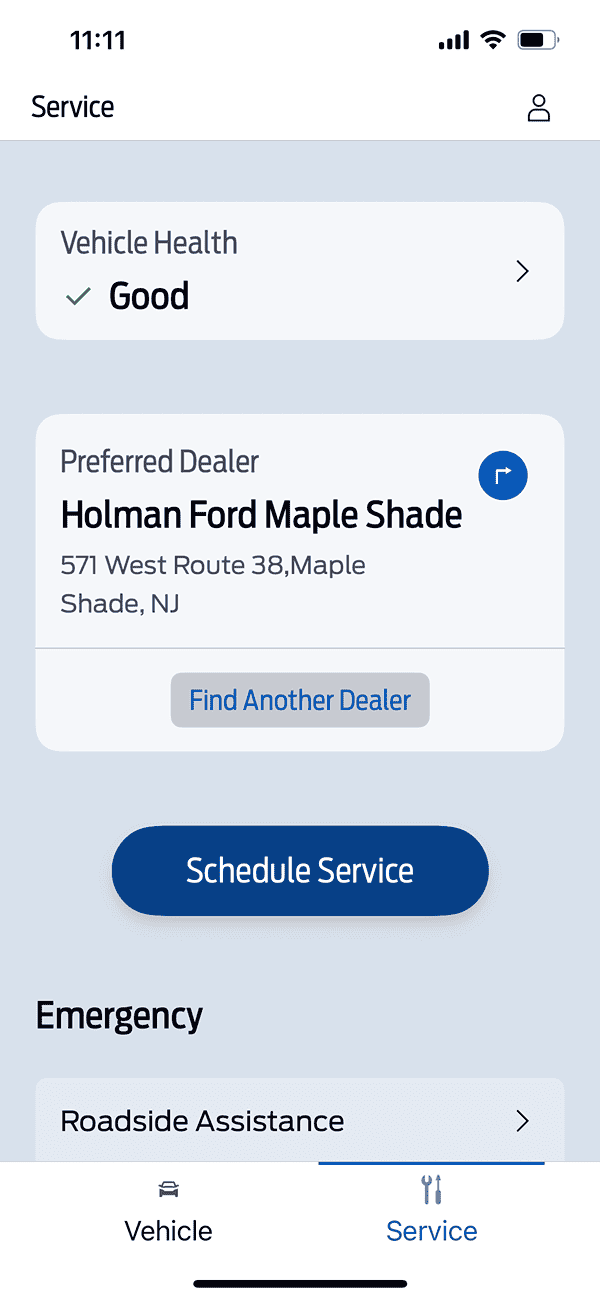
If you rely on FordPass don’t install the iOS18 public beta! The FordPass app is the only glitch I have found so far. 😂

the screen moving sideways, and back is me trying to open location, schedule remote start and settings... nothing will open even on the service tab.

I don't really use it much because 98% of the time my truck is in deep sleep!


NextTruck

2.0L EcoBoost
Well-known member
Joined
Sep 26, 2022
Threads
24
Messages
429
Reaction score
411
Location
PA
Vehicle(s)
2017 JeepGC Overland, 2010 Tahoe
Engine
2.0L EcoBoost
Clubs
 
I also used to be able to manual enter DIY service records and would also show oil life. Doesn't seem to be available any more
 

Milous

2.5L Hybrid
Well-known member
Joined
Jun 20, 2021
Threads
17
Messages
506
Reaction score
910
Location
WA State
Vehicle(s)
2022 XLT Alto Blu, LUX, Sunroof, delivered 3/18/22
Engine
2.5L Hybrid
If you rely on FordPass don’t install the iOS18 public beta! The FordPass app is the only glitch I have found so far. 😂

the screen moving sideways, and back is me trying to open location, schedule remote start and settings... nothing will open even on the service tab.
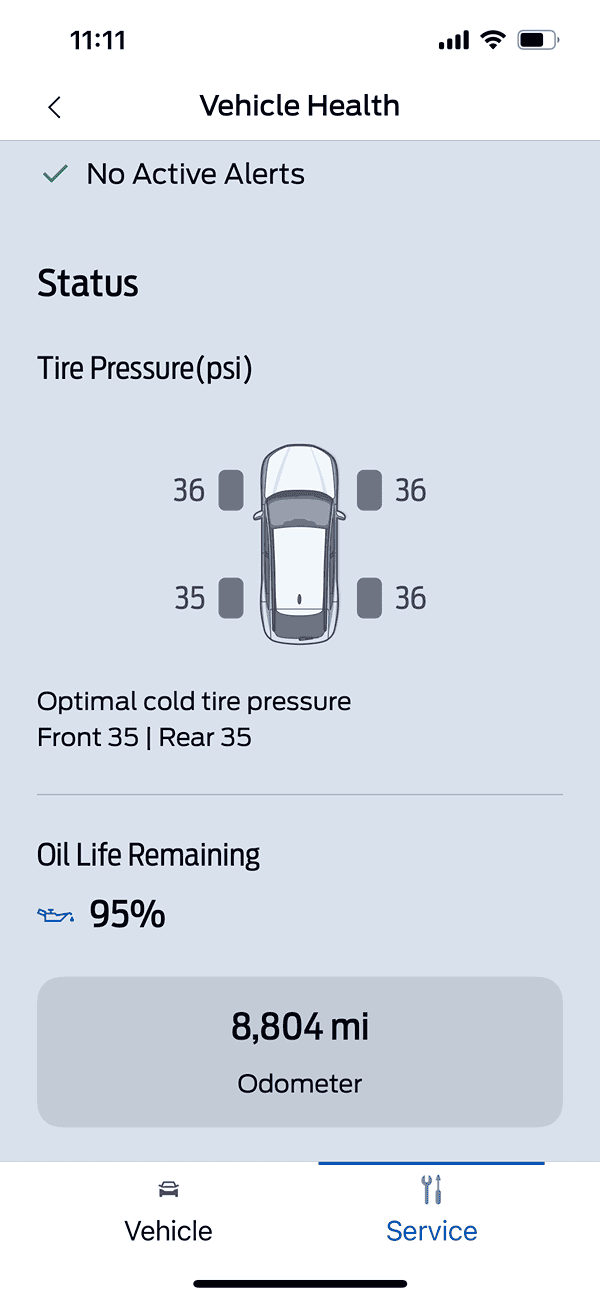
I've had the exact same issue here (Iphone 15, IOS18 public Beta). But yesterday I got a notice on my phone to update to IOS18 Beta 4, did so, and Viola! No more sliding screens on FordPass, they all open and now I can see tire pressure, oil life etc.!
 

NedF

2.5L Hybrid
Well-known member
Joined
Apr 13, 2023
Threads
13
Messages
566
Reaction score
623
Location
BC Canada
Vehicle(s)
Was a '23 now a '24 Lariat Lux
Engine
2.5L Hybrid
I've had the exact same issue here (Iphone 15, IOS18 public Beta). But yesterday I got a notice on my phone to update to IOS18 Beta 4, did so, and Viola! No more sliding screens on FordPass, they all open and now I can see tire pressure, oil life etc.!
Yeah, I updated the beta yesterday as well and found the app was working again. I was going to update here but too much going on. Well when I say working again I mean showing me my truck is in deep sleep like usual. 😂
 
Sponsored

billbillw

2.0L EcoBoost
Well-known member
First Name
Bill
Joined
Sep 15, 2022
Threads
2
Messages
744
Reaction score
786
Location
Metro Atlanta
Vehicle(s)
'23 Maverick Lariat FX4
Engine
2.0L EcoBoost
My Android updated the app and it now shows % of tank remaining. Overall, I prefer the app from several months ago, back when you could see mileage and other information like tire pressure on the main screen (or no more than 1-click). Now you have to click through a few to see mileage and tire pressure. They also eliminated the ability to upload service receipts in the app. You now have to upload through the website.

For the most part, I enjoy the auto-updating app feature, but this is an exception.
 

HeyBales

2.5L Hybrid
Well-known member
First Name
Mike
Joined
May 3, 2024
Threads
4
Messages
4,836
Reaction score
4,392
Location
KC Metro area
Vehicle(s)
2005 Toyota RAV4, 2024 XLT Hybrid
Engine
2.5L Hybrid
I also used to be able to manual enter DIY service records and would also show oil life. Doesn't seem to be available any more
Not yet if ever.
Have to do it logging into web account - then you can enter that info for manual service.
(thanks for reminder on that, forgot to)
 

MakinDoForNow

2.5L Hybrid
Well-known member
First Name
James
Joined
Sep 24, 2021
Threads
2
Messages
8,435
Reaction score
6,002
Location
Texas
Vehicle(s)
2022 Maverick
Engine
2.5L Hybrid
Thanks for the detailed information. I don't have stand alone WiFi operational on the Maverick, so I would guess the vehicle relies on cellular for any updates. My AT&T signal is minimal at my house, however, I do have access to a strong WiFi signal in my driveway.
I assume truck is like my cell phone. When in range of an approved Wi-Fi connection that's what it uses when out of range it uses cellular and searches for an approved WiFi connection. At home my 5g cell signal strength is weaker than my 4g Lte wifi router signal so .my phone switches to wifi! If I turned wifi on in truck my phone would revert to truck cellular wifi if it's got a weaker 5g or 4g LTE than my cell phone. Right now my phone is connected to 5g Ulta capacity so if I activate phone wifi and shared to truck it would have super duper wifi connection.

Edit to add: according to manual go to settings and turn on wifi then search for network select and enter password. Then truck will use wifi when in range. My Wi-Fi router is not in range of garage or drive. I do have unlimited data on cell phone but only 20 gig guaranteed high speed so if I use phone to connect to streaming server then all that data doesn't use any of data after logging on. Last year when I checked I found a streaming server for $20 or $25 per month. Have to download their app and searches and everything is put into streaming packets and they don't use data plan count.
 
Last edited:
  • Like
Reactions: Dad

HeyBales

2.5L Hybrid
Well-known member
First Name
Mike
Joined
May 3, 2024
Threads
4
Messages
4,836
Reaction score
4,392
Location
KC Metro area
Vehicle(s)
2005 Toyota RAV4, 2024 XLT Hybrid
Engine
2.5L Hybrid
I assume truck is like my cell phone. When in range of an approved Wi-Fi connection that's what it uses when out of range it uses cellular and searches for an approved WiFi connection. At home my 5g cell signal strength is weaker than my 4g Lte wifi router signal so .my phone switches to wifi! If I turned wifi on in truck my phone would revert to truck cellular wifi if it's got a weaker 5g or 4g LTE than my cell phone. Right now my phone is connected to 5g Ulta capacity so if I activate phone wifi and shared to truck it would have super duper wifi connection.
I tested WiFi staying connected from truck.

It doesn't.
I didn't watch all night if it woke up and checked for radio updates, but it dropped off the WiFi AP's list pretty quick after locking the truck. Meaning it turned it's wifi off.
If it's off the list there is no remotely reaching it from the WiFi system.

I believe for security they set it up like other services are setup with cell carriers - Ford has a secure connection from only the ATT network to their network and the system dealing with telematics and access from FordPass app for remote check and starting.

Just like cell carriers have to setup a system for your phone's voice calls to come in from the internet if you have that option enabled (via your home internet provider and wifi the phone connected to), Ford would need to do the same if they wanted the option of Truck to connect via WiFi to the same system - betting they aren't spending the money.
The app already has a secure connect to that system, via several levels of security I'm hoping.
Sponsored


Top