- Thread starter
- #1
Is there a way to turn off the Location option on the 2024 Maverick
Sponsored

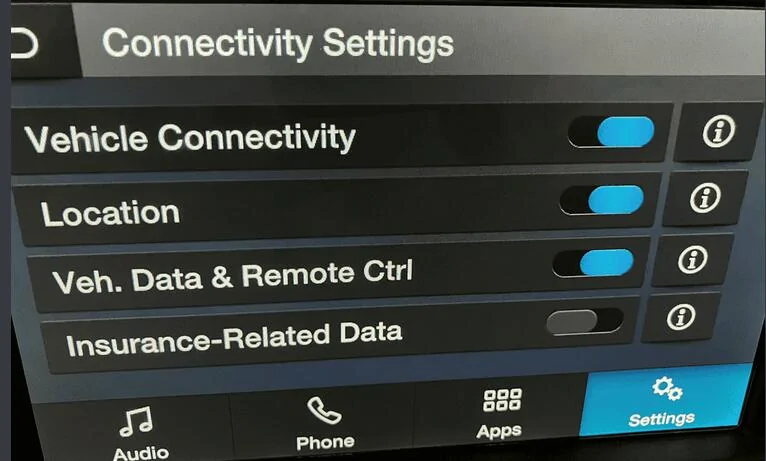
Indeed you can. It depends on your trim level. Either way, it's in your manual.As far as turning off location in the infotainment screen, could I get more detailed directions?
Owners manual seems to gloss over that.As far as turning off location in the infotainment screen, could I get more detailed directions?

For some reason the 1 at the end of the link failed to be included.https://www.mavericktruckclub.com/forum/threads/vehicle-data-collection-notice-how-to-dismiss.22050/page-1
To turn off the location tracking feature in your 2024 Ford Maverick, you can disable the "Share Vehicle Data" setting within the vehicle's infotainment screen,
I would normally show you but I've already pulled fuse number 11/12.

|
Mine doesn't show the 4th one. I wonder if that means they're sending it anyway ?Owners manual seems to gloss over that.
Easier to hunt thru the infotainment screen menus.
I think it's like: Settings>FordPass Connect>Connectivity Settings
You should at least once enable and get the wifi connected, then check for updates and get the one that probably is around.Mine doesn't show the 4th one. I wonder if that means they're sending it anyway ?
You should at least once enable and get the wifi connected, then check for updates and get the one that probably is around.
The rear view camera recall probably has it too.

I somewhat understand why some might want to disable the tracking but you’ll be tracked if you also have a phone, a GPS a iPad a smart watch, etc - it’s difficult to get completely off the grid if you use any technology