
- Thread starter
- #1
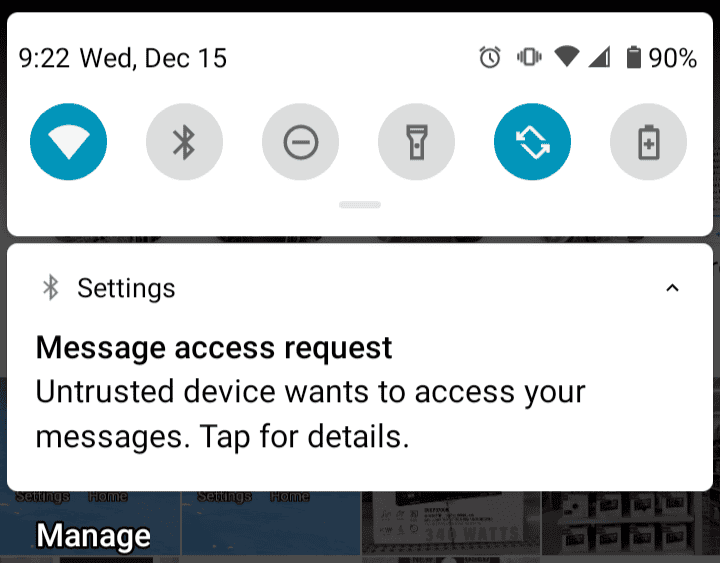
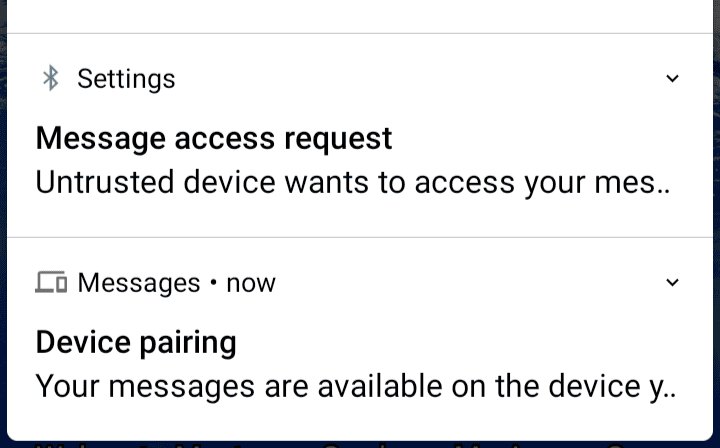
Radio Problem Figured Out... Maybe. Any time you sync your phone with the Ford Connected Touch radio (XL and XLT models), either by Bluetooth or USB, the manual controls are overridden by whatever app you're using on the display. Unplugging your phone or turning off BT doesn't automatically make it go back to manual mode. It's still searching for your phone. You can see this in the notification area on an Android phone, that a device wants access. See screenshots below. It seems like this is resolved when your phone notifies you that the radio is requesting access, to decline that request.
Some people claim they have not had the radio issue. Since it's designed to run Android Auto, I'm wondering if it's more of an issue for Android phones than iPhone. Or possibly these people have not synced their phone at all, so never interrupted the manual radio tuner controls.
Other people claim they fixed it by running the software updater or resetting to factory. So far there are no updates. I've run the update several times and the software version is the same as the day my truck was delivered. If this or factory reset works it's only because the radio finally quits trying to connect to your phone. The next time you sync your phone then disconnect, the problem is back.
There must be or should be some command or button on the radio to forget your phone and revert to manual controls. Otherwise it would be nice if the manual controls would never lose focus, or allow them to override software settings.
One other thing I figured out, if your radio works occasionally, during one of those brief periods, go ahead and select all the stations you want in your presets. There are ten of them; those display buttons always work. So if your tuner and the arrow buttons freeze, you can still navigate to your favorite stations.
https://www.google.com/amp/s/fordau...k-debuts-connected-touch-radio-exclusive/amp/
Some people claim they have not had the radio issue. Since it's designed to run Android Auto, I'm wondering if it's more of an issue for Android phones than iPhone. Or possibly these people have not synced their phone at all, so never interrupted the manual radio tuner controls.
Other people claim they fixed it by running the software updater or resetting to factory. So far there are no updates. I've run the update several times and the software version is the same as the day my truck was delivered. If this or factory reset works it's only because the radio finally quits trying to connect to your phone. The next time you sync your phone then disconnect, the problem is back.
There must be or should be some command or button on the radio to forget your phone and revert to manual controls. Otherwise it would be nice if the manual controls would never lose focus, or allow them to override software settings.
One other thing I figured out, if your radio works occasionally, during one of those brief periods, go ahead and select all the stations you want in your presets. There are ten of them; those display buttons always work. So if your tuner and the arrow buttons freeze, you can still navigate to your favorite stations.
https://www.google.com/amp/s/fordau...k-debuts-connected-touch-radio-exclusive/amp/
Sponsored
Last edited: