
Sponsored

Radio Problem Figured Out...Maybe.

Kenny

2.0L EcoBoost
Well-known member
First Name
Kenny
Joined
Nov 5, 2021
Threads
11
Messages
188
Reaction score
163
Location
81501
Vehicle(s)
2022 Maverick XLT 2.0 Ecoboost with AWD, Tow Pkg
Engine
2.0L EcoBoost
Radio Problem Figured Out... Maybe. Any time you sync your phone with the Ford Connected Touch radio (XL and XLT models), either by Bluetooth or USB, the manual controls are overridden by whatever app you're using on the display. Unplugging your phone or turning off BT doesn't automatically make it go back to manual mode. It's still searching for your phone. You can see this in the notification area on an Android phone, that a device wants access. See screenshots below. It seems like this is resolved when your phone notifies you that the radio is requesting access, to decline that request.

Some people claim they have not had the radio issue. Since it's designed to run Android Auto, I'm wondering if it's more of an issue for Android phones than iPhone. Or possibly these people have not synced their phone at all, so never interrupted the manual radio tuner controls.

Other people claim they fixed it by running the software updater or resetting to factory. So far there are no updates. I've run the update several times and the software version is the same as the day my truck was delivered. If this or factory reset works it's only because the radio finally quits trying to connect to your phone. The next time you sync your phone then disconnect, the problem is back.

There must be or should be some command or button on the radio to forget your phone and revert to manual controls. Otherwise it would be nice if the manual controls would never lose focus, or allow them to override software settings.

One other thing I figured out, if your radio works occasionally, during one of those brief periods, go ahead and select all the stations you want in your presets. There are ten of them; those display buttons always work. So if your tuner and the arrow buttons freeze, you can still navigate to your favorite stations.

https://www.google.com/amp/s/fordau...k-debuts-connected-touch-radio-exclusive/amp/
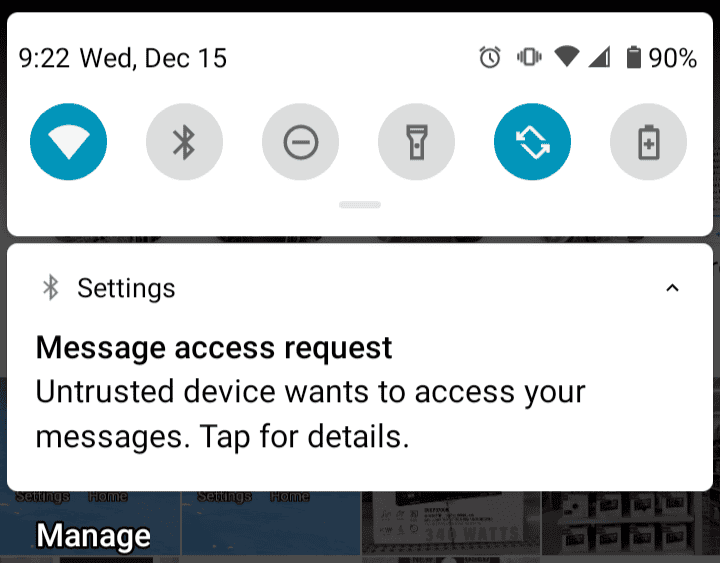
Ford Maverick Radio Problem Figured Out...Maybe. Screenshot_20211215-092315-628


Ford Maverick Radio Problem Figured Out...Maybe. Screenshot_20211215-084040-551
Sponsored

 
Last edited:

22Mav

Well-known member
Banned
First Name
Jared
Joined
Aug 7, 2021
Threads
5
Messages
344
Reaction score
745
Location
MO
Vehicle(s)
Ford Maverick XLT/Lariat.. Undecided still :O
The dealer model I was able to sit in, I noticed right away the radio was super delayed and just completely unresponsive at times. It had me a little concerned but I definitely appreciate you finding a potential solution. It'll be months before mine's delivered to test this out but maybe Ford can issue an official update by then. Hopefully this helps others in the meantime.
 

JoeyCarr

Member
First Name
Jose
Joined
Nov 29, 2021
Threads
1
Messages
10
Reaction score
16
Location
USA
Vehicle(s)
Maverick
Yes. The delay is annoying. I usally exist and hit the presets. I hope they will fix this issue.
 
OP
OP
Kenny

Kenny

2.0L EcoBoost
Well-known member
First Name
Kenny
Joined
Nov 5, 2021
Threads
11
Messages
188
Reaction score
163
Location
81501
Vehicle(s)
2022 Maverick XLT 2.0 Ecoboost with AWD, Tow Pkg
Engine
2.0L EcoBoost
maybe Ford can issue an official update by then.
Someone posted on here what looks like an official bulletin stating that Ford will be rolling out a fix some time this month or January. Most likely that will be in the form of a software update, which you can easily do in the display settings on your dash. Your truck needs to be connected to WiFi, which you can do by making your phone a hotspot.
 

STARCOMMTREY1

2.5L Hybrid
Well-known member
First Name
Trey
Joined
Aug 6, 2021
Threads
81
Messages
2,499
Reaction score
6,673
Location
Boligee, AL
Vehicle(s)
F350, Ultra Classic, Versa Note and soon to be Mav
Engine
2.5L Hybrid
Someone posted on here what looks like an official bulletin stating that Ford will be rolling out a fix some time this month or January. Most likely that will be in the form of a software update, which you can easily do in the display settings on your dash. Your truck needs to be connected to WiFi, which you can do by making your phone a hotspot.
Wonder if it will do it off its own 4g modem?
 

Sponsored

OP
OP
Kenny

Kenny

2.0L EcoBoost
Well-known member
First Name
Kenny
Joined
Nov 5, 2021
Threads
11
Messages
188
Reaction score
163
Location
81501
Vehicle(s)
2022 Maverick XLT 2.0 Ecoboost with AWD, Tow Pkg
Engine
2.0L EcoBoost
Wonder if it will do it off its own 4g modem?
That is an extra paid service. I doubt very many people are going to pay a monthly fee for something they can do with their own phone.
 
OP
OP
Kenny

Kenny

2.0L EcoBoost
Well-known member
First Name
Kenny
Joined
Nov 5, 2021
Threads
11
Messages
188
Reaction score
163
Location
81501
Vehicle(s)
2022 Maverick XLT 2.0 Ecoboost with AWD, Tow Pkg
Engine
2.0L EcoBoost
Follow up: Ford finally issued a software update that fixes this issue. Mine now works great with no glitches. Run the software update. The new version is G1.8.0.1_RC15_R21461a. It didn't seem like it worked the first time I tried. But the next time I started my truck, the display said it was still installing the update. When it was finished, I checked the version and it was the one mentioned above. Over a month late, but better late than never.
 

Kaneda

Member
First Name
Kevin
Joined
Dec 3, 2021
Threads
1
Messages
14
Reaction score
19
Location
Philadelphia
Vehicle(s)
2006 Scion Xb
Radio Problem Figured Out... Maybe. Any time you sync your phone with the Ford Connected Touch radio (XL and XLT models), either by Bluetooth or USB, the manual controls are overridden by whatever app you're using on the display. Unplugging your phone or turning off BT doesn't automatically make it go back to manual mode. It's still searching for your phone. You can see this in the notification area on an Android phone, that a device wants access. See screenshots below. It seems like this is resolved when your phone notifies you that the radio is requesting access, to decline that request.

Some people claim they have not had the radio issue. Since it's designed to run Android Auto, I'm wondering if it's more of an issue for Android phones than iPhone. Or possibly these people have not synced their phone at all, so never interrupted the manual radio tuner controls.

Other people claim they fixed it by running the software updater or resetting to factory. So far there are no updates. I've run the update several times and the software version is the same as the day my truck was delivered. If this or factory reset works it's only because the radio finally quits trying to connect to your phone. The next time you sync your phone then disconnect, the problem is back.

There must be or should be some command or button on the radio to forget your phone and revert to manual controls. Otherwise it would be nice if the manual controls would never lose focus, or allow them to override software settings.

One other thing I figured out, if your radio works occasionally, during one of those brief periods, go ahead and select all the stations you want in your presets. There are ten of them; those display buttons always work. So if your tuner and the arrow buttons freeze, you can still navigate to your favorite stations.

https://www.google.com/amp/s/fordau...k-debuts-connected-touch-radio-exclusive/amp/
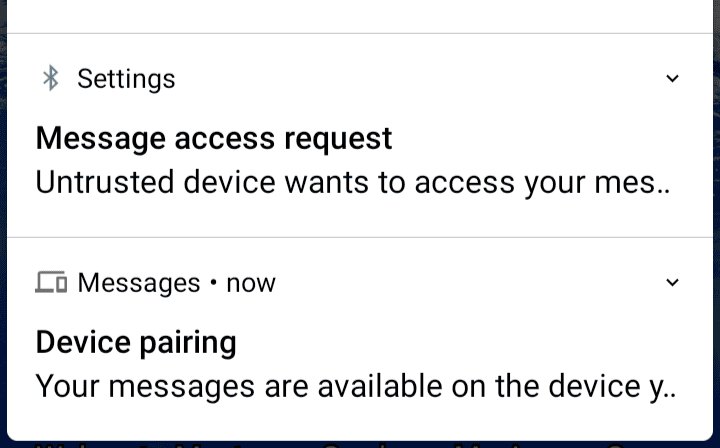
You should be able to drop the phone from the car's memory both via the Android auto settings and the Bluetooth settings. I've done this once before after I found the head unit got into a funny state.

One thing I've realized is that Android updates can cause the car to get really confused. Your best course of action is actually on the phone side of things, go into the Apps > Android Auto and clear out the cache for the app and drop the truck from your known vehicles.


Top