Sponsored

How To: Sync 3/4 swap for non Sync 3 XL/XLT

zackmd1

2.0L EcoBoost
Well-known member
First Name
Zack
Joined
Jun 12, 2021
Threads
4
Messages
216
Reaction score
501
Location
Maryland
Vehicle(s)
1970 Mustang 429BB / 2019 Tesla Model 3
Engine
2.0L EcoBoost
This thread is meant to serve as the how to thread for Sync 4 swaps into XL and XLT Mavericks. I will list the parts required and custom wiring required in order to have a functioning system. Main parts required are going to be the ACM (radio) and APIM (sync module). Keep in mind that this swap will require the construction of a custom harness for the APIM as XL and XLT models do not have the APIM connector present. The harness ties into the main ACM connector for all signal wires required for the APIM and has an additional grey ACM connector for APIM to ACM communication. This harness is by far the hardest part of the swap.

PARTS REQUIRED

1. ACM: M1PT-18K810-AB. These can be found on eBay for around $150 and will provide the ability to integrate Sirius XM if desired. This ACM comes from a Bronco Sport.

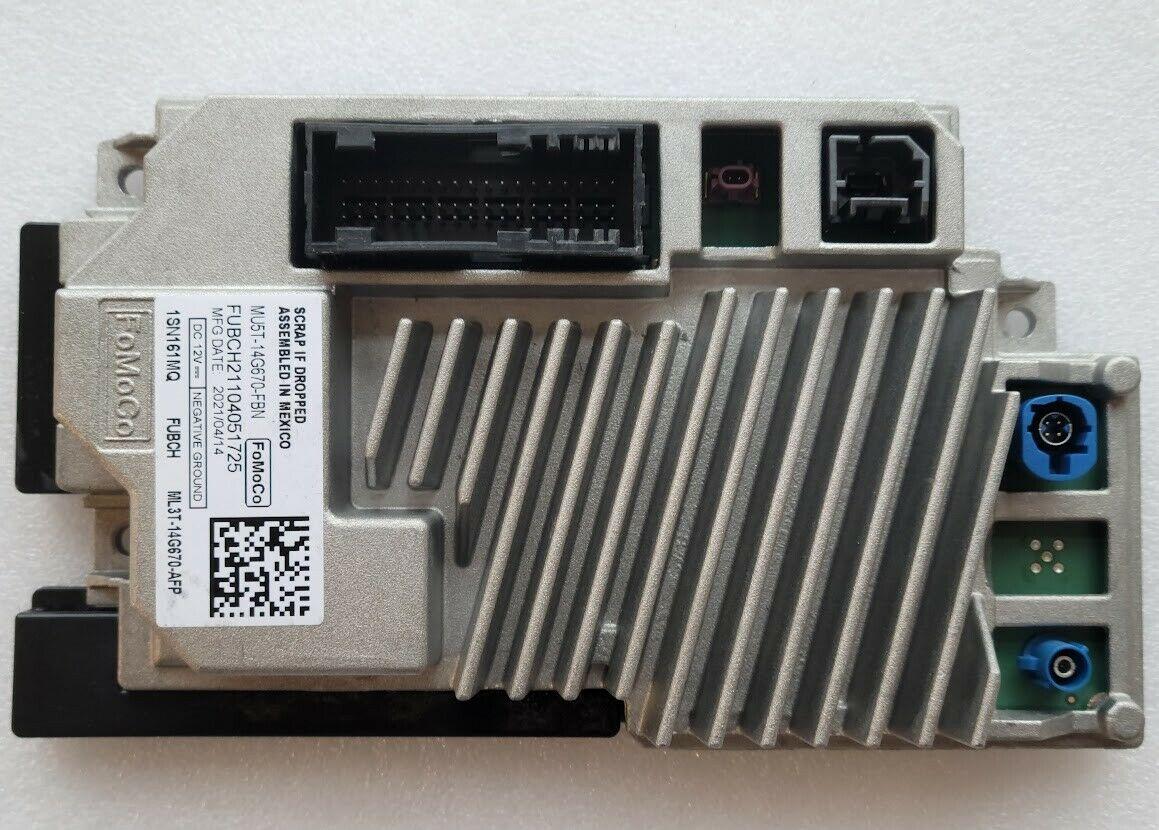
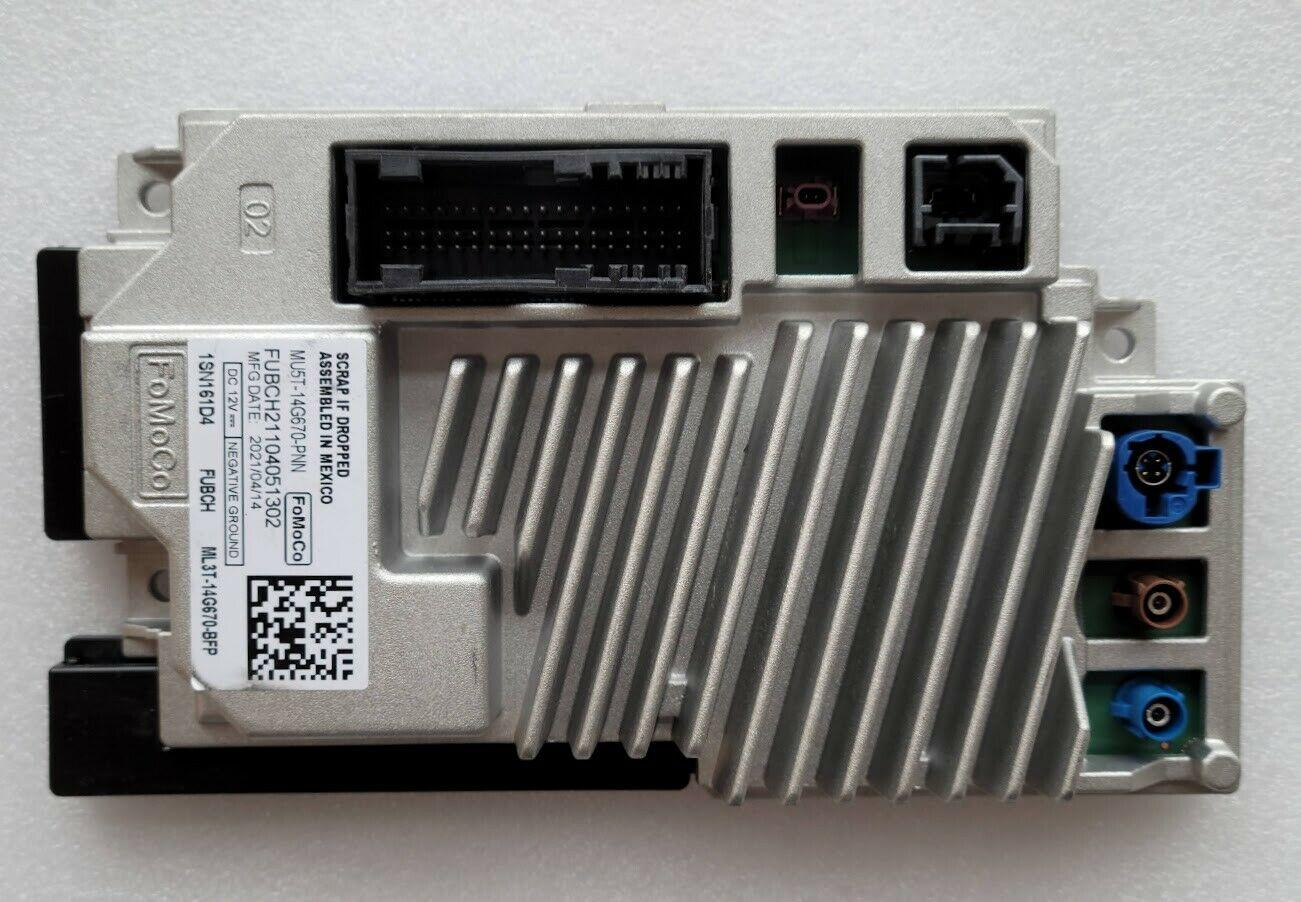
2. APIM Sync 4: For Sync 4 swaps you are looking for the below configuration. There are at least three hardware variants of the Sync 4 APIM, Non Nav 8" (one large blue connector), Nav 8" (one large and one small blue connector), and Nav 12"+ (one large and one small blue connector and one small brown connector). For this swap to function, you need a Nav 8" variant of the Sync 4 APIM. These again can be found on ebay for around $300.

Non Nav 8"
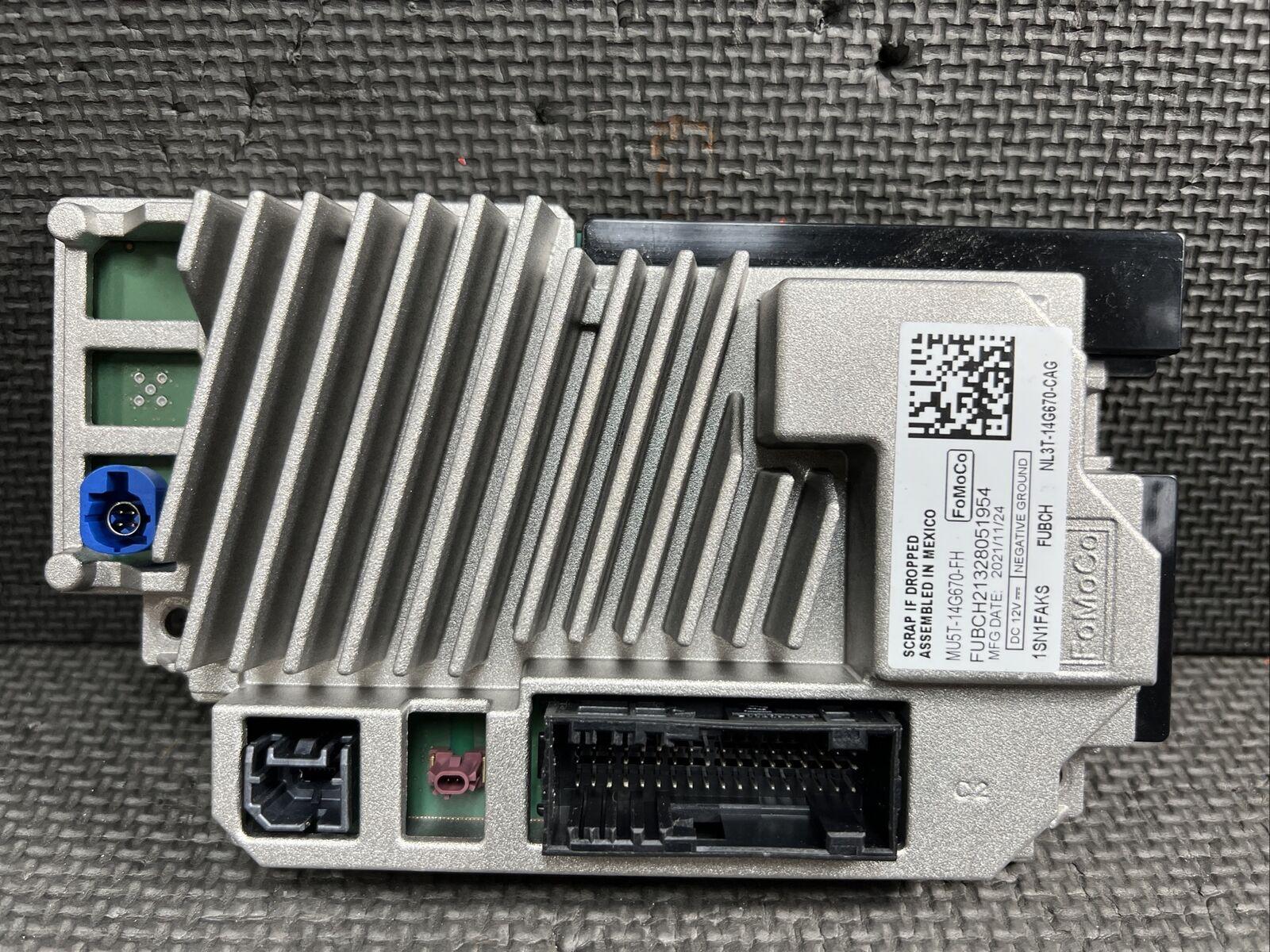
Ford Maverick How To: Sync 3/4 swap for non Sync 3 XL/XLT sync 4 non nav


Nav 8"

Ford Maverick How To: Sync 3/4 swap for non Sync 3 XL/XLT sync 4 nav


Nav 12"+

Ford Maverick How To: Sync 3/4 swap for non Sync 3 XL/XLT sync 4 nav 12


2. Sync 3 APIM: This swap can also be done with Sync 3. You will need to find a Sync 3 Gen 4 APIM (usually 2019 and up models). Sync 3 will not have wireless carplay/android functionality and will require additional wiring. It will however have the ability of OTA updates, something missing with Sync 4. These can be found on ebay for around $350.

3. APIM bracket: OEM installs use a bracket to secure the APIM in the dash behind the ACM. The part number for this bracket is LJ6Z-14A301-AA. Now I found that my XL dash did NOT have the required inserts to properly install this bracket and as such I made brackets of my own from 2" aluminum bar purchased from the local hardware store as seen below. It is IMPARATIVE that you install the APIM as close to OEM orientation as possible or else GPS Nav/Carplay will not function properly.
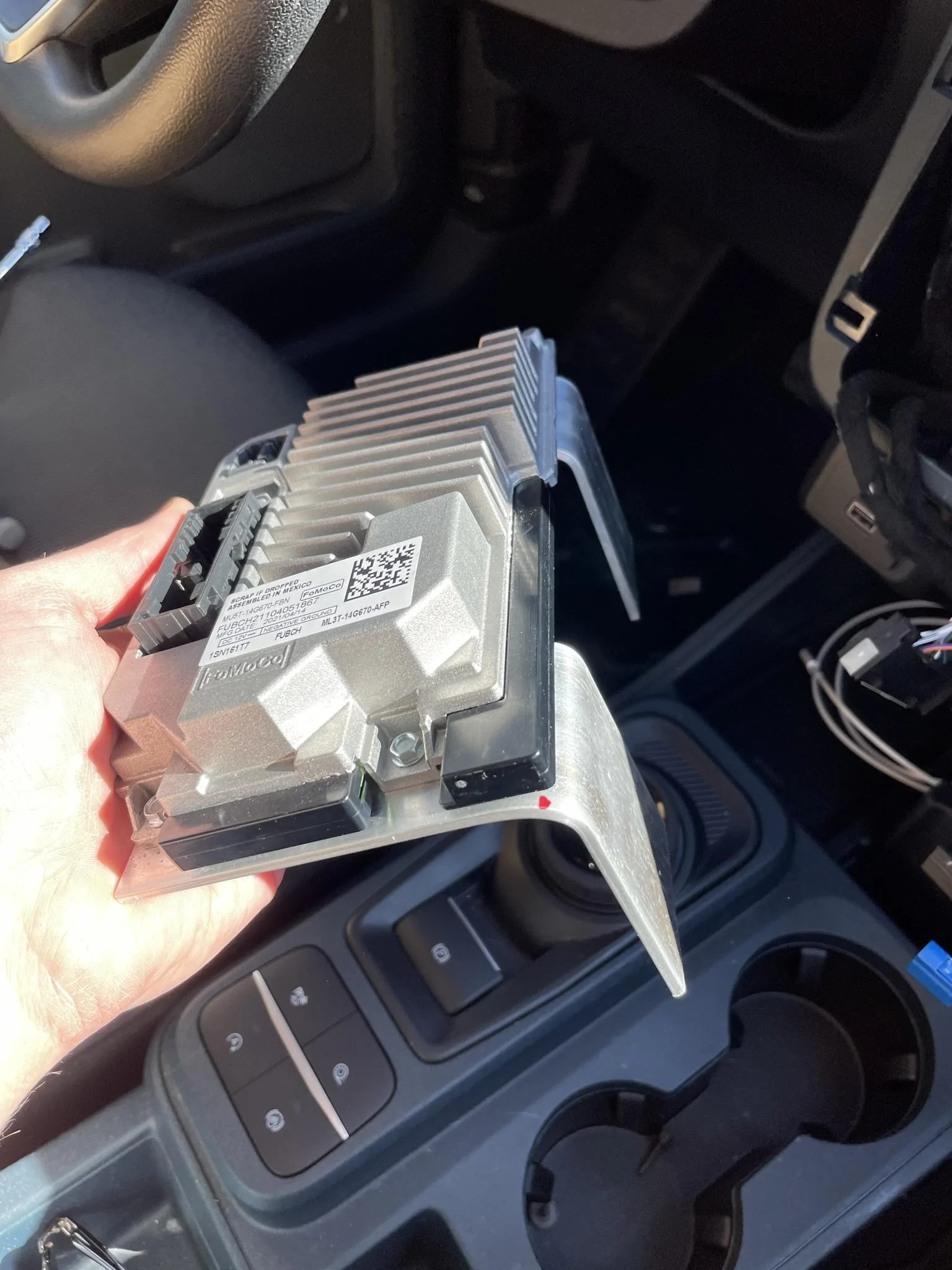
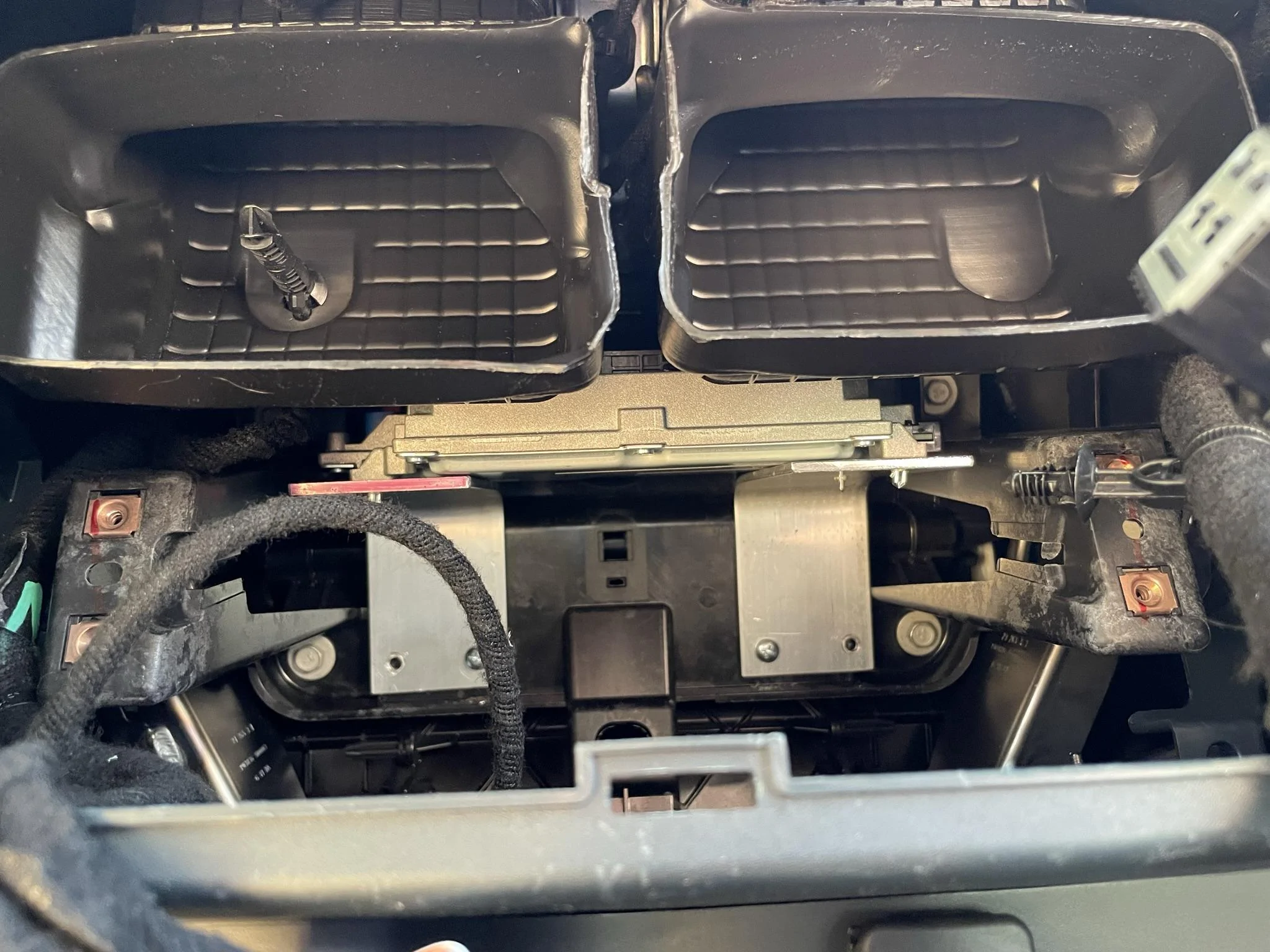
Ford Maverick How To: Sync 3/4 swap for non Sync 3 XL/XLT IMG_1420

Ford Maverick How To: Sync 3/4 swap for non Sync 3 XL/XLT IMG_1422


4. APIM 54 pin connector: Can be easily found on ebay by searching "Ford Sync APIM connector". Usually run around $20.

Ford Maverick How To: Sync 3/4 swap for non Sync 3 XL/XLT apim connector


5. ACM passthrough Harness: This is a passthrough harness designed for AMP installs but can also be used for the custom wiring of this swap without the need to modify the OEM harness installed in the vehicle. I would suggest selecting the DIY option at $40 as there will be some extensive modification to this harness. 2018-2023 Select Ford Elite Harness (lljcustoms.com)

6. ACM ANC delete harness: Required for the Grey ACM connector only. You will be populating this connector with 8 wires from the APIM for communication between the APIM and ACM. $15 Select Ford | Lincoln 2020-Up ANC Bypass (lljcustoms.com)

7. Satellite Antenna (optional): Required for Sirius XM. $16 Amazon.com: Eightwood Mini Satellite Radio Antenna Fakra K Curry Female Connector Compatible with Sirius XM Car Vehicle Trucks RV HD Hi-Fi Radio Stereo Receiver Tuner 2320-2345MHz : Electronics

8. GPS Antenna extension: Required to extend the OEM antenna wiring to new APIM location. $6 Amazon.com: Tecreddy Fakra Z Male to Female Car FM Adapter Cable 1ft for Volkswagen/Audi Car GPS Navigation FM AM Radio TEL Telematics Bluetooth Module XM Satellite Radio, 30cm : Electronics

All together this should cost under $600 to compete.
Sponsored
 
OP
OP

zackmd1

2.0L EcoBoost
Well-known member
First Name
Zack
Joined
Jun 12, 2021
Threads
4
Messages
216
Reaction score
501
Location
Maryland
Vehicle(s)
1970 Mustang 429BB / 2019 Tesla Model 3
Engine
2.0L EcoBoost
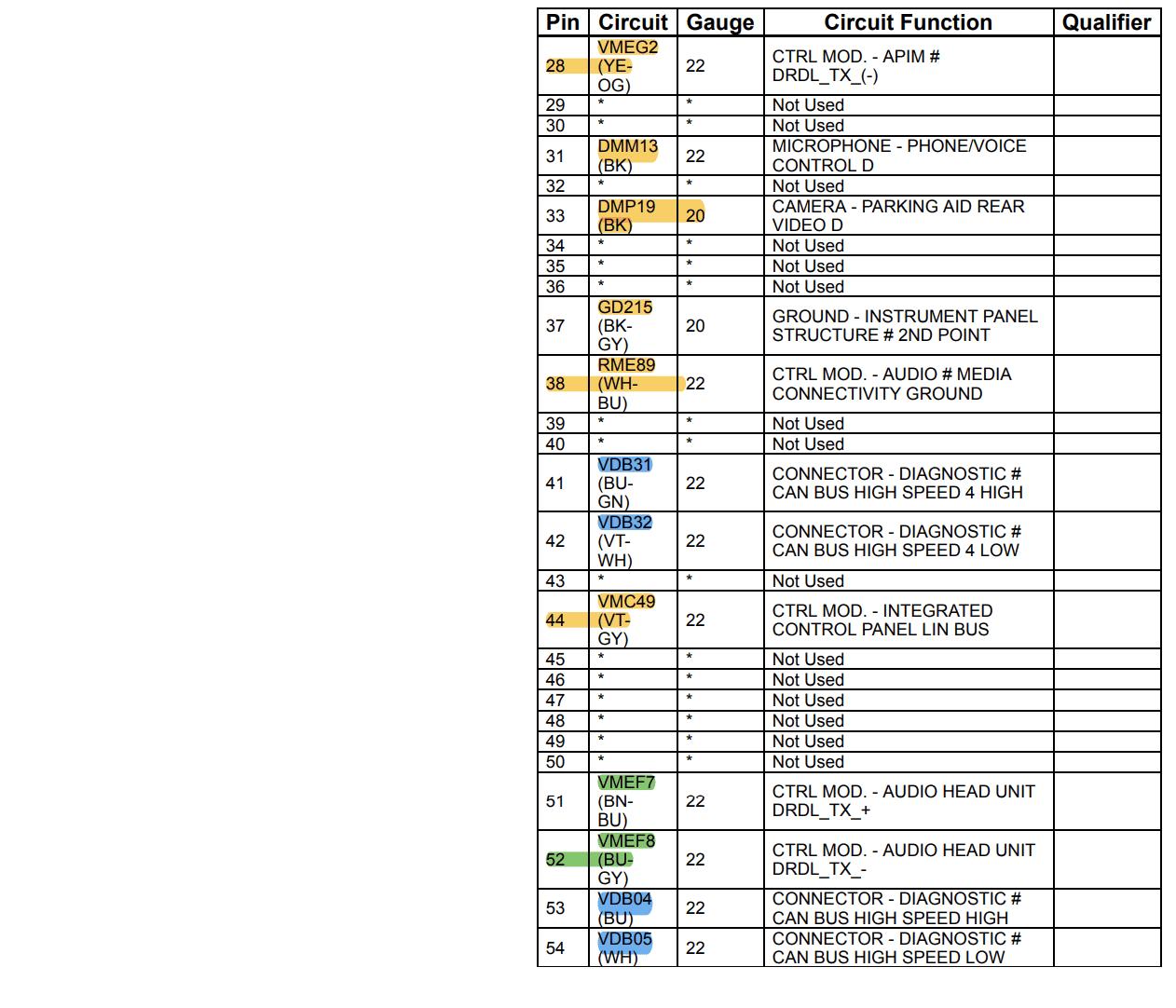
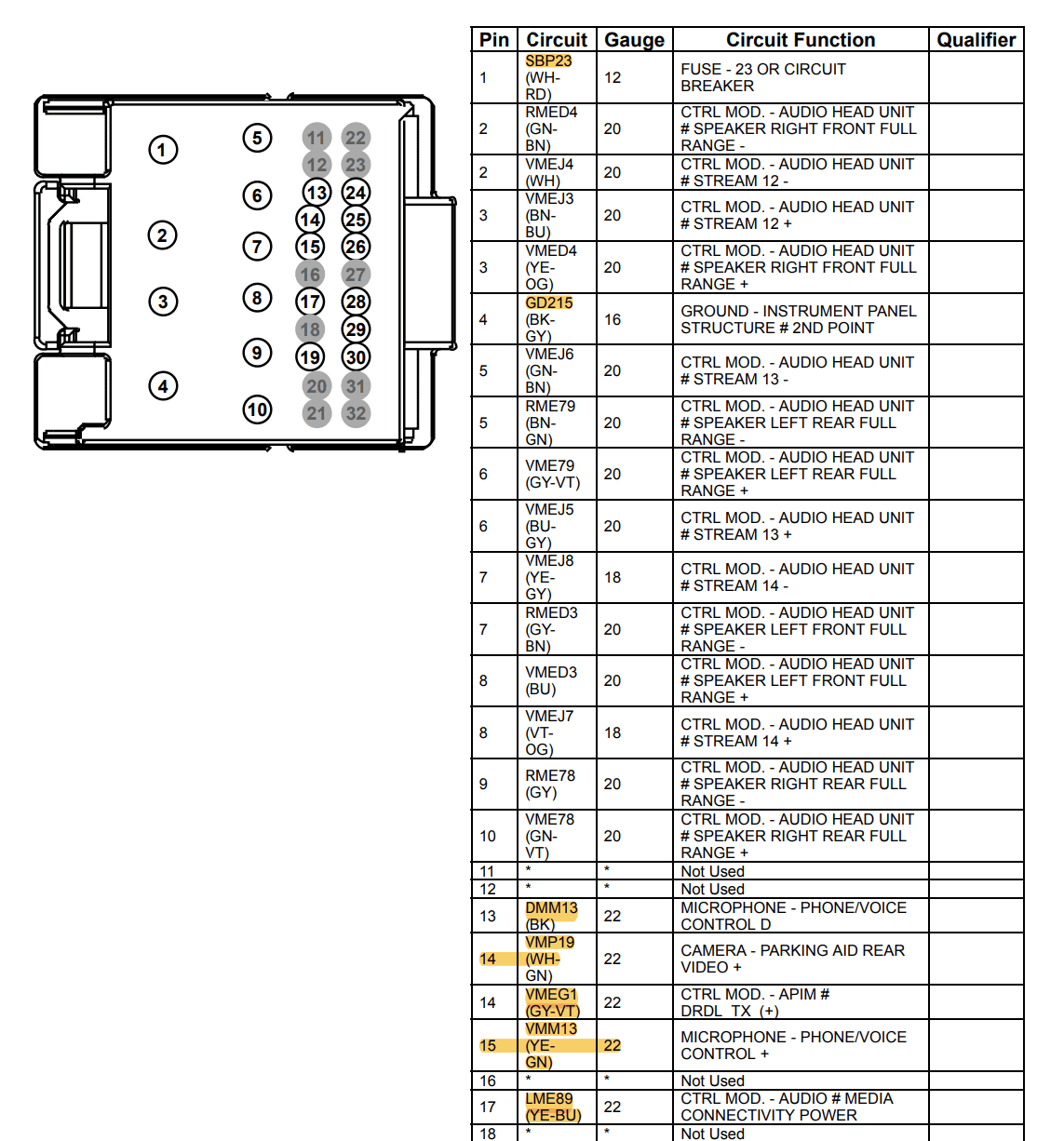
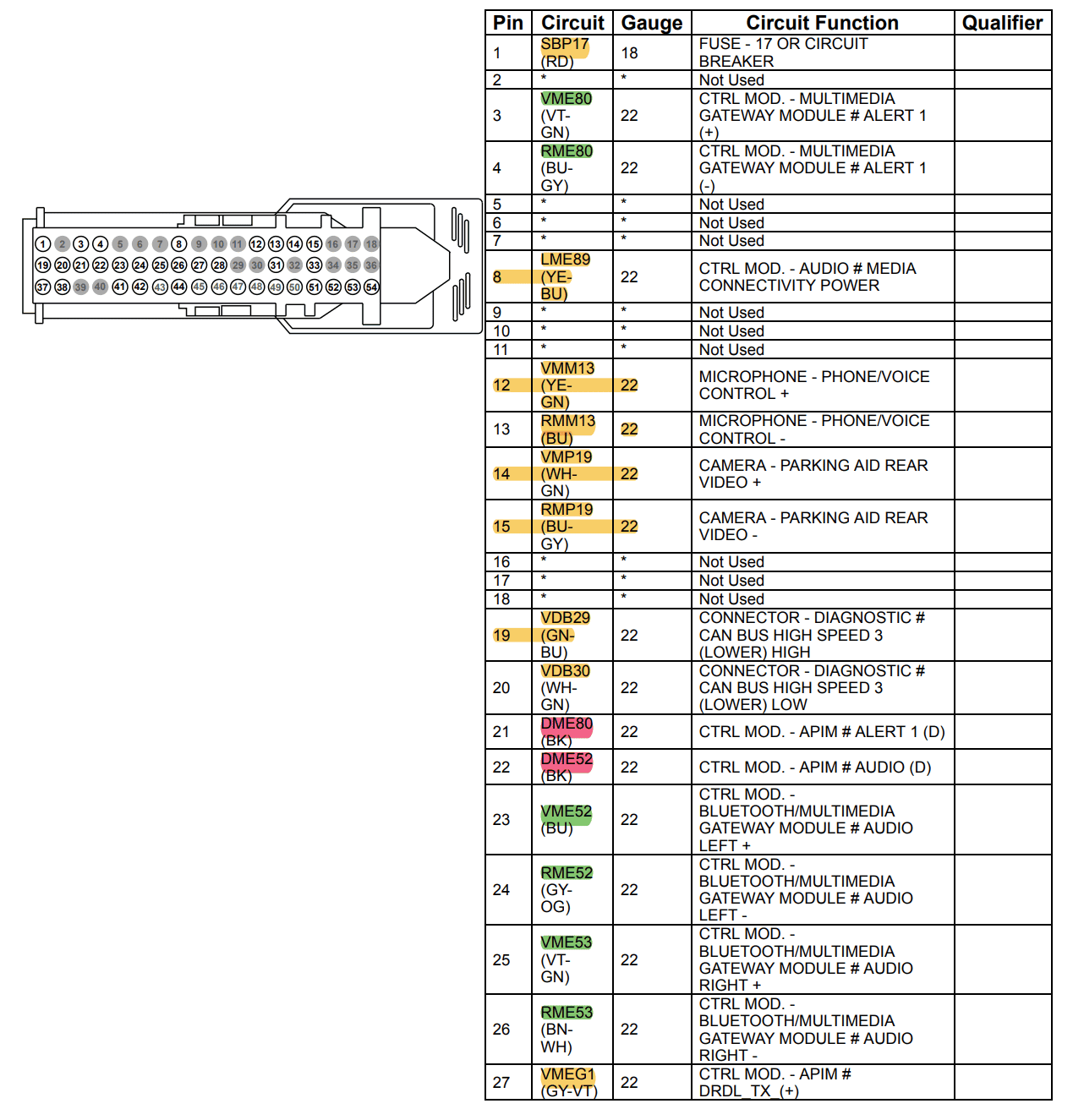
Attached are the wiring diagrams required to create the adapter harness...

APIM Connector

Ford Maverick How To: Sync 3/4 swap for non Sync 3 XL/XLT APIM 1

Ford Maverick How To: Sync 3/4 swap for non Sync 3 XL/XLT APIM 2


ACM Connector 1 (Existing ACM connector, Black)

Ford Maverick How To: Sync 3/4 swap for non Sync 3 XL/XLT ACM 1

Ford Maverick How To: Sync 3/4 swap for non Sync 3 XL/XLT ACM 2


ACM Connector 2 (Additional ACM connector for APIM to ACM communication, Grey)

Ford Maverick How To: Sync 3/4 swap for non Sync 3 XL/XLT Grey ACM


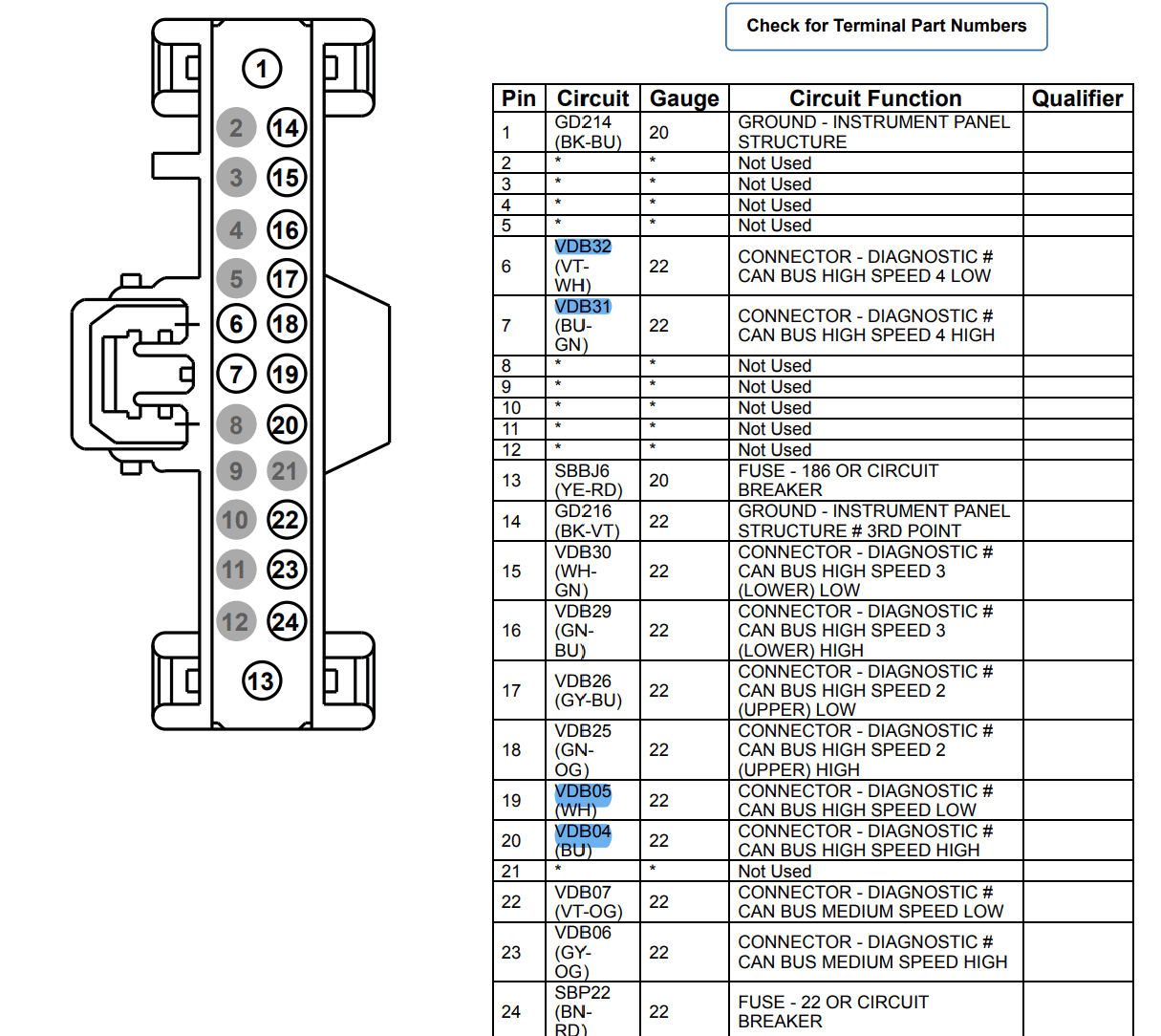
The color coded highlights depict where each circuit can be found/is needed. Green highlights are between the APIM and ACM Connector 2 only. Yellow highlights are between ACM Connector 1 and the APIM. Blue highlights are only required for Sync 3 installs and need to be traced back and tied into the Gateway (OBD II) module. The OBD II module connector diagram is below.

OBD II Module Connector (Sync 3 only)

Ford Maverick How To: Sync 3/4 swap for non Sync 3 XL/XLT OBD


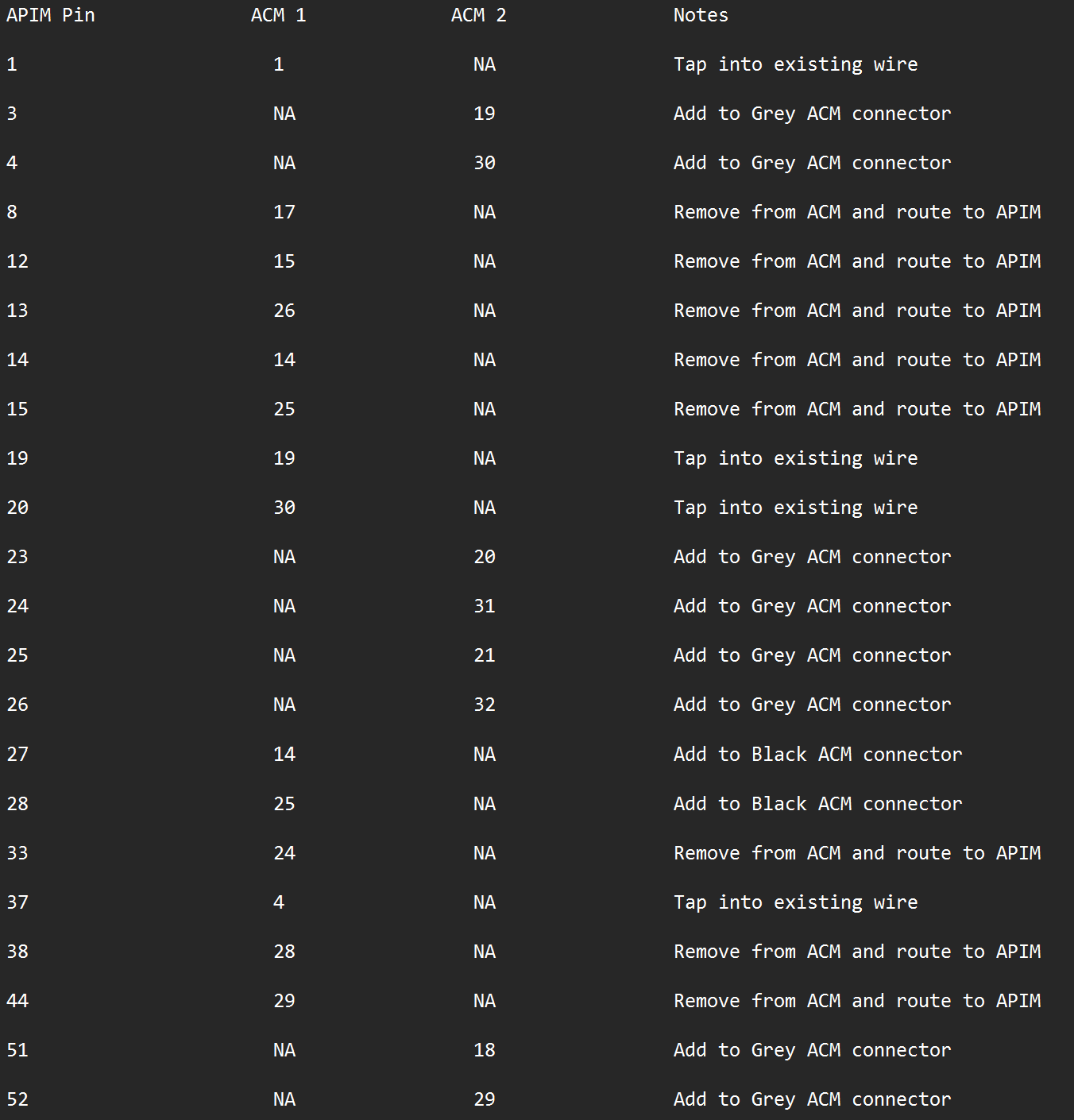
To more easily lay out the harness, below is a pin to pin trace from the APIM connector to ACM connectors 1 and 2 for a Sync 4 swap. Any pins I do not mention on the APIM side are not required for a functional system.

Ford Maverick How To: Sync 3/4 swap for non Sync 3 XL/XLT Pin connections


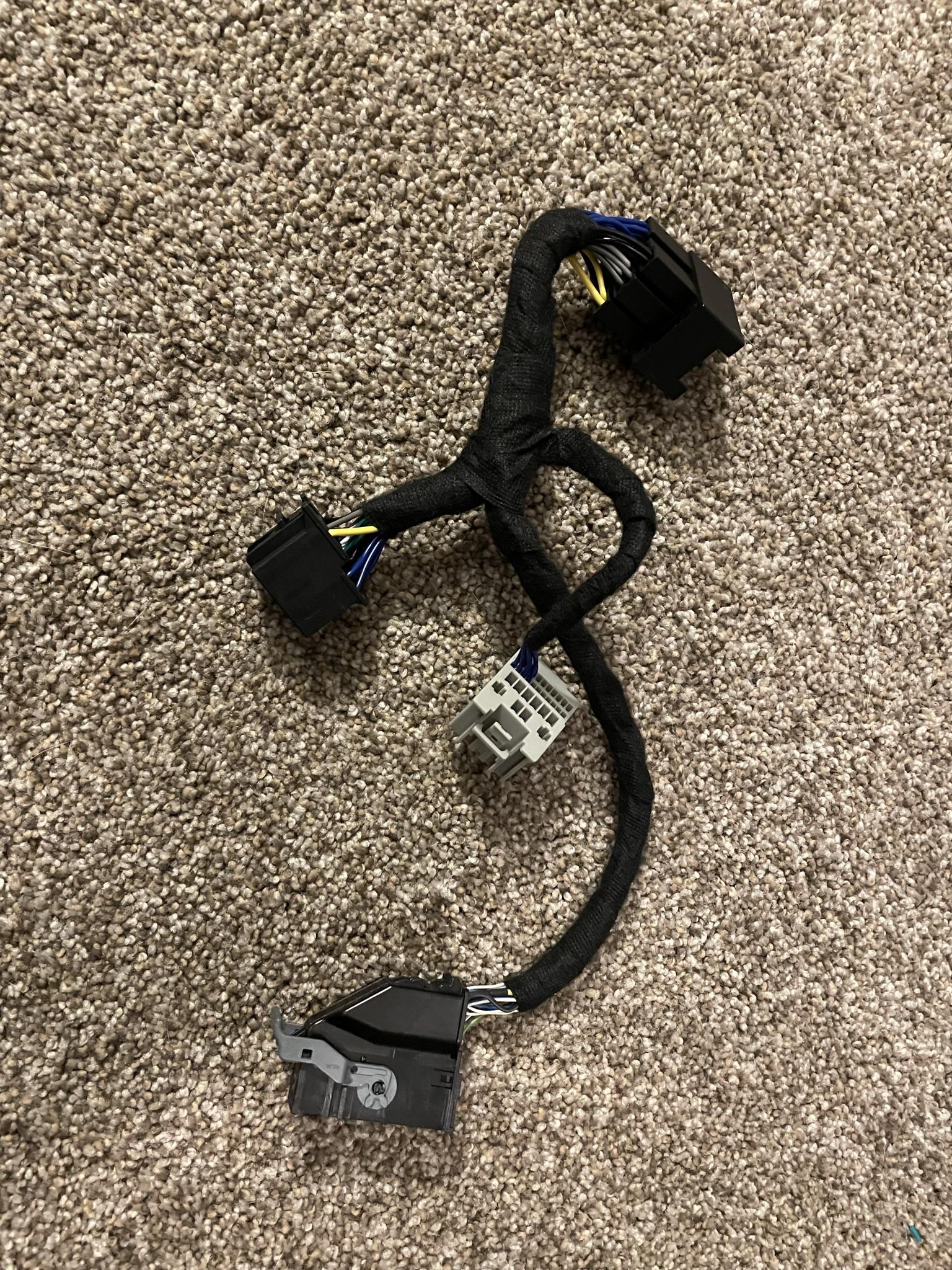
When complete you should have something similar to the below. You want at least 12" of wire length between the APIM connector and ACM connectors. The fabric tape use here is Tesa Tape and can be found on Amazon.

Amazon.com: Tesa Black Fuzzy Fleece Interior Wire Loom Harness Tape for VW, Audi, Mercedes, BMW 19 mm X 15 Meters (5 Rolls) : Automotive

Ford Maverick How To: Sync 3/4 swap for non Sync 3 XL/XLT IMG_1357


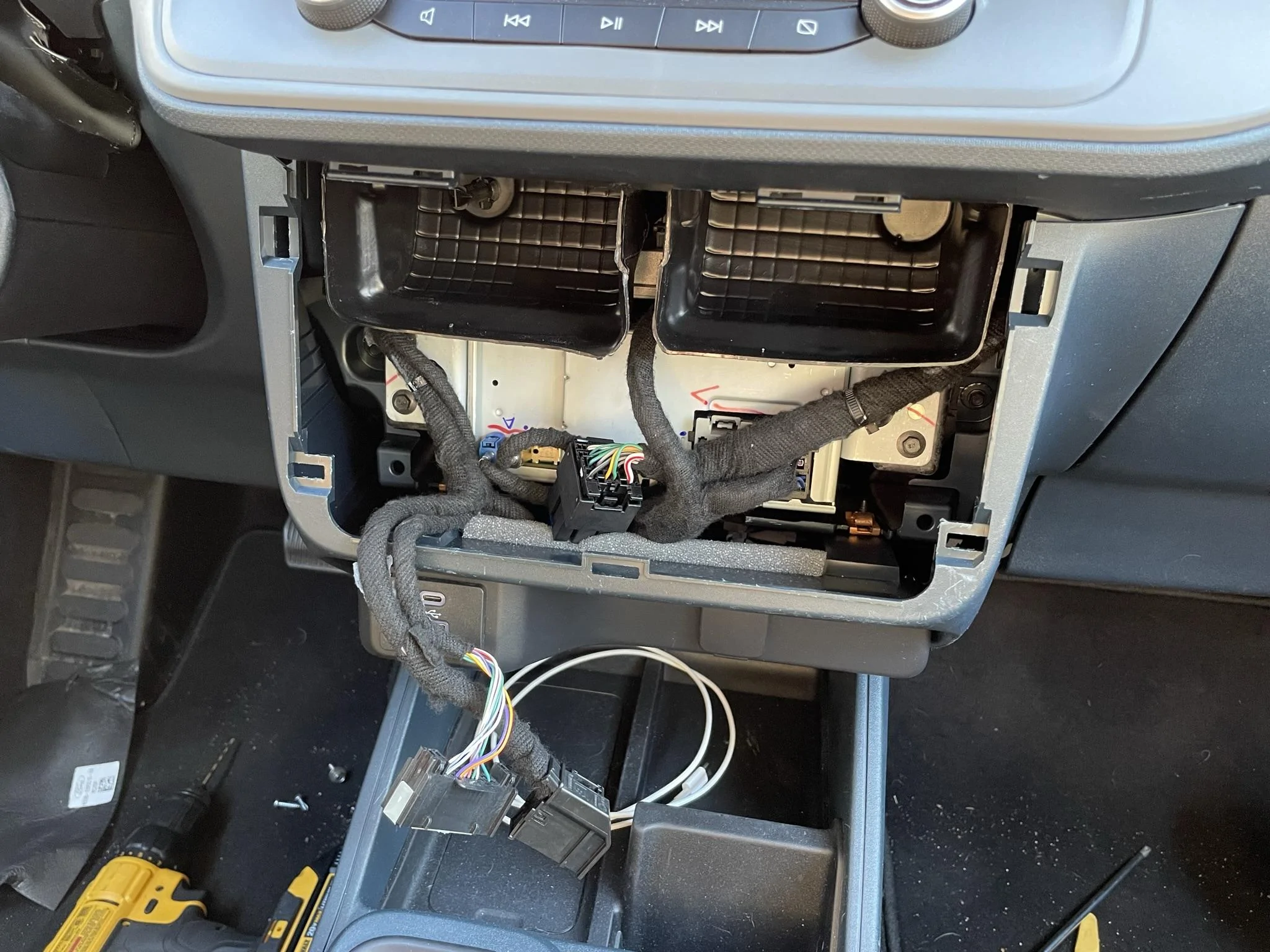
Once the harness is complete you can plug everything in like so.

Ford Maverick How To: Sync 3/4 swap for non Sync 3 XL/XLT IMG_1423


The antenna extension plugs into the existing small blue connector and is routed to the small blue connector on the APIM. The new Satellite antenna plugs into the yellow port on the ACM and the existing small black connector plugs into the black port on the ACM.
 
Last edited:
OP
OP

zackmd1

2.0L EcoBoost
Well-known member
First Name
Zack
Joined
Jun 12, 2021
Threads
4
Messages
216
Reaction score
501
Location
Maryland
Vehicle(s)
1970 Mustang 429BB / 2019 Tesla Model 3
Engine
2.0L EcoBoost
Programming....

In order to program Sync 4, a new version of Forscan is needed. Considering Forscan is Russian in origin, I would not expect any additional support or releases any time soon though. I still have access to the .exe of the test build that I was provided that is fully functional (for now) but more than likely we will need to find a new way to program our vehicles in the future. Ford UCDS is an alternative.

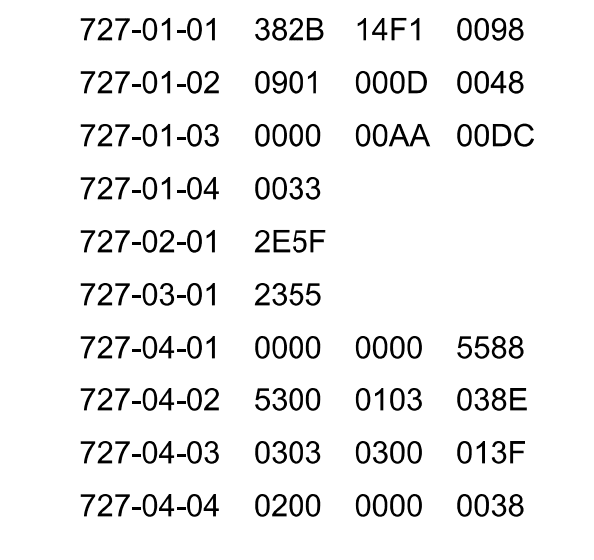
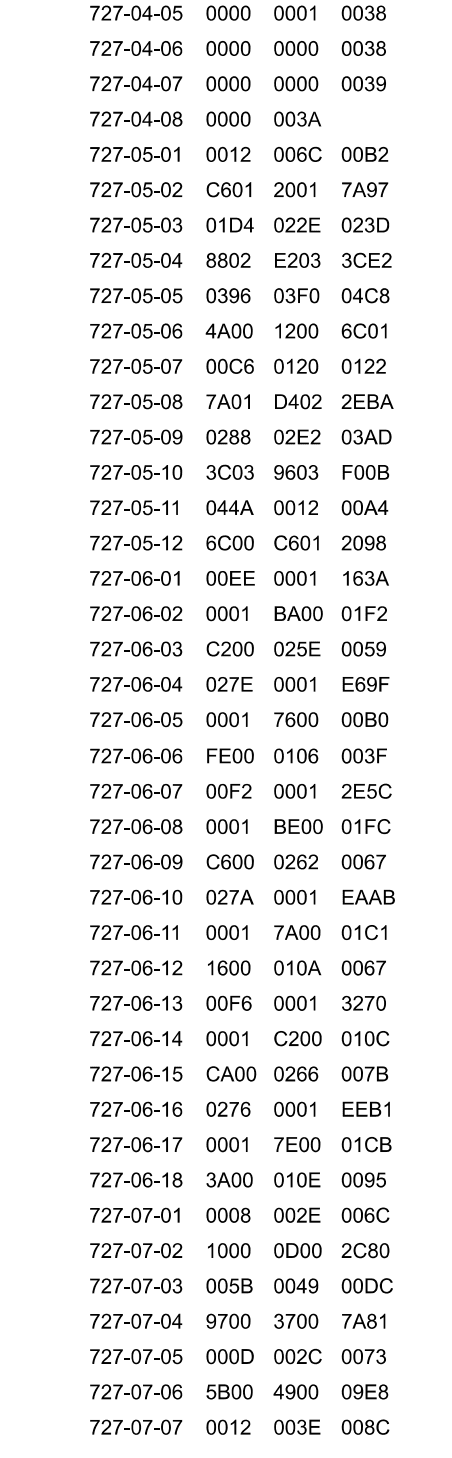
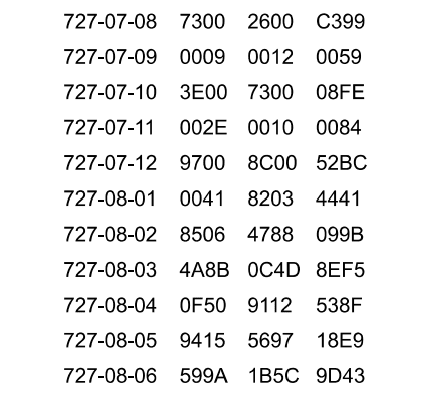
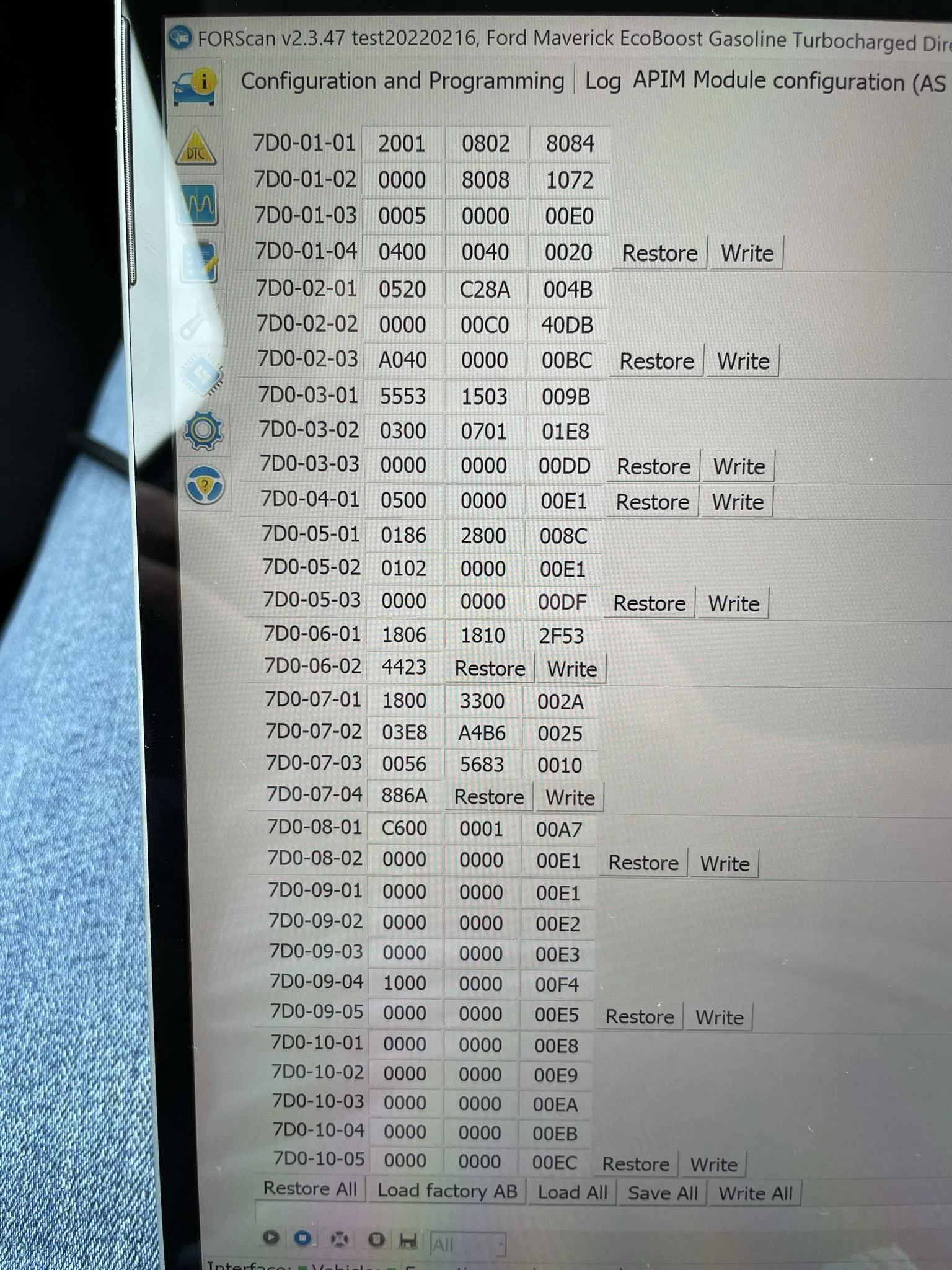
Also attached is my as built configuration for both the APIM and ACM. This is perfectly functional in my vehicle but may require edits for different options and features that exist in other vehicles.

FX4 large LCD clusters only

credit to @propp2531


720-05-01 *xxx xxxx xxxx
1=ENSSAMFM Disabled, ENSSCD Disabled, ENSSDAB Disabled, ENSSS Enabled

This change is required to the IPC as built in order to have Sirius XM displayed on the cluster. Base IPCs do not require this change.

ACM As Built

Ford Maverick How To: Sync 3/4 swap for non Sync 3 XL/XLT ACM as built 1

Ford Maverick How To: Sync 3/4 swap for non Sync 3 XL/XLT ACM as built 2

Ford Maverick How To: Sync 3/4 swap for non Sync 3 XL/XLT ACM as built 3


Sync 4 APIM As Built

Ford Maverick How To: Sync 3/4 swap for non Sync 3 XL/XLT IMG_1480


And here is the final product…

 
Last edited:

TrippMe

2.0L EcoBoost
Well-known member
First Name
Tripp
Joined
Sep 2, 2021
Threads
13
Messages
118
Reaction score
89
Location
SoCal
Vehicle(s)
Maverick
Engine
2.0L EcoBoost
Awesome write up!

What do I get if I do this swap? (Wireless carplay/Android auto, XM,....?)
 

Sponsored

OP
OP

zackmd1

2.0L EcoBoost
Well-known member
First Name
Zack
Joined
Jun 12, 2021
Threads
4
Messages
216
Reaction score
501
Location
Maryland
Vehicle(s)
1970 Mustang 429BB / 2019 Tesla Model 3
Engine
2.0L EcoBoost
Awesome write up!

What do I get if I do this swap? (Wireless carplay/Android auto, XM,....?)

All of the above if doing Sync 4. You will also get MUCH faster operation, clearer graphics, and much greater stability.
 
OP
OP

zackmd1

2.0L EcoBoost
Well-known member
First Name
Zack
Joined
Jun 12, 2021
Threads
4
Messages
216
Reaction score
501
Location
Maryland
Vehicle(s)
1970 Mustang 429BB / 2019 Tesla Model 3
Engine
2.0L EcoBoost
So no OTA updates and that's it? Can we update it via a USB? I want it for smoother faster operation alone tbh. Wireless will also be a big boom.
Then no wifi... Is that literally only for OTA updates?
So that’s the weird part. Wi-Fi is working or else wireless CarPlay would not function (wireless CarPlay uses a direct Wi-Fi connection) but I was not able to get it to see any Wi-Fi networks. My guess is that the sync 4 APIM gets its network connection from the TCU.

To get back to the question though, No OTA updates and no built in Nav. The maps and location work but the actual Nav service is a subscription from ford and does not work without an accompanying TCU. There is a manual way to update but not as easy as the old usb method. That being said, I’m not too concerned about updates right now since I haven’t run across any stability issues or compatibility issues.
 

BLUE1870

2.0L EcoBoost
Active member
First Name
Steve
Joined
Dec 30, 2021
Threads
2
Messages
36
Reaction score
51
Location
Rockford, Illinois
Vehicle(s)
XLT and '24 Chevy Trax
Engine
2.0L EcoBoost
I'm not familiar with using FORScan - first Ford. Can the programming be done with the standard license or is the extended license required?
 
OP
OP

zackmd1

2.0L EcoBoost
Well-known member
First Name
Zack
Joined
Jun 12, 2021
Threads
4
Messages
216
Reaction score
501
Location
Maryland
Vehicle(s)
1970 Mustang 429BB / 2019 Tesla Model 3
Engine
2.0L EcoBoost
I'm not familiar with using FORScan - first Ford. Can the programming be done with the standard license or is the extended license required?
Extended license is required. They provide free 2 month extended licenses if you request one. Not sure if they are still doing that though given current events.
 
Sponsored

Redneck Garage

2.5L Hybrid
Well-known member
First Name
David
Joined
Aug 26, 2021
Threads
47
Messages
1,388
Reaction score
2,300
Location
Franklin TN
Website
www.theredneckgarage.com
Vehicle(s)
10 Wrangler 22 Lexus 22 Maverick 23 Maverick
Engine
2.5L Hybrid
Clubs
 
Programming....

In order to program Sync 4, a new version of Forscan is needed. Considering Forscan is Russian in origin, I would not expect any additional support or releases any time soon though. I still have access to the .exe of the test build that I was provided that is fully functional (for now) but more than likely we will need to find a new way to program our vehicles in the future. Ford UCDS is an alternative.

Also attached is my as built configuration for both the APIM and ACM. This is perfectly functional in my vehicle but may require edits for different options and features that exist in other vehicles.

ACM As Built

ACM as built 1.png

ACM as built 2.png

ACM as built 3.png


Sync 4 APIM As Built

IMG_1480.jpeg


And here is the final product…

Damn son that is really impressive !!!! Thanks for sharing your knowledge / upgrade !!!
 

uh50

2.0L EcoBoost
Well-known member
First Name
Howard
Joined
Oct 4, 2021
Threads
30
Messages
1,236
Reaction score
1,395
Location
Brookhaven Lake O' the Pines, Texas
Website
www.hchaney.com
Vehicle(s)
2022 Maverick XL, VB, 2.0 EB
Engine
2.0L EcoBoost
To zackmd1 and propp2531, I'll add my kudos to those you've already received for your impressive work, research, experimenting, documentation, and results. Shoot, your documentation alone contains valuable pin information for uses other than Sync3/4 swap.

Now, all we need is some enterprising entrepreneurs to manufacturer the harnesses & brackets, assemble the parts, set up a franchise system to provide turnkey services for the swap. 🤩

Thanks does not seem like enough as when I make the swap, you will have saved me probably hundreds of hours. But thanks again.
 

propp2531

2.0L EcoBoost
Well-known member
Joined
Aug 23, 2021
Threads
4
Messages
142
Reaction score
296
Location
Philadelphia
Vehicle(s)
Maverick XLT FX-4
Engine
2.0L EcoBoost
All of the above if doing Sync 4. You will also get MUCH faster operation, clearer graphics, and much greater stability.
Faster operation is an understatement. Carplay is instantaneous. The boot time is near zero. That was one of the most frustrating parts of the OEM system. It would turn on but then it would be unresponsive for minutes at a time.
 

propp2531

2.0L EcoBoost
Well-known member
Joined
Aug 23, 2021
Threads
4
Messages
142
Reaction score
296
Location
Philadelphia
Vehicle(s)
Maverick XLT FX-4
Engine
2.0L EcoBoost
To zackmd1 and propp2531, I'll add my kudos to those you've already received for your impressive work, research, experimenting, documentation, and results. Shoot, your documentation alone contains valuable pin information for uses other than Sync3/4 swap.

Now, all we need is some enterprising entrepreneurs to manufacturer the harnesses & brackets, assemble the parts, set up a franchise system to provide turnkey services for the swap. 🤩

Thanks does not seem like enough as when I make the swap, you will have saved me probably hundreds of hours. But thanks again.
@zackmd1 is the real hero in all of this. I made a ton of mistakes during this process and there is no way I wouldve been able to figure out the wiring diagrams on my own. The only thing that made sense to me was Forscan.
Sponsored


Top