
Sponsored

EV coach as startup default. 2025

MarkLally

2.5L Hybrid
Well-known member
First Name
Mark
Joined
Oct 7, 2021
Threads
17
Messages
179
Reaction score
492
Location
Carthage NC
Vehicle(s)
2025 XLT Maverick hybrid AWD, 4K tow, 2019 Ranger
Engine
2.5L Hybrid
Can anyone tell me how to keep the EV coach as the default start up screen in the information on demand section (to the right of the speedometer) at start up and to stay that way?
Right now I have to shuffle through the information that I set up in the "My View" to get it to show up.
My wife's sons 25 XL hybrid FWD maverick starts up and stays this way every time and I want mine to do the same. I have duplicated his my view boxes to try to get this to happen for me, to no avail. As a mater of fact, the only way I can get that section of the display to display anything is to shuffle the the button on the right side of the steering wheel, and you have to do that at every start up.

Please help.
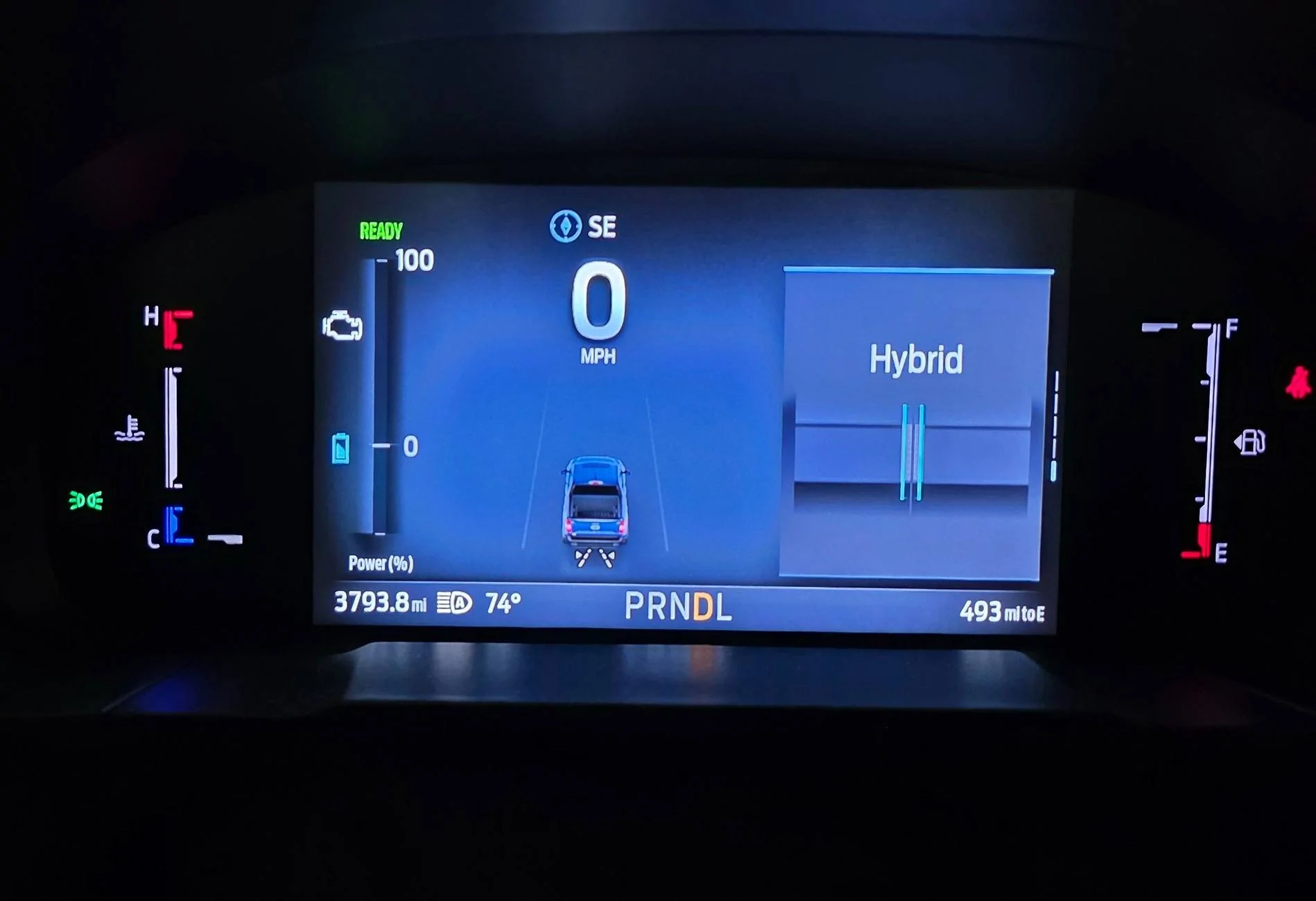
Ford Maverick EV coach as startup default. 2025 25 instrument cluster
Sponsored


KO Stradivarius

2.5L Hybrid
Well-known member
Joined
May 3, 2025
Threads
2
Messages
97
Reaction score
179
Location
The Disputed Lands
Vehicle(s)
'25 XLT
Engine
2.5L Hybrid
I have a similar problem. No mater how I configure My View, it does not save those settings. My truck has somehow saved what I believe were some settings that I set not long after I bought it. All attempts to change it since then are only temporary until the next restart. The configuration screen remains exactly as I want but the info shown in My View does not change.

Mine happens to show Trip 1, Trip 2, This Trip, Fuel Economy, and EV Coach no matter how many times I change it. I want to replace Fuel Economy with Tire Pressure but it never saves it permanently.

It seems non-sensical that the only way to save the settings is to choose the checkboxes and then just push the Return Arrow, and that is supposedly the process to save your last settings? It just doesn't seem right to me. I wonder why there is no need to press "OK" or have a "Save Settings" prompt. It's ridiculous.
 

Randorita

2.5L Hybrid
Well-known member
First Name
Randy
Joined
Sep 7, 2024
Threads
0
Messages
299
Reaction score
395
Location
Mississippi
Vehicle(s)
2021 Toyota RAV4, 2025 Maverick Lariat
Engine
2.5L Hybrid
I have the same issue. I have the speedometer come up in the middle. I have to choose Eco mode, then put up EV Coach. The other screen comes up with Android Auto maps and whatever I have been listening to on my phone in both right panels. I cannot change it and it keep the setting on it either. So much for customization.
 

TP Mav

2.5L Hybrid
Active member
First Name
Tim
Joined
Apr 23, 2025
Threads
1
Messages
25
Reaction score
42
Location
Nebraska
Vehicle(s)
2025 Maverick XL AWD
Engine
2.5L Hybrid
I'll be curious if there is any answer. I've gotten used to the startup routine:
1. Hit 'OK' on seatbelt pop-up
2. If I'm quick enough, select the Yes option to return to eco mode. Otherwise, I click mode left twice to get to Eco.
3. Hit up arrow twice to reach the EV Coach.
 

rarabama16

2.5L Hybrid
Active member
First Name
Rusty
Joined
Jan 27, 2025
Threads
0
Messages
26
Reaction score
34
Location
Gainesville, GA
Vehicle(s)
2025 Ford Maverick XLT
Engine
2.5L Hybrid
Clubs
 
Tried to get these screens to stick and pull-up automatically on start-up, to track fuel economy, but gave up and only look at it occasionally now. I found that constant monitoring didn’t improve mileage and I’m still averaging 39.4mpg with heavy interstate travel. Live and let live.
 

Sponsored

Ozarkbeard

Well-known member
Joined
May 22, 2022
Threads
14
Messages
4,344
Reaction score
5,477
Location
.
Vehicle(s)
.
Engine
Undecided
Tried to get these screens to stick and pull-up automatically on start-up, to track fuel economy, but gave up and only look at it occasionally now. I found that constant monitoring didn’t improve mileage and I’m still averaging 39.4mpg with heavy interstate travel. Live and let live.
EV Coach is really not useful in freeway driving because you're going to be in Hybrid mode for practically the entire drive. Unless it's stop and go freeway driving.
 

lp_man

2.5L Hybrid
Member
First Name
Luke
Joined
Oct 17, 2024
Threads
1
Messages
15
Reaction score
17
Location
NC
Vehicle(s)
Honda Accord
Engine
2.5L Hybrid
I’ve tried to figure this out to no avail as well.
 

gooberfingies

2.5L Hybrid
Member
First Name
Sam
Joined
Apr 14, 2025
Threads
0
Messages
5
Reaction score
2
Location
Oregon
Vehicle(s)
2025 Ford Maverick Lariat
Engine
2.5L Hybrid
Mine always comes up with EV coach on start up, I have it on the very bottom of my list of things on the My View screen. For some reason, if I leave my truck running and I get out for a minute and get back in, the EV coach goes away and I get just the speedometer in the middle of the screen with the semi circle speedometer going around it. I haven't been able to figure out how to get that semi circle speedometer without getting out and back in again yet lol
 
OP
OP
MarkLally

MarkLally

2.5L Hybrid
Well-known member
First Name
Mark
Joined
Oct 7, 2021
Threads
17
Messages
179
Reaction score
492
Location
Carthage NC
Vehicle(s)
2025 XLT Maverick hybrid AWD, 4K tow, 2019 Ranger
Engine
2.5L Hybrid
Mine always comes up with EV coach on start up, I have it on the very bottom of my list of things on the My View screen. For some reason, if I leave my truck running and I get out for a minute and get back in, the EV coach goes away and I get just the speedometer in the middle of the screen with the semi circle speedometer going around it. I haven't been able to figure out how to get that semi circle speedometer without getting out and back in again yet lol
Well, this at least proves that the "on demand" screen, which is the one the contains the EV coach, can indeed be programed to come on at start up. Can you tell us how you got the EV coach box to appear at the bottom of your list ? It seems to me that the list (with the check boxes) is in a fixed order, how do you get yours to change order ?
 
Last edited:

gooberfingies

2.5L Hybrid
Member
First Name
Sam
Joined
Apr 14, 2025
Threads
0
Messages
5
Reaction score
2
Location
Oregon
Vehicle(s)
2025 Ford Maverick Lariat
Engine
2.5L Hybrid
Honestly I'm not sure, I just added stuff to the My View screen shortly after picking up my truck. I'm assuming it was because it was the last thing I added to My View
 
Sponsored

HeyBales

2.5L Hybrid
Well-known member
First Name
Mike
Joined
May 3, 2024
Threads
4
Messages
4,851
Reaction score
4,413
Location
KC Metro area
Vehicle(s)
2005 Toyota RAV4, 2024 XLT Hybrid
Engine
2.5L Hybrid
Like this? About 14 minutes.


gooberfingies

2.5L Hybrid
Member
First Name
Sam
Joined
Apr 14, 2025
Threads
0
Messages
5
Reaction score
2
Location
Oregon
Vehicle(s)
2025 Ford Maverick Lariat
Engine
2.5L Hybrid
Yep that's the menu to edit it. I'm not sure how it decides what order your options will be in. Also it has this weird glitch where the EV coach is there on start up but shows it as being on the very top My View option, if I go up or down to change options it brings it down to the bottom. Not sure if that has anything to do with it
 

Greg F

2.5L Hybrid
Member
First Name
Greg
Joined
Dec 29, 2024
Threads
1
Messages
17
Reaction score
22
Location
Southern Ontario, Canada
Vehicle(s)
2025 Ford Maverick Lariat AWD Hybrid
Engine
2.5L Hybrid
I gave up on selecting Eco mode. It was just too much of a pain in the butt. In the winter, I will select Slippery, because it usually is slippery, and I don't want the regenerative braking to be locking up my wheels when I'm trying to stop. In the summer, I just leave it in Normal mode.
 

HeyBales

2.5L Hybrid
Well-known member
First Name
Mike
Joined
May 3, 2024
Threads
4
Messages
4,851
Reaction score
4,413
Location
KC Metro area
Vehicle(s)
2005 Toyota RAV4, 2024 XLT Hybrid
Engine
2.5L Hybrid
I gave up on selecting Eco mode. It was just too much of a pain in the butt. In the winter, I will select Slippery, because it usually is slippery, and I don't want the regenerative braking to be locking up my wheels when I'm trying to stop. In the summer, I just leave it in Normal mode.
Ya - there is no way to make a drive mode truly automatic.
Without Forscan.

Unless - and this was another video - get your seat belt done before start - then you'll get a prompt to keep last mode used - arrow up for Yes, press Ok.
Better be focused and quick - or you'll miss it.
 

VA Flash

2.5L Hybrid
Well-known member
First Name
Randy
Joined
Jan 6, 2025
Threads
4
Messages
53
Reaction score
51
Location
Charlottesville, VA
Vehicle(s)
2025 Lariat Hybrid AWD
Engine
2.5L Hybrid
Can anyone tell me how to keep the EV coach as the default start up screen in the information on demand section (to the right of the speedometer) at start up and to stay that way?
Right now I have to shuffle through the information that I set up in the "My View" to get it to show up.
My wife's sons 25 XL hybrid FWD maverick starts up and stays this way every time and I want mine to do the same. I have duplicated his my view boxes to try to get this to happen for me, to no avail. As a mater of fact, the only way I can get that section of the display to display anything is to shuffle the the button on the right side of the steering wheel, and you have to do that at every start up.

Please help.

25 instrument cluster .jpg
I leave mine in EV coach most of the time. If you have it in EV coach when you turn off the ignition it will restart with the EV coach showing if you push OK to clear the seat belt notification and push OK again. If you push forward on the toggle instead of just pushing OK, it will advance to another my view setting. After starting up and pushing OK it will always bring me back to the last my view setting that I was on, after pushing ok to clear the seat belt alert of course. 😀
Sponsored


Top