
Sponsored

Any difficulty connecting to your home wifi?

Big-Enough

2.5L Hybrid
Active member
First Name
frank
Joined
Mar 11, 2025
Threads
13
Messages
35
Reaction score
39
Location
Ontario
Vehicle(s)
2025 Lariat
Engine
2.5L Hybrid
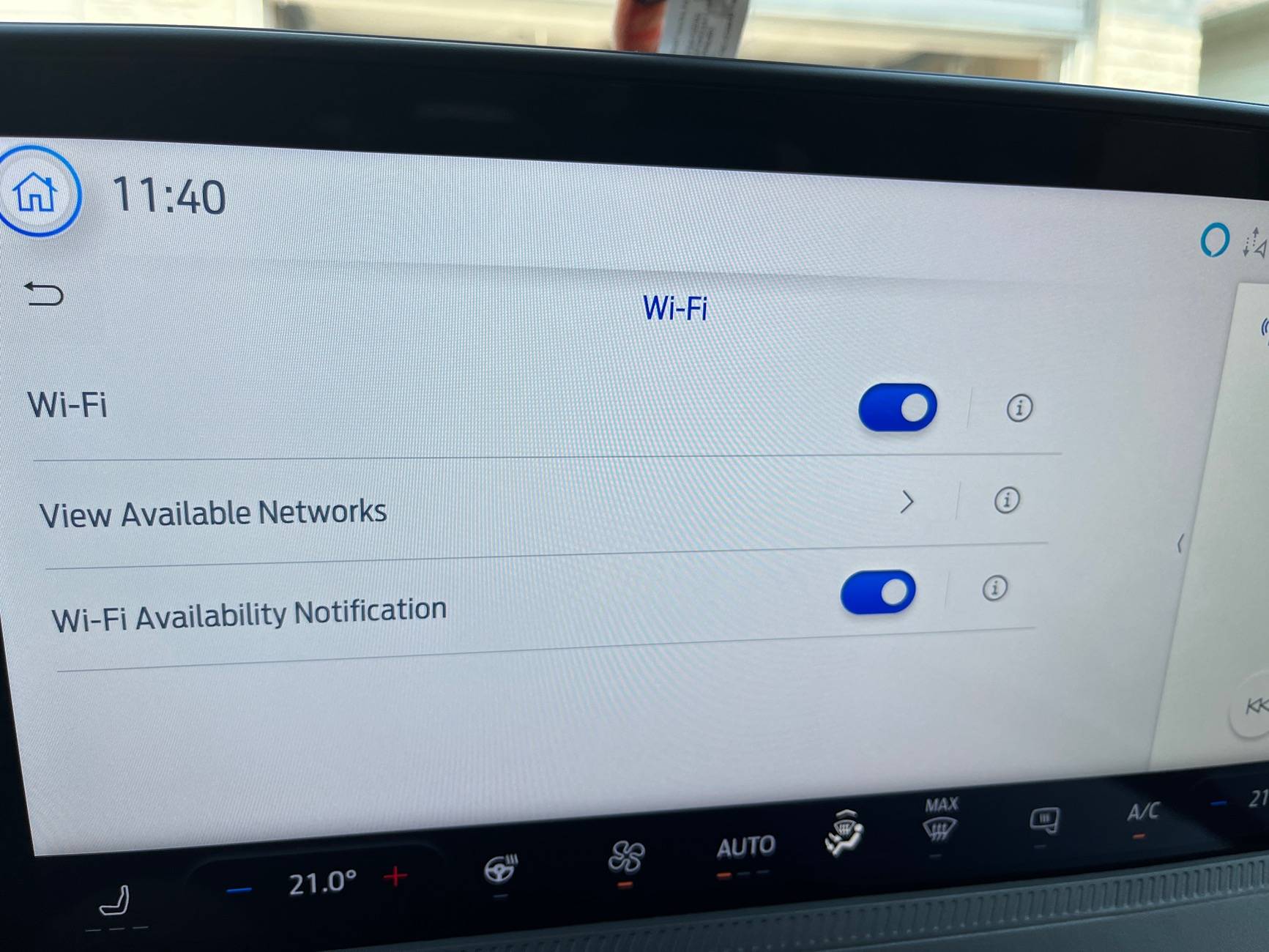
Sitting in the garage and on my driveway my ‘25 Maverick doesn’t see my wifi. Yet my RV that sits further down the driveway connects its Sync no problem to my wifi and the Blink camera in the RV connects no problem as well. I have tried adding my wifi connection but since it doesn’t see it it didn’t connect. My ‘14 Escape had no problem connecting as well.
Anyone noticed this with their Maverick, i don’t think there is anything else i need to turn on.
Ford Maverick Any difficulty connecting to your home wifi? IMG_2906
Sponsored


HeyBales

2.5L Hybrid
Well-known member
First Name
Mike
Joined
May 3, 2024
Threads
4
Messages
4,917
Reaction score
4,500
Location
KC Metro area
Vehicle(s)
2005 Toyota RAV4, 2024 XLT Hybrid
Engine
2.5L Hybrid
I guess just a wimpier antenna.

I can't find the picture in the manual, and must not be using correct search term.
They have an overview picture of where the different antenna's are, besides the roof one.
Got any added metal parts over top of back window, I think tailgate or side areas?

ETA due to other comments:
The point about changed WiFi is good one. You could have changed the settings on AP to not broadcast the existence of the WiFi network, as a light security measure, after the others were setup.
But almost any device, once they've connected, will remember when they come back within range of a network.

My 24MY has reached from the end of a driveway, say 60 ft away from the AP that happens to be in the closest room, with a decent window.

To the point of small WiFi area due to when truck is the AP instead of a Station.
Do they still offer that ability with 25MY?
I thought there were complaints about it being stated on the window sticker, but not actually available.
Of course the programmers could easily make a difference in power levels between the 2 so it could both reach far as a station, but provide a small area as an AP.
But that would take extra work - let's see - would Ford make extra work so both features worked appropriately...
 
Last edited:

Alfetta159

2.5L Hybrid
Well-known member
Joined
Jul 2, 2025
Threads
5
Messages
270
Reaction score
577
Location
Vacaville, California
Vehicle(s)
2023 Ford Maverick Lariat, 2014 Chevrolet Spark
Engine
2.5L Hybrid
You might check if something has changed with your wireless access point (usually part of the ISP gateway aka 'router') since connecting the other two vehicles and make sure there's nothing big and metallic in the way. Just a guess.
 

egamar

2.5L Hybrid
Member
First Name
Matt
Joined
Jan 2, 2025
Threads
1
Messages
22
Reaction score
20
Location
Oregon
Vehicle(s)
2025 Maverick Hybrid AWD
Engine
2.5L Hybrid
I had very similar experience. Parked in driveway no more than 30 feet from wireless access point. Every other wifi based device I own has no problem connecting. Mav ‘sees’ the network, but consistently fails to negotiate a connection. My guess is the same antenna used for hotspot has dual purpose to connect vehicle to local wifi, and it/they are likely tuned to provide minimal range. Consider that hotspot use is intended for area inside and immediately surrounding the vehicle, because you don’t want other drivers, neighbors, etc. trying to use your connection. I gave up because the Mav connects via its own onboard dedicated cellular for SW updates, and those work fine.
 

jorgy_bc

2.5L Hybrid
Well-known member
First Name
Glenn
Joined
Jan 25, 2025
Threads
6
Messages
68
Reaction score
182
Location
Galiano Island, BC, Canada
Vehicle(s)
Maverick Lariat
Engine
2.5L Hybrid
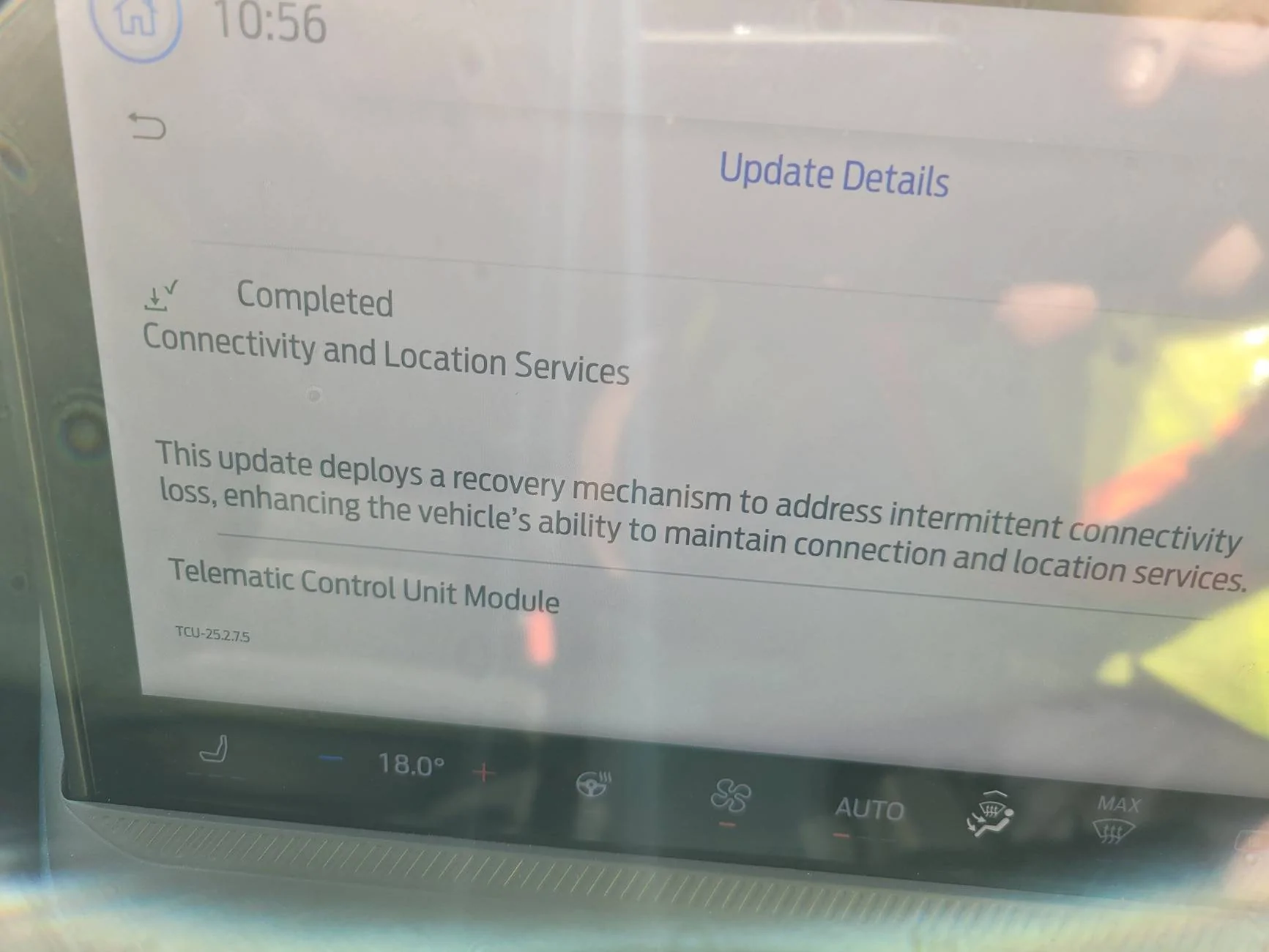
May not be the issue, but make sure this wifi update is installed.
Ford Maverick Any difficulty connecting to your home wifi? 20250729_105638
 

Sponsored

Joylove

2.0L EcoBoost
Active member
Joined
Apr 13, 2025
Threads
1
Messages
28
Reaction score
15
Location
USA
Vehicle(s)
2025 Ford Maverick Tremor
Engine
2.0L EcoBoost
What’s the benefit of this? Don’t firmware updates come over cellular? Is there some small reason to share my internet to my car?
 

Alfetta159

2.5L Hybrid
Well-known member
Joined
Jul 2, 2025
Threads
5
Messages
270
Reaction score
577
Location
Vacaville, California
Vehicle(s)
2023 Ford Maverick Lariat, 2014 Chevrolet Spark
Engine
2.5L Hybrid
What’s the benefit of this? Don’t firmware updates come over cellular? Is there some small reason to share my internet to my car?
I know that Navigation updates don't come over the cellular/phone network or an Internet connection for that matter. I recall when I first updated the OS for the car, it wanted an IP style Internet connection.
 

chiko

2.5L Hybrid
Well-known member
First Name
Eric
Joined
Mar 21, 2025
Threads
20
Messages
158
Reaction score
90
Location
Hampton, VA
Vehicle(s)
2024 Maverick
Engine
2.5L Hybrid
I also have lousy connection reliabiility. I gave up. While I was trying I learned that my main modem/wifi had support for both 5G and 2.4G. The truck only supports 2.4G and the contact I chatted at with Ford indicated that its better if you give different names to each bandwidth so I have 3 Wifi names now, 5G name(factory), 2.4G name (variant on the 5G) and a 3rd for the Wifi extender that automatically suffixes a name to the 2.4G. WPA passkey is consistent and also factory.
 
Last edited:

cyberdog

2.5L Hybrid
Well-known member
First Name
Ray
Joined
Oct 15, 2021
Threads
5
Messages
663
Reaction score
785
Location
08084
Vehicle(s)
2023 Maverick Lariat Hybrid
Engine
2.5L Hybrid
When possible, use wifi to perform your Sync updates, and I speak from experience. I downloaded a Sync update LAST Year, inserted the thumb drive, the update went in and confirmed installation, no problem to that point.

When I uploaded the confirmation file from the thumb drive to Ford, which was required so I could download the Map update, their system indicated the file required further review by Ford technicians, as it didn't match the expected format. - Their site still shows that message as of yesterday, making it impossible to download further updates, nor a Map update. They advised to try updating over wifi, which I've done possibly 4-5 times since last year, with updates downloading one of those times, however their portal still hasn't updated. (I would like to download my one free Map update at some point, yet their website sort of sucks).

Lesson learned, use the built in update of wifi, and not the download website for Sync updates.
 

CarWal16

2.5L Hybrid
Member
First Name
Sean
Joined
Sep 28, 2024
Threads
0
Messages
17
Reaction score
27
Location
Oak Creek, WI
Vehicle(s)
2024 Ford Maverick Hybrid Lariat Terrain
Engine
2.5L Hybrid
I had very similar experience. Parked in driveway no more than 30 feet from wireless access point. Every other wifi based device I own has no problem connecting. Mav ‘sees’ the network, but consistently fails to negotiate a connection. My guess is the same antenna used for hotspot has dual purpose to connect vehicle to local wifi, and it/they are likely tuned to provide minimal range. Consider that hotspot use is intended for area inside and immediately surrounding the vehicle, because you don’t want other drivers, neighbors, etc. trying to use your connection. I gave up because the Mav connects via its own onboard dedicated cellular for SW updates, and those work fine.
Likewise, I also wasn't able to connect at first to my home network. And similarly, unlike OP's issue (sorry can't help with not seeing SSID), my Mav saw the network, but just couldn't connect.

After googling, I came upon a discussion regarding WiFi devices not being able to handle a feature called 'Fast Roaming', which allows seamless connectivity switching between access points. Sure enough, it was enabled on my mesh network, and as soon as I turned it off, the Mav connected.

Since it only appears to be useful for downloading NAV maps on my '24 Lariat Hybrid (which is replaced by maps on CarPlay, anyways), I decided there was no need to connect to my network and thus reenabled 'Fast Roaming' on my network for the other more modern devices to take advantage.
Sponsored


Top