
Sponsored

ACC Intelligent Speed Lost or Broken.

JasonDroninAround

2.0L EcoBoost
Well-known member
First Name
Jason
Joined
Feb 8, 2025
Threads
31
Messages
321
Reaction score
814
Location
Hanford, CA, USA
Website
www.youtube.com
Vehicle(s)
2025 Ford Maverick Tremor
Engine
2.0L EcoBoost
Two of my beloved features of the ACC seem to have broken. The slow down for curves/speed zones and the internal database for the curves/speed limits. This is the first time this has happened and I do not know how to fix it.

I first noticed, when using the ACC, the truck was not slowing down on its own when the speed limit lowered. I went through all the cruise control menus and turned made sure all of those settings were turned on. They were.

I though it was a camera problem but I do not think that is it. I have it set to go 5 mph over the speed limit. I will be going 60 in a 55. When I approach a 45 mph speed limit sign, it does seem to detect the speed limit sign and it turns to 45 but the cruise control setting will remain at 60 instead of dropping down to 50 like normal.

I parked, turned off, locked, and let the truck sit a few minutes, hoping to get the 'bug' to clear but that was not working.

Then, I noticed another thing. When I got on roads closer to home, roads where I the truck usually knew the speed limit before it spotted a speed limit sign, the speed limit sign on the dash just read '--' and the cruise control speed would just remain the same as what I had it set before I turned. Also missing from the internal database is how it knows when a shaper turn is coming up and temporarily slows down for the turn.

Here are a few other bits of info that may help:

It is a 2025 Tremor with the 2.0.

While Googling for answers, I read to make sure 'Speed Sign Recognition' was turned on. I cannot find that option in the ACC menu. It was there somewhere when I first bough the truck and turned it on, but I cannot find it again. Though, there is still a option to set the speed above/below the speed sign speed separate from the speed warning option.

I just got home from a road trip from Central California to East Texas and back. The ACC worked fine every day except for today, the last day.
Sponsored

 

OleFordGuy

2.0L EcoBoost
Well-known member
First Name
Craig
Joined
Dec 5, 2021
Threads
38
Messages
3,803
Reaction score
5,995
Location
Alabama
Vehicle(s)
11 F150 Lariat, 24 Expedition Limited, 22 Mav Lariat AWD
Engine
2.0L EcoBoost
Two of my beloved features of the ACC seem to have broken. The slow down for curves/speed zones and the internal database for the curves/speed limits. This is the first time this has happened and I do not know how to fix it.

I first noticed, when using the ACC, the truck was not slowing down on its own when the speed limit lowered. I went through all the cruise control menus and turned made sure all of those settings were turned on. They were.

I though it was a camera problem but I do not think that is it. I have it set to go 5 mph over the speed limit. I will be going 60 in a 55. When I approach a 45 mph speed limit sign, it does seem to detect the speed limit sign and it turns to 45 but the cruise control setting will remain at 60 instead of dropping down to 50 like normal.

I parked, turned off, locked, and let the truck sit a few minutes, hoping to get the 'bug' to clear but that was not working.

Then, I noticed another thing. When I got on roads closer to home, roads where I the truck usually knew the speed limit before it spotted a speed limit sign, the speed limit sign on the dash just read '--' and the cruise control speed would just remain the same as what I had it set before I turned. Also missing from the internal database is how it knows when a shaper turn is coming up and temporarily slows down for the turn.

Here are a few other bits of info that may help:

It is a 2025 Tremor with the 2.0.

While Googling for answers, I read to make sure 'Speed Sign Recognition' was turned on. I cannot find that option in the ACC menu. It was there somewhere when I first bough the truck and turned it on, but I cannot find it again. Though, there is still a option to set the speed above/below the speed sign speed separate from the speed warning option.

I just got home from a road trip from Central California to East Texas and back. The ACC worked fine every day except for today, the last day.
sorry, no idea. as a thought, any ota updates/changes that could have affected it??
 
OP
OP
JasonDroninAround

JasonDroninAround

2.0L EcoBoost
Well-known member
First Name
Jason
Joined
Feb 8, 2025
Threads
31
Messages
321
Reaction score
814
Location
Hanford, CA, USA
Website
www.youtube.com
Vehicle(s)
2025 Ford Maverick Tremor
Engine
2.0L EcoBoost
sorry, no idea. as a thought, any ota updates/changes that could have affected it??
That was also a though but will an OTA update happen away from home w/o WiFi? It 'broke' the morning after spending the night in a Hotel in Quartzite, AZ
 

BlueSpec1

2.5L Hybrid
Well-known member
First Name
Gene
Joined
Jul 10, 2022
Threads
3
Messages
779
Reaction score
796
Location
Texas
Vehicle(s)
23 XLT 2.5L, 22 Escape Plug In, 23 Bolt EUV
Engine
2.5L Hybrid
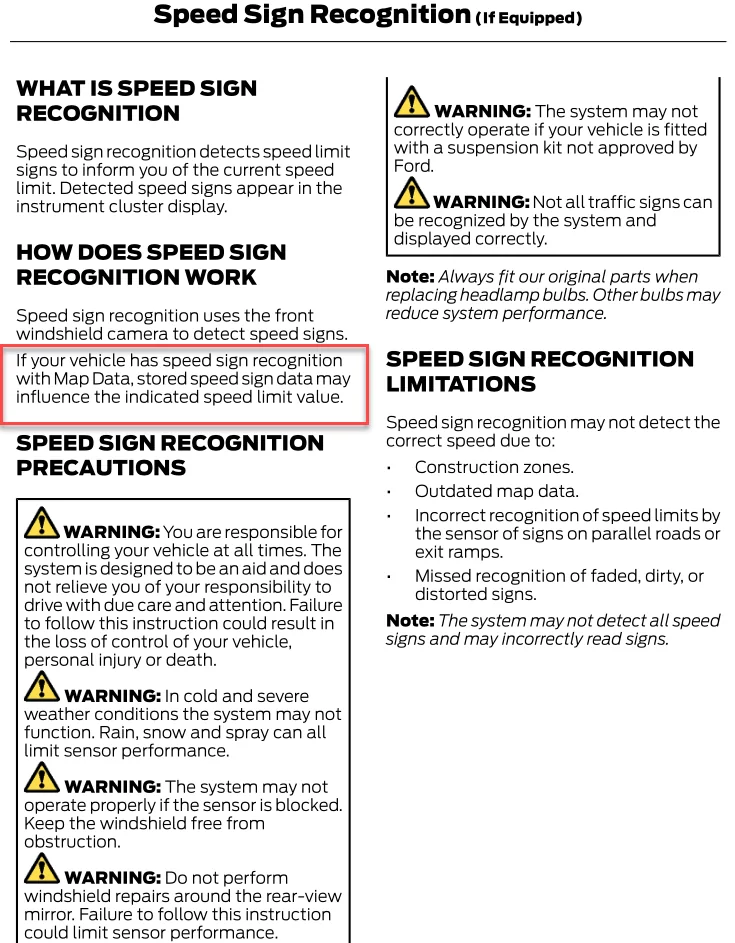
Navigation Map Data related??

Sounds like how TSR tha's been added to Maverick's that don't have Navigation, you'll get -- awhile after passing a sign that the windshield camera detects.

Cruise Control - Vehicles With: Adaptive Cruise Control With Lane Centering - 2025 Maverick

Speed Sign Recognition
Speed sign recognition detects speed limit signs and informs the driver of the current speed limit. Detected speed signs appear in the center display.
Vehicles equipped with speed sign recognition with navigation, stored speed sign data may influence the indicated speed limit value.
Speed sign recognition detects speed limit signs to inform you of the current speed limit. Detected speed signs appear in the center display.
Speed sign recognition may not operate correctly due to:
• Outdated map data from navigation.
• Incorrect recognition of speed limits by the sensor of signs on parallel roads or exit ramps.
• Missed recognition of faded, dirty or distorted signs.

To turn on and off the speed sign recognition speed warning and adjust the level tolerance of the speed sign recognition follow the on screen prompts from the
center display.

For additional speed sign recognition information messages, and center display settings, refer to Owner's Literature.

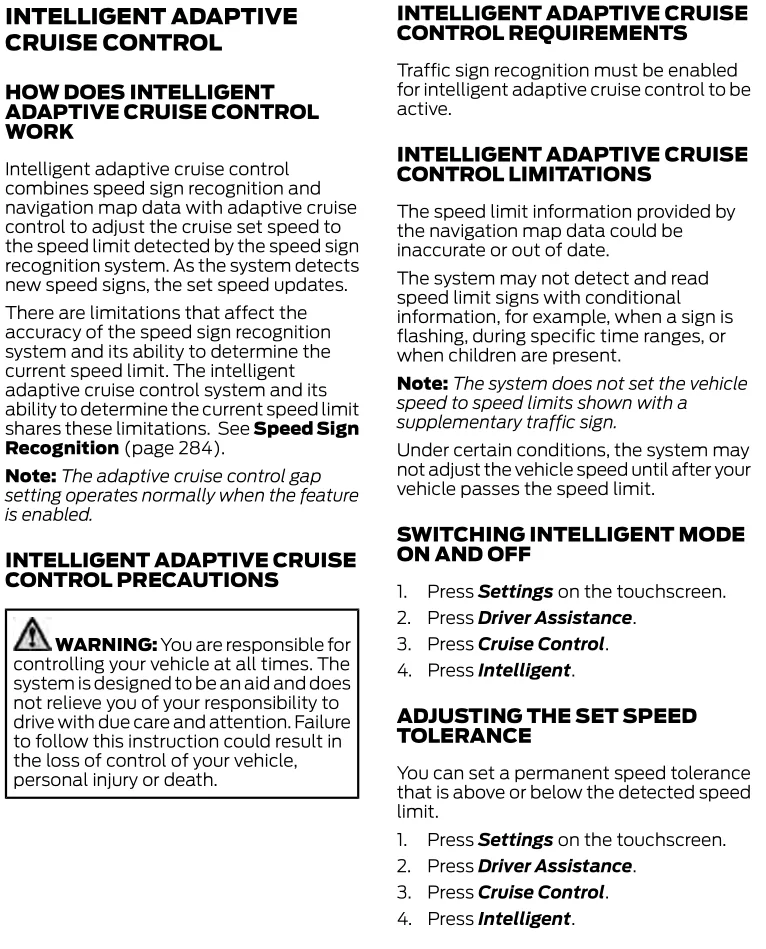
Intelligent ACC equipped with speed sign recognition working with the speed limit information provided by the navigation map data could be inaccurate or out of
date.

2025 Maverick Owner's
Ford Maverick ACC Intelligent Speed Lost or Broken. 1760398642251-bt


From my Escape's that does have IACC.
Ford Maverick ACC Intelligent Speed Lost or Broken. 1760398180344-oi
 
Last edited:

Sponsored

OP
OP
JasonDroninAround

JasonDroninAround

2.0L EcoBoost
Well-known member
First Name
Jason
Joined
Feb 8, 2025
Threads
31
Messages
321
Reaction score
814
Location
Hanford, CA, USA
Website
www.youtube.com
Vehicle(s)
2025 Ford Maverick Tremor
Engine
2.0L EcoBoost
OK. I think I found the problem. I went out to try something but without my cell phone in my pocket. I always use Google Navigation on Android Auto. Without my phone with me, the Ford map was on top. It said no GPS and still had my location as the motel I stayed at last night. Now, I have to figure out how to turn the GPS back on.
 

BlueSpec1

2.5L Hybrid
Well-known member
First Name
Gene
Joined
Jul 10, 2022
Threads
3
Messages
779
Reaction score
796
Location
Texas
Vehicle(s)
23 XLT 2.5L, 22 Escape Plug In, 23 Bolt EUV
Engine
2.5L Hybrid
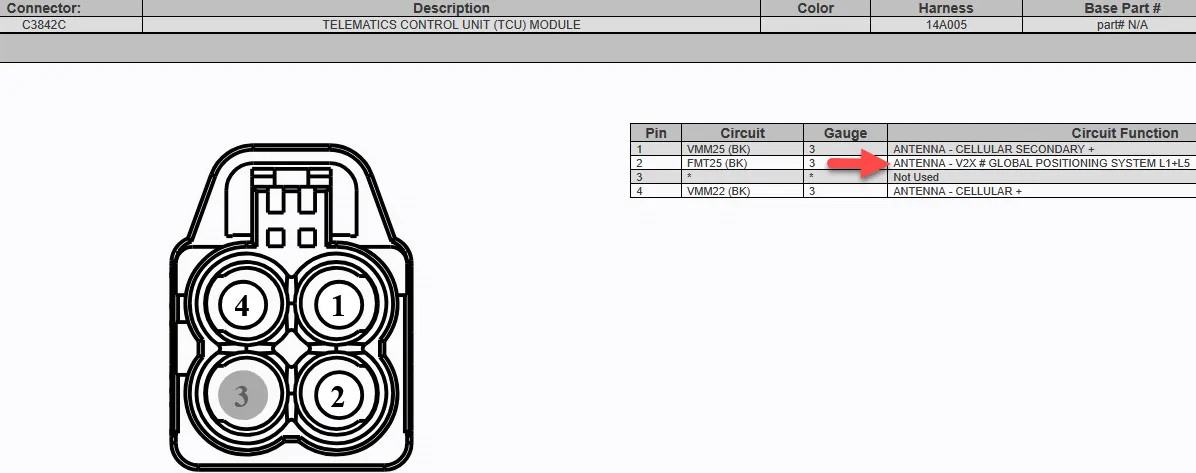
Looks like GPS still routes thru the TCU module on 2025s.
Ford Maverick ACC Intelligent Speed Lost or Broken. 1760414102843-bu
 
OP
OP
JasonDroninAround

JasonDroninAround

2.0L EcoBoost
Well-known member
First Name
Jason
Joined
Feb 8, 2025
Threads
31
Messages
321
Reaction score
814
Location
Hanford, CA, USA
Website
www.youtube.com
Vehicle(s)
2025 Ford Maverick Tremor
Engine
2.0L EcoBoost
You can check out anytime you want, but you can never leave.
I went out there and did two different types of Sync 4 resets. One with the menus and one with the radio power button and the right skip track button. Nina the one of them fixed my GPS but now my truck is parked in front of the Ford headquarters in Michigan LOL
 
OP
OP
JasonDroninAround

JasonDroninAround

2.0L EcoBoost
Well-known member
First Name
Jason
Joined
Feb 8, 2025
Threads
31
Messages
321
Reaction score
814
Location
Hanford, CA, USA
Website
www.youtube.com
Vehicle(s)
2025 Ford Maverick Tremor
Engine
2.0L EcoBoost
Something else I tried before I reset the Sync 4 is that I went into the vehicle connectivity menu and tried to open up the connections. Apparently there is a switch in there somewhere to toggle a vehicle location on and off. When I try to go to that subsection, I just get a spinny loading animation and get spit back out to the previous menu. That's when I tried the two different resets. Back at that connectivity menu I still get nothing but spit back out. This one might be a dealership problem
 
Sponsored

BlueSpec1

2.5L Hybrid
Well-known member
First Name
Gene
Joined
Jul 10, 2022
Threads
3
Messages
779
Reaction score
796
Location
Texas
Vehicle(s)
23 XLT 2.5L, 22 Escape Plug In, 23 Bolt EUV
Engine
2.5L Hybrid
F11 is its fuse.
 
OP
OP
JasonDroninAround

JasonDroninAround

2.0L EcoBoost
Well-known member
First Name
Jason
Joined
Feb 8, 2025
Threads
31
Messages
321
Reaction score
814
Location
Hanford, CA, USA
Website
www.youtube.com
Vehicle(s)
2025 Ford Maverick Tremor
Engine
2.0L EcoBoost
F11 is its fuse.
I'll try that when I get home. I'm at work and it's raining today. It did the hardest of parked resets I think it could. Sat out there all night long and the GPS still thinks I'm sitting out front of the Ford headquarters :)
 

BlueSpec1

2.5L Hybrid
Well-known member
First Name
Gene
Joined
Jul 10, 2022
Threads
3
Messages
779
Reaction score
796
Location
Texas
Vehicle(s)
23 XLT 2.5L, 22 Escape Plug In, 23 Bolt EUV
Engine
2.5L Hybrid
Something else I tried before I reset the Sync 4 is that I went into the vehicle connectivity menu and tried to open up the connections. Apparently there is a switch in there somewhere to toggle a vehicle location on and off. When I try to go to that subsection, I just get a spinny loading animation and get spit back out to the previous menu.
That's spinning is probably no cellular connection to Ford's servers thru the TCU.
So either blown fuse, or more likely the TCU module not working.
 
OP
OP
JasonDroninAround

JasonDroninAround

2.0L EcoBoost
Well-known member
First Name
Jason
Joined
Feb 8, 2025
Threads
31
Messages
321
Reaction score
814
Location
Hanford, CA, USA
Website
www.youtube.com
Vehicle(s)
2025 Ford Maverick Tremor
Engine
2.0L EcoBoost
That's spinning is probably no cellular connection to Ford's servers thru the TCU.
So either blown fuse, or more likely the TCU module not working.
That may be as well. Maybe whatever fuse that controls the GPS also controls the Cellular connection.
 
OP
OP
JasonDroninAround

JasonDroninAround

2.0L EcoBoost
Well-known member
First Name
Jason
Joined
Feb 8, 2025
Threads
31
Messages
321
Reaction score
814
Location
Hanford, CA, USA
Website
www.youtube.com
Vehicle(s)
2025 Ford Maverick Tremor
Engine
2.0L EcoBoost
I have exhausted all my self help options and I'm scheduled to drop off the truck at the dealership on Monday after work. I believe that it is the module that controls the cellular connection and the GPS. It still needs to go in for that passenger airbag light recall anyway :( At least my first true broken part of my truck didn't leave me stranded. Until it is fixed, I just have to pay more attention to the speed limit zones and slow down the cruise control manually .... first world problems, right? lol
Sponsored

 
Last edited:


Top