
Sponsored

The New Ford App

jonshep

2.0L EcoBoost
Well-known member
First Name
John
Joined
Jul 28, 2024
Threads
4
Messages
284
Reaction score
313
Location
SW Oklahoma
Vehicle(s)
2024 Maverick XLT 2002 F250 7.3 Diesel
Engine
2.0L EcoBoost
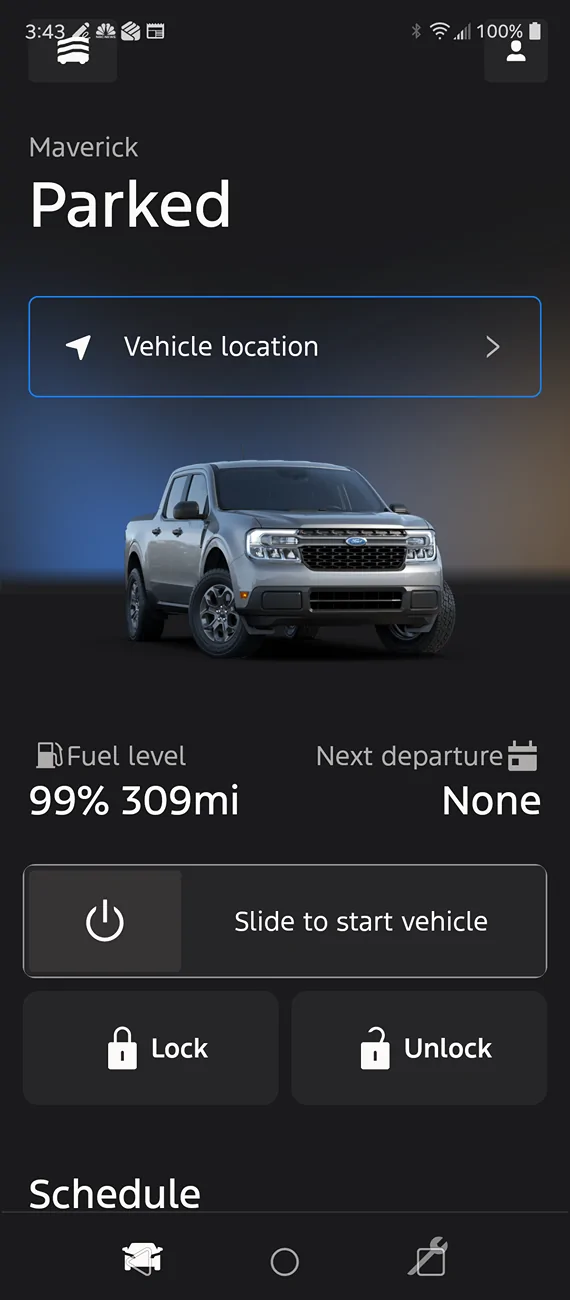
My Ford Pass app updated to the new improvd Ford App. The new app has the top icon so high on my phone screen that when I tap them I get my phone settings. The bottom icons for sevice and whatever that one on left is, are on top of my Go Back Triangle and the square that shows all open apps. Consequently I can't use the improved Ford app. Somebody tell me what I am doing wrong or are some of you having the same experience?
Sponsored
 

CarbonGrayFX4

2.0L EcoBoost
Well-known member
First Name
Luke
Joined
Dec 2, 2024
Threads
15
Messages
337
Reaction score
662
Location
Virginia
Vehicle(s)
2024 Carbon Gray XLT FX4
Engine
2.0L EcoBoost
On the bottom: double tap the small square on the far left side of the ◀⏺⏹ task bar to hide it?

On the top: be pin-point accurate, use a touch pen?
 

Carlitos_92

2.0L EcoBoost
Well-known member
Joined
Mar 24, 2024
Threads
4
Messages
2,266
Reaction score
4,593
Location
Texas
Vehicle(s)
2023 Area 51 XLT EB AWD Lux FX4
Engine
2.0L EcoBoost
Clubs
 
Guessing this is an Android issue? I can’t see any way for clickable buttons to be difficult on the current iPhone version.
 

Matso

2.5L Hybrid
Well-known member
First Name
Matt
Joined
Aug 27, 2021
Threads
6
Messages
290
Reaction score
442
Location
44410
Vehicle(s)
2011 Mustang GT Premium
Engine
2.5L Hybrid
No problem on my Samsung. I have no idea what you guys are even talking about.
 

Tim d

2.0L EcoBoost
Well-known member
First Name
Tim
Joined
May 18, 2022
Threads
19
Messages
1,700
Reaction score
1,768
Location
Alpena
Vehicle(s)
Ram
Engine
2.0L EcoBoost
My Ford Pass app updated to the new improvd Ford App. The new app has the top icon so high on my phone screen that when I tap them I get my phone settings. The bottom icons for sevice and whatever that one on left is, are on top of my Go Back Triangle and the square that shows all open apps. Consequently I can't use the improved Ford app. Somebody tell me what I am doing wrong or are some of you having the same experience?
Don't have this problem with my android.fiddle with your phone screen.
 

Sponsored

Old Young Man

2.0L EcoBoost
Well-known member
First Name
Patrick
Joined
Apr 27, 2024
Threads
4
Messages
150
Reaction score
212
Location
Ormond Beach
Vehicle(s)
2024 Maverick Lariat Tremor
Engine
2.0L EcoBoost
Are your fonts adjustable on your phone? I have mine set larger and it affects some apps,
 

tabrewer

2.5L Hybrid
Member
First Name
Terry
Joined
Sep 19, 2022
Threads
1
Messages
17
Reaction score
15
Location
Idaho
Vehicle(s)
2024 Lariat Hybrid,Jeep Wrangler,Chevy S10,Volt
Engine
2.5L Hybrid
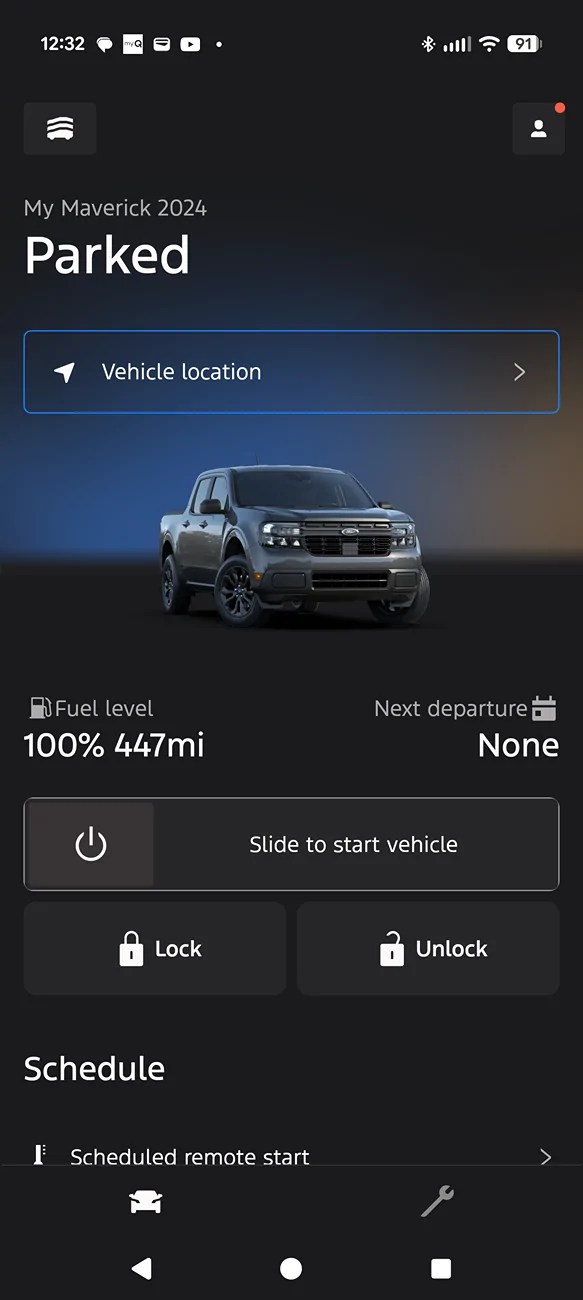
I have no problems on Pixel 10

Ford Maverick The New Ford App Screenshot_20251028-123208
 

Shakesbear

2.0L EcoBoost
Well-known member
First Name
J. R.
Joined
Jan 5, 2022
Threads
3
Messages
1,171
Reaction score
1,417
Location
Heart of the Texas Hill Country
Vehicle(s)
Lariat AWD, FX4, 4K, Lux, no CP360 assist
Engine
2.0L EcoBoost
My Ford Pass app updated to the new improvd Ford App. The new app has the top icon so high on my phone screen that when I tap them I get my phone settings. The bottom icons for sevice and whatever that one on left is, are on top of my Go Back Triangle and the square that shows all open apps. Consequently I can't use the improved Ford app. Somebody tell me what I am doing wrong or are some of you having the same experience?
If you've increased the font size to make it easier to see, that may be your problem ;)
 
OP
OP
jonshep

jonshep

2.0L EcoBoost
Well-known member
First Name
John
Joined
Jul 28, 2024
Threads
4
Messages
284
Reaction score
313
Location
SW Oklahoma
Vehicle(s)
2024 Maverick XLT 2002 F250 7.3 Diesel
Engine
2.0L EcoBoost
If you've increased the font size to make it easier to see, that may be your problem ;)
I can't find anywehere to adjust font size on the app. I moved the font on my phone down asf as it would go, and that didn't help. My son's tell me I need a new phone, so maybe they will buy me one for Christmas. Thanks for the reply, that was at least something to look at.
 
OP
OP
jonshep

jonshep

2.0L EcoBoost
Well-known member
First Name
John
Joined
Jul 28, 2024
Threads
4
Messages
284
Reaction score
313
Location
SW Oklahoma
Vehicle(s)
2024 Maverick XLT 2002 F250 7.3 Diesel
Engine
2.0L EcoBoost
Ford Maverick The New Ford App Screenshot_20251029-154321
 
Sponsored
OP
OP
jonshep

jonshep

2.0L EcoBoost
Well-known member
First Name
John
Joined
Jul 28, 2024
Threads
4
Messages
284
Reaction score
313
Location
SW Oklahoma
Vehicle(s)
2024 Maverick XLT 2002 F250 7.3 Diesel
Engine
2.0L EcoBoost
That's my screen shot. Note the over lay on icons.
 

Carlitos_92

2.0L EcoBoost
Well-known member
Joined
Mar 24, 2024
Threads
4
Messages
2,266
Reaction score
4,593
Location
Texas
Vehicle(s)
2023 Area 51 XLT EB AWD Lux FX4
Engine
2.0L EcoBoost
Clubs
 
Your fonts do look bigger compared to Terry's in post #7.

Someone with an Android phone will have to help you find the setting you need. It's probably under "Accessibility" or something like that. It's going to change fonts system-wide, though.

You might also remove/reinstall the app just in case something got installed wonky, or Ford already fixed a bug you're not caught up to yet.
 

HeyBales

2.5L Hybrid
Well-known member
First Name
Mike
Joined
May 3, 2024
Threads
4
Messages
4,919
Reaction score
4,501
Location
KC Metro area
Vehicle(s)
2005 Toyota RAV4, 2024 XLT Hybrid
Engine
2.5L Hybrid

Attachments

  • 0 bytes Views: 0

bighap

2.5L Hybrid
Well-known member
Joined
Aug 27, 2021
Threads
8
Messages
745
Reaction score
1,295
Location
Oregon
Vehicle(s)
2023 Maverick Lariat Hybrid
Engine
2.5L Hybrid
OP
OP
jonshep

jonshep

2.0L EcoBoost
Well-known member
First Name
John
Joined
Jul 28, 2024
Threads
4
Messages
284
Reaction score
313
Location
SW Oklahoma
Vehicle(s)
2024 Maverick XLT 2002 F250 7.3 Diesel
Engine
2.0L EcoBoost
Check your display settings and make sure it isn't zoomed in.
I want to thank everyone who replied and gave me some ideas on what to alter. My old LG does not zoom. While I was in the settings for the screen Display, I went thru evey setting to check for anything that could possibly be causing the problem. I turned off "one handed screen" and that resolved my screen issue. I don't remember turning that on, but that was the issue. Everybody make a note of this problem. A bid thanks to all of you for your posts.
👍👍👍👍👍
Sponsored


Top