

Wi-Fi and AA shouldn't make a newer phone overheat. There's something else going on with the phone.
Sponsored

Are you also putting the phone on the wireless charging pad when using the Wireless Android Auto?I think not just from wifi, probably connected to android auto and stuff, not sure why.
No, my case too tick to make connection.Are you also putting the phone on the wireless charging pad when using the Wireless Android Auto?
If so, DON'T! The FORD Wireless Charging pad has been known to overheat phones. Just an FYI
Thx, I be checking some of the stuff you mention for sure.I have no other ideas at this point. Other than possibly there is a TON of Apps running in the background other than Android Auto, WiFi and Bluetooth. Try a hard shutdown (Power completely off) and then see how it acts. Also check to make sure that your phone is not hacked and running a bitcoin Miner in the background.
I would look into what processes are running on your phone. The Phone is really too new to be having this issue.

Works as intended, unless it's not the truck and instead their absence.Mine doesn't have wifi, but i seriously thought your headline read "WIFE turns on every time I get in the truck"

Wow That is very strange. If you turn the wifi off in settings the truck turns it on? Never heard of that wierd. Maybe try airplane mode to see if anything changes.My Samsung Android phone does the exact same thing. If the truck is on, the phones Wi-Fi will keep turning on no matter how many times you turn it off. It Kills the battery life of a phone. I assume we would need to turn off Android Auto to turn off the phones Wi-Fi.
Don't want to give a spoiler, so just keep reading.Wow That is very strange. If you turn the wifi off in settings the truck turns it on? Never heard of that wierd. Maybe try airplane mode to see if anything changes.

So FYI on the 2025 with built in Wireless AA/Carplay, if it's like the Bronco Sport, you can turn off "Wireless App Projection" in the stereos settings and only use AA/Carplay via a USB Cable.Yup, I don't mind all that, just my phone heats up a bit, is my concern after all.
This is a great info sir.So FYI on the 2025 with built in Wireless AA/Carplay, if it's like the Bronco Sport, you can turn off "Wireless App Projection" in the stereos settings and only use AA/Carplay via a USB Cable.
I know this because I wanted to use my AAWireless adapter in this Bronco Sport loaner I'm driving, not the built in Wireless AA. It works just like in my 2022 Maverick now. Just took a while to figure it out.
My phone wasn't set to auto connect, but it does anywaySetting on my phone = auto connect to ANY WIFI IN MY LIST OF WIFI's that I have furnished the password for. When I am home my phone connects to my WiFi and uses the WiFi data plan (even for voice calls). When I get in range of your WiFi signal and have ever entered your password (or if you have an open network) my phone will use your network. ON YOUR PHONE GO TO NETWORK SETTINGS AND TURN OFF "CONNECT TO WIFI AUTOMATICALLY" leave "notify when network is available" so you can manually hit connect button if you want to when you get into truck.
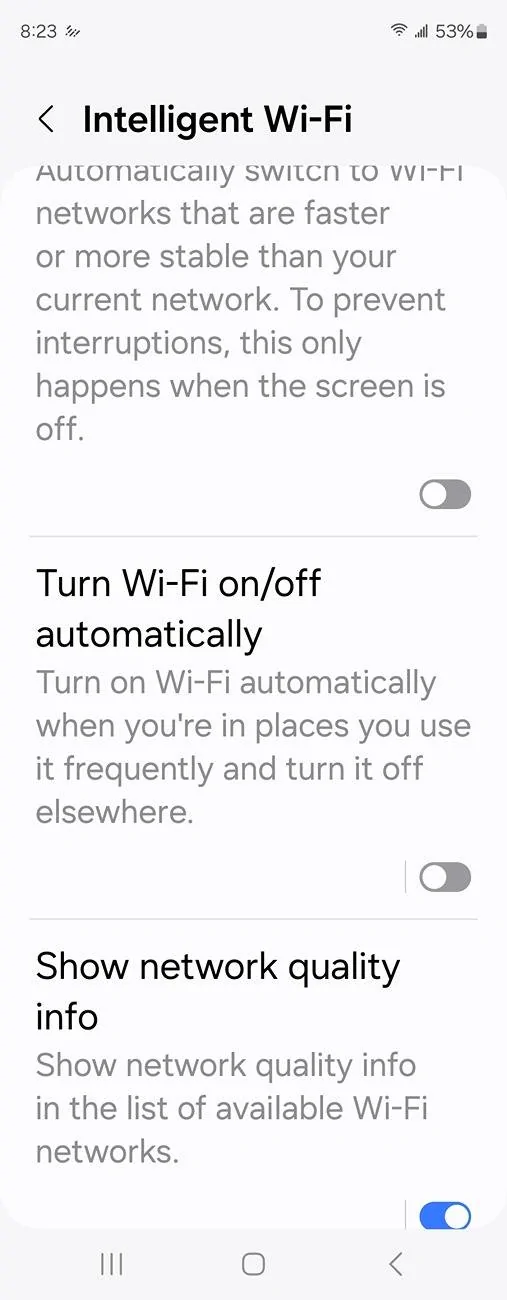
Yup, wonder if andkdjdvajfk/android auto will work if wifi is off.My phone wasn't set to auto connect, but it does anyway





