Sponsored

USB-C port stopped connecting

Surly Old Bill

2.5L Hybrid
Well-known member
First Name
bill
Joined
Apr 30, 2025
Threads
10
Messages
786
Reaction score
1,210
Location
Richmond, CA
Vehicle(s)
2024 Maverick XL
Engine
2.5L Hybrid
I've had the C port not connect in the past, rarely, but it would always reconnect if I rebooted (turned off engine, removed key, restarted).
Yesterday it wasn't connecting from the get-go, and restarts didn't reboot. I was on an 8 hour drive with about 4-5 stops.

I checked the forum but didn't find any solutions, but there have been people with similar problem.

USB-A port worked fine with the same thumbdrive that didn't work in the C port.
I have an A to C adapter; that was eliminated as a problem via using a different thumbdrive that has both A and C ends: it worked in A but not C.

I don't know if this is a mechanical problem (loose connector/wire) with the port, or an electrical/software problem with the head unit.

Has anyone had this issue and solved it?
Sponsored
 

CNJFF

2.5L Hybrid
Well-known member
Joined
Jul 14, 2025
Threads
3
Messages
207
Reaction score
351
Location
NJ
Vehicle(s)
Maverick
Engine
2.5L Hybrid
Clubs
 
Everything I'm finding with this issue was resolved by replacing the hub.

Aside from that, try cleaning out the port with compressed air (the cans for computer keyboards and such, not utility air). Might be some dust in there. If you are feeling froggy pull the hub and check the wiring.
 

Gaidheal

2.5L Hybrid
Well-known member
First Name
Jamie
Joined
Nov 15, 2025
Threads
7
Messages
147
Reaction score
239
Location
PEI
Vehicle(s)
2025 XLT Hybrid
Engine
2.5L Hybrid
New MY26 hydrib work truck - both the USB ports under the dash stopped working. The ones behind the console work so far.

The truck is going in for other issues (brakes let go at an intersection) next week so that will be added to the order.

Is there any other new vehicle with so much promise and so many problems as these POS mavericks?
 
OP
OP

Surly Old Bill

2.5L Hybrid
Well-known member
First Name
bill
Joined
Apr 30, 2025
Threads
10
Messages
786
Reaction score
1,210
Location
Richmond, CA
Vehicle(s)
2024 Maverick XL
Engine
2.5L Hybrid
New MY26 hydrib work truck - both the USB ports under the dash stopped working. The ones behind the console work so far.

The truck is going in for other issues (brakes let go at an intersection) next week so that will be added to the order.

Is there any other new vehicle with so much promise and so many problems as these POS mavericks?
"behind the console"
Where are these located? Are you talking about the power ports in the back seat?
 

smoreho2

2.5L Hybrid
Well-known member
First Name
Steve
Joined
Sep 28, 2022
Threads
4
Messages
184
Reaction score
121
Location
Virginia
Vehicle(s)
2023 XLT Hybrid (October 2023)
Engine
2.5L Hybrid
I've had the C port not connect in the past, rarely, but it would always reconnect if I rebooted (turned off engine, removed key, restarted).
Yesterday it wasn't connecting from the get-go, and restarts didn't reboot. I was on an 8 hour drive with about 4-5 stops.

I checked the forum but didn't find any solutions, but there have been people with similar problem.

USB-A port worked fine with the same thumbdrive that didn't work in the C port.
I have an A to C adapter; that was eliminated as a problem via using a different thumbdrive that has both A and C ends: it worked in A but not C.

I don't know if this is a mechanical problem (loose connector/wire) with the port, or an electrical/software problem with the head unit.

Has anyone had this issue and solved it?
check your cord first before replacing hubs
 

Sponsored

Gaidheal

2.5L Hybrid
Well-known member
First Name
Jamie
Joined
Nov 15, 2025
Threads
7
Messages
147
Reaction score
239
Location
PEI
Vehicle(s)
2025 XLT Hybrid
Engine
2.5L Hybrid
"behind the console"
Where are these located? Are you talking about the power ports in the back seat?
Yes. In the rear seat area, behind the center console.

BTW - the front USB ports worked today.

Just another maverick "what will work or not today" situation I guess.

I think TEMU sells more reliable junk
 
OP
OP

Surly Old Bill

2.5L Hybrid
Well-known member
First Name
bill
Joined
Apr 30, 2025
Threads
10
Messages
786
Reaction score
1,210
Location
Richmond, CA
Vehicle(s)
2024 Maverick XL
Engine
2.5L Hybrid
Yes. In the rear seat area, behind the center console.

BTW - the front USB ports worked today.

Just another maverick "what will work or not today" situation I guess.

I think TEMU sells more reliable junk
I didn't know you could access Mysuk-3 radio stuff via the rear USB ports! I'll plug a thumbrive in there tomorrow and check that out.
 

Gaidheal

2.5L Hybrid
Well-known member
First Name
Jamie
Joined
Nov 15, 2025
Threads
7
Messages
147
Reaction score
239
Location
PEI
Vehicle(s)
2025 XLT Hybrid
Engine
2.5L Hybrid
Not sure if you can do media from the peanut gallery... we were just trying to keep our phones and flashlights charged between jobs.

The USB worked to charge stuff - then it didn't. Continued to not work until the next day.

Random weirdness we now laugh about (way too often)... and we make DAMNED sure we have the key in our pocket when we get out so we don't get stranded.
 
OP
OP

Surly Old Bill

2.5L Hybrid
Well-known member
First Name
bill
Joined
Apr 30, 2025
Threads
10
Messages
786
Reaction score
1,210
Location
Richmond, CA
Vehicle(s)
2024 Maverick XL
Engine
2.5L Hybrid
Not sure if you can do media from the peanut gallery... we were just trying to keep our phones and flashlights charged between jobs.

The USB worked to charge stuff - then it didn't. Continued to not work until the next day.

Random weirdness we now laugh about (way too often)... and we make DAMNED sure we have the key in our pocket when we get out so we don't get stranded.
I found the dash USB were extremely slow as "chargers" so I got one in the cigarette lighter hole that charges A and C.
On the key thang; I have an XT so no door keypad. And you can't self-install (program) a Ford keypad on the '24, so I bit the bullet and scheduled a keypad install at a disservice center. After calling and talking with them and making an appointment for first thing in the morning, I arrived and sat there for 6+ hours for the 15 minute procedure, then checked with the desk to see what was going on and they said "oh, we don't have the correct keypad for your vehicle". But when I called and scheduled they affirmed that they would order the correct keypad and have it (there are only two types). This is my typical dealership disservice center experience. At least I got the 300 dollars back that I had pre-paid for the 80 dollar keypad and 15 minutes of "service".
Went old school and have a key hidden under the pickup now. I'm not going to carry a key on runs and bike rides; I've lost one before and had to back-track 10 miles of trail until I found it.

Back to topic, I'll do a soft reset on the head unit and see if that works, then pop out the dash USB thingy and check the wiring. I may make a USB test port to check the WIRING between the ports and the head unit just to narrow things down; someone graciously supplied the pin-out diagram.

Hopefully it's just a loose connection, but if it's the ports in the box themselves, I'll replace the ports with one of my own making. I'm not going to throw 80 bucks at a new part that is prone to failure. On that note, it's just wires, maybe some soldered connection in that port box has come loose, and I can just solder it back in place.

Regardless, I'll post results.
 
OP
OP

Surly Old Bill

2.5L Hybrid
Well-known member
First Name
bill
Joined
Apr 30, 2025
Threads
10
Messages
786
Reaction score
1,210
Location
Richmond, CA
Vehicle(s)
2024 Maverick XL
Engine
2.5L Hybrid
Ok, I investigated.
I popped off the housing for the USB port and checked everything out; all wires connected well.
As mentioned above, USB A port was fine.
USB C port did not work with different USB thumb drives...BUT...

Solution to MY problem found.
I was using a USB A to USB C adapter to plug in some old thumb drives.
I tested a thumb drive with USB C connection, without the adapter, and NO PROBLEMS.

In my case, it was the adapter. That's not good news for others with the same problem, but it solves it for me. I'll just use USB C thumb drives from now on (I use a wireless adapter in the A port to connect my phone data). It's the little A to C adapter that came with it I was using, and it failed after 6 months. I can probably just pry up the pins inside, one looks like it seated low. But I'll probably just use C thumb drives from now on.

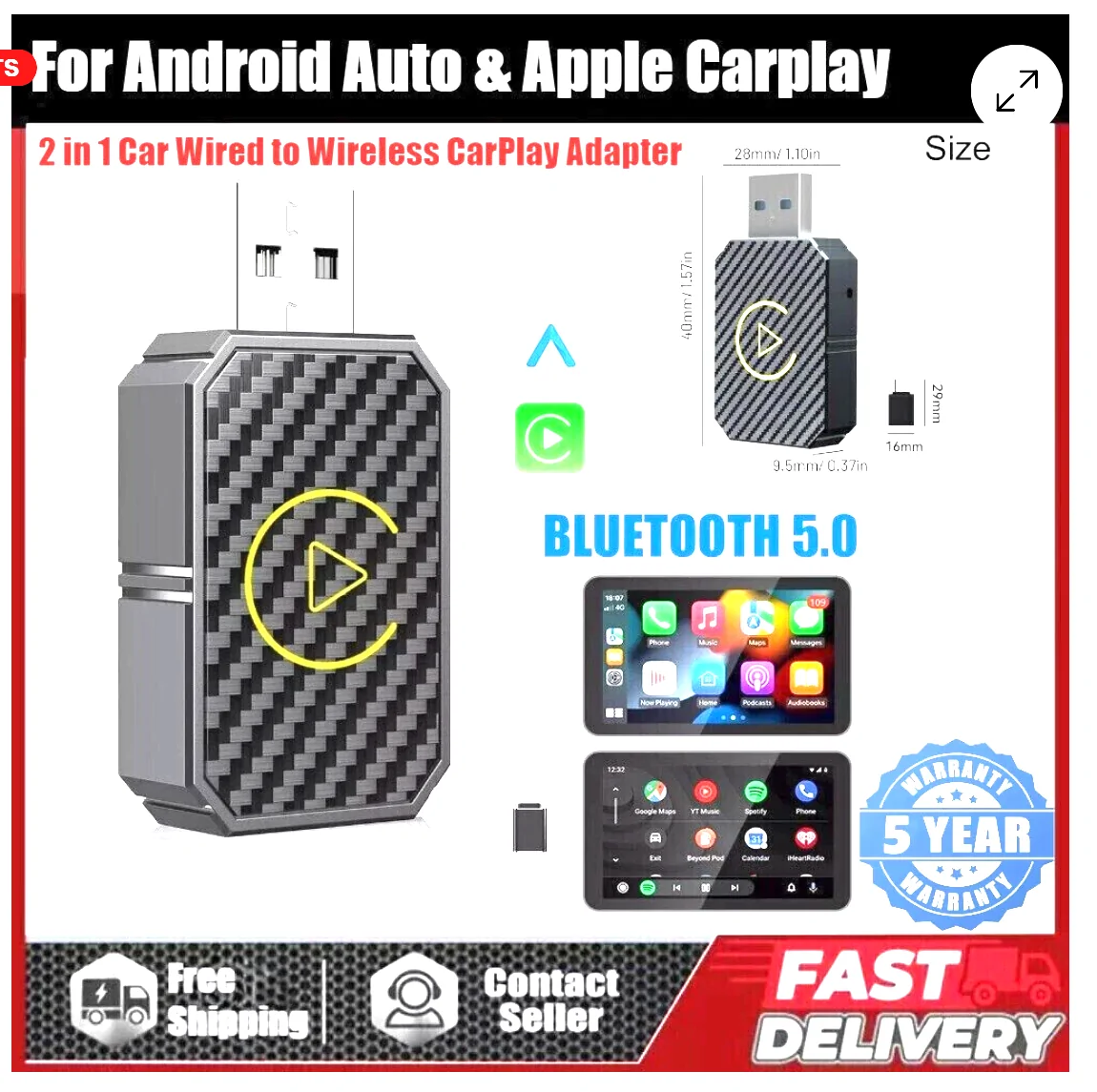
My wireless adapter:

Ford Maverick USB-C port stopped connecting 1773014643742-o0
Sponsored


Top