Bluetooth; I never bother with Android Auto. I thought AA was going to be lots more useful than it really is for me. I use a Garmin GPS for nav, mostly because I want it to work without cellular data. If an SMS msg comes in while I'm driving, I can poke a virtual button and have it spoken. RCS messages are invisible thru the truck's UI. I should research this more myself. The answer is out there somewhere...
You can download all the maps you want in the Google maps app and use it without an internet connection. All you need is GPS.
No traffic data, of course.
MetalsGeek, one thing I do is have it set so Android Auto connects, but does not open. My Sync 3 radio stays as my default screen. If I do get a phone call, or text, AA will then open. Also, if I press the voice command button.
Otherwise, the only way I know AA is connected is the option appears on the bottom row.
Just a thought if you haven't tried that. Maybe a tolerable work around for your needs?
MetalsGeek, one thing I do is have it set so Android Auto connects, but does not open. My Sync 3 radio stays as my default screen. If I do get a phone call, or text, AA will then open. Also, if I press the voice command button. Otherwise, the only way I know AA is connected is the option appears on the bottom row. Just a thought if you haven't tried that. Maybe a tolerable work around for your needs?
Thanks for the suggestion, although my XLT does not have SYNC3. I find that physically connecting my phone every time I jump in the truck to run a quick errand (to use AA) is simply too much hassle for what it's worth.
Thanks for the suggestion, although my XLT does not have SYNC3. I find that physically connecting my phone every time I jump in the truck to run a quick errand (to use AA) is simply too much hassle for what it's worth.
Yup, understood. Without a wireless dongle, that monkeying with the cable every trip would stink.
For the OP's original question, today I tested changing the voice in Google Assistant, and it does change the voice that reads the texts. So, if they're using AA, that option does work.
PF, are you using Android or an I-Phone? If Android, you could try changng the voice of Google Assistant to see if that would change the voice that reads your texts.
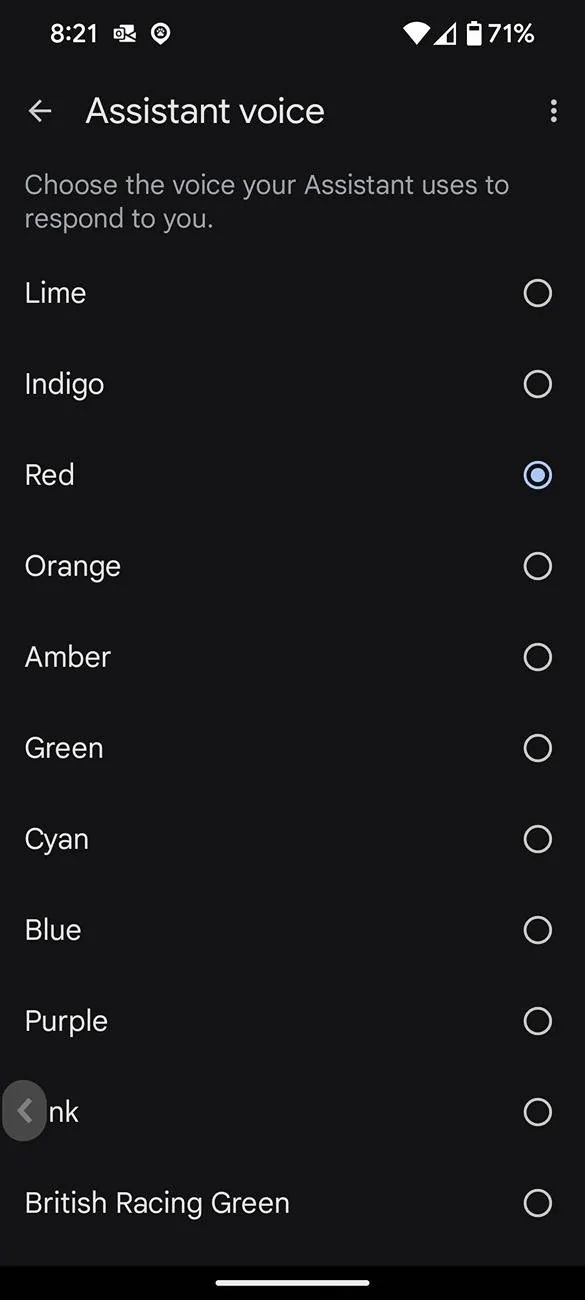
On my phone I go to setting > Google Service and Preferences > All Services > Search Assistant and Voice > Google Assistant > Assistant Voice & Sound" > Assistant Voice.
They label the voices as colors, but each is a different voice. I think "Red" is the default female voice. Blue is a male voice. Lots of different options.
I'm not sure this will change the voice that reads your texts, but it's possible as Android Auto uses Assistant.
Had the same annoyance with my car—voice reading texts just sounded off. Ended up switching some important messages to a service like bulk sms so I could hear them clearly on my phone instead. Much easier to follow a grocery list or quick reminders without the car’s voice getting in the way.