
Sponsored

No CarPlay Display, IPhone physical connected

Space

2.5L Hybrid
Well-known member
First Name
Roger
Joined
Oct 4, 2023
Threads
11
Messages
110
Reaction score
80
Location
Brandon, Florida
Vehicle(s)
Ford Maverick Lariat
Engine
2.5L Hybrid
Another CarPlay issue. This one seems to be shared by IPhone. Just took a one hour trip to Land O Lakes Brewing Supply store. CarPlay worked fine. Finished up and went to popular barbecue place for lunch. Inadvertently left my phone still connected in truck. On return trip home CarPlay would not display apps, but sound functional. Tried everything I could think of to get CarPlay working but hard problem existed. Noticed at stop light while fumbling with phone again that an overheat message popped up. Not there before. At home CarPlay display functional after about 5 minutes.
Google search reveals similar issues where charging phone with wireless or hard connections can cause overheating by itself. CarPlay has large operating overhead and causes heating. Truck cab gets hot fast in Florida sun. A-bit of a catch 22. The overheated phone was not immediately obvious. Some are saying a wireless adapter could avoid simultaneous charging heat causing aggravation. Or you could stick phone in an ice bucket. Don’t you love this new tech.🤓
Sponsored


Dad

2.5L Hybrid
Well-known member
First Name
Tom
Joined
Jan 9, 2022
Threads
58
Messages
5,334
Reaction score
5,730
Location
SoCal
Vehicle(s)
2022 Maverick, - Lariat, Hyundai Palisade
Engine
2.5L Hybrid
You probably thought of using a known working cable to connect. Let us know whether your issue was resolved.
 

Harry's Humble Hitch

2.0L EcoBoost
Well-known member
First Name
¬Harry
Joined
Sep 21, 2022
Threads
1
Messages
58
Reaction score
71
Location
the South East
Vehicle(s)
Dakota, Maverick
Engine
2.0L EcoBoost
Mine has a problem where CarPlay won't start after a key cycle with my phone connected. My theory is that plugging in the phone is what triggers CarPlay. While the infotainment powers off on exit, the 12v system stays on until the battery voltage is low. So, when the car turns back on, it's already receiving power, and there is nothing to trigger CarPlay.

I'll probably get Forscan and reduce the 12v timeout to 1-2 minutes.
 
Last edited:

Raphaelfns

2.0L EcoBoost
Member
First Name
Raphael
Joined
Mar 14, 2024
Threads
1
Messages
15
Reaction score
8
Location
Brazil
Vehicle(s)
2023 Ford Maverick Lariat
Engine
2.0L EcoBoost
Mine has a problem where CarPlay won't start after a key cycle with my phone connected. My theory is that plugging in the phone is what triggers CarPlay. While the infotainment powers off on exit, the 12v system stays on until the battery voltage is low. So, when the car turns back on, it's already receiving power, and there is nothing to trigger CarPlay.

I'll probably get Forscan and reduce the 12v timeout to 2-3 minutes.
Do you know how to do that on Forscan? If so, would you mind sharing here?
Thank you
 

Harry's Humble Hitch

2.0L EcoBoost
Well-known member
First Name
¬Harry
Joined
Sep 21, 2022
Threads
1
Messages
58
Reaction score
71
Location
the South East
Vehicle(s)
Dakota, Maverick
Engine
2.0L EcoBoost
Do you know how to do that on Forscan? If so, would you mind sharing here?
Thank you
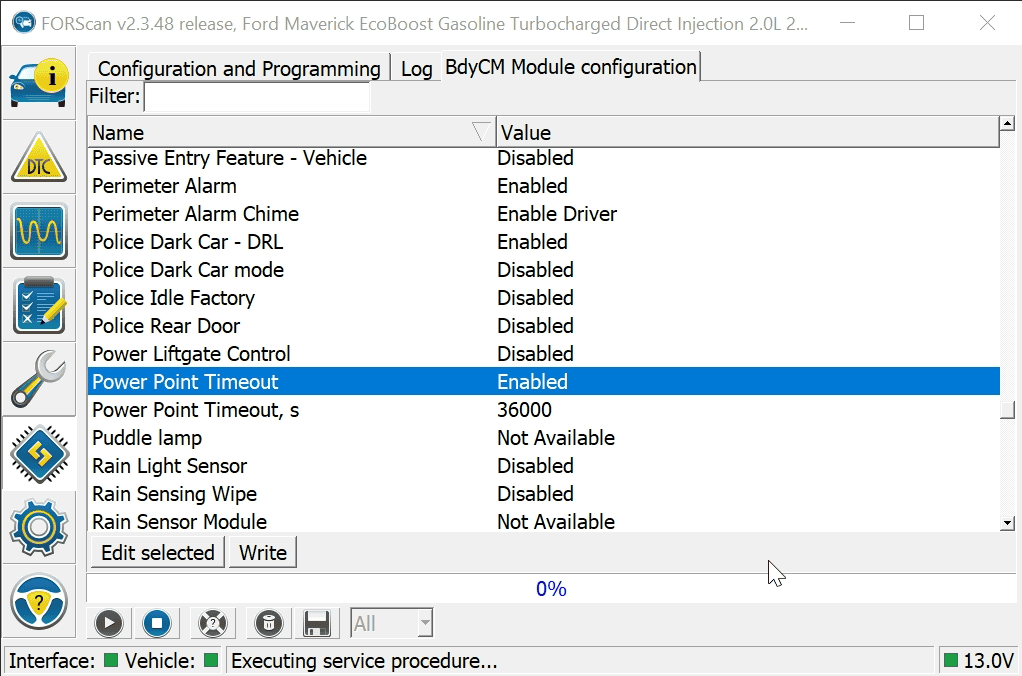
I'm going to try what is mentioned in the thread below. The default timeout should be set to 30 minutes if the ignition is in ACC mode and 75 minutes if the vehicle is off, assuming the battery monitor allows.
I needed to have my interior 12v outlets remain powered for some low-draw LED emergency lights that I sometimes use when my vehicle is not running. I tried finding a hardware solution via jumping wires in the fuse panel but instead found a Forscan solution. Initially, I was going to disable the timer, but on second thought, I changed the variable to 10 hours. This way, I shouldn't kill my battery if there is something plugged in with a parasitic draw.

I have confirmed that this will override the timer past the default time, but I haven't waited the entire 10 hours yet to see if it cuts off at 36,000 seconds. Interestingly, I was sitting in the vehicle at the 15-minute mark and heard the "click" when the sockets would have turned off, but they remained on.

[ UPDATE: I have confirmed this setting change affects all power outlets (interior 12v and USB, USB-C, and both external pigtails. ]

Picture showing setting within the BCM configuration tool:


Desktop-screenshot.png
Sponsored

 
Last edited:


Top