
Sponsored

JOB1 Climate Control Swap Question/Help

UberGadgetFreak

2.5L Hybrid
Well-known member
First Name
Joe
Joined
Jun 28, 2021
Threads
9
Messages
552
Reaction score
771
Location
Mt. Holly, NC
Vehicle(s)
03 Marauder, 21 Bronco, 22 Maverick
Engine
2.5L Hybrid
First, a big thank you to @Redneck Garage for his video on changing out the climate controls. I just did this on my Tremor today.

As they do require some tweaking via ForSCAN, I wanted to see if I could get some help on something.

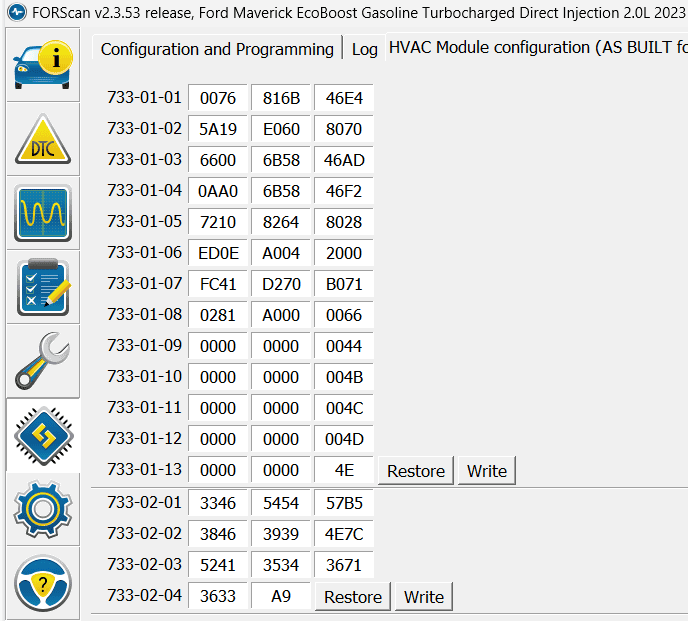
The AsBuilt on the Tremor before making changes with the factory JOB2 controls:
Ford Maverick JOB1 Climate Control Swap Question/Help 1685205261603


Then I swapped the controls for the JOB1 version and used the AsBuilt values from my 2022 Lariat Hybrid:
Ford Maverick JOB1 Climate Control Swap Question/Help 1685205276629


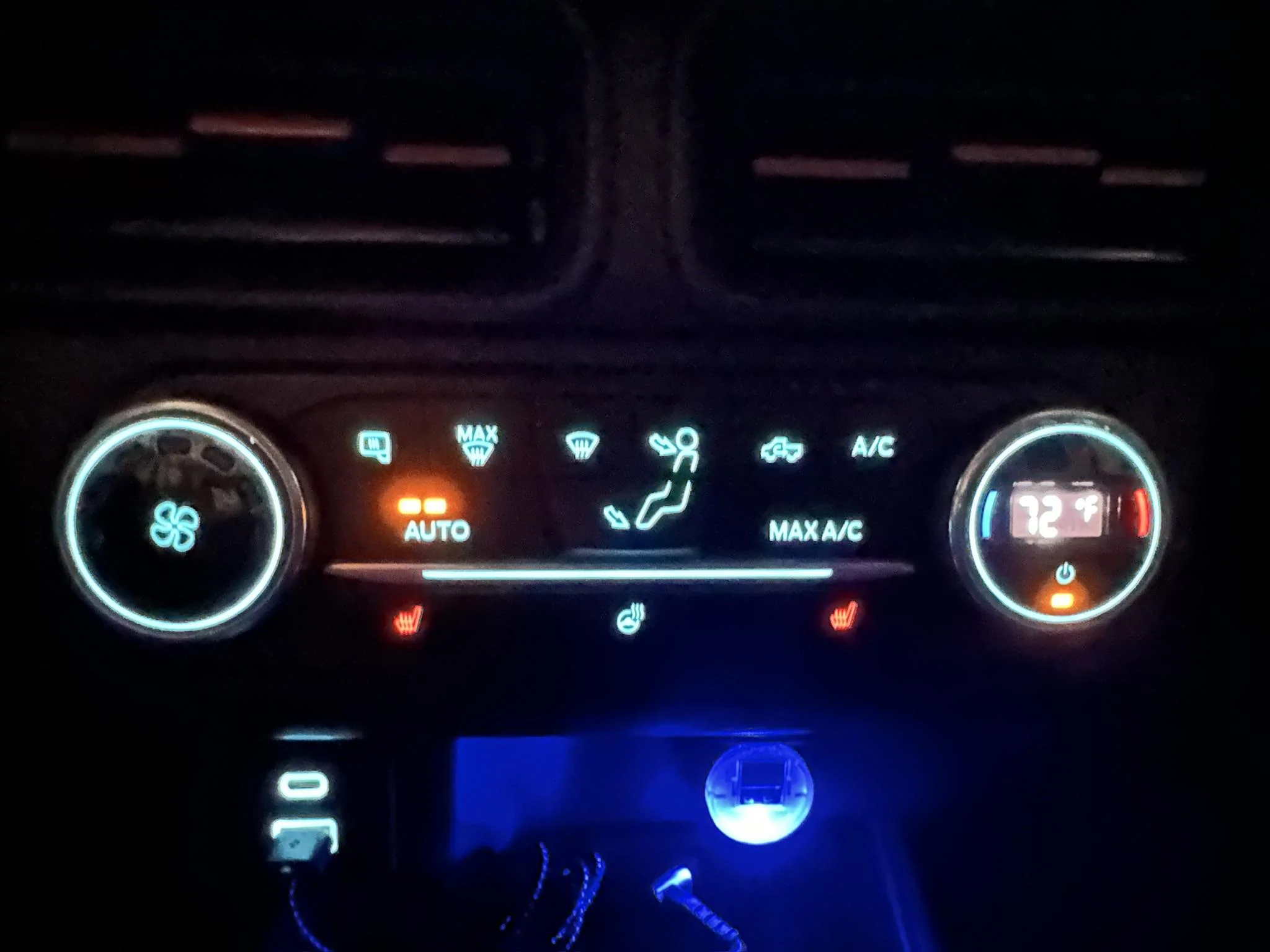
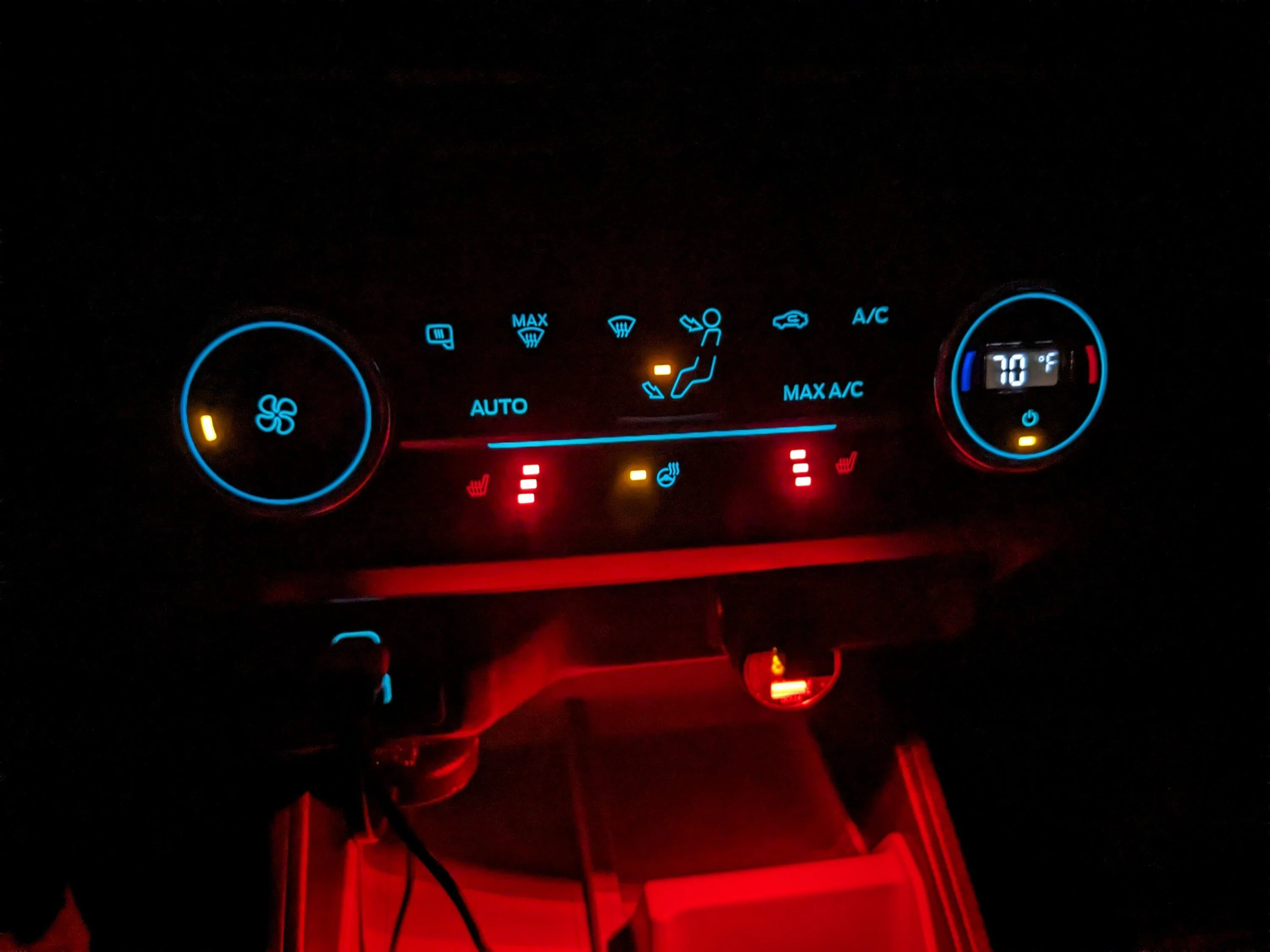
Everything seems to work fine. AC button, heated seats, wheel, mirrors, etc. But I am being OCD :)

I got a checksum error on 733-01-08.

My ask is if someone can share their AsBuilt data for a 2022 EB Lariat with the JOB1 climate controls for comparison, and most notably what is 733-01-08 on those?? But if any values differ from above, I am interested to know which ones.

Also, on the HVAC values, there is one for Engine Type that did switch to Hybrid after this was written. I set it back to Gasoline and wrote it, but it did not change the values from what you see above.


[EDIT]
My first image with values is all 0000 and FFFF for the first 2 columns. I am not sure if that was ForScan being weird or my Tremor is out of whack as I checked the AsBuilt values, and they were definitely not that way.

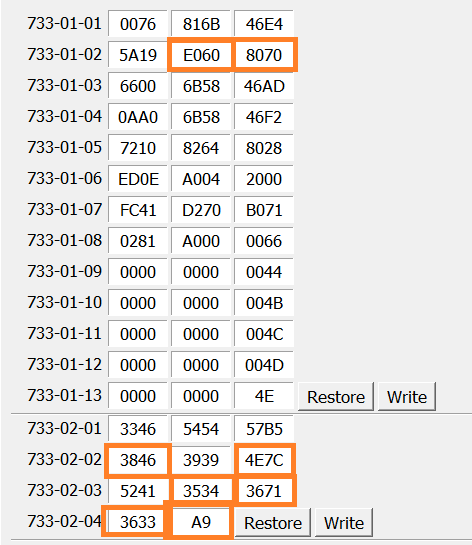
I manually set the original values from the AsBuilt data on the Motorcraft Service site, then compared to the VIN for a 2022 Lariat AWD model I found on Carvana's site.

The items highlighted are the only values that differed between what should have been my AsBuilt values and the 2022 Lariat AWD with the JOB1 control values. This time they wrote successfully, too:
Ford Maverick JOB1 Climate Control Swap Question/Help 1685229533181
Sponsored

 
Last edited:

peekaypee

2.5L Hybrid
Well-known member
First Name
Paul
Joined
Jul 1, 2021
Threads
1
Messages
50
Reaction score
26
Location
San Diego, CA
Vehicle(s)
Toyota Pickup, Maverick Lariat Hybrid & Tremor
Engine
2.5L Hybrid
First, a big thank you to @Redneck Garage for his video on changing out the climate controls. I just did this on my Tremor today.

As they do require some tweaking via ForSCAN, I wanted to see if I could get some help on something.

The AsBuilt on the Tremor before making changes with the factory JOB2 controls:
1685205261603.png


Then I swapped the controls for the JOB1 version and used the AsBuilt values from my 2022 Lariat Hybrid:
1685205276629.png


Everything seems to work fine. AC button, heated seats, wheel, mirrors, etc. But I am being OCD :)

I got a checksum error on 733-01-08.

My ask is if someone can share their AsBuilt data for a 2022 EB Lariat with the JOB1 climate controls for comparison, and most notably what is 733-01-08 on those?? But if any values differ from above, I am interested to know which ones.

Also, on the HVAC values, there is one for Engine Type that did switch to Hybrid after this was written. I set it back to Gasoline and wrote it, but it did not change the values from what you see above.
First, a big thank you to @Redneck Garage for his video on changing out the climate controls. I just did this on my Tremor today.

As they do require some tweaking via ForSCAN, I wanted to see if I could get some help on something.

The AsBuilt on the Tremor before making changes with the factory JOB2 controls:
1685205261603.png


Then I swapped the controls for the JOB1 version and used the AsBuilt values from my 2022 Lariat Hybrid:
1685205276629.png


Everything seems to work fine. AC button, heated seats, wheel, mirrors, etc. But I am being OCD :)

I got a checksum error on 733-01-08.

My ask is if someone can share their AsBuilt data for a 2022 EB Lariat with the JOB1 climate controls for comparison, and most notably what is 733-01-08 on those?? But if any values differ from above, I am interested to know which ones.

Also, on the HVAC values, there is one for Engine Type that did switch to Hybrid after this was written. I set it back to Gasoline and wrote it, but it did not change the values from what you see above.
Hi UGF. Like that you have done this. I want to do it too, and watched Red's...video too. I'm new to Forscan, but recently bought the cable and downloaded the freeware software for Forscan. Any steps you could walk me through when you have completed yours? Also, where did you end up purchasing your retro climate controllers? Thanks ahead of time. Sincerely Paul
 
OP
OP
UberGadgetFreak

UberGadgetFreak

2.5L Hybrid
Well-known member
First Name
Joe
Joined
Jun 28, 2021
Threads
9
Messages
552
Reaction score
771
Location
Mt. Holly, NC
Vehicle(s)
03 Marauder, 21 Bronco, 22 Maverick
Engine
2.5L Hybrid
Hi UGF. Like that you have done this. I want to do it too, and watched Red's...video too. I'm new to Forscan, but recently bought the cable and downloaded the freeware software for Forscan. Any steps you could walk me through when you have completed yours? Also, where did you end up purchasing your retro climate controllers? Thanks ahead of time. Sincerely Paul
I got my JOB1 controls from Tasca Parts.
Order Ford Part Number: NZ6Z-19980-B (Link goes to Tasca's page to order it).

Its not too complicated, but I know I'd miss steps right now trying it from memory. I will go in and get some screenshots and put a walkthough post in this thread a bit later today for you.
 

peekaypee

2.5L Hybrid
Well-known member
First Name
Paul
Joined
Jul 1, 2021
Threads
1
Messages
50
Reaction score
26
Location
San Diego, CA
Vehicle(s)
Toyota Pickup, Maverick Lariat Hybrid & Tremor
Engine
2.5L Hybrid
I got my JOB1 controls from Tasca Parts.
Order Ford Part Number: NZ6Z-19980-B (Link goes to Tasca's page to order it).

Its not too complicated, but I know I'd miss steps right now trying it from memory. I will go in and get some screenshots and put a walkthough post in this thread a bit later today for you.
Thanks so much for your speedy reply. That's awesome. I also have a Tremor and thought the same thing after watching Redneck Garage's swap out. Those new stylled ones are annoying because you have to look up at the screen all the time.
Good luck with completing it.. as I'm excited to see your post, and then do it myself 🙌
 
OP
OP
UberGadgetFreak

UberGadgetFreak

2.5L Hybrid
Well-known member
First Name
Joe
Joined
Jun 28, 2021
Threads
9
Messages
552
Reaction score
771
Location
Mt. Holly, NC
Vehicle(s)
03 Marauder, 21 Bronco, 22 Maverick
Engine
2.5L Hybrid
ForScan Steps:

Before you begin, if you have never set up ForScan with the OBDLink-EX cable, connect the cable to a USB port and see if the light turns yellow. If the light is red, the drivers are not yet installed. If they do not install automatically after a few minutes, then you can download them from this link. Download, extract, and install the FTDI Virtual COM Port Driver.

You will also need to have an extended license for ForScan. You can get a free 2-month Extended license from this link. Follow the instructions to install the license.

I am using Windows, so my steps are for that OS. These steps assume the new climate controls are installed (easy to do: remove the trim plate, disconnect two cables, remove 4 6mm screws that attach the climate controls to the trim, install the new one, bolts should be snug but not tight, reconnect cables then snap the trim piece back in place).

Step 1: Start ForScan with the cable plugged in to your laptop.
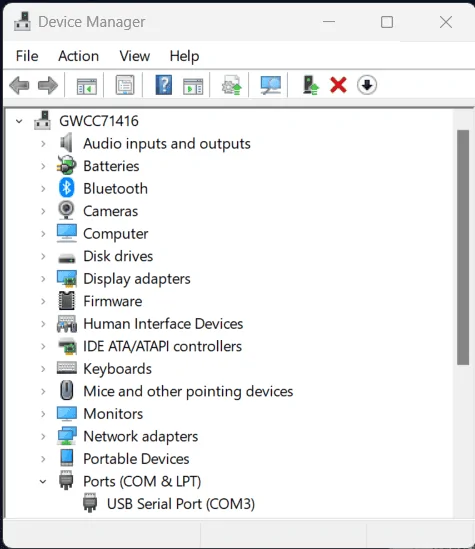
Verify it shows up as a regular COM port in Device Manager (right-click the Start button and select Device Manager. From there, expand Ports (COM & LPT). You should see a USB Serial Port listed:
Ford Maverick JOB1 Climate Control Swap Question/Help 1685221498140


Step 2: Connect the OBD connector to the OBD port under the left side of the dash. The light should turn green. This means it has a connection.

Step 3: Turn on the vehicle, but do not start the engine.

Step 4: Start ForScan. It will open to a mostly empty screen.

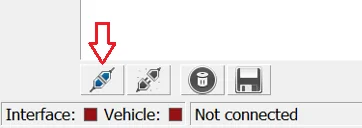
Step 5: click the connect button on the bottom button bar:
Ford Maverick JOB1 Climate Control Swap Question/Help 1685221645888


ForScan will establish a data connection. You may see prompts for the folllowing:
- Update cable firmware
- Update port speed settings
- Save a profile for your vehicle

Answer YES to all three.

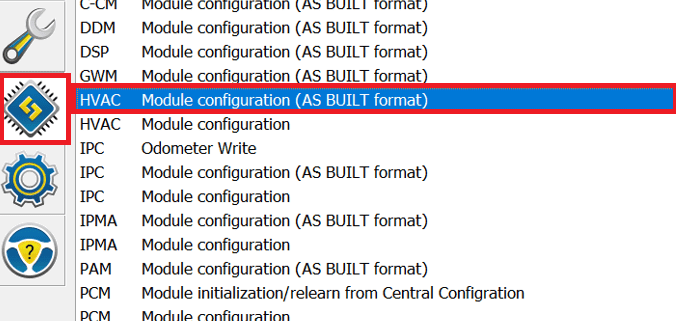
Step 6: Once its past all the prompts and connects, click the CHIP icon on the left, then click on the line for "HVAC Module Configuration (AS BUILT format)"

Ford Maverick JOB1 Climate Control Swap Question/Help 1685221800913


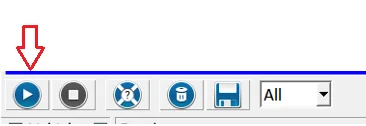
Step 7: click the "Start Service Procedure" button on the bottom tool bar:

Ford Maverick JOB1 Climate Control Swap Question/Help 1685221875900


This will read values. You may see the log information scroll as it reads in data.

You will also get a warning saying "Changing configuration is potentially not safe". Answer YES to this dialog.

Step 8: Enter the appropriate values for the JOB1 Climate Control Unit in the screen that appears:
Ford Maverick JOB1 Climate Control Swap Question/Help 1685229642126

[EDIT] Image updated to use the more correct values to add JOB1 controls to my Tremor

You should only have to modify 4 lines:
733-01-02
733-02-02
733-02-03
733-02-04

After all values are entered, click the "Write All" button at the bottom of the screen.

You will get a few warnings on the instrument cluster, the lights may flash, and then its done. Click the Stop service procedure button (the one to the right of the start button).

Step 9: turn off the vehicle, disconnect the cable, then turn it back on again. The JOB1 climate controls should now be working properly.
 
Last edited:

Sponsored

volksnuts

2.0L EcoBoost
Well-known member
First Name
Brian
Joined
Nov 12, 2021
Threads
21
Messages
1,769
Reaction score
2,916
Location
Katy,TX
Vehicle(s)
Maverick Lariat HPR
Engine
2.0L EcoBoost
Clubs
 
So can you change drive modes?
I wasn’t aware you could still purchase the controls with screens new
I thought they were discontinued and the new screen less ones would be substituted (now that I type it out it seems like a bad idea in Fords part to not have original configuration parts available)
 
OP
OP
UberGadgetFreak

UberGadgetFreak

2.5L Hybrid
Well-known member
First Name
Joe
Joined
Jun 28, 2021
Threads
9
Messages
552
Reaction score
771
Location
Mt. Holly, NC
Vehicle(s)
03 Marauder, 21 Bronco, 22 Maverick
Engine
2.5L Hybrid
So can you change drive modes?
I wasn’t aware you could still purchase the controls with screens new
I thought they were discontinued and the new screen less ones would be substituted (now that I type it out it seems like a bad idea in Fords part to not have original configuration parts available)
Its a 'service life' thing where any new vehicle has to have the same parts available for a number of years after the vehicle is produced.

And yes, I was able to change drive modes. I forgot to disable the first setting under ABS Module, but once I set that, it works.
 

Christato71

2.0L EcoBoost
Active member
Joined
Jun 12, 2023
Threads
2
Messages
25
Reaction score
17
Location
USA
Vehicle(s)
2023 Ford Maverick Lariat
Engine
2.0L EcoBoost
Clubs
 
ForScan Steps:

Before you begin, if you have never set up ForScan with the OBDLink-EX cable, connect the cable to a USB port and see if the light turns yellow. If the light is red, the drivers are not yet installed. If they do not install automatically after a few minutes, then you can download them from this link. Download, extract, and install the FTDI Virtual COM Port Driver.

You will also need to have an extended license for ForScan. You can get a free 2-month Extended license from this link. Follow the instructions to install the license.

I am using Windows, so my steps are for that OS. These steps assume the new climate controls are installed (easy to do: remove the trim plate, disconnect two cables, remove 4 6mm screws that attach the climate controls to the trim, install the new one, bolts should be snug but not tight, reconnect cables then snap the trim piece back in place).

Step 1: Start ForScan with the cable plugged in to your laptop.
Verify it shows up as a regular COM port in Device Manager (right-click the Start button and select Device Manager. From there, expand Ports (COM & LPT). You should see a USB Serial Port listed:
1685221498140.png


Step 2: Connect the OBD connector to the OBD port under the left side of the dash. The light should turn green. This means it has a connection.

Step 3: Turn on the vehicle, but do not start the engine.

Step 4: Start ForScan. It will open to a mostly empty screen.

Step 5: click the connect button on the bottom button bar:
1685221645888.png


ForScan will establish a data connection. You may see prompts for the folllowing:
- Update cable firmware
- Update port speed settings
- Save a profile for your vehicle

Answer YES to all three.

Step 6: Once its past all the prompts and connects, click the CHIP icon on the left, then click on the line for "HVAC Module Configuration (AS BUILT format)"

1685221800913.png


Step 7: click the "Start Service Procedure" button on the bottom tool bar:

1685221875900.png


This will read values. You may see the log information scroll as it reads in data.

You will also get a warning saying "Changing configuration is potentially not safe". Answer YES to this dialog.

Step 8: Enter the appropriate values for the JOB1 Climate Control Unit in the screen that appears:
1685229642126.png

[EDIT] Image updated to use the more correct values to add JOB1 controls to my Tremor

You should only have to modify 4 lines:
733-01-02
733-02-02
733-02-03
733-02-04

After all values are entered, click the "Write All" button at the bottom of the screen.

You will get a few warnings on the instrument cluster, the lights may flash, and then its done. Click the Stop service procedure button (the one to the right of the start button).

Step 9: turn off the vehicle, disconnect the cable, then turn it back on again. The JOB1 climate controls should now be working properly.
I also have a lariat Maverick and thinking about making this swap. I would assume I would just need to make the above changes as well?
 
OP
OP
UberGadgetFreak

UberGadgetFreak

2.5L Hybrid
Well-known member
First Name
Joe
Joined
Jun 28, 2021
Threads
9
Messages
552
Reaction score
771
Location
Mt. Holly, NC
Vehicle(s)
03 Marauder, 21 Bronco, 22 Maverick
Engine
2.5L Hybrid
I also have a lariat Maverick and thinking about making this swap. I would assume I would just need to make the above changes as well?
Yes. At this point, both my FE and Tremor have identical values and everything works in both.
 

TheShark

2.5L Hybrid
Well-known member
First Name
Mark
Joined
Jul 22, 2021
Threads
12
Messages
1,504
Reaction score
2,281
Location
North Carolina
Vehicle(s)
2025 Maverick Lariat AWD Hybrid, 2024 2dr Bronco Heritage Limited Edition
Engine
2.5L Hybrid
Clubs
 
Yes. At this point, both my FE and Tremor have identical values and everything works in both.
Thanks for the Forscan settings. I installed a 2020 Ford Escape temperature control unit in my 2023 XLT FX4 Lux and got everything working. Picked up the unit on ebay for $55 with free shipping. I installed it and of course the heated seats, steering wheel and mirrors didn't work, followed your Forscan settings changing the value of the 4 settings you outlined, worked like charm. The thing I sweated the most was swapping the heated mirror and the recirculation button from the old unit to the new, took my time and it worked with no broken or scratched parts. One added thing I did get was a bit of chrome bling in the XLT, the new unit has a chrome strip right above the heated seats and steering wheel buttons which lights up.

Ford Maverick JOB1 Climate Control Swap Question/Help C9FB270F-0E2E-4DC4-A27F-2B673C77BE77_1_102_o
 
Sponsored

Dignam

2.5L Hybrid
Well-known member
Joined
Jan 19, 2023
Threads
3
Messages
242
Reaction score
367
Location
Madison, WI
Vehicle(s)
'25 Maverick Lariat
Engine
2.5L Hybrid
Very similar to TheShark, I found a 2020 Escape HVAC control on Ebay to replace mine on my '23 XLT FX4 4K Lux.

As for the FORScan updates, I ended up pulling a factory AB file for the HVAC module since almost none of my values matches the ones listed above in this thread. Slight heart attack there. All seems to be working well though!

(decided to leave the car recirc button just for fun)
Ford Maverick JOB1 Climate Control Swap Question/Help PXL_20231209_011350091
 

Automan21

2.0L EcoBoost
Well-known member
First Name
Mel
Joined
Nov 30, 2023
Threads
23
Messages
1,061
Reaction score
925
Location
CT
Vehicle(s)
‘23 XLT Eco AWD 4K Tow
Engine
2.0L EcoBoost
So I did this swap for the digital unit with the heated wheeling seat buttons cuz I'm doing those mods soon. Got it to work easy since it was a EB XLT to EB ELT swap.
My issue is that when I auto start from the Ford app it also starts the heated seat and heated wheel. Even though I don't have them installed yet.
Anyone know why and can I change this?
 

Toinky

2.0L EcoBoost
Well-known member
Joined
Nov 30, 2022
Threads
7
Messages
105
Reaction score
197
Location
California
Vehicle(s)
Toyota Tacoma
Engine
2.0L EcoBoost
So I did this swap for the digital unit with the heated wheeling seat buttons cuz I'm doing those mods soon. Got it to work easy since it was a EB XLT to EB ELT swap.
My issue is that when I auto start from the Ford app it also starts the heated seat and heated wheel. Even though I don't have them installed yet.
Anyone know why and can I change this?
My Lariat Lux has a menu option called something like Remote Start Options. Under that menu you can select what it does with the seats and steering wheel and maybe even the HVAC. (Not near the truck or I would check. I can get the exact details if you'd like, but I figure if you don't have the menu option, there's no point. And if you do have the menu option, you can play on your own.) I also recall seeing the same settings in Forscan. You can tell it to do nothing (except start the engine) if you'd like.
 

Automan21

2.0L EcoBoost
Well-known member
First Name
Mel
Joined
Nov 30, 2023
Threads
23
Messages
1,061
Reaction score
925
Location
CT
Vehicle(s)
‘23 XLT Eco AWD 4K Tow
Engine
2.0L EcoBoost
My Lariat Lux has a menu option called something like Remote Start Options. Under that menu you can select what it does with the seats and steering wheel and maybe even the HVAC. (Not near the truck or I would check. I can get the exact details if you'd like, but I figure if you don't have the menu option, there's no point. And if you do have the menu option, you can play on your own.) I also recall seeing the same settings in Forscan. You can tell it to do nothing (except start the engine) if you'd like.
I do have that in the menu but it just says auto climate or last climate.
I might have to check in forscan. Getting warmer and don’t want a hot seat or wheel on start up when I get it all wired up.
Any way the climate controls have been programmed from the donor vehicle and got stuck in that mode?
 

Toinky

2.0L EcoBoost
Well-known member
Joined
Nov 30, 2022
Threads
7
Messages
105
Reaction score
197
Location
California
Vehicle(s)
Toyota Tacoma
Engine
2.0L EcoBoost
I do have that in the menu but it just says auto climate or last climate.
I might have to check in forscan. Getting warmer and don’t want a hot seat or wheel on start up when I get it all wired up.
Any way the climate controls have been programmed from the donor vehicle and got stuck in that mode?
I haven't tested it, but I'm confident that "auto climate" would NOT turn on the seat or steering wheel heaters if it's hot outside, right? It (at least stock) looks at the ambient temp and adjusts hot/cold based on that. I think that's also something you may be able to adjust in Forscan (i.e., what temp trigger AC vs. heat). I'd be glad to poke around my stock model to see what is set and what is tweakable. Just let me know. Oh, and to state the obvious, "last climate" would turn on with whatever setting you shut it off with.
Sponsored


Top