
Sponsored

How do you install Android Auto?

dlhort1955

2.0L EcoBoost
Well-known member
First Name
Dave
Joined
Nov 17, 2023
Threads
30
Messages
489
Reaction score
494
Location
Milwaukee
Vehicle(s)
Maverick FX4
Engine
2.0L EcoBoost
I had my phone installed. Google Pixel 8, so the phone is good to go. I tried to install AA and that disconnected the phone. I also have the Motorola dohickey so I dont need a USB cord. The instructions with the Motorola do not match what the phone settings state. Is there a good youtube video out there where the guy speaks understandable english? I understand I have to install it with the cord first and then change it to Bluetooth.
Sponsored

 

mamboman777

2.5L Hybrid
Well-known member
First Name
Josh
Joined
Aug 3, 2021
Threads
111
Messages
3,476
Reaction score
11,812
Location
NRH, TX
Vehicle(s)
2012 Ford Focus, 2022 Ford Maverick
Engine
2.5L Hybrid
I'm not sure I remember, but let's give it a go ....

Plug in your phone to USB using data cable. Follow prompts on phone and/or Ford screen.

After Android Auto is confirmed working while plugged in, unplug phone and plug in Motorola dongle.

Then follow instructions that came with Motorola dongle...I first plug in the dongle and wait about a minute (it has to boot up). I think it says to pair with the dongle using the phone Bluetooth settings. If that doesn't work, try connecting to the Wi-Fi network on the Motorola return your phone Wi-Fi settings .

After connected to dongle, follow instructions on phone and or Ford .
 

mamboman777

2.5L Hybrid
Well-known member
First Name
Josh
Joined
Aug 3, 2021
Threads
111
Messages
3,476
Reaction score
11,812
Location
NRH, TX
Vehicle(s)
2012 Ford Focus, 2022 Ford Maverick
Engine
2.5L Hybrid
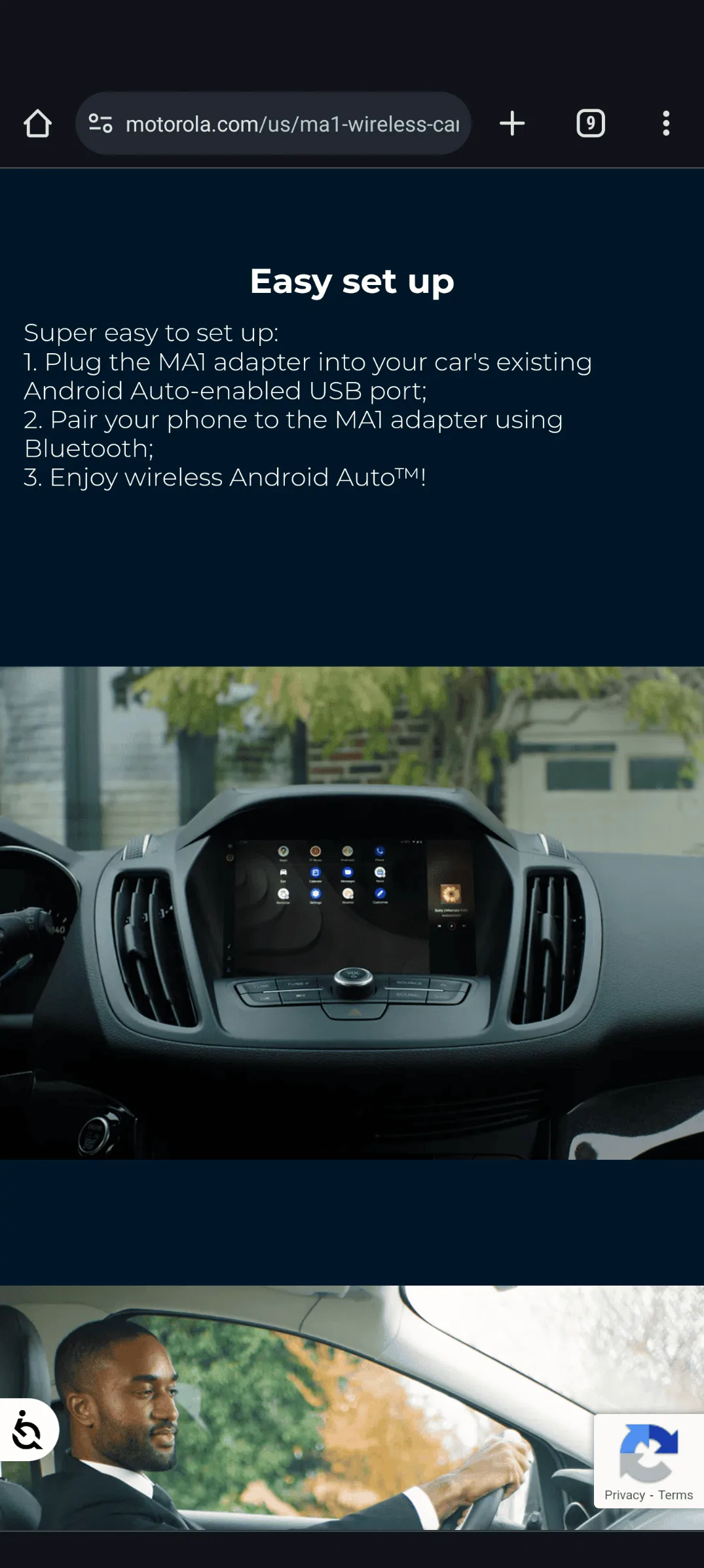
Here's the instructions for the Motorola dongle:

Ford Maverick How do you install Android Auto? 1000003227
 

ejouie

2.0L EcoBoost
Well-known member
First Name
Evan
Joined
Sep 21, 2022
Threads
10
Messages
358
Reaction score
444
Location
Newnan, GA
Vehicle(s)
'23 Ford Maverick, Atlas Blue, FWD, EcoBoost, XLT
Engine
2.0L EcoBoost
Clubs
 
It will use Bluetooth to talk with the phone while it sets up a Wi-Fi connection between the two.

Sort of like using text messages to coordinate the start of a video call.
 

Decayed

2.0L EcoBoost
Well-known member
First Name
yes
Joined
Oct 18, 2021
Threads
51
Messages
3,358
Reaction score
5,210
Location
Directly above the center of the Earth
Vehicle(s)
a car
Engine
2.0L EcoBoost
You don't "install" android auto. Both the phone and the vehicle are already set up for it. To start the connection just attach the phone via the USB port. Mind you, once it starts, control shifts from the phone screen to the vehicle touchscreen. If that doesn't work you have a problem unrelated to the dongle.

Once you verify it's functioning properly, try putting the dongle in the loop.
 

Sponsored

Dnel29

2.0L EcoBoost
Well-known member
First Name
Dave
Joined
Jan 23, 2022
Threads
14
Messages
202
Reaction score
228
Location
Regina, SK, Canada
Vehicle(s)
2025 Ford Maverick Lariat EcoBoost
Engine
2.0L EcoBoost
Should be straight forward for connecting, if the adapter works.

I've had issues with the wireless AA adapters. Maybe you'll have better luck!

Biggest issue I've had is initial connection and once connected it would disconnect after about 10 minutes. Tried 3 different adapters within a 3 week period...returned them all.

Hopefully it's just my Mk7 VW GTi, and won't be an issue on the Maverick.
 

Ozarkbeard

Well-known member
Joined
May 22, 2022
Threads
14
Messages
4,344
Reaction score
5,477
Location
.
Vehicle(s)
.
Engine
Undecided
I had my phone installed. Google Pixel 8, so the phone is good to go. I tried to install AA and that disconnected the phone. I also have the Motorola dohickey so I dont need a USB cord. The instructions with the Motorola do not match what the phone settings state. Is there a good youtube video out there where the guy speaks understandable english? I understand I have to install it with the cord first and then change it to Bluetooth.
First time, connect your phone directly using a brand name USB C plug on both ends. My user manual (in pretty good English) discusses Android Auto on page 388. Your manual pages may be different. If you have the .pdf of the manual you can find instructions by searching Android Auto.
 

DadsLariat

2.5L Hybrid
Well-known member
First Name
Dan
Joined
Feb 9, 2023
Threads
8
Messages
119
Reaction score
186
Location
SouthEast Wisconsin
Vehicle(s)
2024 Mav Lariat Hybrid, 2015 Hyundai Santa Fe
Engine
2.5L Hybrid
While waiting for my Maverick to be built, I purchased a Motorola M1A (dohickey). I plugged it into a USB port on my PC, hit the pair button on the M1A and paired my phone to it. When my Mav was finally at home,, I just plugged in the M1A and hit the Android Auto on my screen and followed instruction. I never used a cable. I have a Google Pixel 6. Works great with my Maverick.
 
OP
OP
dlhort1955

dlhort1955

2.0L EcoBoost
Well-known member
First Name
Dave
Joined
Nov 17, 2023
Threads
30
Messages
489
Reaction score
494
Location
Milwaukee
Vehicle(s)
Maverick FX4
Engine
2.0L EcoBoost
I plug in my phone to the USB port on bottom left and I get this message on the phone:

Smart Device Link Core
Component USB

No installed apps work with
this USB accessory. Learn more
about this accessory at
http://www.smartdevicelink.com

cancel view


If I click on view it takes me to the SDL website.

Then I am lost.
 

Art Vandelay

2.5L Hybrid
Well-known member
First Name
Brian
Joined
Jan 24, 2021
Threads
19
Messages
810
Reaction score
1,384
Location
New York
Vehicle(s)
2023 Hybrid Lariat Alto Blue
Engine
2.5L Hybrid
I plug in my phone to the USB port on bottom left and I get this message on the phone:

Smart Device Link Core
Component USB

No installed apps work with
this USB accessory. Learn more
about this accessory at
http://www.smartdevicelink.com

cancel view


If I click on view it takes me to the SDL website.

Then I am lost.
Did you first use Android Auto in your Maverick without the wireless adapter with a USB cable?
 
Sponsored

CurtisB

2.5L Hybrid
Well-known member
Joined
Jan 11, 2024
Threads
6
Messages
1,953
Reaction score
2,528
Location
92868
Vehicle(s)
2023 Maverick XLT Hybrid
Engine
2.5L Hybrid
Clubs
 
Plug in the adapter FIRST. Press button on the side of the adapter to make blue light flash. Open up the bluetooth on you phone, look for the adapter (Instructions should tell you the name of your adapter), select the adaptor...................should be done!
 

Decayed

2.0L EcoBoost
Well-known member
First Name
yes
Joined
Oct 18, 2021
Threads
51
Messages
3,358
Reaction score
5,210
Location
Directly above the center of the Earth
Vehicle(s)
a car
Engine
2.0L EcoBoost
I plug in my phone to the USB port on bottom left and I get this message on the phone:

Smart Device Link Core
Component USB

No installed apps work with
this USB accessory. Learn more
about this accessory at
http://www.smartdevicelink.com

cancel view

If I click on view it takes me to the SDL website.

Then I am lost.
That shouldn't happen when you connect your phone. What make model year is it? Do you have another phone you can try?

I'd call the dealer about it.
 
OP
OP
dlhort1955

dlhort1955

2.0L EcoBoost
Well-known member
First Name
Dave
Joined
Nov 17, 2023
Threads
30
Messages
489
Reaction score
494
Location
Milwaukee
Vehicle(s)
Maverick FX4
Engine
2.0L EcoBoost
That shouldn't happen when you connect your phone. What make model year is it? Do you have another phone you can try?

I'd call the dealer about it.
Decayed, it is a 2023 XLT. All other phones in the house are iphones. I use a droid.
 

Decayed

2.0L EcoBoost
Well-known member
First Name
yes
Joined
Oct 18, 2021
Threads
51
Messages
3,358
Reaction score
5,210
Location
Directly above the center of the Earth
Vehicle(s)
a car
Engine
2.0L EcoBoost
Decayed, it is a 2023 XLT. All other phones in the house are iphones. I use a droid.

Sorry I meant the phone.

ETA did you try the phone.
Sponsored


Top