Anyone know how. I have 2 new Fords and one phone. Read that you can, but do not see how.
Area51BS Well-known member First Name Ron Joined Oct 11, 2021 Threads 92 Messages 801 Reaction score 1,117 Location Florida Vehicle(s) Maverick Engine 2.0L EcoBoost Feb 10, 2022 Thread starter #1 Anyone know how. I have 2 new Fords and one phone. Read that you can, but do not see how. Sponsored
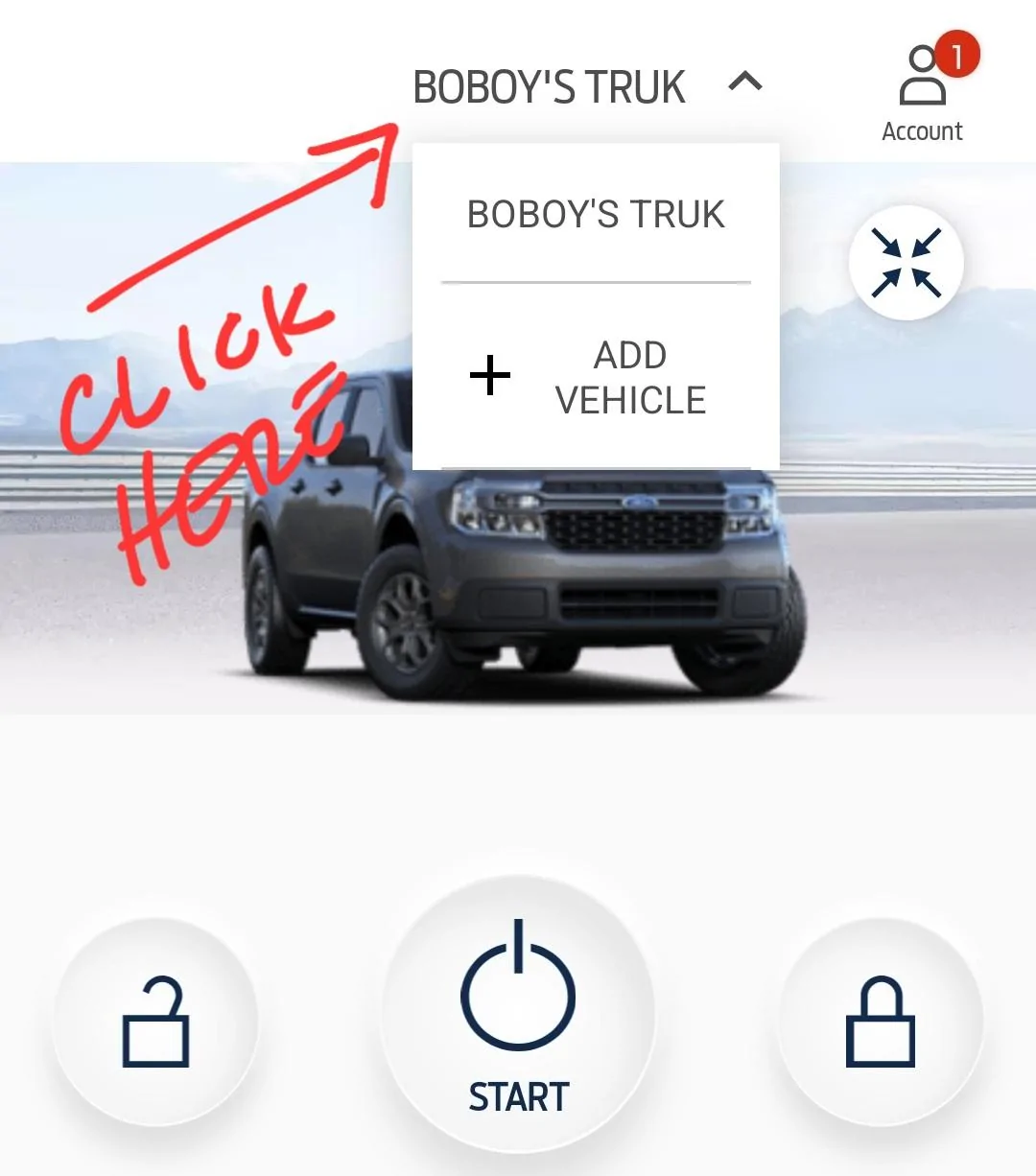
Xbbqpitmaster Well-known member First Name Bill Joined Dec 21, 2021 Threads 11 Messages 399 Reaction score 407 Location Full Time Gypsy Vehicle(s) 2024 Ford Maverick XLT Engine 2.5L Hybrid Feb 10, 2022 #2 Open the app, tap “add vehicle”, then you can just type in the vin, or scan the barcode on the door jam.
Open the app, tap “add vehicle”, then you can just type in the vin, or scan the barcode on the door jam.
BoboysTruck Well-known member Joined Dec 14, 2021 Threads 27 Messages 560 Reaction score 1,338 Location Virginia Vehicle(s) F150, Focus, Juke Engine 2.5L Hybrid Feb 10, 2022 #3 Click your current vehicle and you'll see the drop down to ADD VEHICLE
OP OP Area51BS Well-known member First Name Ron Joined Oct 11, 2021 Threads 92 Messages 801 Reaction score 1,117 Location Florida Vehicle(s) Maverick Engine 2.0L EcoBoost Feb 10, 2022 Thread starter #4 BoboysTruck said: Click your current vehicle and you'll see the drop down to ADD VEHICLE Click to expand... Thanks. That was it. Didn’t t see the small drop down arrow. Sponsored
BoboysTruck said: Click your current vehicle and you'll see the drop down to ADD VEHICLE Click to expand... Thanks. That was it. Didn’t t see the small drop down arrow. Sponsored