Sponsored

New truck

Germack

2.5L Hybrid
New member
First Name
Hauke
Joined
Aug 24, 2025
Threads
1
Messages
1
Reaction score
6
Location
Windsor
Vehicle(s)
2025 Ford Maverick, Hybrid AWD Lariat
Engine
2.5L Hybrid
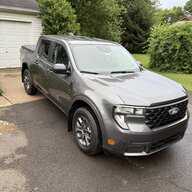
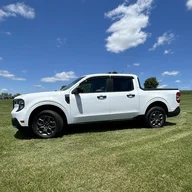
Just purchased the 2025 maverick lariat AWD hybrid in ruby red a month ago. Ford had employee pricing, which dropped the pricing by 7k. I got the first 1000 km down and I have to say it is great drive and the fuel consumption is awesome. I run it between 4.2 to 5.2 l/100 km in the city. On the highway it is 5.6 l/100, which beats any car I had. I bought it because I am retiring and was looking for a small project truck. I did looked at the Hyundai Santa Cruz as well which had a more refined drive. But I did find the cab dark and the over all appearances better on the maverick . Also, for the same price a hybrid on top of it. The only thing i would have liked. That the drive mode would stay in last one you drove and the switch from km to mph could have been easier like at my F150. I know there is a window popping up for drive mode and ask you if you want to keep it . But the window gets overwritten by the seat belt window. And after that the mode window disappears.
Sponsored

 

grandpopa'sMPGs

2.5L Hybrid
Well-known member
First Name
Steve
Joined
Sep 5, 2025
Threads
1
Messages
190
Reaction score
192
Location
Cincinnati, Ohio
Vehicle(s)
Ford Maverick, Chevy Cruze
Engine
2.5L Hybrid
Once you really learn how to make use of hybrid driving (takes a year) You can expect to get city driving over 50 MPG. I am bouncing from 55-60 MPG all summer now, up from 44 MPG last summer. Highway above 65 mph drive fuel economy way down. My winter driving is 10-20 MPG's lower city. Highway unchanged.
 

Cancunbadlands

2.0L EcoBoost
Well-known member
First Name
Cancun
Joined
Jul 5, 2025
Threads
4
Messages
3,846
Reaction score
3,899
Location
Cancun
Vehicle(s)
2024 Ford Maverick Lariat Tremor
Engine
2.0L EcoBoost
Clubs
 
Bienvenido Welcome greetings from the #cancunbadlands
 

jcofthewest

Well-known member
First Name
John
Joined
Mar 20, 2025
Threads
1
Messages
148
Reaction score
118
Location
Wyoming
Vehicle(s)
'95 GMC 2500, '06 Jeep Wrangler, '05 Chevy SSR
Engine
Undecided
The seat belt pop up can be stopped with these steps.
1. buckle the 3 back seat belts and keep them buckled, espicially if you haul things on the seat like bottled water.
2. buckle the drivers seal belt and passenger if there is a person in it before starting the truck.
No pop up. The last drive mode has been discussed many times on here and general consensus is it needs to stay in last used. Welcome to the club and the Maverick. I retired a year ago and decided the full size truck with 14 to 15 mpg locally had to go. I looked at Ridgelines and Mavericks having ruled out the Santa Cruz. Te MPG of Ridgelines was as bad as the full size, the entry and exit of the cab was not as easy as the Maverick, and the one I liked was 15k more.
Please post a picture or 2 when you can.
I tried that in mine (25 XL). Still got the screen with a green check mark. I still have to acknowledge that my truck acknowledged that I buckled up! I've discovered that it goes away after 1/10th of a mile.
 

Sponsored

Cancunbadlands

2.0L EcoBoost
Well-known member
First Name
Cancun
Joined
Jul 5, 2025
Threads
4
Messages
3,846
Reaction score
3,899
Location
Cancun
Vehicle(s)
2024 Ford Maverick Lariat Tremor
Engine
2.0L EcoBoost
Clubs
 
Bienvenido Welcome greetings from the #cancunbadlands
 

jcofthewest

Well-known member
First Name
John
Joined
Mar 20, 2025
Threads
1
Messages
148
Reaction score
118
Location
Wyoming
Vehicle(s)
'95 GMC 2500, '06 Jeep Wrangler, '05 Chevy SSR
Engine
Undecided
Once you really learn how to make use of hybrid driving (takes a year) You can expect to get city driving over 50 MPG. I am bouncing from 55-60 MPG all summer now, up from 44 MPG last summer. Highway above 65 mph drive fuel economy way down. My winter driving is 10-20 MPG's lower city. Highway unchanged.
I'm technically challenged. Haven't figured out how to share pictures to MTC.
[/QUOTE
Click on the insert Image Icon and load them on here Very Easy!! If I can do it anyone can!!:)
Thanks for the help. I don't see that image icon that you speak of. I'm an android user, sharing pictures in text messages with regular contacts is right there. All I see and use are the options at the bottom of posts on threads (reply, quote+/-, and attach file). I'm a bit dense and awkward in these media platforms. Thanks for the help. If I can learn the process, I'll share my experience of my new Maverick.
 
Sponsored

jcofthewest

Well-known member
First Name
John
Joined
Mar 20, 2025
Threads
1
Messages
148
Reaction score
118
Location
Wyoming
Vehicle(s)
'95 GMC 2500, '06 Jeep Wrangler, '05 Chevy SSR
Engine
Undecided
Thanks for the help. I don't see that image icon that you speak of. I'm an android user, sharing pictures in text messages with regular contacts is right there. All I see and use are the options at the bottom of posts on threads (reply, quote+/-, and attach file). I'm a bit dense and awkward in these media platforms. Thanks for the help. If I can learn the process, I'll share my experience of my new Maverick.
On some thought, maybe because I only do MTC on my phone.
 

Mavman1

2.5L Hybrid
Well-known member
First Name
Jeff
Joined
Jul 18, 2024
Threads
6
Messages
197
Reaction score
254
Location
S/E Pennsylvania
Vehicle(s)
2025 Maverick XLT Hybrid AWD 4K Luxury Trim Oxford White
Engine
2.5L Hybrid
Clubs
 
I'm technically challenged. Haven't figured out how to share pictures to MTC.
To share a photo,
Step 1: Hit "Reply" and add your comments.
Step 2: Then select "Attach Files.
Step 3: Attach a photo file from wherever it resides on your computer etc.
I'm technically challenged. Haven't figured out how to share pictures to MTC.
Thanks for the help. I don't see that image icon that you speak of. I'm an android user, sharing pictures in text messages with regular contacts is right there. All I see and use are the options at the bottom of posts on threads (reply, quote+/-, and attach file). I'm a bit dense and awkward in these media platforms. Thanks for the help. If I can learn the process, I'll share my experience of my new Maverick.
There is nothing that actually says "Image Icon".
Do this:
Step 1: Reply to a message with some wording as you have been doing.
Step 2: Then click on the "Attach Files" button and proceed to select a "file" or in this case a photo from wherever it resides on your computer or phone. Then Preview or Post.
 

Hunters Edge

2.0L EcoBoost
Well-known member
First Name
Sid
Joined
Jan 26, 2024
Threads
30
Messages
1,807
Reaction score
2,158
Location
Michigan
Vehicle(s)
F150 crew
Engine
2.0L EcoBoost
Hello and welcome to MTC. Congratulations on your new Maverick.
 

jcofthewest

Well-known member
First Name
John
Joined
Mar 20, 2025
Threads
1
Messages
148
Reaction score
118
Location
Wyoming
Vehicle(s)
'95 GMC 2500, '06 Jeep Wrangler, '05 Chevy SSR
Engine
Undecided
On some thought, maybe because I only do MTC on my phone.
Click on the insert Image Icon and load them on here Very Easy!! If I can do it anyone can!!:)
To share a photo,
Step 1: Hit "Reply" and add your comments.
Step 2: Then select "Attach Files.
Step 3: Attach a photo file from wherever it resides on your computer etc.


There is nothing that actually says "Image Icon".
Do this:
Step 1: Reply to a message with some wording as you have been doing.
Step 2: Then click on the "Attach Files" button and proceed to select a "file" or in this case a photo from wherever it resides on your computer or phone. Then Preview or Post.
Ok, here goes.
To share a photo,
Step 1: Hit "Reply" and add your comments.
Step 2: Then select "Attach Files.
Step 3: Attach a photo file from wherever it resides on your computer etc.


There is nothing that actually says "Image Icon".
Do this:
Step 1: Reply to a message with some wording as you have been doing.
Step 2: Then click on the "Attach Files" button and proceed to select a "file" or in this case a photo from wherever it resides on your computer or phone. Then Preview or Post.


Top