

- Thread starter
- #1
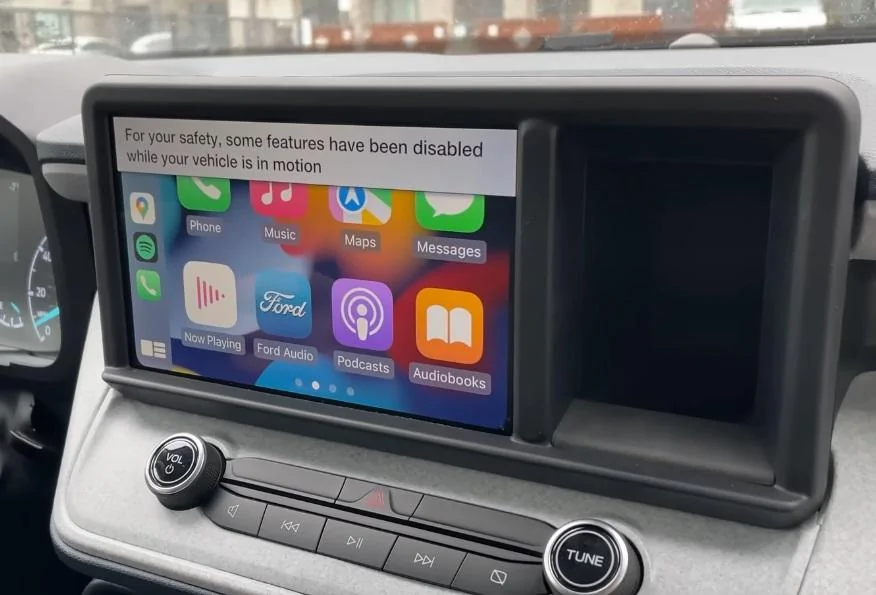
I’ve noticed when I’m plugged into Apple play after I come to a stop and start up again I get a message. That for my safety certain s things are enabled. Curious why that appears.
Sponsored

Thank youApple CarPlay is so buggy on mine that I just ignore the issues and figure one day it will update and work properly.
Today it kept disconnecting and reconnecting. I use the USB and not Bluetooth so I would think it’s more of a software issue.

Hi Andy! This doesn't sound like an experience we want you to have with your Maverick. Could you please send us a PM with your VIN and the name and location of your Ford dealer? I'd be happy to see how I can assist you on my end.I’ve noticed when I’m plugged into Apple play after I come to a stop and start up again I get a message. That for my safety certain s things are enabled. Curious why that appears.

You might want to search for the "radio update" threads on here. Just in case you have not received the update.I’ve noticed when I’m plugged into Apple play after I come to a stop and start up again I get a message. That for my safety certain s things are enabled. Curious why that appears.
I updated mine yesterday, oddly afterward it took a while to find my Iphone again but is working now. Don't know if it took care of the glitches or not.You might want to search for the "radio update" threads on here. Just in case you have not received the update.

I believe he is referring to the message in CarPlay or Android Auto that states "For your safety, some features have been disabled while your vehicle is in motion."Hi Andy! This doesn't sound like an experience we want you to have with your Maverick. Could you please send us a PM with your VIN and the name and location of your Ford dealer? I'd be happy to see how I can assist you on my end.

They bought used chips from Atari...I guess I was jinxed but saying I just turn it off and back on to fix it…
Worked fine this morning and now this afternoon got no radio or audio for that matter. Only a space invader sounds….
Tried everything and nothing worked… so maybe I better try the update too!

Other things to check is what version of Apple Carplay is on your phone, how old is your phone, and do you have a good quality cable you are plugging in with?I guess I was jinxed but saying I just turn it off and back on to fix it…
Tried everything and nothing worked… so maybe I better try the update too!
I will update my phone tonight too… I am using the Apple Supplied USB cord.Other things to check is what version of Apple Carplay is on your phone, how old is your phone, and do you have a good quality cable you are plugging in with?
Hi Andy! This doesn't sound like an experience we want you to have with your Maverick. Could you please send us a PM with your VIN and the name and location of your Ford dealer? I'd be happy to see how I can assist you on my end.
Good afternoon my dealer is Butch a Oustalet in Gulfport Ms. My vin # 3FTTW8E91NRA09931Hi Andy! This doesn't sound like an experience we want you to have with your Maverick. Could you please send us a PM with your VIN and the name and location of your Ford dealer? I'd be happy to see how I can assist you on my end.
TryingI believe he is referring to the message in CarPlay or Android Auto that states "For your safety, some features have been disabled while your vehicle is in motion."
I do agree that this message is a bit annoying as I don't believe any other Ford vehicle has this as a "safety feature". Could you see if this could be disabled in a future update? Thanks!
curious if you received my message ?Hi Andy! This doesn't sound like an experience we want you to have with your Maverick. Could you please send us a PM with your VIN and the name and location of your Ford dealer? I'd be happy to see how I can assist you on my end.
Is my picture what you are referring to? There is no way to disable that prompt as it comes standard on every single Maverick. Just wanted to give you a heads up.Trying
curious if you received my message ?


