Sponsored

Is it possible to use Maps & have FM radio?

Joined
Oct 11, 2022
Threads
1
Messages
21
Reaction score
8
Location
Canada
Vehicle(s)
Maverick
Engine
2.0L EcoBoost
This is my first time using Android Auto. I figured out that if I tune FM Radio, THEN connect Android Auto, I can listen to the radio and use the maps. However - I can't see what station I'm on or tune while doing this, since it doesn't show the radio details.

Is this possible? Or is it really only designed to use phone apps only when using Android Auto??
Sponsored

 

NJBob

2.0L EcoBoost
Well-known member
First Name
Bob
Joined
Dec 25, 2021
Threads
139
Messages
2,391
Reaction score
1,579
Location
New Jersey
Vehicle(s)
2022 Maverick, 2003 MR2, 2019 Forrester, 1969 Z/28
Engine
2.0L EcoBoost
On mine you can just use the tuning knob or the presets on the steering wheel. The screen behind the steering wheel can be programed showing the station. This is a sync 3.
 

commadorebob

2.0L EcoBoost
Well-known member
First Name
Bob
Joined
Sep 17, 2022
Threads
62
Messages
4,954
Reaction score
10,550
Location
Alabama
Vehicle(s)
2025 Expedition Max Platinum; 2023 Maverick Lariat
Engine
2.0L EcoBoost
If you have Android auto set up, whenever you hit the "Maps" tab, it will open Android Auto's map (Waze, Google, etc.). You just need to clock on the Ford "app" within the menu to go back to the audio settings to set to an FM radio station. But you can continue to listen to FM once back in Android Auto.
 
OP
OP
Joined
Oct 11, 2022
Threads
1
Messages
21
Reaction score
8
Location
Canada
Vehicle(s)
Maverick
Engine
2.0L EcoBoost
On mine you can just use the tuning knob or the presets on the steering wheel. The screen behind the steering wheel can be programed showing the station. This is a sync 3.
Ah - the dash screen thing is what I may have been missing! I will check into that.
 
OP
OP
Joined
Oct 11, 2022
Threads
1
Messages
21
Reaction score
8
Location
Canada
Vehicle(s)
Maverick
Engine
2.0L EcoBoost
If you have Android auto set up, whenever you hit the "Maps" tab, it will open Android Auto's map (Waze, Google, etc.). You just need to clock on the Ford "app" within the menu to go back to the audio settings to set to an FM radio station. But you can continue to listen to FM once back in Android Auto.
Ah Ok i don't recall seeing a Ford icon in that list. I will check that out. Thank you!
 

Sponsored

jsus

2.5L Hybrid
Well-known member
Joined
Dec 20, 2021
Threads
0
Messages
2,873
Reaction score
3,859
Location
USA
Vehicle(s)
2022 Ford Escape Hybrid AWD
Engine
2.5L Hybrid
This is my first time using Android Auto. I figured out that if I tune FM Radio, THEN connect Android Auto, I can listen to the radio and use the maps. However - I can't see what station I'm on or tune while doing this, since it doesn't show the radio details.

Is this possible? Or is it really only designed to use phone apps only when using Android Auto??
Think of it this way. Android Auto is an app that operates on the Maverick's touch screen. The operating system (like Windows on your computer or Android on your phone) is always there in the background. You can exit out of Android Auto to see the Ford interface, including your radio settings.

There are a couple ways of doing this. One is to pull up your app list on the touch screen and find the one labeled Ford - the icon is a Ford logo. Another is to press the physical speaker button down below the touch screen. That's a shortcut to the audio settings (where you find things like the balance/fade settings). Now you're in the Ford interface, you can just tap the Audio tab on the bottom left, and view your current radio station. To switch back to Android Auto, just tap on the Android Auto tab at the bottom of the screen.

The physical track forward/back buttons on both the steering wheel and below the touch screen will always control your current media source. So if you have your Android Auto maps on screen, you can press those buttons to scroll through stations. One thing to note there - the buttons on the steering wheel will scroll through your radio presets. The buttons below the screen will act like your conventional radio scanner, going through each station it finds in order. When you use either set of buttons to scroll radio stations, it will pop up a banner on the top of the touch screen letting you know the current station. So one option to quickly see the current station is to hit forward and then immediately hit back, and glance at the top of the touch screen.

Additionally, you can scroll through the LCD on the instrument cluster using up/down on the steering wheel, and display the current radio station on there.
 

ejouie

2.0L EcoBoost
Well-known member
First Name
Evan
Joined
Sep 21, 2022
Threads
10
Messages
379
Reaction score
476
Location
Newnan, GA
Vehicle(s)
'23 Ford Maverick, Atlas Blue, FWD, EcoBoost, XLT
Engine
2.0L EcoBoost
Clubs
 
Will the Android Auto voice navigation still be mixed over the FM radio?
 

NJBob

2.0L EcoBoost
Well-known member
First Name
Bob
Joined
Dec 25, 2021
Threads
139
Messages
2,391
Reaction score
1,579
Location
New Jersey
Vehicle(s)
2022 Maverick, 2003 MR2, 2019 Forrester, 1969 Z/28
Engine
2.0L EcoBoost
OP
OP
Joined
Oct 11, 2022
Threads
1
Messages
21
Reaction score
8
Location
Canada
Vehicle(s)
Maverick
Engine
2.0L EcoBoost
I checked mine after work and did not see any icon like that at all.
 
OP
OP
Joined
Oct 11, 2022
Threads
1
Messages
21
Reaction score
8
Location
Canada
Vehicle(s)
Maverick
Engine
2.0L EcoBoost
Think of it this way. Android Auto is an app that operates on the Maverick's touch screen. The operating system (like Windows on your computer or Android on your phone) is always there in the background. You can exit out of Android Auto to see the Ford interface, including your radio settings.

There are a couple ways of doing this. One is to pull up your app list on the touch screen and find the one labeled Ford - the icon is a Ford logo. Another is to press the physical speaker button down below the touch screen. That's a shortcut to the audio settings (where you find things like the balance/fade settings). Now you're in the Ford interface, you can just tap the Audio tab on the bottom left, and view your current radio station. To switch back to Android Auto, just tap on the Android Auto tab at the bottom of the screen.

The physical track forward/back buttons on both the steering wheel and below the touch screen will always control your current media source. So if you have your Android Auto maps on screen, you can press those buttons to scroll through stations. One thing to note there - the buttons on the steering wheel will scroll through your radio presets. The buttons below the screen will act like your conventional radio scanner, going through each station it finds in order. When you use either set of buttons to scroll radio stations, it will pop up a banner on the top of the touch screen letting you know the current station. So one option to quickly see the current station is to hit forward and then immediately hit back, and glance at the top of the touch screen.

Additionally, you can scroll through the LCD on the instrument cluster using up/down on the steering wheel, and display the current radio station on there.
Thank you for your detailed reply. I wonder if if the icon you and another person mentioned are specific to the Lariat edition. My XLT Luxury does not have this Ford Icon.
 
Sponsored

jsus

2.5L Hybrid
Well-known member
Joined
Dec 20, 2021
Threads
0
Messages
2,873
Reaction score
3,859
Location
USA
Vehicle(s)
2022 Ford Escape Hybrid AWD
Engine
2.5L Hybrid
Thank you for your detailed reply. I wonder if if the icon you and another person mentioned are specific to the Lariat edition. My XLT Luxury does not have this Ford Icon.
It's an Android Auto thing, not specific to the vehicle. If you tap on the bottom left of the touch screen with Android Auto open, that pulls up your list of all open apps. You'll find the Ford icon there.
 

paneubert

2.5L Hybrid
Well-known member
Joined
Jan 17, 2022
Threads
34
Messages
2,866
Reaction score
4,835
Location
Seattle
Vehicle(s)
2025 Hybrid XLT/4K/AWD/CoPilot/Eruption Green
Engine
2.5L Hybrid
I think while everyone is trying to help, they are leading you down the wrong path. Or at least an overly complicated path. Here is how you get to the radio while Android Auto is also running. Could be maps, could be Spotify, could be Waze, whatever. Doesn't matter.

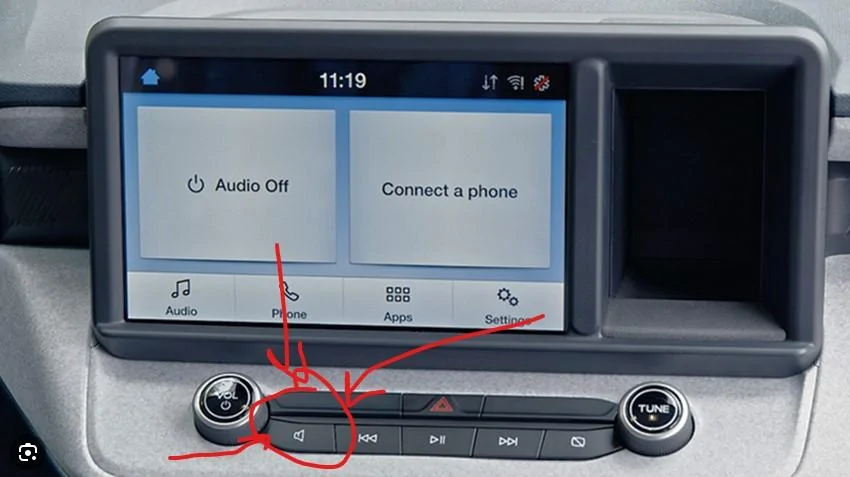
Click the physical button below the screen that looks like a speaker symbol. It will open a menu where you can select AM, FM. etc.... Essentially change the audio "source". I can't recall exactly, since at this point it is all muscle memory and automatic for me while driving, but you might also need to tap that "Audio" button on the screen that you see in the example screenshot below.

So step 1 is to press the physical speaker button below the screen, then MAYBE also need to press the "virtual" Audio button on the screen.

You can then go back and forth between that and Android Auto and it will continue to play your radio, even while the screen displays something via Android Auto. And yes, it will still read out your GPS directions and other voice type things over the radio playing. Sometimes it seems to mute the radio so it can talk to you, sometime it seems to turn down the radio and up the volume of the "robot person" who is talking to you.

Another fun fact. Did you know if you adjust the volume knob (or the volume buttons on the steering wheel) WHILE the robot is talking to you that it will increase or decrease the volume of only those notifications, separate from your radio or Spotify or other music? So if you ever feel like the robot isn't speaking loud enough (or it is screaming at you), just turn it up or down while it is in the middle of talking to you.

Ford Maverick Is it possible to use Maps & have FM radio? Infotainment
 
OP
OP
Joined
Oct 11, 2022
Threads
1
Messages
21
Reaction score
8
Location
Canada
Vehicle(s)
Maverick
Engine
2.0L EcoBoost
I think while everyone is trying to help, they are leading you down the wrong path. Or at least an overly complicated path. Here is how you get to the radio while Android Auto is also running. Could be maps, could be Spotify, could be Waze, whatever. Doesn't matter.

Click the physical button below the screen that looks like a speaker symbol. It will open a menu where you can select AM, FM. etc.... Essentially change the audio "source". I can't recall exactly, since at this point it is all muscle memory and automatic for me while driving, but you might also need to tap that "Audio" button on the screen that you see in the example screenshot below.

So step 1 is to press the physical speaker button below the screen, then MAYBE also need to press the "virtual" Audio button on the screen.

You can then go back and forth between that and Android Auto and it will continue to play your radio, even while the screen displays something via Android Auto. And yes, it will still read out your GPS directions and other voice type things over the radio playing. Sometimes it seems to mute the radio so it can talk to you, sometime it seems to turn down the radio and up the volume of the "robot person" who is talking to you.

Another fun fact. Did you know if you adjust the volume knob (or the volume buttons on the steering wheel) WHILE the robot is talking to you that it will increase or decrease the volume of only those notifications, separate from your radio or Spotify or other music? So if you ever feel like the robot isn't speaking loud enough (or it is screaming at you), just turn it up or down while it is in the middle of talking to you.

Infotainment.jpg
Thank you! Yes, this exactly what I needed to know.
Sponsored


Top