
Sponsored

Stickies

2.0L EcoBoost
Active member
First Name
JP
Joined
Mar 29, 2025
Threads
0
Messages
36
Reaction score
37
Location
Rhode Island
Vehicle(s)
2024 Maverick XLT
Engine
2.0L EcoBoost
I installed the frt/bk camera - while the integration is nice, this unit runs hotter than an over. The heat coming from the shroud where the plug & play is, is beyond acceptable. The unit kept turning off and on, making me think that something is overheating. I changed the setting to 2K and do not live in the southern/western states. Sooner or later the heat will damage something, if not cause a fire. Definitely not worth the cost of my truck. I'm very dissatisfied and have contacted Mangoal. We'll see if they respond as quick as my initial fit inquiry.
Sponsored

 
Last edited:

Mangoal

2.0L EcoBoost
Member
Diamond Sponsor
Joined
Jul 26, 2026
Threads
2
Messages
23
Reaction score
14
Location
North America
Vehicle(s)
2024 Maverick XLT
Engine
2.0L EcoBoost
I installed the frt/bk camera - while the integration is nice, this unit runs hotter than an over. The heat coming from the shroud where the plug & play is, is beyond acceptable. The unit kept turning off and on, making me think that something is overheating. I changed the setting to 2K and do not live in the southern/western states. Sooner or later the heat will damage something, if not cause a fire. Definitely not worth the cost of my truck. I'm very dissatisfied and have contacted Mangoal. We'll see if they respond as quick as my initial fit inquiry.
Thanks for reaching out. We definitely want to help figure out what’s going on with your setup.

While dash cams run warm during high-res recording, getting excessively hot alongside constant rebooting usually comes down to a power connection issue or an SD card read/write error locking up the processor.


Could you try a quick test for us to help narrow it down?
  1. Pop the SD card out and power the camera on—does it still keep rebooting and getting hot without the card inserted?
  2. Are you using the included SD card, or a third-party one?

When you get a chance, shoot me a quick DM with your order number or email address so we can locate your support ticket and work through this with you.
 
Last edited:
OP
OP
Mangoal_Support

Mangoal_Support

2.0L EcoBoost
Well-known member
Diamond Sponsor
Joined
Jul 7, 2026
Threads
2
Messages
47
Reaction score
76
Location
North America
Website
linktr.ee
Vehicle(s)
2024 Maverick XLT
Engine
2.0L EcoBoost
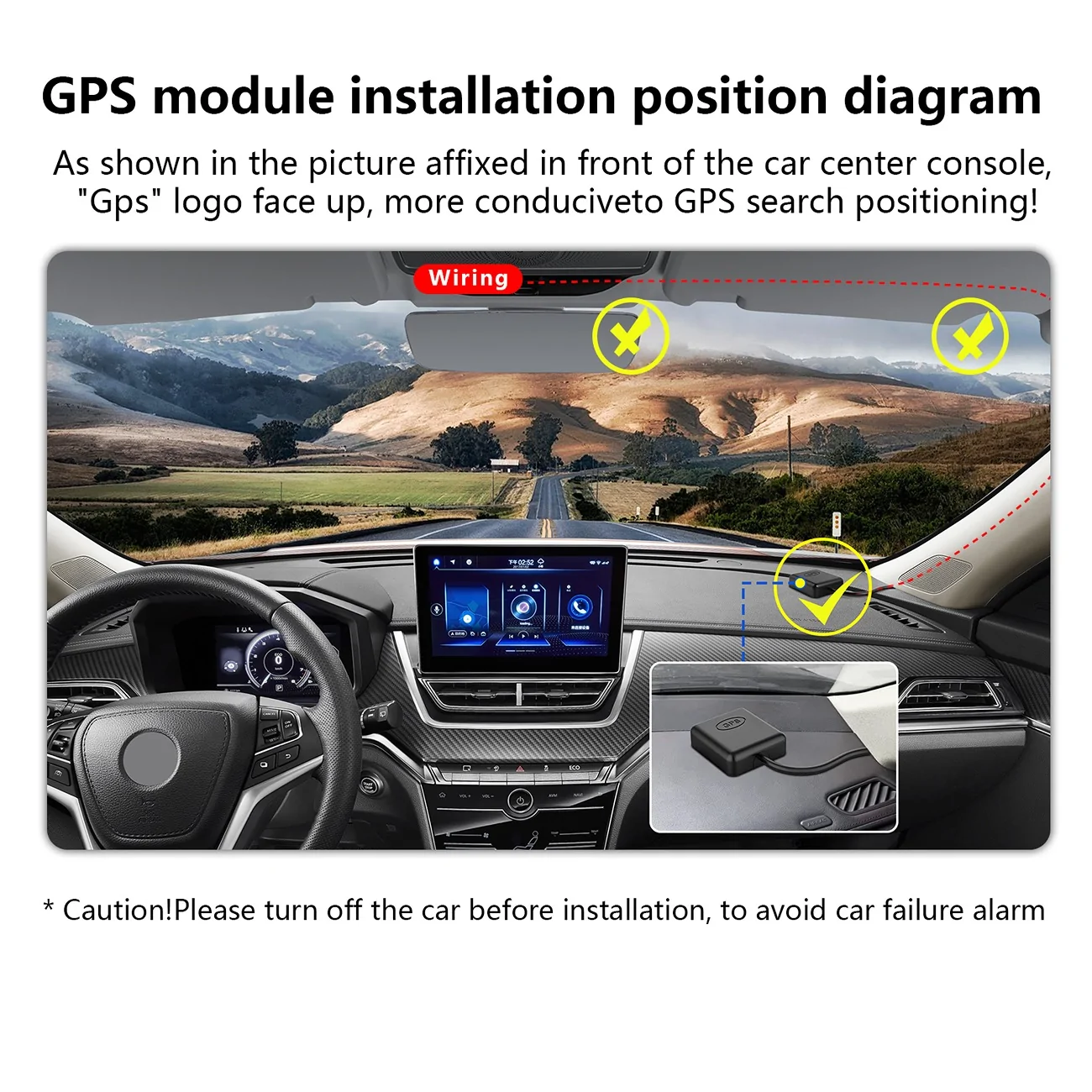
@Mangoal_Support one more question for you. If I decide to hook up the GPS, do I have to put it on the front dash? Can I not run the wire to the back and adhere the gps puck to my rear window near the rear camera instead? Or will it not get a GPS signal positioned vertically that way?
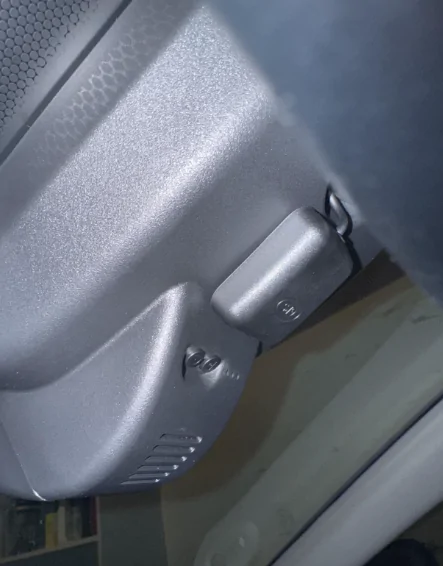
There are two recommended mounting positions for the GPS module: on the dashboard or attached underneath the main dash‑cam unit. It is not recommended to install it near the rear‑camera location, as this will severely interfere with GPS signal reception.

GPS.webp


GPS-8.webp
 

TNFurb

2.5L Hybrid
Well-known member
First Name
Kelly
Joined
Jul 16, 2023
Threads
16
Messages
518
Reaction score
651
Location
Nashville
Vehicle(s)
ā€˜23 Bronco Sport OB ā€˜24 Mav Lariat Hybrid
Engine
2.5L Hybrid
I thought about fishwiring, but pillar A & B were fairly simple. I ran mine at the top of pillar A driver side, then across top headliner to the top of pillar B and headliner to center. Just be cautious of the airbags.

If you do run throgh headliner - let me know bc I'd be interested in doing that. I have a sunroof though.
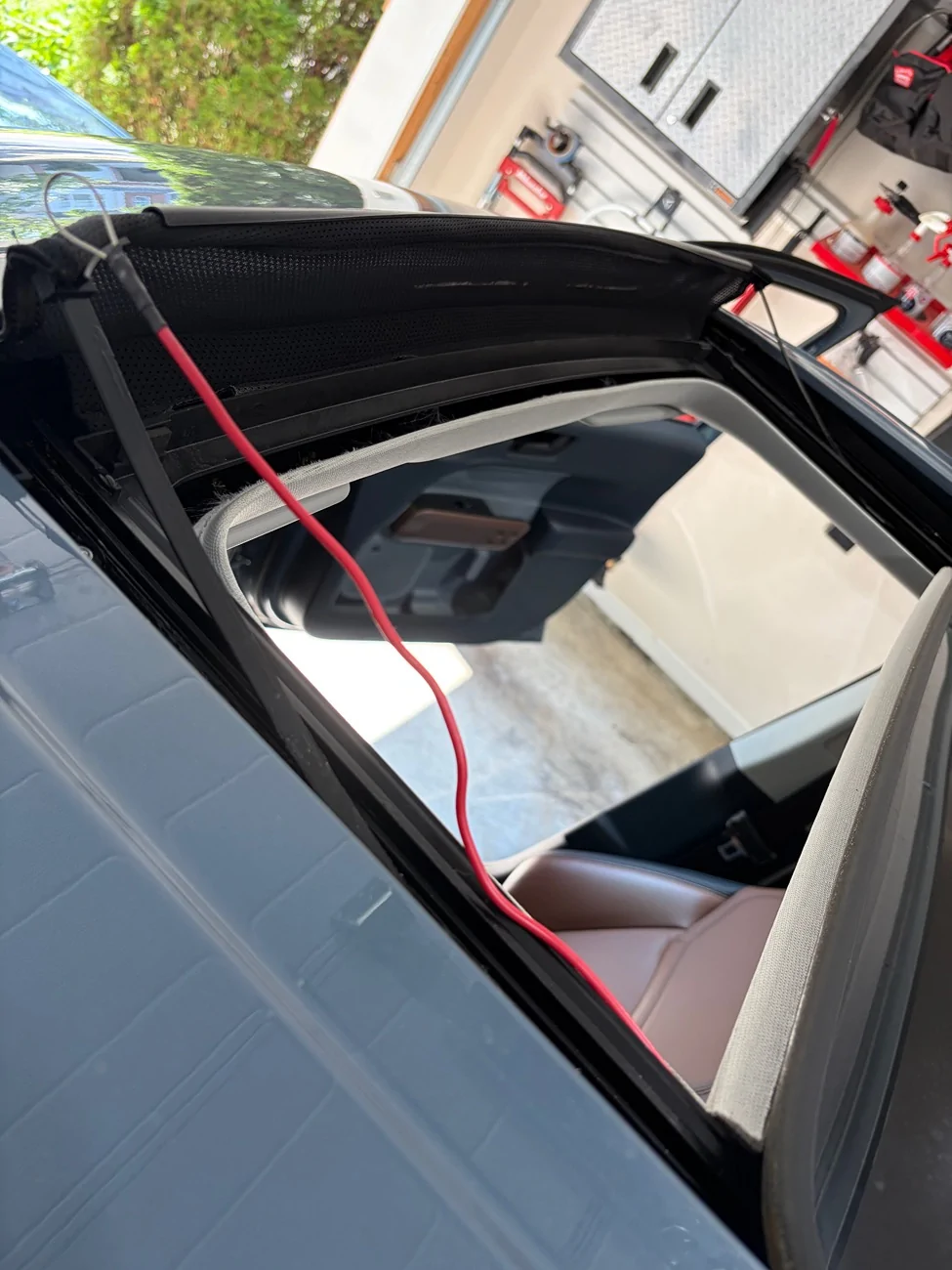
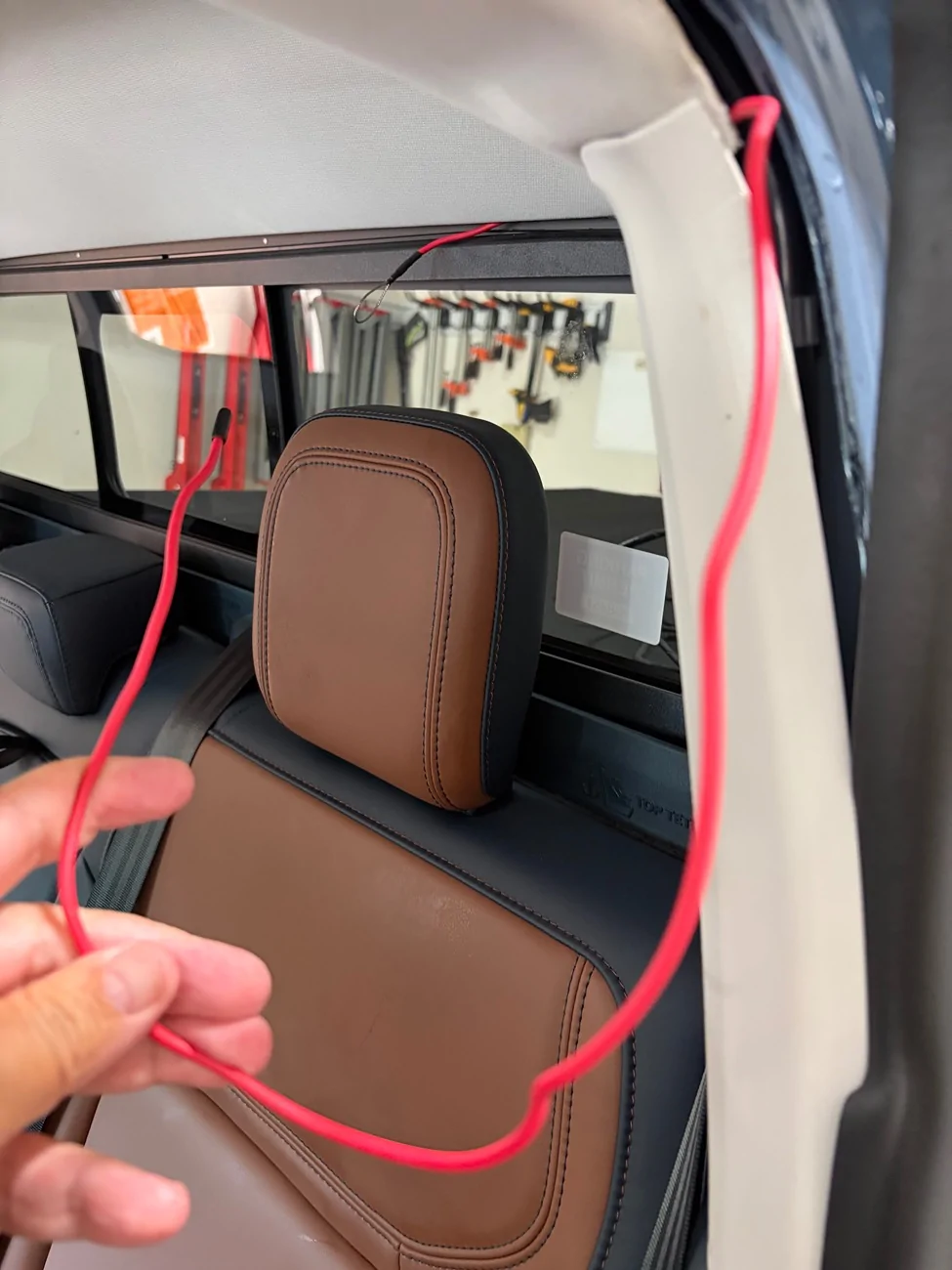
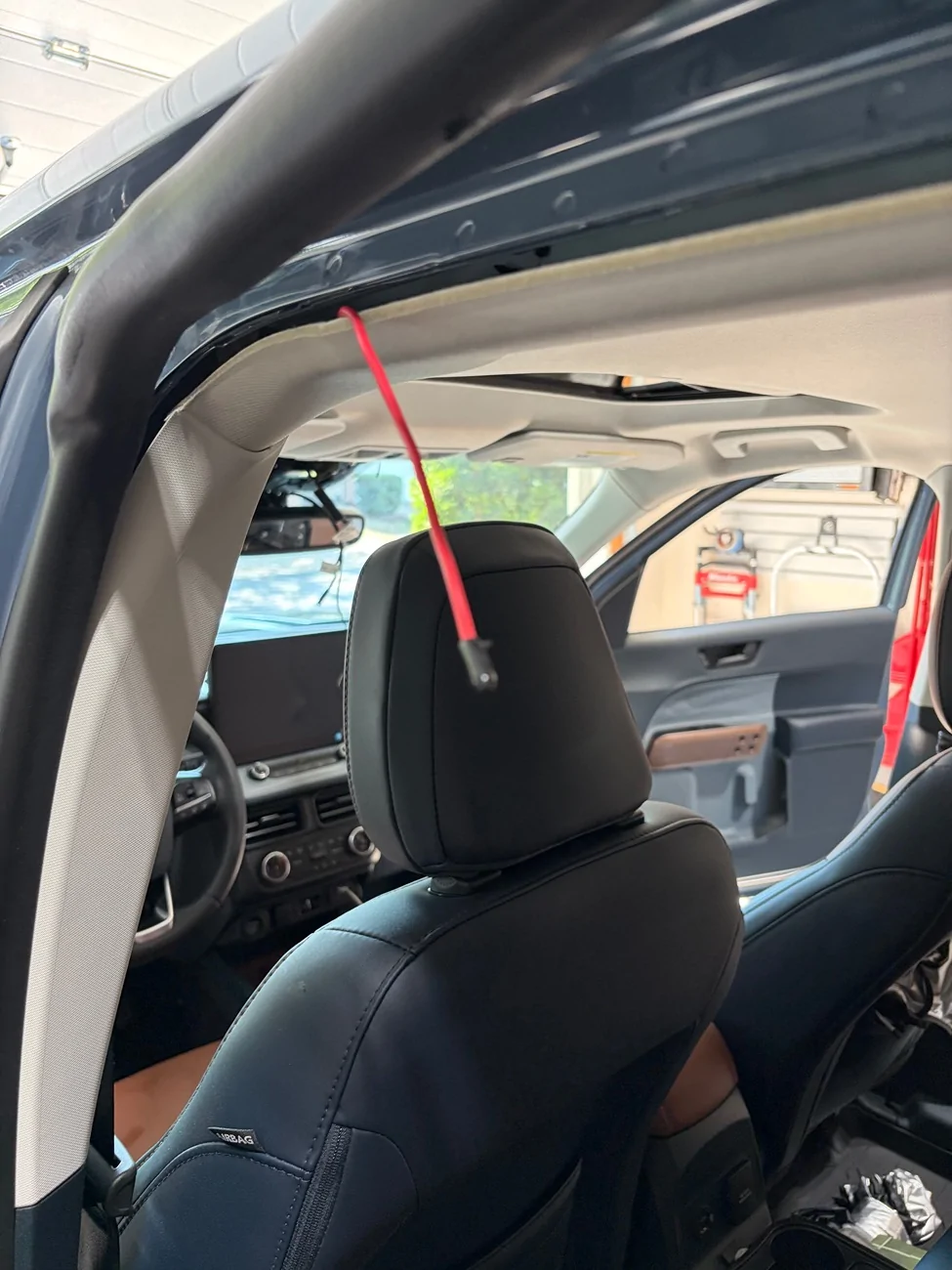
I have installed and I did run it through the head liner. But I did have to take the seal off the driver rear door in order to complete the work. Pics attached. Essentially I ran the cord from the back cab window to the rear driver door. Then I use a second fish and ran it from the side of the sunroof back to the rear driver door and grabbed the rear camera cable from there then pulled it to the sunroof. Then I used one of my two fishes get from the sunroof to the mirror and I pulled the rear camera cable the rest of the way up to there. Took me a little bit I was able to do it. I then tucked the camera cable under and past the airbag that was running along the rear door. That allowed me to then pull on each end of the camera cable to get it all pulled over further away from the airbags and more in line with the driver side edge of the sunroof. I tickled all of the excess cable between the edge of the sunroof and the driver side front door.

IMG_1486.webp


IMG_1484.webp


IMG_1485.webp
 

TNFurb

2.5L Hybrid
Well-known member
First Name
Kelly
Joined
Jul 16, 2023
Threads
16
Messages
518
Reaction score
651
Location
Nashville
Vehicle(s)
ā€˜23 Bronco Sport OB ā€˜24 Mav Lariat Hybrid
Engine
2.5L Hybrid
@Mangoal_Support I installed my cameras today. At first I had a heck of a time getting connected to the camera from the app to get it set up. But I think realized what was happening. I have wireless Apple CarPlay because I upgrade my truck to a 12 inch infotainment screen and a sync 4 APIM. So my phone was automatically connecting to my truck and would not stay connected to the camera WiFi. The only way for me to get it to work was to forget my phone on the truck and then delete the truck from phone. So this was ok to get it set up. But now that means anytime I want/need to connect to the camera via the skycam app, I have to go through the process. Is there not some other way for this to work? Is that what you expect the 2025-2026 Maverick owners to do that have wireless CarPlay built in from the factory? My only other suggestion is to give the customer an option for a shorter rear camera cable when ordering. That’s a lot of cable shoved up in my headliner.
 

Sponsored

OP
OP
Mangoal_Support

Mangoal_Support

2.0L EcoBoost
Well-known member
Diamond Sponsor
Joined
Jul 7, 2026
Threads
2
Messages
47
Reaction score
76
Location
North America
Website
linktr.ee
Vehicle(s)
2024 Maverick XLT
Engine
2.0L EcoBoost
@Mangoal_Support I installed my cameras today. At first I had a heck of a time getting connected to the camera from the app to get it set up. But I think realized what was happening. I have wireless Apple CarPlay because I upgrade my truck to a 12 inch infotainment screen and a sync 4 APIM. So my phone was automatically connecting to my truck and would not stay connected to the camera WiFi. The only way for me to get it to work was to forget my phone on the truck and then delete the truck from phone. So this was ok to get it set up. But now that means anytime I want/need to connect to the camera via the skycam app, I have to go through the process. Is there not some other way for this to work? Is that what you expect the 2025-2026 Maverick owners to do that have wireless CarPlay built in from the factory? My only other suggestion is to give the customer an option for a shorter rear camera cable when ordering. That’s a lot of cable shoved up in my headliner.
Please select the option that best fits your daily usage:
  • Temporary solution: Disconnect from Wireless CarPlay (or switch your phone to Airplane Mode) before connecting to the dash cam Wi-Fi.
  • Footage-viewing solution: For viewing or downloading multiple files, you can remove the MicroSD card and play back recordings directly on a computer using a card reader.
  • Wired setup solution: Switch CarPlay from wireless to a wired USB connection. This completely avoids Wi-Fi conflicts between CarPlay and the dash cam.
Rear Camera Cable Specifications: The standard rear-camera extension cable is 5.5 meters long, which fits most standard vehicles. A 6.5-meter cable is provided for select larger or specialized vehicle models.


1786500858005-eh.webp
 
Last edited:

Mangoal

2.0L EcoBoost
Member
Diamond Sponsor
Joined
Jul 26, 2026
Threads
2
Messages
23
Reaction score
14
Location
North America
Vehicle(s)
2024 Maverick XLT
Engine
2.0L EcoBoost
@Mangoal_Support I installed my cameras today. At first I had a heck of a time getting connected to the camera from the app to get it set up. But I think realized what was happening. I have wireless Apple CarPlay because I upgrade my truck to a 12 inch infotainment screen and a sync 4 APIM. So my phone was automatically connecting to my truck and would not stay connected to the camera WiFi. The only way for me to get it to work was to forget my phone on the truck and then delete the truck from phone. So this was ok to get it set up. But now that means anytime I want/need to connect to the camera via the skycam app, I have to go through the process. Is there not some other way for this to work? Is that what you expect the 2025-2026 Maverick owners to do that have wireless CarPlay built in from the factory? My only other suggestion is to give the customer an option for a shorter rear camera cable when ordering. That’s a lot of cable shoved up in my headliner.
No need to keep deleting the truck from your phone! The cam records automatically whenever you drive, so you only need to switch to the camera's Wi-Fi when pulling clips or tweaking settings.

Good point on the rear cable. 5.5m is our standard length for most cars, but that definitely leaves a lot of extra slack in a Maverick. Passed this along to the team to see if we can offer a shorter option down the road! šŸ‘
 

TNFurb

2.5L Hybrid
Well-known member
First Name
Kelly
Joined
Jul 16, 2023
Threads
16
Messages
518
Reaction score
651
Location
Nashville
Vehicle(s)
ā€˜23 Bronco Sport OB ā€˜24 Mav Lariat Hybrid
Engine
2.5L Hybrid
No need to keep deleting the truck from your phone! The cam records automatically whenever you drive, so you only need to switch to the camera's Wi-Fi when pulling clips or tweaking settings.

Good point on the rear cable. 5.5m is our standard length for most cars, but that definitely leaves a lot of extra slack in a Maverick. Passed this along to the team to see if we can offer a shorter option down the road! šŸ‘
Thanks for the response. I realize I don’t need to keep deleting the truck. But I do have to delete it if I ever want to download a clip. Is that what you’re saying? If so, my other suggestion is to switch to Bluetooth connection instead of a WiFi connection. With wireless Apple CarPlay and wireless android auto becoming more prevalent, it is a small hassle to have to delete the connection from your phone whenever you want to download a clip.
 

Mangoal

2.0L EcoBoost
Member
Diamond Sponsor
Joined
Jul 26, 2026
Threads
2
Messages
23
Reaction score
14
Location
North America
Vehicle(s)
2024 Maverick XLT
Engine
2.0L EcoBoost
Thanks for the response. I realize I don’t need to keep deleting the truck. But I do have to delete it if I ever want to download a clip. Is that what you’re saying? If so, my other suggestion is to switch to Bluetooth connection instead of a WiFi connection. With wireless Apple CarPlay and wireless android auto becoming more prevalent, it is a small hassle to have to delete the connection from your phone whenever you want to download a clip.
You definitely don't need to delete or unpair the truck from your phone at all.

Since Wireless CarPlay actually uses Wi-Fi to stream to your screen, and iPhones can only connect to one Wi-Fi network at a time, you're just temporarily switching Wi-Fi networks when pulling a clip—no re-pairing required.

If you want to avoid toggling Wi-Fi altogether, using a USB cable for CarPlay frees up your phone's Wi-Fi completely, so you can connect to the camera anytime without interrupting CarPlay.

Wish we could use Bluetooth instead, but BT speed is just way too slow for large 2K/4K video files.

Hope this makes things much easier! šŸ‘
 

TNFurb

2.5L Hybrid
Well-known member
First Name
Kelly
Joined
Jul 16, 2023
Threads
16
Messages
518
Reaction score
651
Location
Nashville
Vehicle(s)
ā€˜23 Bronco Sport OB ā€˜24 Mav Lariat Hybrid
Engine
2.5L Hybrid
You definitely don't need to delete or unpair the truck from your phone at all.

Since Wireless CarPlay actually uses Wi-Fi to stream to your screen, and iPhones can only connect to one Wi-Fi network at a time, you're just temporarily switching Wi-Fi networks when pulling a clip—no re-pairing required.

If you want to avoid toggling Wi-Fi altogether, using a USB cable for CarPlay frees up your phone's Wi-Fi completely, so you can connect to the camera anytime without interrupting CarPlay.

Wish we could use Bluetooth instead, but BT speed is just way too slow for large 2K/4K video files.

Hope this makes things much easier! šŸ‘
It won’t let me toggle. When I try to select the camera WiFi, it won’t stay with the camera. It automatically switches back to my wireless Apple CarPlay. There’s no way to turn the wireless CarPlay off other than shutting down the truck which of course means the camera shuts off to.
 
Sponsored

Mangoal

2.0L EcoBoost
Member
Diamond Sponsor
Joined
Jul 26, 2026
Threads
2
Messages
23
Reaction score
14
Location
North America
Vehicle(s)
2024 Maverick XLT
Engine
2.0L EcoBoost
It won’t let me toggle. When I try to select the camera WiFi, it won’t stay with the camera. It automatically switches back to my wireless Apple CarPlay. There’s no way to turn the wireless CarPlay off other than shutting down the truck which of course means the camera shuts off to.
Makes sense. IOS uses Bluetooth in the background to force the Wi-Fi back to CarPlay, which is why it keeps overriding you when you try to switch.

Here’s the quick workaround using Airplane Mode:
  1. Turn on Airplane Mode (cuts the Bluetooth handshake so CarPlay can't hijack the connection).

  2. Turn Wi-Fi back on and connect to the dash cam to download your clips.

  3. Turn Airplane Mode off when you're done. Phone and truck will re-handshake and Wireless CarPlay pops right back up in a few seconds.
Give that a shot when you get a chance and let us know if that works! šŸ‘
 

TNFurb

2.5L Hybrid
Well-known member
First Name
Kelly
Joined
Jul 16, 2023
Threads
16
Messages
518
Reaction score
651
Location
Nashville
Vehicle(s)
ā€˜23 Bronco Sport OB ā€˜24 Mav Lariat Hybrid
Engine
2.5L Hybrid
Makes sense. IOS uses Bluetooth in the background to force the Wi-Fi back to CarPlay, which is why it keeps overriding you when you try to switch.

Here’s the quick workaround using Airplane Mode:
  1. Turn on Airplane Mode (cuts the Bluetooth handshake so CarPlay can't hijack the connection).

  2. Turn Wi-Fi back on and connect to the dash cam to download your clips.

  3. Turn Airplane Mode off when you're done. Phone and truck will re-handshake and Wireless CarPlay pops right back up in a few seconds.
Give that a shot when you get a chance and let us know if that works! šŸ‘
Perfect! Thank you so much. Impressed with your customer service!
Sponsored


Top