
- Thread starter
- #31
Got them, thanks! This should provide the information I need to make GPS data work for you too and not just the camera playback.Just DM'd you a link to two of the files.
Sponsored
Got them, thanks! This should provide the information I need to make GPS data work for you too and not just the camera playback.Just DM'd you a link to two of the files.
No worries! Got it! Thanks, this should allow me to make your video playback and hopefully include GPS data too.Sent a DM with a link to my google drive which should be a raw video from the Miltona dashcam.(Yeah I'm an idiot for not thinking of this!)
Haha, yeah I was about to say, 'Oh, testing shows you don't have a GPS'The new version works great! I don't have the GPS module hooked up but maybe I will now. I'm in the process of getting the back camera in today, was thinking of trying to run it through the headliner (no sunroof of this replacement Mav) instead of along the edge of the headliner as I did in the '25 as the curtain airbag deploying destroyed the rear camera cable.
This was the best video I found showing how some of the bits come apart:Yeah, I was looking at that headliner post to, maybe I'll take a crack at like you did it.
This release should work with your camera:Sent a DM with a link to my google drive which should be a raw video from the Miltona dashcam.(Yeah I'm an idiot for not thinking of this!)
https://buymeacoffee.com/chrisl8$donations? My bank gives me a Zelle option.
The latest release has an AppImage build that should work on Linux. Let me know if that doesn't work for you and I will keep pursuing the Flatpack route.Interested, mostly in a Linux (Debian / Ubuntu / Flat Pack) version
I have the Thinkware DC-M2-FG (VHL3Z-19G490-K). Would love to try the software!!Hey all,
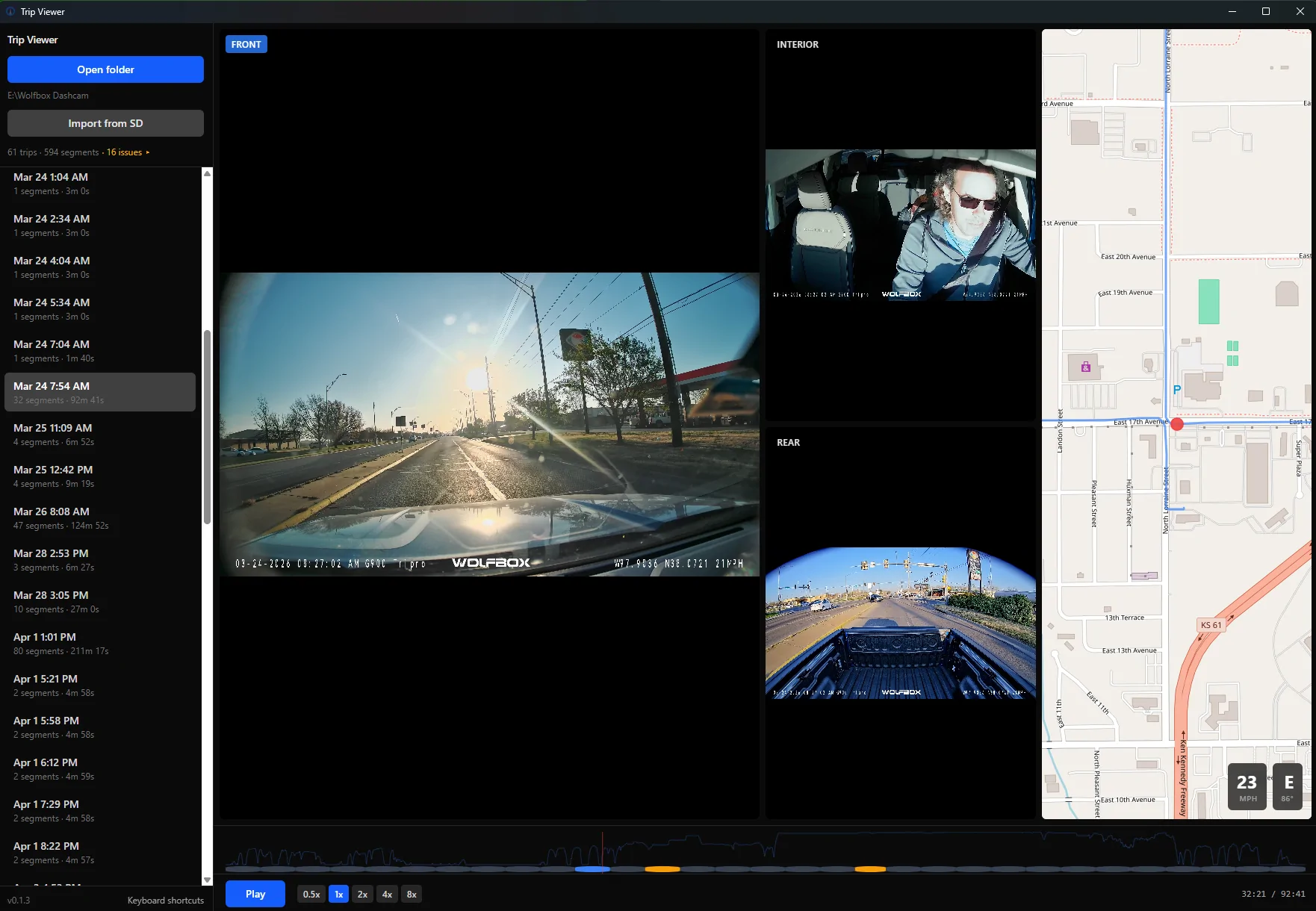
I built a free dashcam viewer and wanted to share it in case anyone else here is frustrated with the software that comes with their dashcam.
I have a Wolf Box 3-channel setup (front/interior/rear) and the stock app is... not great. Buried speed controls, no real scrubbing, sluggish playback. The paid
third-party viewers are better but none of them handle three channels well. So I built my own.
Trip Viewer is a free, open-source Windows app that:
- Plays all 3 camera channels simultaneously, perfectly synced
- Shows your position on a live GPS map as the video plays
- Has a timeline with speed graph so you can jump to interesting moments
- Lets you click a side view to make it the main view, double-click for fullscreen
- Can import footage directly from your SD card with integrity verification
- Auto-detects and groups your files into trips — no manual organizing
- Is lightweight (~3 MB install) and uses hardware video decoding so it's actually smooth
You can download it here: https://github.com/chrisl8/trip-viewer
Click "Releases" on the right side, then download the _x64-setup.exe file. Just run the installer and you're good. Windows may pop up a SmartScreen warning since the
app is new — click "More info" then "Run anyway."
One thing to note: most dashcams record in HEVC format, and Windows needs a decoder for that. The app will check on startup and point you to the Microsoft Store if
you need it (it's a one-time install).
Right now it's built and tested with Wolf Box dashcams specifically, but the architecture is designed to support other brands. If you have a different dashcam (Viofo,
Thinkware, BlackVue, etc.) and want to try it, let me know what model you have and I'll see about adding support.
This is a personal project — I'm a software developer and built this with help from AI tooling (Claude Code). It's MIT licensed, totally free, no ads, no tracking. If
you run into bugs or have feature ideas, you can open an issue on GitHub or just reply here and I'll see it.
Windows only for now, but the tech supports Mac/Linux so I'm open to porting if there's interest.
Happy to answer any questions!
![]()
You can download it here: https://github.com/chrisl8/trip-viewerI have the Thinkware DC-M2-FG (VHL3Z-19G490-K). Would love to try the software!!
You can download it here: https://github.com/chrisl8/trip-viewer
If it doesn't work, put some example video files on a share drive somewhere like Google Drive or Dropbox and send me a share link and I'll use them to learn how the videos are encoded and add support for them to the application.
Tried your software with my Thinkware DC-M2-FG(1). Downloaded video to iPhone 16 (iOS 26.4.2). Transferred video to PC Windows 11 ver. 25H2 OS Build 26200.8246. Worked great. I have to learn more about the camera and how to load the rear camera video but your software with the latest Ver 0.3.0 worked great!Thanks, I will do that!