
Sponsored

Dead display

1Guy1Truck

2.5L Hybrid
Well-known member
Joined
Mar 19, 2022
Threads
25
Messages
320
Reaction score
352
Location
RI
Vehicle(s)
2022 Maverick XLT
Engine
2.5L Hybrid
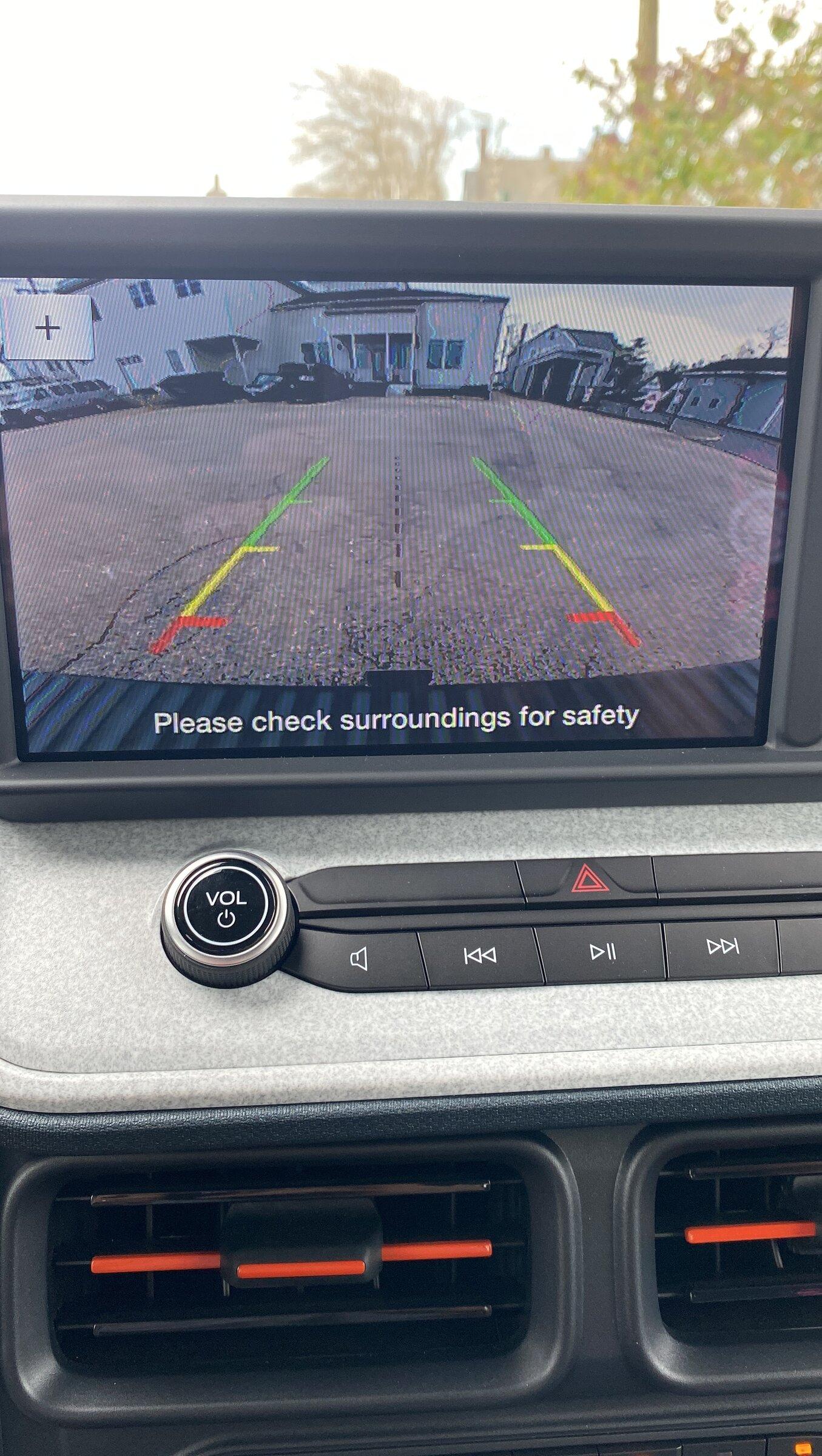
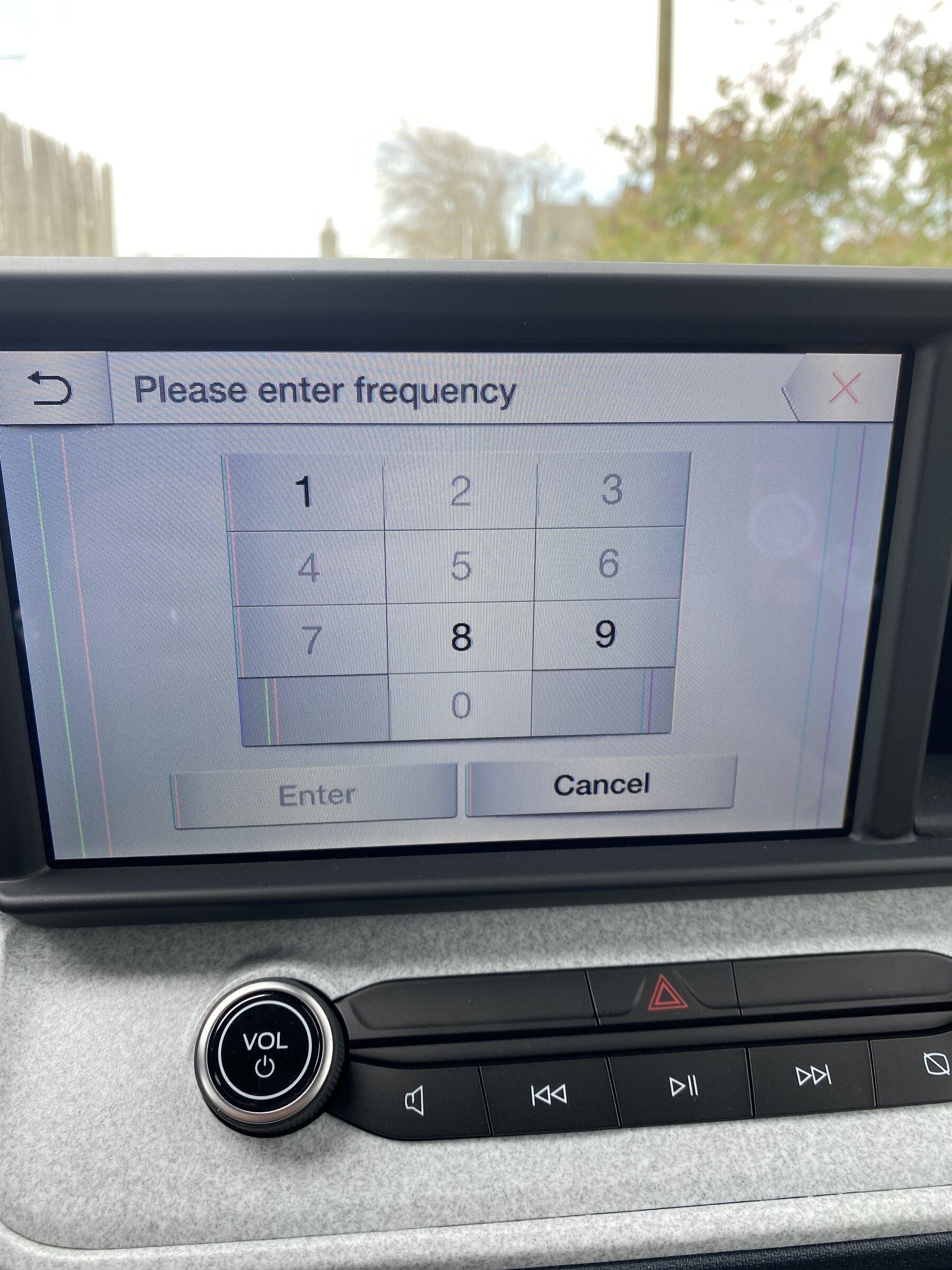
Display has vertical lines at all times and in reverse it’s all scrambled (hard to tell in photo). Only 1,800 miles, not happy.
Ford Maverick Dead display 417F7B6B-CAE9-46C3-9DBA-9A09FBDE5244
Ford Maverick Dead display 9038921B-0A62-4132-BAC9-CB85E29C1435
Sponsored


LeersMav

2.5L Hybrid
Well-known member
First Name
Maximus GP
Joined
Jul 19, 2021
Threads
5
Messages
685
Reaction score
694
Location
Orange County, CA
Vehicle(s)
PriusV, Sonata PHEV, F-50 Mavrick Lariat Hybrid FE
Engine
2.5L Hybrid

What he said ...... copied some instructions from that thread below vvvvvvv


Had this issue with the SYNC3 in my Transit Connect - found the following, and it worked to reset. I used the SOFT reset procedure.

Types of Reset:
  • Soft Reset - Resets the module with no loss of settings or data - provides a graceful shutdown and restart.
  • Hard Reset - Resets the module with no loss of settings or data - provides an abrupt shutdown and restart.
  • Master Reset - Resets the module back to factory defaults. All personal data and settings are lost. This will require bluetooth pairings, saved addresses and repairing with FordPass (if equipped).
To perform a Soft Reset:
  1. Press and hold the Seek Up (>>|) button while pressing and holding the Radio Power button.
  2. After approximately 5 seconds the screen will go black, release the buttons.
  3. Allow some time for the system reset to complete.
To perform a Hard Reset:
  1. With the ignition OFF, disconnect the power to the SYNC module buy either disconnecting the vehicle battery or the large 54 pin connector at the back of the module.
  2. Reconnect the power after 30 seconds.
  3. Turn the ignition on and wait for the system to boot.
To perform a Master Reset:
  1. Press Settings in the Feature bar at the bottom of the screen.
  2. Press the General icon (you may have to swipe to the next screen).
  3. Press the Scroll bar or swipe vertically until you see Master Reset. Press Master Reset.
  4. A message confirming that all system settings will be erased and reset to factory defaults will appear. Press Continue.
  5. A “Resetting to factory defaults” message will appear, the system will turn off and the screen will go blank. It may take a few minutes for the system to reset and resume normal operation.
 
First Name
Matt
Joined
Sep 3, 2022
Threads
0
Messages
5
Reaction score
0
Location
Houston
Vehicle(s)
2020 Jeep Unlimited
Engine
2.0L EcoBoost
My 22 Maverick XL Iconic Silver screen went out. After contacting Ford to do the resets and they didn't work, I was advised to go to the dealer. The dealer says the screen is bad and waiting on a new one (on backorder). Ugh. It is like flying blind. Sure wish there was more troubleshooting that could be done... #ford
 
Last edited:

Sponsored

icegradner

2.5L Hybrid
Well-known member
Joined
Nov 5, 2021
Threads
19
Messages
3,802
Reaction score
5,904
Location
British Columbia, Canada
Vehicle(s)
2022 XLT Maverick Hybrid
Engine
2.5L Hybrid
Clubs
 
Having seen many bad monitors in my time, the coloured lines on the screen, like in the picture from the OPs one, are a classic sign of a failing LCD panel. No amount of resets will fix a hardware failure like that long term. Just adding this as a heads up to anyone who might run into this issue in the future.
 

jsus

2.5L Hybrid
Well-known member
Joined
Dec 20, 2021
Threads
0
Messages
2,873
Reaction score
3,859
Location
USA
Vehicle(s)
2022 Ford Escape Hybrid AWD
Engine
2.5L Hybrid
Having seen many bad monitors in my time, the coloured lines on the screen, like in the picture from the OPs one, are a classic sign of a failing LCD panel. No amount of resets will fix a hardware failure like that long term. Just adding this as a heads up to anyone who might run into this issue in the future.
Couple things here indicate it's not a defective LCD panel, other than the fact that a force reboot/"soft reset" cleared up both issues. One is that a defective LCD panel's lines generally will run the entire height of the LCD vertically and will always be present. In OP's case, the lines are limited to a specific UI element - everything under the header for the outer bars, and there are some that are limited to the height of the buttons. Further, the image from the camera feed was distorted, not clear and in focus, which is a separate issue. For another, the lines did not persist when the backup camera was active.
 

icegradner

2.5L Hybrid
Well-known member
Joined
Nov 5, 2021
Threads
19
Messages
3,802
Reaction score
5,904
Location
British Columbia, Canada
Vehicle(s)
2022 XLT Maverick Hybrid
Engine
2.5L Hybrid
Clubs
 
Couple things here indicate it's not a defective LCD panel, other than the fact that a force reboot/"soft reset" cleared up both issues. One is that a defective LCD panel's lines generally will run the entire height of the LCD vertically and will always be present. In OP's case, the lines are limited to a specific UI element - everything under the header for the outer bars, and there are some that are limited to the height of the buttons. Further, the image from the camera feed was distorted, not clear and in focus, which is a separate issue. For another, the lines did not persist when the backup camera was active.
If you look closely there are some coloured line distortions in the backup camera image as well, just not in the same place. It could be the graphics co-processor for the screen, rather than the screen itself.

Edit: Other posiliblity, the screen is in some kind of test/service mode. I recall seeing similar coloured lines in videos of the instrument cluster when it was in service mode.
 
First Name
Matt
Joined
Sep 3, 2022
Threads
0
Messages
5
Reaction score
0
Location
Houston
Vehicle(s)
2020 Jeep Unlimited
Engine
2.0L EcoBoost
My 22 Maverick XL Iconic Silver screen went out. After contacting Ford to do the resets and they didn't work, I was advised to go to the dealer. The dealer says the screen is bad and waiting on a new one (on backorder). Ugh. It is like flying blind. Sure wish there was more troubleshooting that could be done... #ford
Still waiting...Called Ford and Dealer. What a fiasco. Neither seems helpful...
 
First Name
Matt
Joined
Sep 3, 2022
Threads
0
Messages
5
Reaction score
0
Location
Houston
Vehicle(s)
2020 Jeep Unlimited
Engine
2.0L EcoBoost
Heard from Ford and the dealership. The part came in (despite dealership saying no ETA and backorder). :) Display replaced and seems to be working fine now!
Sponsored


Top