
Sponsored

jcast0311

2.0L EcoBoost
Well-known member
First Name
James
Joined
Jul 20, 2023
Threads
11
Messages
253
Reaction score
327
Location
South Texas
Vehicle(s)
2023 Ford Maverick Lariat 2.0 EB LUX FX4 4K CG
Engine
2.0L EcoBoost
Clubs
 
It's almost like you jailbroke your car and you need a factory reset.
No. I did all the steps that the ford update page told me to do.
I tried master reset … the car auto shuts off before it can complete the reset and it’s really annoying.
Sponsored


 

BlackBeard

2.5L Hybrid
Member
First Name
Dennis
Joined
Jul 5, 2023
Threads
1
Messages
13
Reaction score
22
Location
Memphis
Vehicle(s)
2023 Maverick XLT
Engine
2.5L Hybrid
Clubs
 

jcast0311

2.0L EcoBoost
Well-known member
First Name
James
Joined
Jul 20, 2023
Threads
11
Messages
253
Reaction score
327
Location
South Texas
Vehicle(s)
2023 Ford Maverick Lariat 2.0 EB LUX FX4 4K CG
Engine
2.0L EcoBoost
Clubs
 
Only works for the US App Store FordPass app according to the developer

As a follow up to 2/8/22 thread https://www.mavericktruckclub.com/f...ck-diy-how-to-instructions.10056/#post-785687

Yesterday, I saw a reddit thread that the Siri shortcuts were working again on iPhones and Apple watches.

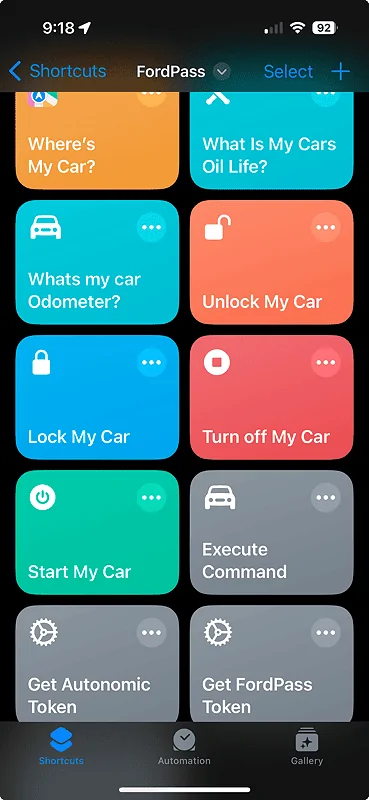
Functions include:
Start my Car
Turn off my Car
Lock my Car
Unlock my Car
Whats my Car Odometer?
Whats my Cars Oil Life?
Wheres my Car?

I purged the old versions I had used and installed the new shortcuts following the reddit thread. I entered my FordPass email address, FordPass password, and VIN number in during the installation of the first shortcut. After installing all the shortcuts, I manually activated the Start my Car shortcut (pushed the tile) and granted permission to run and voila... Maverick started. Followed up with Turn off my Car which also worked.

Will test verbally later today.
Cheers!
Bryon
FordPass Siri Shortcuts.png


(Only works for the US AppStore ford pass app)

Install all of these, Make sure you install the first 4 in order. also the first shortcut is critical as you have to insert your login details and VIN number correctly for it to work.

Fordpass Settings https://www.icloud.com/shortcuts/fde6cc1200434ffdae2ffd16aeb297a3

Get fordpass token https://www.icloud.com/shortcuts/00059a7fbda349cd8ae166d2863b8752

Get Autonomic token https://www.icloud.com/shortcuts/08cbca80d4e641d3bb01dd67dda57955

Execute Command https://www.icloud.com/shortcuts/1b707a69ad3c4579b3d8728e9cbcbcd3

Start my Car https://www.icloud.com/shortcuts/71c5c519ca064668974692e8a5914b95

Turn off my Car https://www.icloud.com/shortcuts/e7c32ced47a04114b2e97a650ca74c33

Lock my Car https://www.icloud.com/shortcuts/487da05b29e7451e8a2234abe7c3ea28

Unlock my Car https://www.icloud.com/shortcuts/ce48e9fedc6e481cbd543cbb1c47ca53

Whats my Car Odometer https://www.icloud.com/shortcuts/0037f6b7bc884e66bd35325000b50d55

Whats my cars oil life? https://www.icloud.com/shortcuts/f8639ae0bcc841048f24ebde9a27db82

Wheres my car? https://www.icloud.com/shortcuts/08212976c3634db29930961a36975602
I finally got the new update on my Mac and ford pass works.
Is there a way to change Km to miles??
 

BlackBeard

2.5L Hybrid
Member
First Name
Dennis
Joined
Jul 5, 2023
Threads
1
Messages
13
Reaction score
22
Location
Memphis
Vehicle(s)
2023 Maverick XLT
Engine
2.5L Hybrid
Clubs
 
It worked for me except for Siri. “I can’t help with that.” When I ask her.
Have to make sure you have the first 4 shortcuts, have run them, and then run this one with a press before asking Siri to do it.
 

Sponsored

jcast0311

2.0L EcoBoost
Well-known member
First Name
James
Joined
Jul 20, 2023
Threads
11
Messages
253
Reaction score
327
Location
South Texas
Vehicle(s)
2023 Ford Maverick Lariat 2.0 EB LUX FX4 4K CG
Engine
2.0L EcoBoost
Clubs
 
Have to make sure you have the first 4 shortcuts, have run them, and then run this one with a press before asking Siri to do it.
I closed the app. Went to Walmart and tried it. It worked!
 

jcast0311

2.0L EcoBoost
Well-known member
First Name
James
Joined
Jul 20, 2023
Threads
11
Messages
253
Reaction score
327
Location
South Texas
Vehicle(s)
2023 Ford Maverick Lariat 2.0 EB LUX FX4 4K CG
Engine
2.0L EcoBoost
Clubs
 
Only works for the US App Store FordPass app according to the developer

As a follow up to 2/8/22 thread https://www.mavericktruckclub.com/f...ck-diy-how-to-instructions.10056/#post-785687

Yesterday, I saw a reddit thread that the Siri shortcuts were working again on iPhones and Apple watches.

Functions include:
Start my Car
Turn off my Car
Lock my Car
Unlock my Car
Whats my Car Odometer?
Whats my Cars Oil Life?
Wheres my Car?

I purged the old versions I had used and installed the new shortcuts following the reddit thread. I entered my FordPass email address, FordPass password, and VIN number in during the installation of the first shortcut. After installing all the shortcuts, I manually activated the Start my Car shortcut (pushed the tile) and granted permission to run and voila... Maverick started. Followed up with Turn off my Car which also worked.

Will test verbally later today.
Cheers!
Bryon
FordPass Siri Shortcuts.png


(Only works for the US AppStore ford pass app)

Install all of these, Make sure you install the first 4 in order. also the first shortcut is critical as you have to insert your login details and VIN number correctly for it to work.

Fordpass Settings https://www.icloud.com/shortcuts/fde6cc1200434ffdae2ffd16aeb297a3

Get fordpass token https://www.icloud.com/shortcuts/00059a7fbda349cd8ae166d2863b8752

Get Autonomic token https://www.icloud.com/shortcuts/08cbca80d4e641d3bb01dd67dda57955

Execute Command https://www.icloud.com/shortcuts/1b707a69ad3c4579b3d8728e9cbcbcd3

Start my Car https://www.icloud.com/shortcuts/71c5c519ca064668974692e8a5914b95

Turn off my Car https://www.icloud.com/shortcuts/e7c32ced47a04114b2e97a650ca74c33

Lock my Car https://www.icloud.com/shortcuts/487da05b29e7451e8a2234abe7c3ea28

Unlock my Car https://www.icloud.com/shortcuts/ce48e9fedc6e481cbd543cbb1c47ca53

Whats my Car Odometer https://www.icloud.com/shortcuts/0037f6b7bc884e66bd35325000b50d55

Whats my cars oil life? https://www.icloud.com/shortcuts/f8639ae0bcc841048f24ebde9a27db82

Wheres my car? https://www.icloud.com/shortcuts/08212976c3634db29930961a36975602
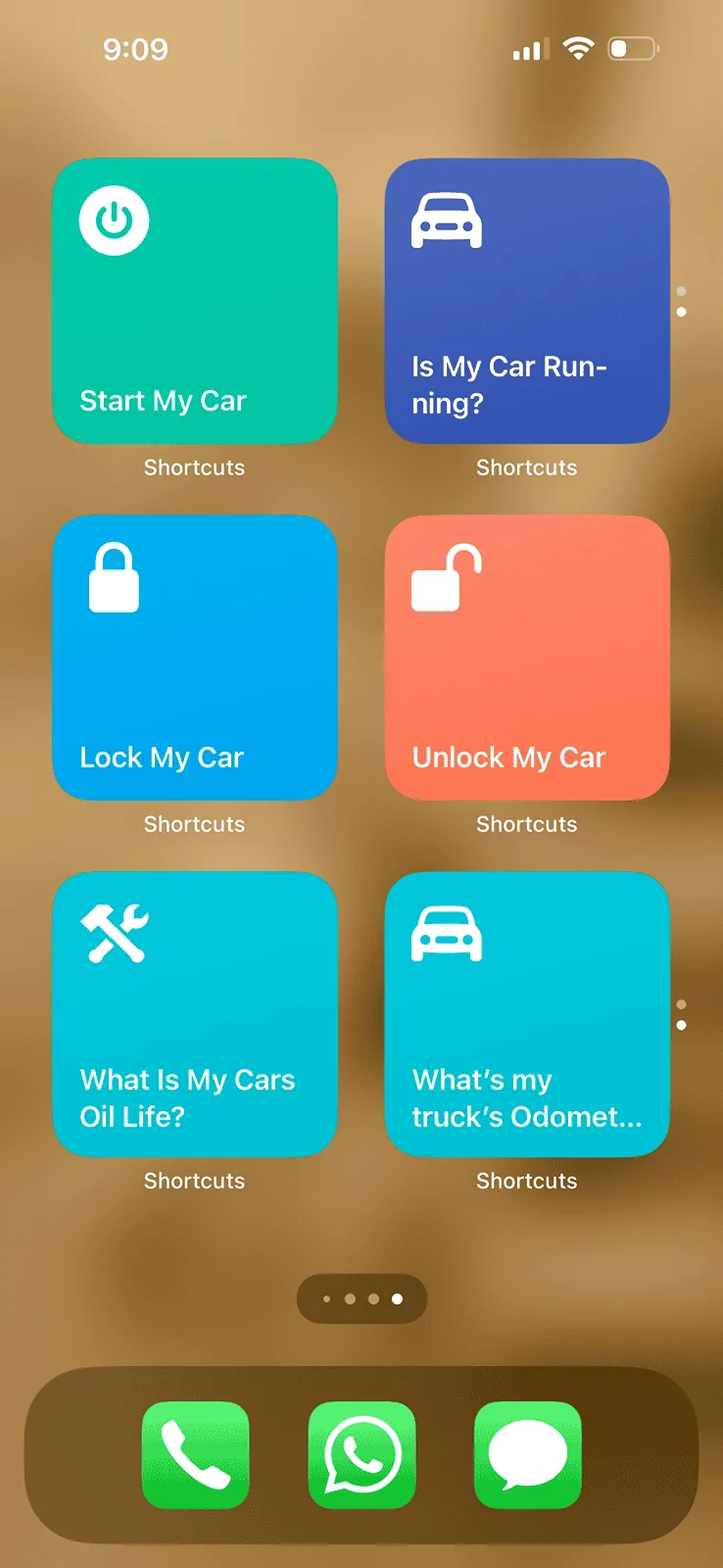
Got it all working perfectly now. Here’s a view of my Maverick iPhone wall screen. Thanks! No more using FordPass app.

Ford Maverick Siri Shortcuts for Start / Stop / Unlock / Lock & More Commands Work! IMG_0998
 

BlackBeard

2.5L Hybrid
Member
First Name
Dennis
Joined
Jul 5, 2023
Threads
1
Messages
13
Reaction score
22
Location
Memphis
Vehicle(s)
2023 Maverick XLT
Engine
2.5L Hybrid
Clubs
 
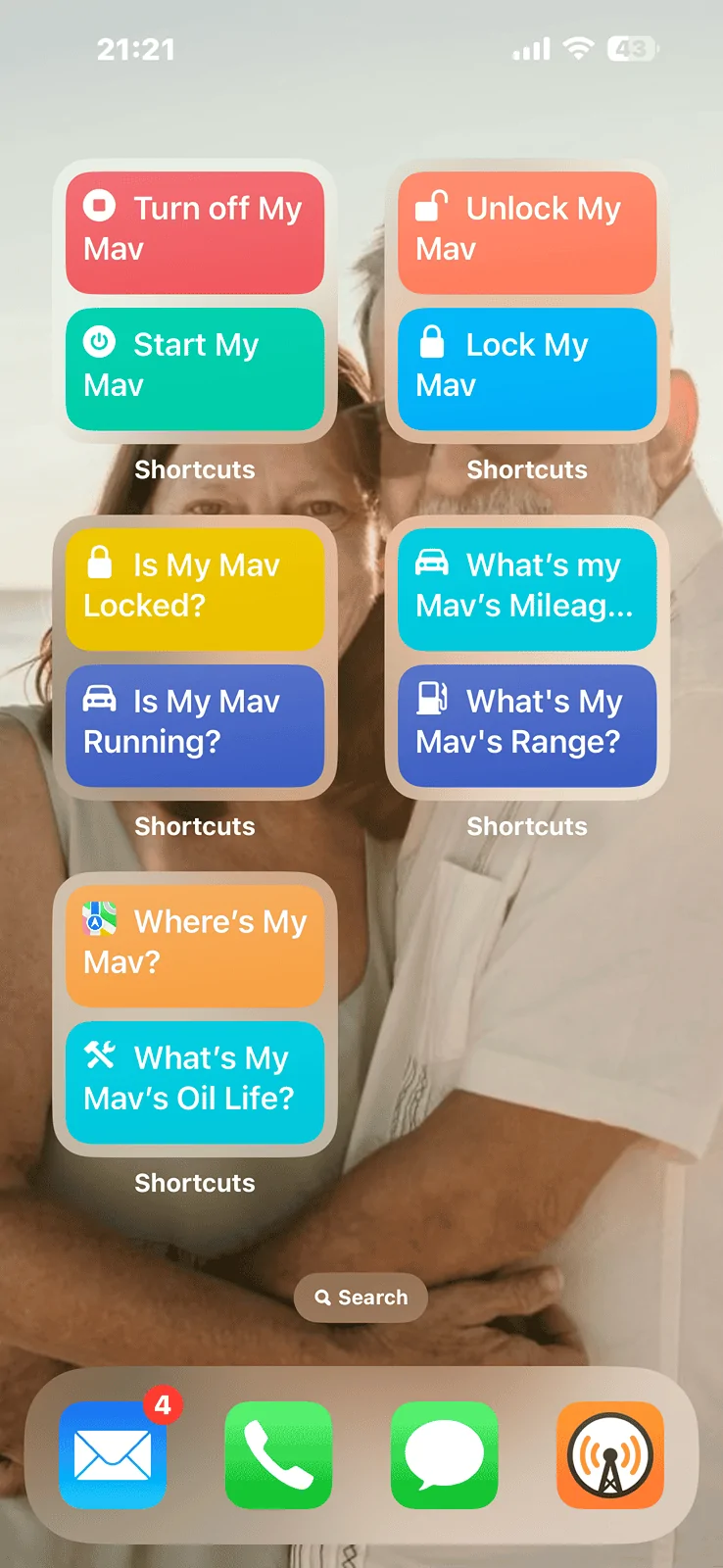
Nice! I got a bit carried away.
Ford Maverick Siri Shortcuts for Start / Stop / Unlock / Lock & More Commands Work! IMG_0793
 

BlackBeard

2.5L Hybrid
Member
First Name
Dennis
Joined
Jul 5, 2023
Threads
1
Messages
13
Reaction score
22
Location
Memphis
Vehicle(s)
2023 Maverick XLT
Engine
2.5L Hybrid
Clubs
 
I was trying to do the same but I didn’t know how to change it the duo one.
Apple doesn’t make it easy. Have to delete the ones you don’t want then add the dual ones. They should let you have more control, mod the ones you have, etc.
 
Sponsored

jcast0311

2.0L EcoBoost
Well-known member
First Name
James
Joined
Jul 20, 2023
Threads
11
Messages
253
Reaction score
327
Location
South Texas
Vehicle(s)
2023 Ford Maverick Lariat 2.0 EB LUX FX4 4K CG
Engine
2.0L EcoBoost
Clubs
 
Cool while it lasted. Just today it just stopped.
 

TRUCKHEF

2.5L Hybrid
Well-known member
Joined
Sep 24, 2021
Threads
7
Messages
346
Reaction score
414
Location
SOCAL
Vehicle(s)
22' Ford Maverick XLT
Engine
2.5L Hybrid
Same. Mine is no longer working either.
 

Mjasi3

2.5L Hybrid
New member
First Name
Mike
Joined
May 28, 2024
Threads
0
Messages
3
Reaction score
0
Location
Chicago usa
Vehicle(s)
Bronco
Engine
2.5L Hybrid
Only works for the US App Store FordPass app according to the developer

As a follow up to 2/8/22 thread https://www.mavericktruckclub.com/f...ck-diy-how-to-instructions.10056/#post-785687

Yesterday, I saw a reddit thread that the Siri shortcuts were working again on iPhones and Apple watches.

Functions include:
Start my Car
Turn off my Car
Lock my Car
Unlock my Car
Whats my Car Odometer?
Whats my Cars Oil Life?
Wheres my Car?

I purged the old versions I had used and installed the new shortcuts following the reddit thread. I entered my FordPass email address, FordPass password, and VIN number in during the installation of the first shortcut. After installing all the shortcuts, I manually activated the Start my Car shortcut (pushed the tile) and granted permission to run and voila... Maverick started. Followed up with Turn off my Car which also worked.

Will test verbally later today.
Cheers!
Bryon
FordPass Siri Shortcuts.webp
So I was able to get this working. iOS 17.5.1 fordpass 5.

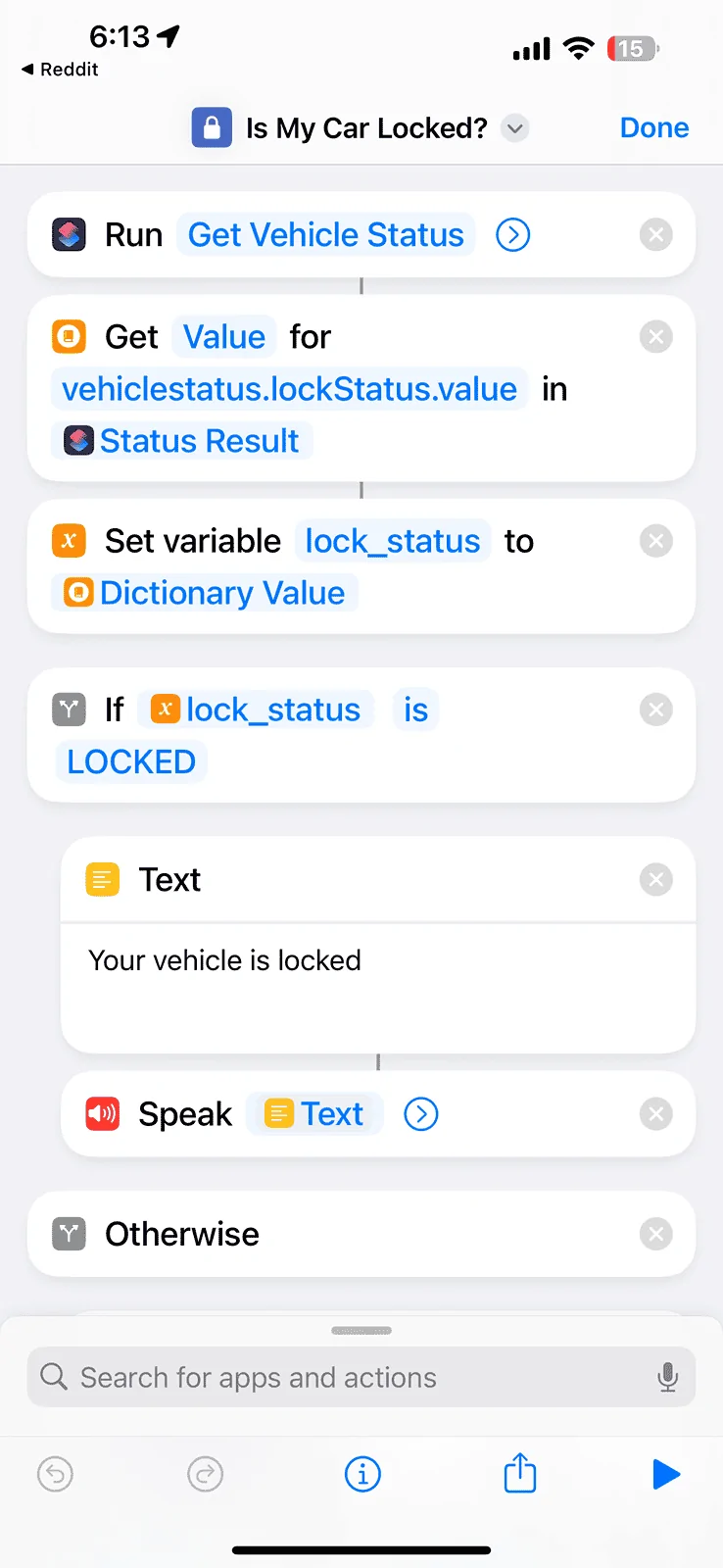
I tried these from this Reddit post (https://www.reddit.com/r/shortcuts/s/z0bgbN2t9g) but couldn’t get them to work. They are missing the execute command. But they have commands for: is my vehicle locked, zone lighting, range, etc.

Can those other commands be implemented using the setup in the ones here?

For instance here is “their” “is it locked” shortcut. How do I change the one from maverick to work?
Ford Maverick Siri Shortcuts for Start / Stop / Unlock / Lock & More Commands Work! IMG_7934
 

Mjasi3

2.5L Hybrid
New member
First Name
Mike
Joined
May 28, 2024
Threads
0
Messages
3
Reaction score
0
Location
Chicago usa
Vehicle(s)
Bronco
Engine
2.5L Hybrid
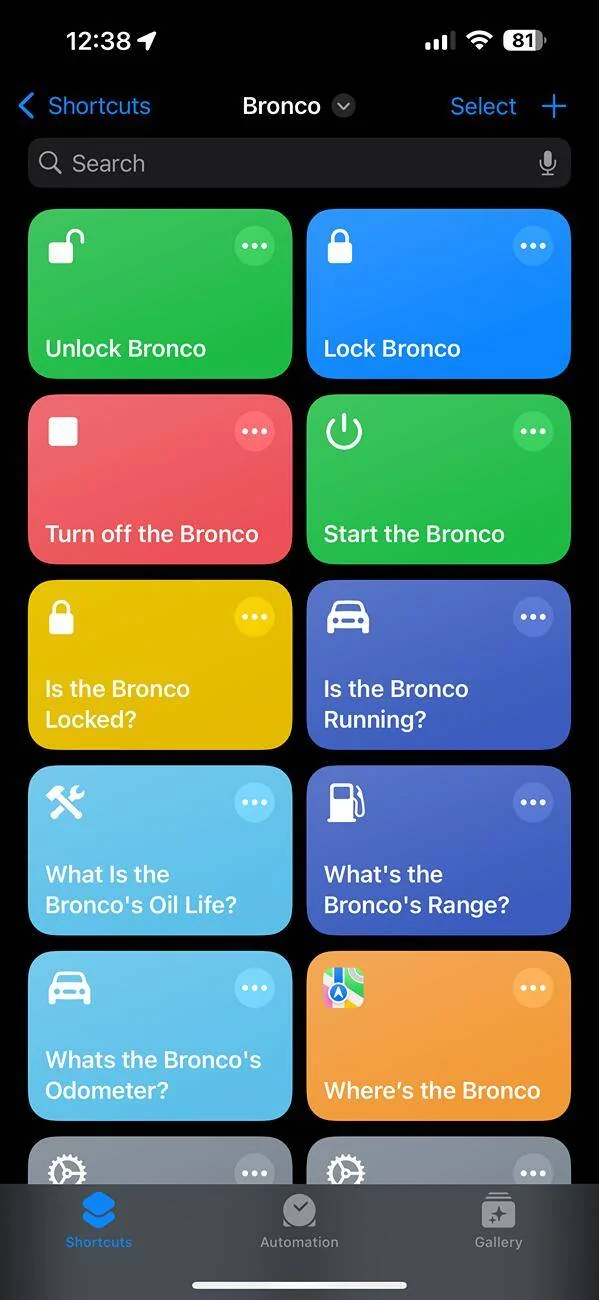
ok, had this all working. all commands (and through SIRI) and received all notifications back. Upgraded to IOS 18. and the commands are broken. Siri doesnt recognize them, and none of the states work. if I manually go to the shortcut and press unlock/lock (haven't tried turn on/off yet) they work. Any body else have this problem with ios18 and troubleshooting?
Ford Maverick Siri Shortcuts for Start / Stop / Unlock / Lock & More Commands Work! IMG_0234
 

Mjasi3

2.5L Hybrid
New member
First Name
Mike
Joined
May 28, 2024
Threads
0
Messages
3
Reaction score
0
Location
Chicago usa
Vehicle(s)
Bronco
Engine
2.5L Hybrid
ok, had this all working. all commands (and through SIRI) and received all notifications back. Upgraded to IOS 18. and the commands are broken. Siri doesnt recognize them, and none of the states work. if I manually go to the shortcut and press unlock/lock (haven't tried turn on/off yet) they work. Any body else have this problem with ios18 and troubleshooting?
IMG_0234.jpg
ok. got it working. just in case somebody else has issues.

turned off shortcuts in systems preferences/iCloud. restarted iPhone. turned on shortcuts in system preferences. this got the notifications/status shortcuts working. But not the lock, unlock, start, stop with Siri.

I then deleted the lock, unlocked, start, stop shortcuts, and re-imported them from this link (which I think is the same as before):.

Siri now recognizes the shortcuts.
Sponsored


Top