
- First Name
- David
- Joined
- Dec 8, 2024
- Threads
- 38
- Messages
- 144
- Reaction score
- 618
- Location
- So. Calif.
- Vehicle(s)
- 2025 Maverick Hybrid
- Engine
- 2.5L Hybrid
- Thread starter
- #1
TL/DR: Stick-on tactile bumps can serve as 'home key' locators, making it easier to operate essential controls on the Maverick’s glass cockpit touchscreen.
Aside from the 2025 front-grille nosejob, the most hated/criticized feature of the truck is likely the switch away from tactile controls to the glass cockpit style touchscreen.
Many users have expressed concern that the move to touchscreen controls is part of a broader industry trend that is often called unsafe, as it requires drivers to take their eyes off the road for longer periods compared to tactile controls of previous model years. In my reading online here and elsewhere, I ran across a lot of shade tossed at Ford for the change. One person even commented it was a deal-breaker for him; he would not own the truck based on these controls.
As a new ’25 owner/driver, I had no history with the previous incarnation of the controls, so I had no bias toward them. Nevertheless I quickly came to understand their frustrations.
The biggest problem is knowing where to tap. The driver had to first take eyes off the road, focus close, locate the “target,” then tap and hope the finger landed in the right place. A generally terrible experience.
After a couple of months driving and tapping, it occurred to me that a workable solution was an old
one: the tactile bumps like on the “j” and “f” keys on a desktop keyboard. If you’re a touch-typist, you know you’re in the right place when you feel those bumps. Why not try this near the glass screen?
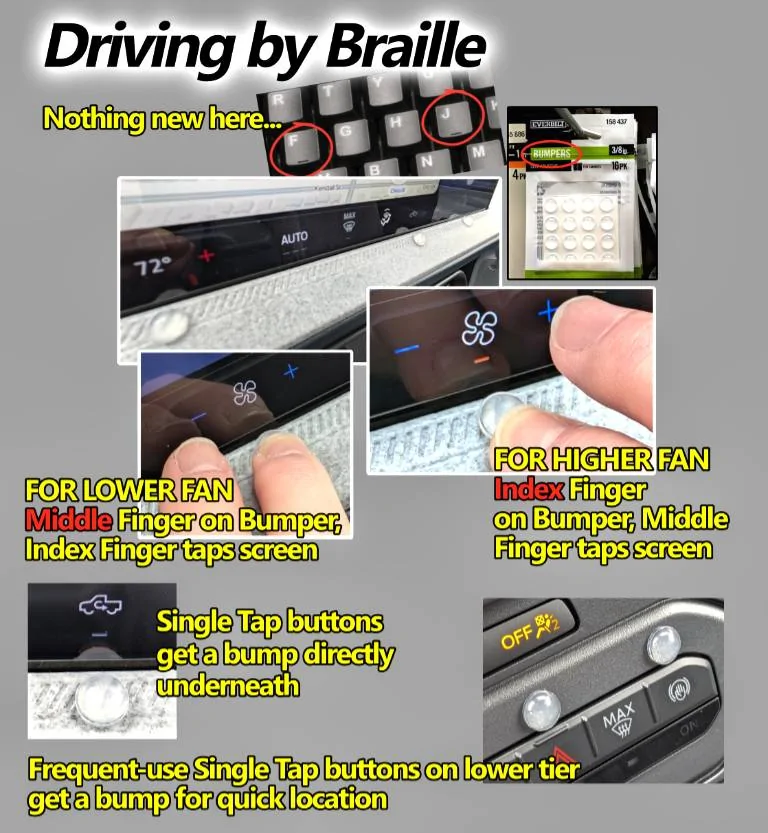
A trip to Home Depot/Ace/Lowes offers a variety of adhesive cabinet bumpers. I bought a small pack and adhered them to the bezel just below the target areas on the truck’s info screen. I know it’s possible to use the “OK Ford” commands to raise/lower the temperature, there’s no command to increase/decrease the fan speed. A glaring omission, eh? I placed a sticky bump just below the fan icon on the screen. Resting either an index or middle finger on the bump, I could easily pivot my hand and land an adjacent finger in the perfect spot every time. It took a little practice, but like touch typing, it becomes second nature after a while.
Yeah, a few quick side glances were needed to approach the bump, but once there, my eyes were right back on the road. The screen controls provide an audio feedback as the “button” is pressed, and another quick glance shows the setting number.
I placed sticky bumps near the most commonly used control areas, as well as over the most-used buttons on the lower tier of hard buttons to help me get to them quickly.
The stick-ons are unobtrusive and have clean lines. My wife remarked they “look like they were part of the truck.” They grip enough to withstand your touch, but if you decide to remove them, they don’t leave a residue.
They have improved my driving experience. As always, YMMV.
Aside from the 2025 front-grille nosejob, the most hated/criticized feature of the truck is likely the switch away from tactile controls to the glass cockpit style touchscreen.
Many users have expressed concern that the move to touchscreen controls is part of a broader industry trend that is often called unsafe, as it requires drivers to take their eyes off the road for longer periods compared to tactile controls of previous model years. In my reading online here and elsewhere, I ran across a lot of shade tossed at Ford for the change. One person even commented it was a deal-breaker for him; he would not own the truck based on these controls.
As a new ’25 owner/driver, I had no history with the previous incarnation of the controls, so I had no bias toward them. Nevertheless I quickly came to understand their frustrations.
The biggest problem is knowing where to tap. The driver had to first take eyes off the road, focus close, locate the “target,” then tap and hope the finger landed in the right place. A generally terrible experience.
After a couple of months driving and tapping, it occurred to me that a workable solution was an old
one: the tactile bumps like on the “j” and “f” keys on a desktop keyboard. If you’re a touch-typist, you know you’re in the right place when you feel those bumps. Why not try this near the glass screen?
A trip to Home Depot/Ace/Lowes offers a variety of adhesive cabinet bumpers. I bought a small pack and adhered them to the bezel just below the target areas on the truck’s info screen. I know it’s possible to use the “OK Ford” commands to raise/lower the temperature, there’s no command to increase/decrease the fan speed. A glaring omission, eh? I placed a sticky bump just below the fan icon on the screen. Resting either an index or middle finger on the bump, I could easily pivot my hand and land an adjacent finger in the perfect spot every time. It took a little practice, but like touch typing, it becomes second nature after a while.
Yeah, a few quick side glances were needed to approach the bump, but once there, my eyes were right back on the road. The screen controls provide an audio feedback as the “button” is pressed, and another quick glance shows the setting number.
I placed sticky bumps near the most commonly used control areas, as well as over the most-used buttons on the lower tier of hard buttons to help me get to them quickly.
The stick-ons are unobtrusive and have clean lines. My wife remarked they “look like they were part of the truck.” They grip enough to withstand your touch, but if you decide to remove them, they don’t leave a residue.
They have improved my driving experience. As always, YMMV.
Sponsored
Last edited: