
Sponsored

Please recommend a portable CD player for the Maverick

Gvmumbral

2.5L Hybrid
Well-known member
First Name
Gerardo
Joined
Dec 8, 2021
Threads
11
Messages
267
Reaction score
214
Location
Pasadena, CA
Vehicle(s)
Honda Element
Engine
2.5L Hybrid
Clubs
 
That looks exactly like the model I bought off Amazon. Do you sometimes have to eject the CD, then re-insert so the radio will recognize it as a source? I just sit mine on top of the console over the first cupholder, so it doesn't slide around, and then store it inside the console when not in use.
Honestly I can't remember having any issues with it. It;s been great so far.
Sponsored


CFLbeachguy

2.5L Hybrid
Active member
First Name
chuck
Joined
Jul 26, 2021
Threads
1
Messages
40
Reaction score
57
Location
Central Florida
Vehicle(s)
2022 Ford Maverick
Engine
2.5L Hybrid
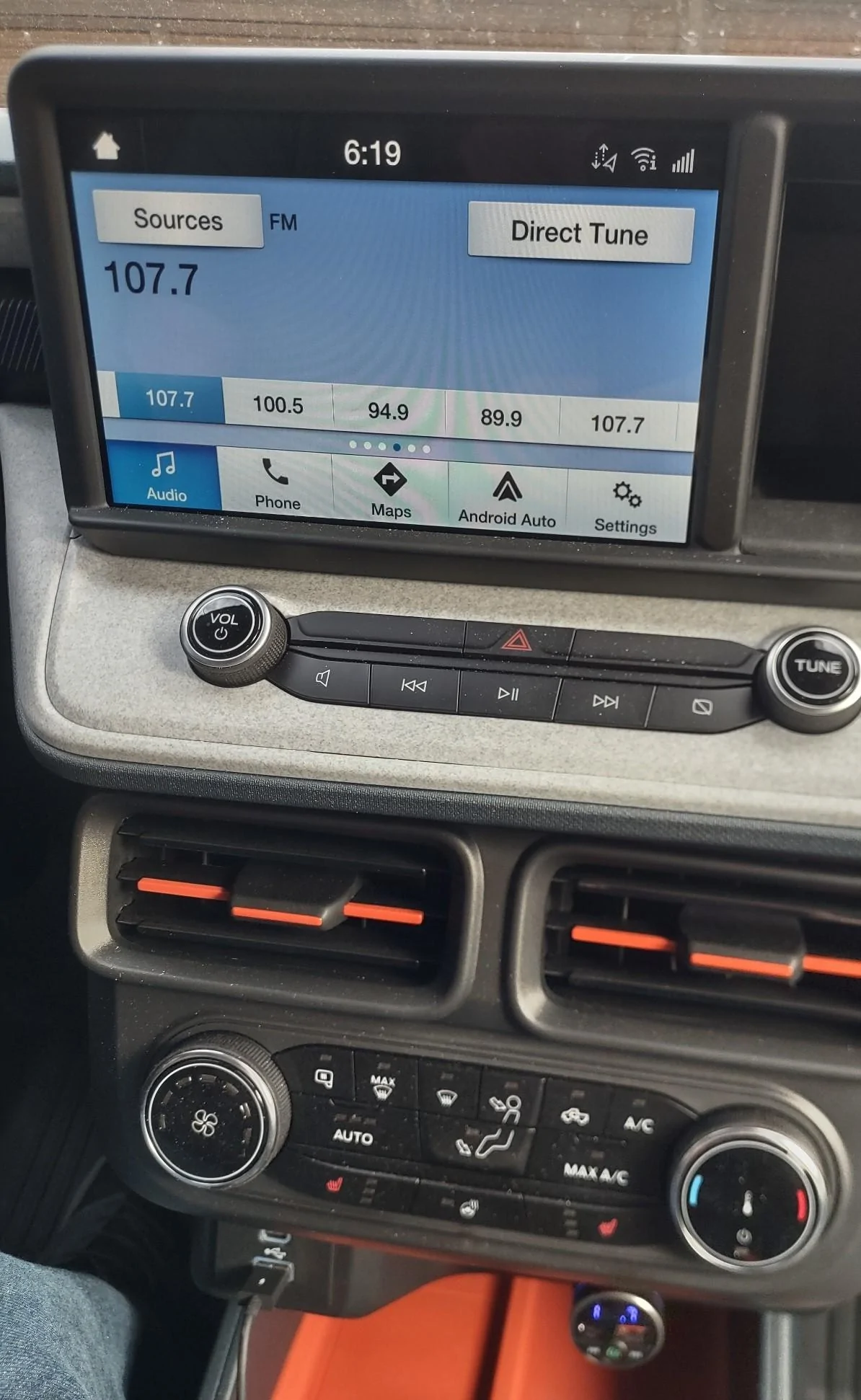
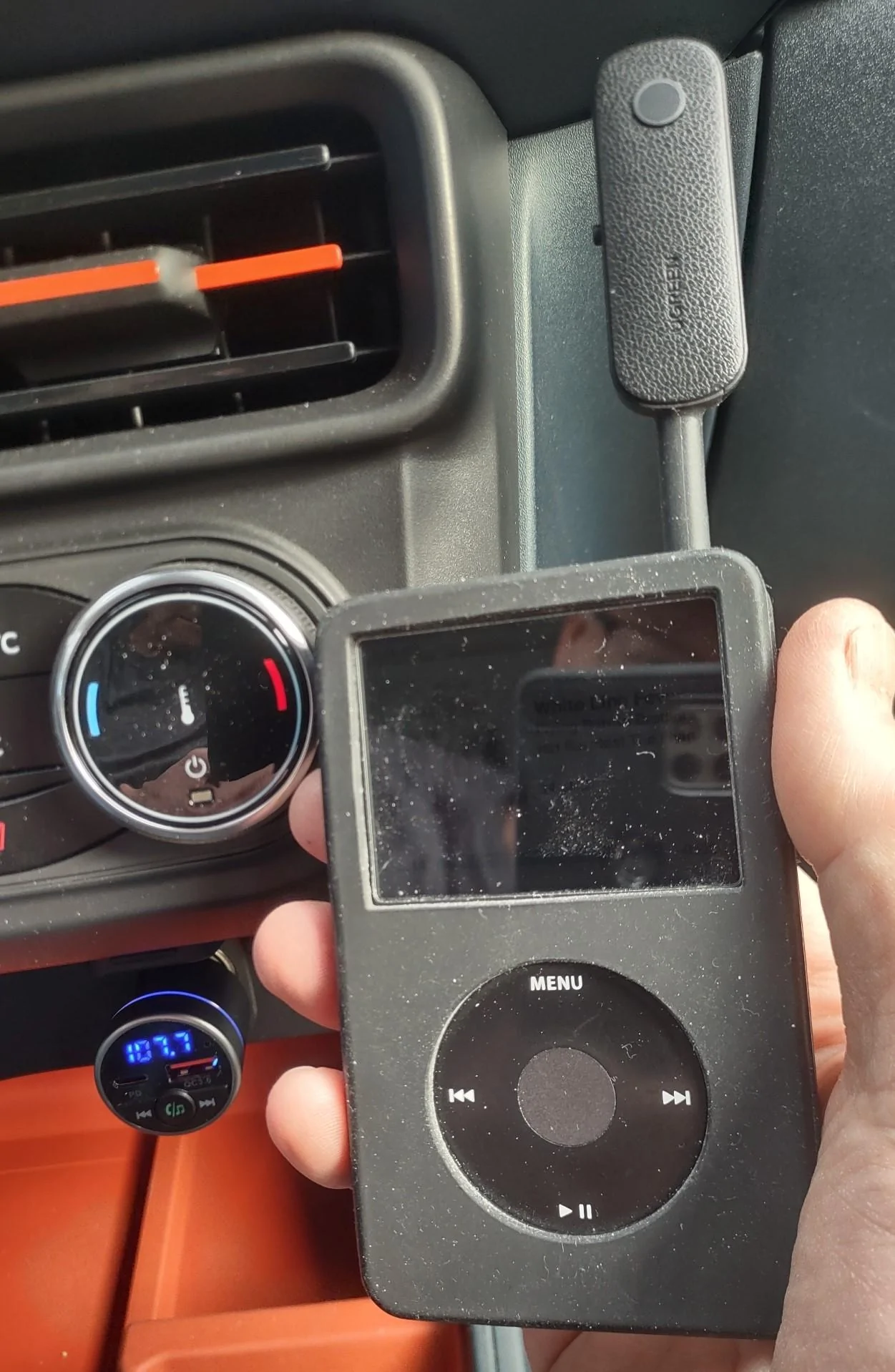
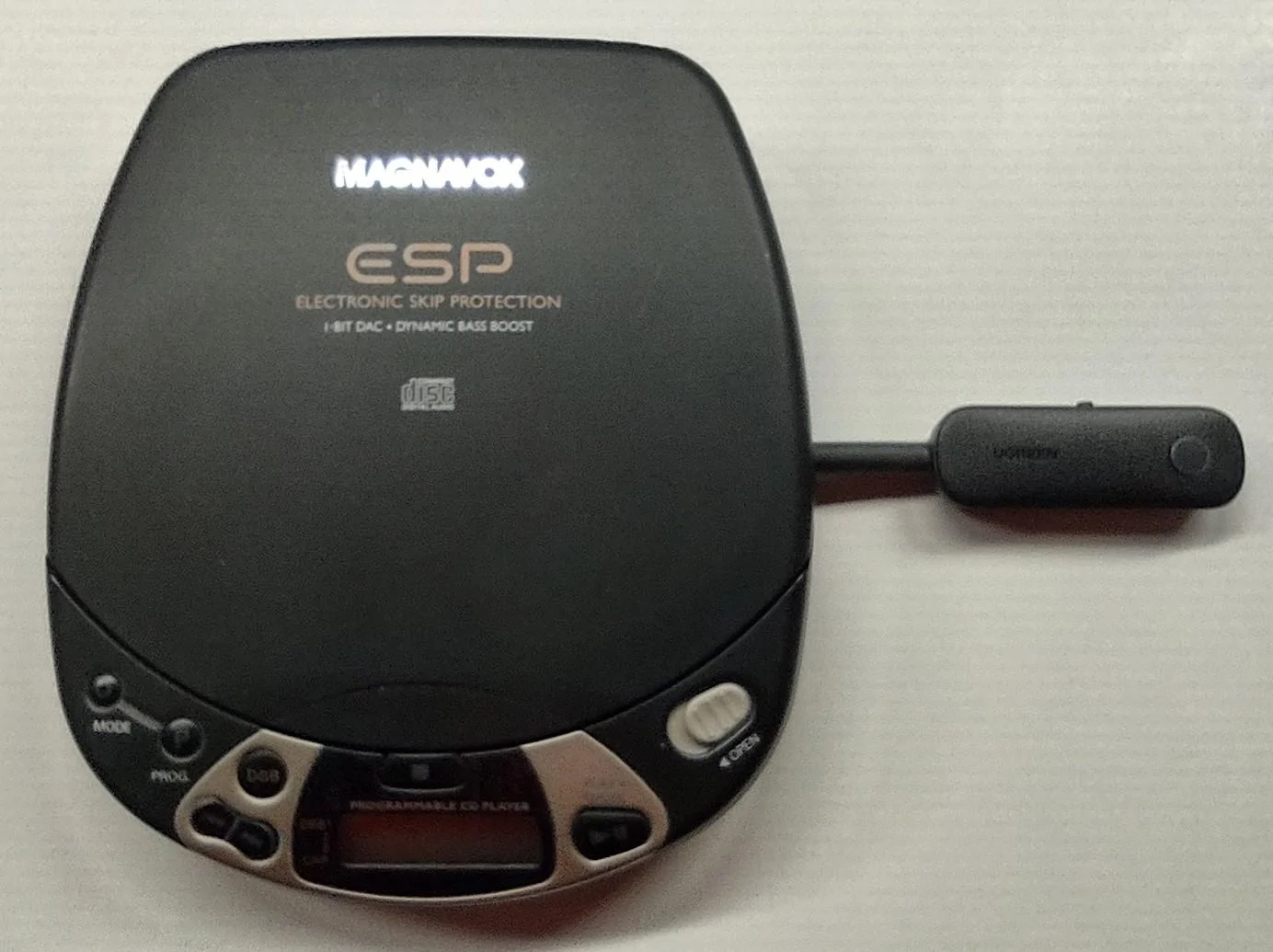
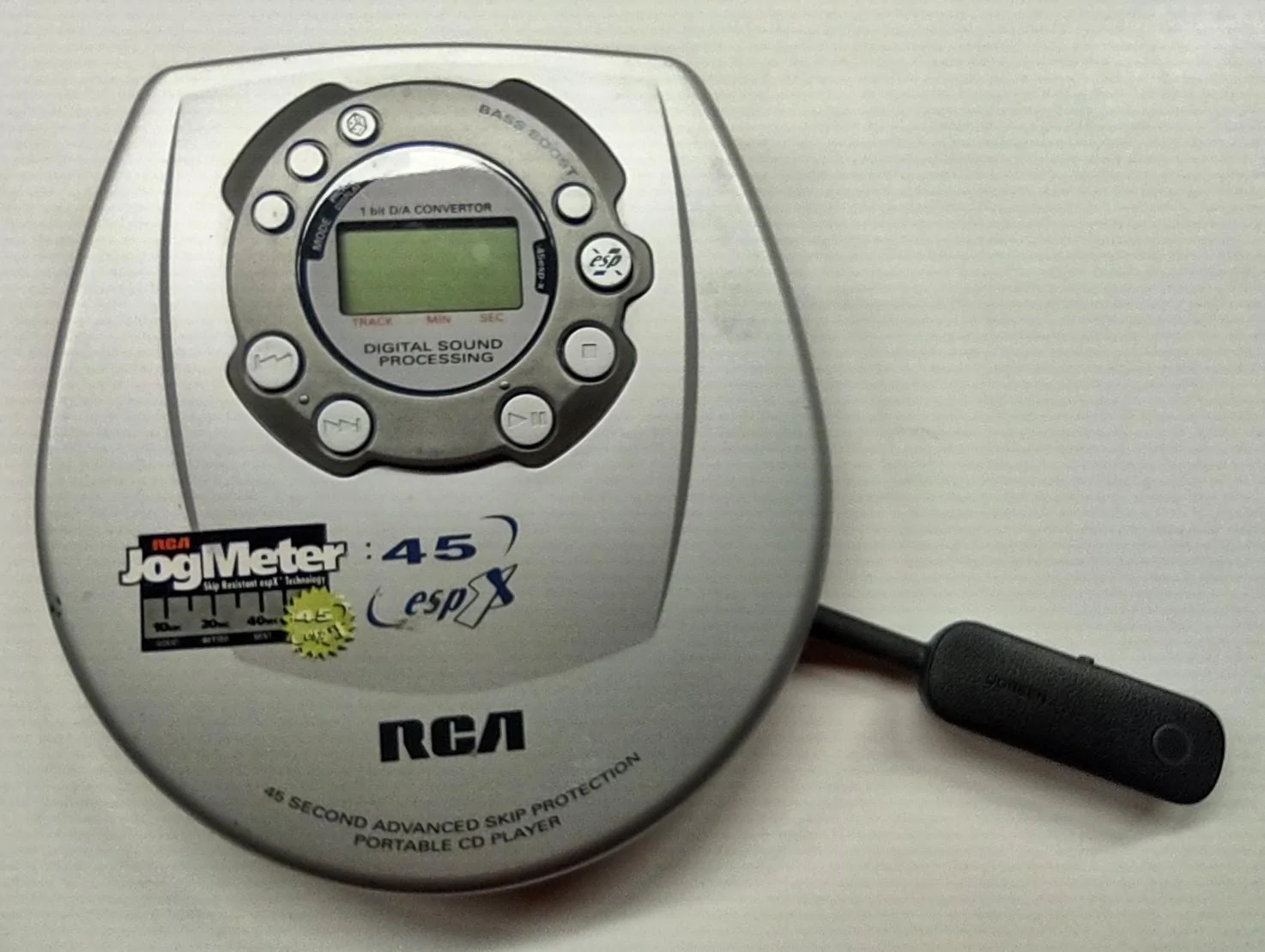
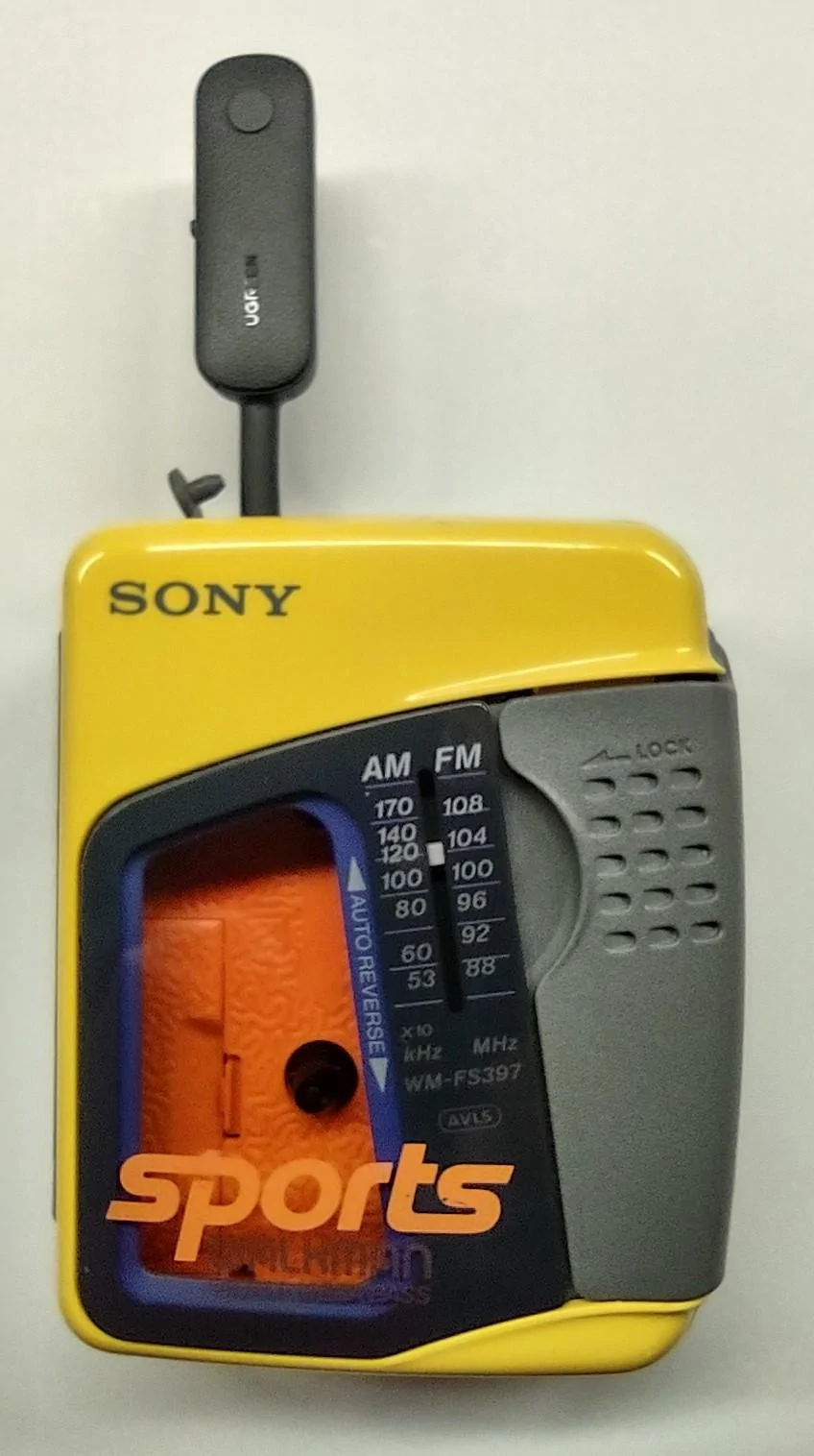
Wow, it's a "Frankenstein" method? Sorry this simple solution is apparently beyond your limited comfort zone. For others who do want to use their old iPod with its iTunes unique capabilies, portable CD player, or portable cassette player in the absence of an AUX port or the ability to connect directly via bluetooth, check out the attached images and decide for yourself. Given the circumstances, I view this simple wireless solution as being quite "clean". And I know for a fact that it works great. Decide for yourself, but no reason to get snarky like TheNightMere. Not sure what TheNightMere means by "FM stations that's static", but to be clear, there is ZERO static when I use my iPod in this manner (regardless of whether it's playing music, in-between songs or paused). As far as TheNightMere's plan to load his music onto a Galaxy S8, I've already done that as well for my ~12,000 song library. With my music library loaded onto a micro SD card in my android phone, I do use that method and have tried out multiple free (do you like ads and commercials?) music player applications as of course such an app is necessary. I've tried Rocket Player, Pi Music, Pulsar, and Musicolet (the latter perhaps being my favorite). However, I haven't used an app yet that works nearly as well as my commercial-free iPod with it's excellent iTunes capabilities (e.g., Genius Mixes, automatic playlists created based on individual preferences or based on current song you're listening to, music genres, etc.). Incidentally, when not being used as part of the discussed solution, the FM Transmitter also happens to be a nice 18W USB-A QC3.0 and 20W USB-C PD fast-charging device. LASTLY, let's not overlook the IMPORTANT FACT that this topic originated with the challenge being how to connect a portable CD player - TheNightMere's elementary plan does NOTHING for that. Anyway, decide for yourself, but don't let TheNightMere's "Frankenstein" comments scare you off! NOTE: Regarding the image that shows a device plugged into the USB port, that device has nothing to do with this discussion - that's simply my wireless Android Auto adapter/dongle.

FM Transmitter with FM Radio.jpg


FM Transmitter with iPod.jpg


FM Transmitter with Magnavox CD Player.jpg


FM Transmitter with RCA CD Player.jpg


FM Transmitter with Sony Cassette Player.jpg
I used the same thing to connect my phone in a Chevy HHR when to AUX plugin went out.>
 

Gpp

2.0L EcoBoost
Well-known member
First Name
Gil
Joined
Sep 28, 2021
Threads
173
Messages
851
Reaction score
1,154
Location
Sanford nc
Vehicle(s)
2022 ford maverick
Engine
2.0L EcoBoost
Clubs
 
Since my last conversation on here about this i had my daughter put her apple music app on my iphone.now i just tell siri what i want to hear and she takes care of it.i also put my music on the phone incase i want to play it instead. for a old man i have learned to adapt to new technology best i can and most of it is right nice.just my 2 cents worth.
 

CACTI_HYBRID

2.5L Hybrid
Well-known member
First Name
Rick
Joined
Feb 15, 2021
Threads
66
Messages
830
Reaction score
1,243
Location
Meridian, ID
Vehicle(s)
2022 Ford Maverick XL Hybrid
Engine
2.5L Hybrid
I am cleaning out a storage unit and found my old collection of CDs and cassette tapes. I know how to rip CDs to MP3, but also have a small CD device that uses a USB connector I will need to try. I could also record the cassettes, (in real time unfortunately) to . Mp3 format with Audacity. I also see they now have Walkman style cassette players that can be USB powered and can play through Bluetooth. That might be a no-conversion option for playing cassettes in the Maverick.
 

Erwin

2.0L EcoBoost
Member
First Name
Erwin
Joined
Oct 27, 2022
Threads
3
Messages
21
Reaction score
13
Location
Castleton, VA
Vehicle(s)
2022 Maverick XL
Engine
2.0L EcoBoost
I got the same one as Gvmumbral but I mounted it vertically on the front of access box in the center console. I used a 3/4' spacer to move it forward to clear the overhang of the access box, It works great, is out of the way and that model works vertically. I live on a one mile gravel road and have had no problem with skips.
 

Sponsored

Edge Haley

2.5L Hybrid
Well-known member
First Name
Edge
Joined
Jul 17, 2021
Threads
5
Messages
1,351
Reaction score
1,825
Location
CARBONDALE-Atlanta
Vehicle(s)
PORSCHE
Engine
2.5L Hybrid
A sincere recommendation: Hire a locaL high school or college student to convert one of your CDs of songs to a "thumb drive / flash drive". You'll never want to see a CD again. I have at lease 600 CD's written/copied to a $2.50 flash drive and would never go back to using CD's, but I buy music on CD's to have them but immediately convert the CD's to mp3 via Itunes. The flash drives are basically indestructible compared to a CD.
 

JT Maverick

2.5L Hybrid
Well-known member
First Name
Joe
Joined
Oct 17, 2022
Threads
2
Messages
138
Reaction score
90
Location
New Jersey
Vehicle(s)
2022 Ford Maverick
Engine
2.5L Hybrid
With iTunes on my laptop, it's real easy to import music from CD's into my iTunes library. Simply connect my inexpensive external CD drive to my laptop, pop in the CD, and iTunes asks me if I want to import the CD's files into my library. Click 'yes' and it's in its way. After the simple import is done, I connect my iPod Classic and it's automatically synched up (but few probably still use iPods). As many more likely do, I then ALSO copy all of the iTunes library's mp3 files onto a micro SD card that is temporarily plugged into my laptop. After copying the mp3 files onto the micro SD card, I remove it from the laptop and simply plug it into my Android phone. The phone's music app then has access to the mp3 files and the music can be played as desired. I have ~12,000 songs on a 128GB micro SD card that's in my Android phone, so of course I'm using the Maverick's Android Auto (connected via a wireless Android Auto Adapter). I've used a few of the free music apps for Android (found on Google Play Store), but I'm currently most happy with the free 'Musicolet' music app. It has a smooth user interface, album artwork looks good, it's easy to select 'artist', 'album', 'song', gives option to 'resume' where you left off the last time you used it, lacks the annoying ads or banners that some free apps have, etc. Anyway, accessing your mp3 files via a micro SD card on your phone works great for me. Note: If you have enough free space on your phone's internal memory, of course you can simply store the mp3 files there without needing to use a microSD card.
 

CACTI_HYBRID

2.5L Hybrid
Well-known member
First Name
Rick
Joined
Feb 15, 2021
Threads
66
Messages
830
Reaction score
1,243
Location
Meridian, ID
Vehicle(s)
2022 Ford Maverick XL Hybrid
Engine
2.5L Hybrid
A follow-up to my previous post. I tried the portable CD player I had for use with my computer, plugged it into the USB port in the Maverick, and while it powered it, nothing else appeared on the Maverick screen. I'm thinking I'd need a different kind of CD player. No matter though... I think ripping the CDs to .mp3 files and then playing them from a flash drive is likely a better option. I already have over 1,300 songs in .MP3 format playing from a tiny Sandisk Ultrafit USB drive plugged into the Maverick port and it works beautifully. :)
Now the cassettes are a different matter. Yes, I could record (in real time :rolleyes:) each cassette into the computer using Audacity, split the tracks, and then save those as .mp3 files finally putting them on a flash drive. Or... maybe something like this Bluetooth cassette player might work? Ya think the Maverick bluetooth would find this and accept songs playing on it? :unsure: https://www.amazon.com/Bluetooth-Ca...ssette+player+bluetooth&qid=1686536738&sr=8-5
 

JT Maverick

2.5L Hybrid
Well-known member
First Name
Joe
Joined
Oct 17, 2022
Threads
2
Messages
138
Reaction score
90
Location
New Jersey
Vehicle(s)
2022 Ford Maverick
Engine
2.5L Hybrid
I SUSPECT it won't work. I base that on my failed attempt to pair the Maverick's audio system with the bluetooth transmitter that is plugged into my iPod Classic's headphone jack. I THINK others confirmed the same as well. That's why I took the next step and picked up the bluetooth FM transmitter that simply plugs into the 12v outlet. When I want to enjoy my iPod with its nice unique capabilities, the iPod's bluetooth transmitter quickly connects with the bluetooth FM transmitter that is connected via bluetooth to the FM radio. After initial set-up, no subsequent set-ups are required each time you connect your music player via the FM transmitter in this way. Works flawlessly for me (not even a hint of static, etc.). BTW, it should also work for your old portable CD player and old portable cassette player (assuming they have headphone jacks). I also really like the bluetooth transmitter that is plugged into my iPod for the purpose I actually bought it for - connecting my iPod to my bluetooth headphones. Total price on Amazon for the bluetooth transmitter AND bluetooth FM transmitter was less than 40 bucks.
Amazon.com: UGREEN Bluetooth 5.0 Transmitter and Receiver 2 in 1 Wireless 3.5mm Bluetooth Adapter, Dual Devices Simultaneously, Aux Bluetooth Audio Car Adapter Compatible with TV Car Home Stereo System Headphones : Electronics
Amazon.com: FM Transmitter for Car Bluetooth 5.3, RIWUSI [All-Metal] PD 20W & QC3.0 18W Fast Car Charger, Wireless FM Radio Car Kit Bluetooth Car Adapter, Noise Cancelling Hands-Free Call, Hi-Fi Music, Blue Light : Electronics
 

GPSMan

2.5L Hybrid
Well-known member
Banned
First Name
John
Joined
Jul 28, 2022
Threads
52
Messages
4,325
Reaction score
5,340
Location
CA
Vehicle(s)
Many
Engine
2.5L Hybrid
Clubs
 
For someone who has not done it, how long does it take to put an entire CD onto USB drive?
 
Sponsored

CACTI_HYBRID

2.5L Hybrid
Well-known member
First Name
Rick
Joined
Feb 15, 2021
Threads
66
Messages
830
Reaction score
1,243
Location
Meridian, ID
Vehicle(s)
2022 Ford Maverick XL Hybrid
Engine
2.5L Hybrid
For someone who has not done it, how long does it take to put an entire CD onto USB drive?
Not terribly long. A CD-ripping program (I'm using Express Rip CD Ripper on a PC) can typically convert all the tracks on an average CD in 30-60 minutes. (Using a faster USB 3.0 port to connect the player or probably faster, a computer with a built-in CD drive could be faster still). To test, I ripped a CD with 14 tracks in just under minutes. Once you get it going, you sit back and let the computer do its work. Then add a few minutes to copy the resulting .mp3 files to a flash drive.
The more time-consuming task would be to convert cassette tapes to .mp3 files. That has to be done in real-time as the entire cassette has to be played, recorded, then the resulting .wav file chopped into the individual tracks, each saved as an .mp3, titles assigned, and finally saved to a flash drive.
When you're ripping a CD, you are working entirely in the digital realm. Cassettes however are analog. You could convert LP records to .mp3 the same way, but it's time-consuming.
I SUSPECT it won't work. I base that on my failed attempt to pair the Maverick's audio system with the bluetooth transmitter that is plugged into my iPod Classic's headphone jack. I THINK others confirmed the same as well. That's why I took the next step and picked up the bluetooth FM transmitter that simply plugs into the 12v outlet. When I want to enjoy my iPod with its nice unique capabilities, the iPod's bluetooth transmitter quickly connects with the bluetooth FM transmitter that is connected via bluetooth to the FM radio. After initial set-up, no subsequent set-ups are required each time you connect your music player via the FM transmitter in this way. Works flawlessly for me (not even a hint of static, etc.). BTW, it should also work for your old portable CD player and old portable cassette player (assuming they have headphone jacks). I also really like the bluetooth transmitter that is plugged into my iPod for the purpose I actually bought it for - connecting my iPod to my bluetooth headphones. Total price on Amazon for the bluetooth transmitter AND bluetooth FM transmitter was less than 40 bucks.
Amazon.com: UGREEN Bluetooth 5.0 Transmitter and Receiver 2 in 1 Wireless 3.5mm Bluetooth Adapter, Dual Devices Simultaneously, Aux Bluetooth Audio Car Adapter Compatible with TV Car Home Stereo System Headphones : Electronics
Amazon.com: FM Transmitter for Car Bluetooth 5.3, RIWUSI [All-Metal] PD 20W & QC3.0 18W Fast Car Charger, Wireless FM Radio Car Kit Bluetooth Car Adapter, Noise Cancelling Hands-Free Call, Hi-Fi Music, Blue Light : Electronics
I have an FM transmitter that plugged into my cigarette lighter hole for power. It also had a USB port and a MP3 player built in and I'd plug in a flashdrive full of .mp3 files and "broadcast" the music to my FM radio in my old Explorer Sport Trac, the vehicle I sold when I got my Maverick. I will need to dig it out and see if it has a mini-jack where I could connect a cord from the headphone out of a Cassette player. A funky solution, but it could work.
 

GPSMan

2.5L Hybrid
Well-known member
Banned
First Name
John
Joined
Jul 28, 2022
Threads
52
Messages
4,325
Reaction score
5,340
Location
CA
Vehicle(s)
Many
Engine
2.5L Hybrid
Clubs
 
Still.... pretty long.... if you have like 500 CD's. 😳

My 2005 Hybrid Escape came with a 6 disc changer under the passenger seat that took cartridges. You could buy extra empty cartridges. I ended up storing like my favorite 120 cds in 20 cartridges. I also (still) have a cartridge CD player for home use too.

(you could also play one in the dash head unit; or put a street maps CD in the head unit- pre smart phones. )
 
Last edited:

CACTI_HYBRID

2.5L Hybrid
Well-known member
First Name
Rick
Joined
Feb 15, 2021
Threads
66
Messages
830
Reaction score
1,243
Location
Meridian, ID
Vehicle(s)
2022 Ford Maverick XL Hybrid
Engine
2.5L Hybrid
I'm beginning to think the FM transmitter idea might be the easiest. Plug a cord into the headphone jack of a portable CD player or Walkman-style cassette player, the other end into the FM transmitter and tune the radio to the right frequency. No conversation needed. Not elegant, but I don't plan on doing this often, perhaps just on long trips.
 

JT Maverick

2.5L Hybrid
Well-known member
First Name
Joe
Joined
Oct 17, 2022
Threads
2
Messages
138
Reaction score
90
Location
New Jersey
Vehicle(s)
2022 Ford Maverick
Engine
2.5L Hybrid
I'm beginning to think the FM transmitter idea might be the easiest. Plug a cord into the headphone jack of a portable CD player or Walkman-style cassette player, the other end into the FM transmitter and tune the radio to the right frequency. No conversation needed. Not elegant, but I don't plan on doing this often, perhaps just on long trips.
Agreed. And using that same approach, you can eliminate the unsightly cord by using the bluetooth FM Transmitter (plugged into 12v outlet) and bluetooth transmitter (plugged into your player's headphone jack). Becomes more elegant that way - you can even have the player completely tucked away while you use it (in glove box, console, etc.).
 

JT Maverick

2.5L Hybrid
Well-known member
First Name
Joe
Joined
Oct 17, 2022
Threads
2
Messages
138
Reaction score
90
Location
New Jersey
Vehicle(s)
2022 Ford Maverick
Engine
2.5L Hybrid
As far as loading a large library of mp3 music files onto a good quality usb flash drive (brand new 400MB/s 128GB SAMSUNG FIT Plus 3.1 flash drive in my case) for playback from the standard non-Sync 3 entertainment system (XLT in my case), I have given it a try. Unfortunately, my experience has been VERY disappointing.

Reasons: 1.) My library consists of approximately 12,000 songs, but the XLT's standard non-Sync 3 infotainment system clearly limits the number of files at an even 10,000 files. I have noticed somewhere that Sync 3 has a 15,000 file limit, but it clearly seems the non-Sync 3 limitation is 10,000 files. 2.) The indexing process takes "forever". Every time you start to access the files on the usb drive the files require indexing. I haven't timed it, but it takes AT LEAST 20-30 minutes for the indexing process to index all 10,000 (max) files - maybe longer. 3.) Once FINALLY indexed, browsing and selecting music to play is VERY slow and "unfriendly".

Given the other options, the 10,000 file limit alone is likely a "show-stopper" for me, but the overall performance from USB seems to totally suck - at least for a large library of mp3 files. I can't really think of anything positive to point out.

Unless there's some future update that drastically improves capabilities and performance, it sure appears that I won't be using the USB for my music playback. I'll continue to play music from my full ~12,000 song library using either Android Auto (AA wireless adapter w/android phone using free Musicolet music player app) or my iPod Classic (connected via bluetooth transmitter in headphone jack and bluetooth FM transmitter in 12V outlet). Using bluetooth (i.e., zero cords) these two solutions perform great and are easily "elegant" enough for me. The iPod Classic remains my favorite whenever I want to use its iTunes Genius ability to create and play from impressive 25-song playlists that can be based off of a song of my choice.
Sponsored


Top