
Sponsored

Now Playing Select Screen

altomav

2.0L EcoBoost
Well-known member
First Name
Keven
Joined
Aug 4, 2021
Threads
5
Messages
429
Reaction score
574
Location
Huntsville, Alabama
Vehicle(s)
Maverick, '71 GMC
Engine
2.0L EcoBoost
The Instrument cluster display allows option to display Select Screens such as NOW PLAYING and others. Is the sole purpose of the 'Now Playing' screen is to just show the radio frequency? As the photo shows below, the Radio Data System (RDS) that displays Station ID, Song title, etc is being displayed on the LCD screen to the right, but the only thing showing on the Instrument Cluster Select screen related is the Frequency. I would like to see RDS data to show on the Select screen. Am I missing something? So far the only use I have for the Now Playing select screen is to see the the Frequency while I'm doing a RF radio station Scan/Seek while connected to Car Play with USB. When iphone is connected with USB you can't see the Audio output screen on the LCD while your tuning. Any comments?
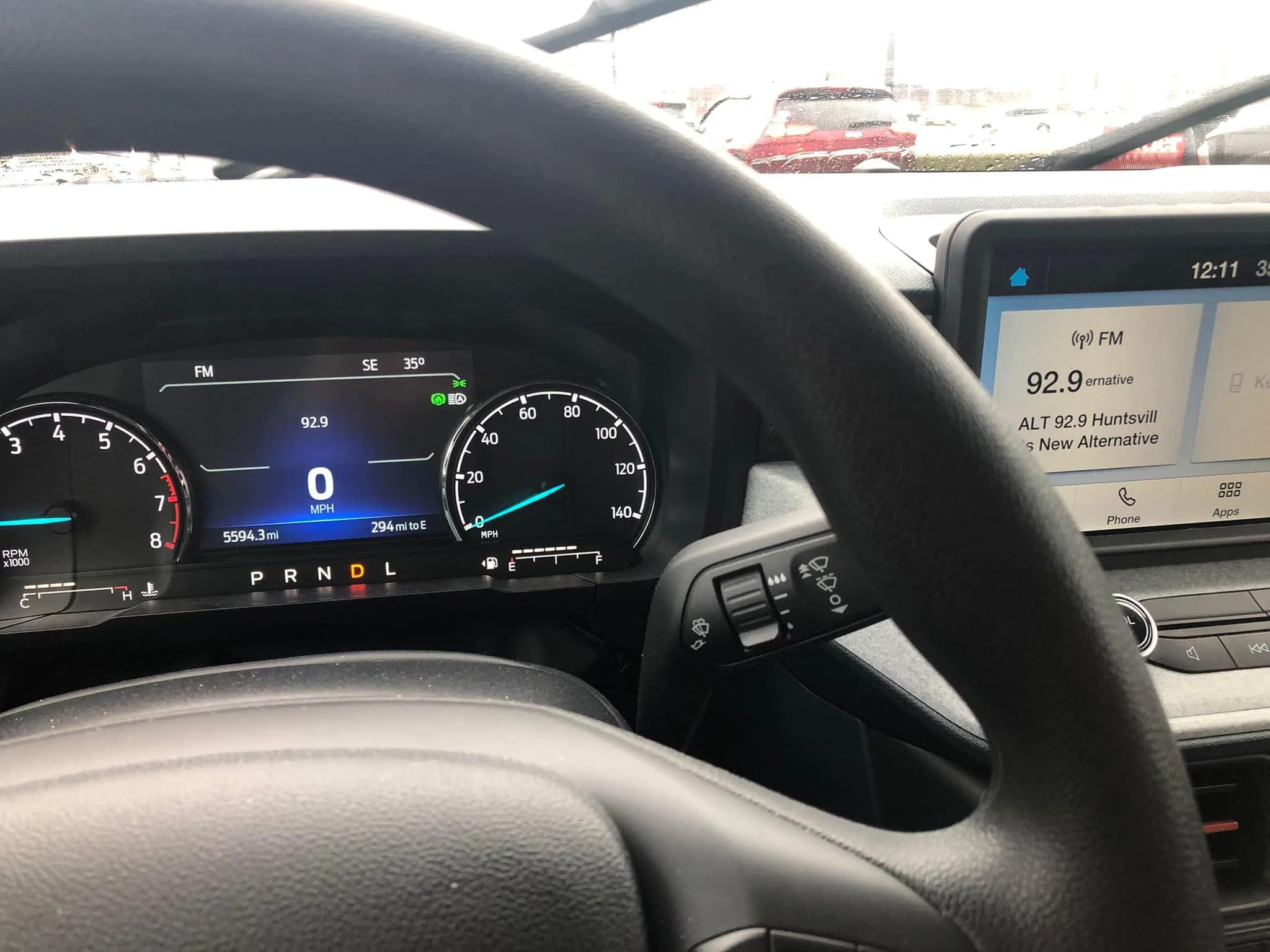
Ford Maverick Now Playing Select Screen R1
Sponsored


Meintc

2.5L Hybrid
Well-known member
First Name
Lynette
Joined
Oct 4, 2021
Threads
18
Messages
1,712
Reaction score
2,292
Location
Northern Lower TC Michigan
Vehicle(s)
2022 CO Hybrid Maverick
Engine
2.5L Hybrid
I don't mean to sound unsympathetic, but can't you just move your eyes to the right to see what's playing. Maybe I'm missing your problem?
 
OP
OP
altomav

altomav

2.0L EcoBoost
Well-known member
First Name
Keven
Joined
Aug 4, 2021
Threads
5
Messages
429
Reaction score
574
Location
Huntsville, Alabama
Vehicle(s)
Maverick, '71 GMC
Engine
2.0L EcoBoost
I don't mean to sound unsympathetic, but can't you just move your eyes to the right to see what's playing. Maybe I'm missing your problem?
This is only an issue when I'm using my iphone connected navigation system. When I'm USB connected the Audio/RDS is not displayed on the LCD screen.
 

Meintc

2.5L Hybrid
Well-known member
First Name
Lynette
Joined
Oct 4, 2021
Threads
18
Messages
1,712
Reaction score
2,292
Location
Northern Lower TC Michigan
Vehicle(s)
2022 CO Hybrid Maverick
Engine
2.5L Hybrid
This is only an issue when I'm using my iphone connected navigation system. When I'm USB connected the Audio/RDS is not displayed on the LCD screen.
Oh ok. Got it. However, wish I could help. 🤷‍♀️
 
OP
OP
altomav

altomav

2.0L EcoBoost
Well-known member
First Name
Keven
Joined
Aug 4, 2021
Threads
5
Messages
429
Reaction score
574
Location
Huntsville, Alabama
Vehicle(s)
Maverick, '71 GMC
Engine
2.0L EcoBoost
Oh ok. Got it. However, wish I could help. 🤷‍♀️
The 'Now Playing' Select screen name is a little misleading unless it has a dual function I'm not aware of.
 

Sponsored

samesea2012

2.5L Hybrid
Well-known member
Joined
Oct 7, 2021
Threads
3
Messages
103
Reaction score
172
Location
TX
Vehicle(s)
None
Engine
2.5L Hybrid
wait, how do yall get the speed in the middle of the dash LCD? mine is always slighly to the right
 

Darnon

2.5L Hybrid
Well-known member
Joined
Jul 4, 2021
Threads
10
Messages
5,708
Reaction score
7,206
Location
WNY
Vehicle(s)
2022 Maverick
Engine
2.5L Hybrid
wait, how do yall get the speed in the middle of the dash LCD? mine is always slighly to the right
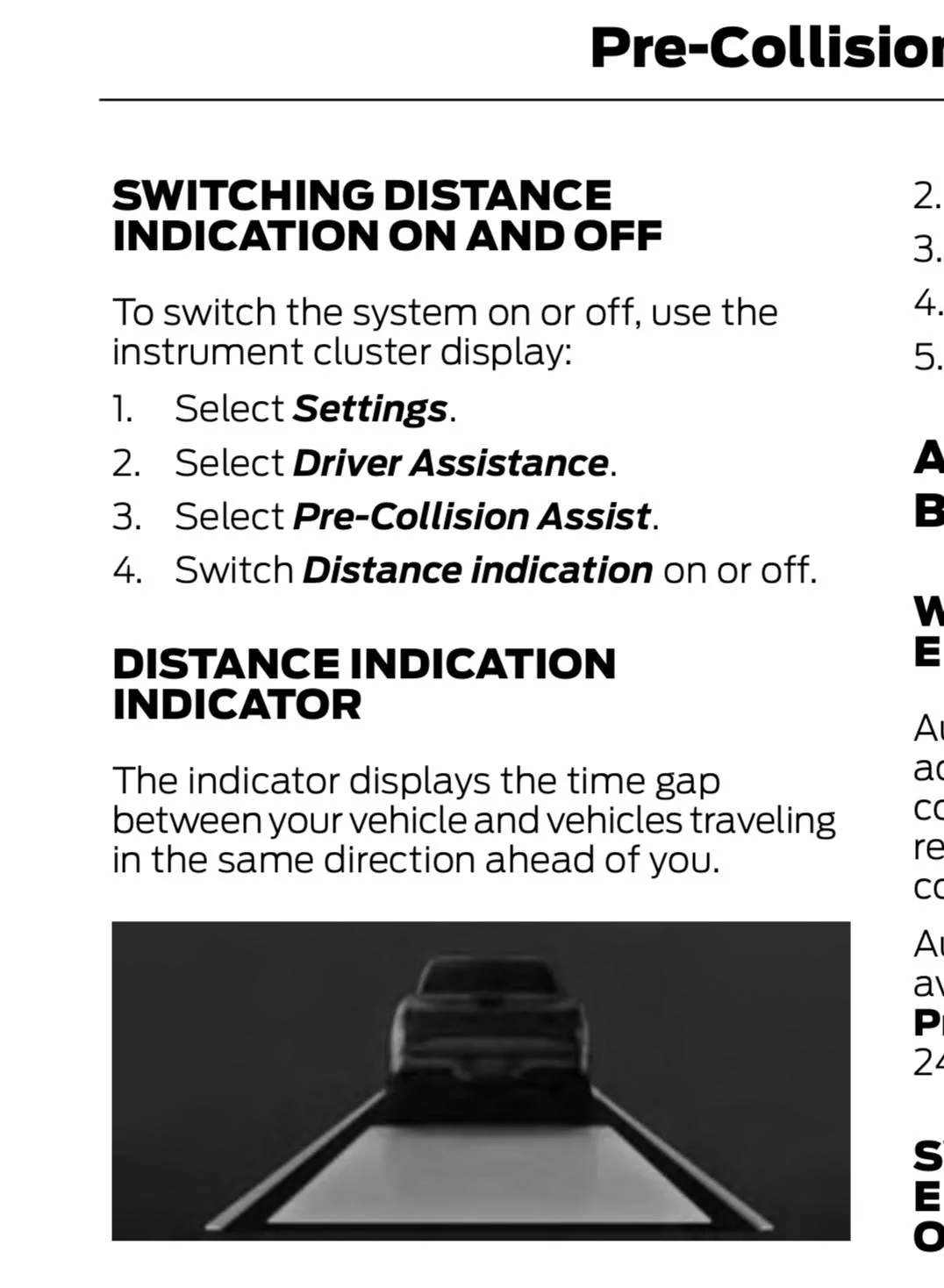
Do you have the Luxury Package? Disable the ACC Distance Indication.

Looking more closely at your video, I think it’s an option you turned on. There is a setting in the cluster for distance indication. That makes the road look gray and will keep it on your screen regardless of ACC or lane keep settings. I accidentally enabled this for a while until I realized it prevented me from bringing up the speed in the center of the screen.

40F1F300-9E37-4CB1-B765-22C17999E9BB.jpeg
 

CuriousGary

2.5L Hybrid
Well-known member
First Name
Gary
Joined
Aug 20, 2022
Threads
1
Messages
315
Reaction score
146
Location
Atlanta
Vehicle(s)
Ford C-Max Hybrid
Engine
2.5L Hybrid
The Instrument cluster display allows option to display Select Screens such as NOW PLAYING and others. Is the sole purpose of the 'Now Playing' screen is to just show the radio frequency? As the photo shows below, the Radio Data System (RDS) that displays Station ID, Song title, etc is being displayed on the LCD screen to the right, but the only thing showing on the Instrument Cluster Select screen related is the Frequency. I would like to see RDS data to show on the Select screen. Am I missing something? So far the only use I have for the Now Playing select screen is to see the the Frequency while I'm doing a RF radio station Scan/Seek while connected to Car Play with USB. When iphone is connected with USB you can't see the Audio output screen on the LCD while your tuning. Any comments?

R1.jpg
Is Select Screens only available on EB Mavericks? I cannot get to Select Screens on my hybrid. If available on hybrids, specifically how do I find it? A picture please, if possible.

On the bottom of p. 116 of the Owner’s Manual 2023, it says:

1. Select Select Screens.

For the life of me, I can’t figure out how to do this.

I want to deselect Calm screen and add This trip. See the right side of p. 116 for selectable Select Screens.
 

Darnon

2.5L Hybrid
Well-known member
Joined
Jul 4, 2021
Threads
10
Messages
5,708
Reaction score
7,206
Location
WNY
Vehicle(s)
2022 Maverick
Engine
2.5L Hybrid
Keep scrolling down (or up) in the first menu. The 'Select Screens' option is the lone entry on the next page, if I'm recalling correctly.

Edit: My memory appears to be incorrect. On mine it is the first entry of the first page.
Sponsored

 
Last edited:


Top