Sponsored

Serious Audio Problems!

Finch

Member
First Name
Jared
Joined
Oct 10, 2022
Threads
2
Messages
10
Reaction score
2
Location
Oregon
Vehicle(s)
Ford Maverick Lariat
I connected my iPhone 13 via CarPlay for the first time last night and lost all audio. It’s even grayed out on the screen. Clicking on the power button doesn’t do anything. No steering controls work. BT audio doesn’t work. Radio doesn’t. No sound and no response from anything. The only sound that comes from the system is the beeps when you press something.
I tried resetting the radio with the power button + skip forward button holds. No luck.
I tried removing the phone both from BT and CP. no luck

And then randomly I was getting gas and it started working! At least the radio did. But just for that one trip. It seems to work 1/5 times.

I checked for software updates and connected wifi. I’m at a loss…

Anyone have this problem? Know a solution?

Sound is even disabled on the settings:
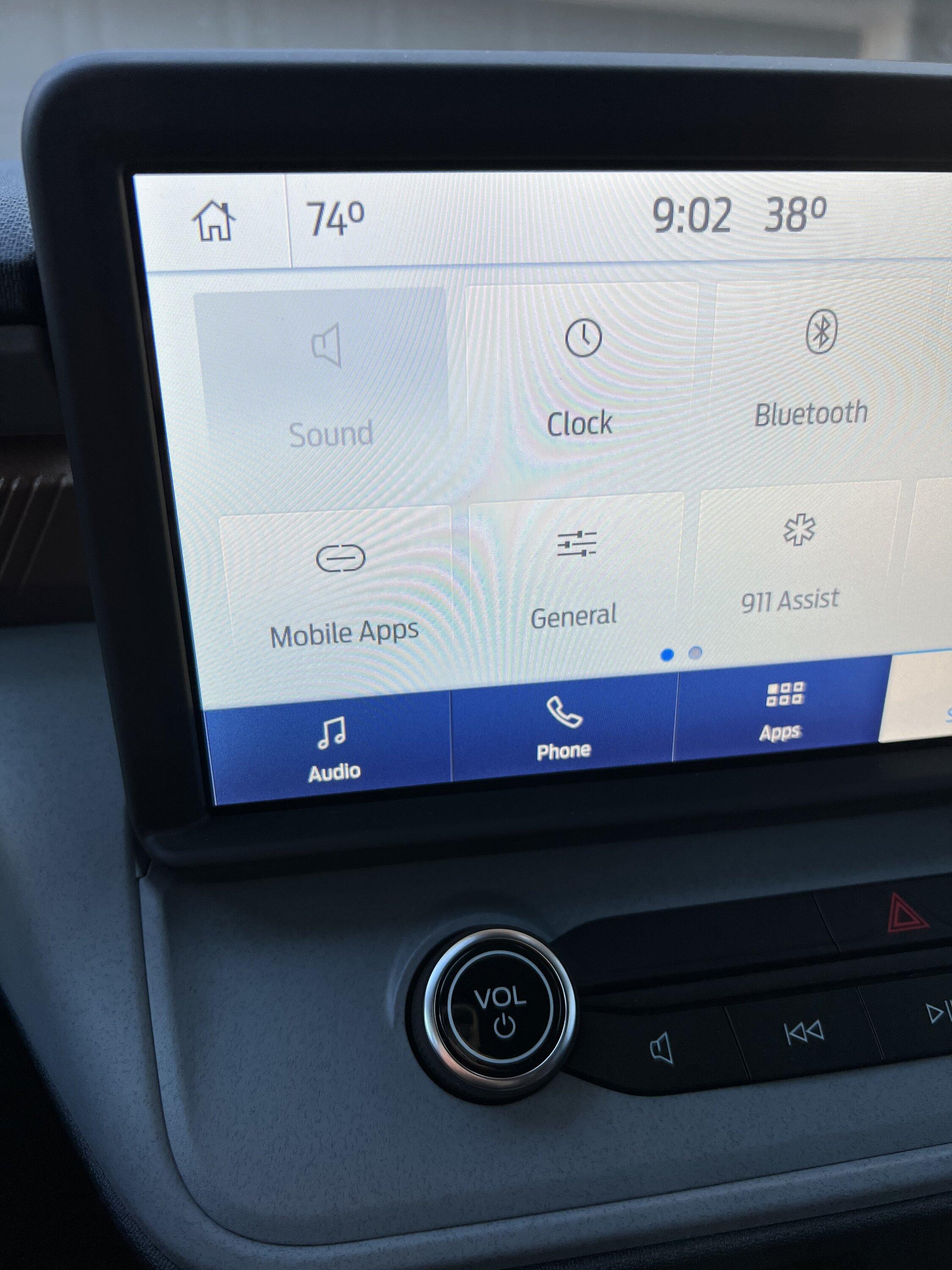
Ford Maverick Serious Audio Problems! 4CC9908E-F68B-411B-B159-1CEE519C9EF8
Sponsored


Clarkdonbran

2.5L Hybrid
Well-known member
Joined
Aug 1, 2021
Threads
103
Messages
2,611
Reaction score
6,965
Location
CA
Vehicle(s)
Maverick Hybrid
Engine
2.5L Hybrid
Clubs
 
I had an issue lately too. Screen froze and radio still played after shut down and opening the door. Soft reset worked.
 

TedTX

2.5L Hybrid
Well-known member
First Name
Ted
Joined
Aug 12, 2022
Threads
20
Messages
1,614
Reaction score
1,311
Location
San Antonio TX
Vehicle(s)
Maverick
Engine
2.5L Hybrid
IPhones are being pushed to update to 16.1 Today for me.
 

jsus

2.5L Hybrid
Well-known member
Joined
Dec 20, 2021
Threads
0
Messages
2,873
Reaction score
3,859
Location
USA
Vehicle(s)
2022 Ford Escape Hybrid AWD
Engine
2.5L Hybrid
Sounds like you've tried all the basic troubleshooting steps, which points at a likely hardware issue, unfortunately. Couple other suggestions would be just to press the power button with the vehicle running to see if anything changes. Failing that, try a master reset of Sync 3.

Could always try disconnecting the 12V battery for 10 minutes, though that may or may not accomplish anything.

Sync 3 uses an APIM (Accessory Protocol Interface Module), which is the module that contains the touchscreen, and a separate ACM (Audio Control Module). It seems like the two aren't communicating for some reason. That's likely why the Sound settings are disabled. This would require disassembly of the vehicle to troubleshoot/reconnect/replace.

Unless, of course, anyone else has any suggestions that you haven't tried yet.

Note that the description of hardware above only applies to Sync 3, which requires Lariat with Luxury Package.
 
Last edited:

Sponsored

OP
OP

Finch

Member
First Name
Jared
Joined
Oct 10, 2022
Threads
2
Messages
10
Reaction score
2
Location
Oregon
Vehicle(s)
Ford Maverick Lariat
Lol yeah I did some yelling but it only gave me the silent treatment. :ROFLMAO:

I found a possible solution or workaround though! If the truck is off, I can turn the radio on!!!!
So I can turn the radio on before I start it and I’ll have audio for that trip!

If anyone else is having audio probs, try working the radio while it’s off. It might help!
 
OP
OP

Finch

Member
First Name
Jared
Joined
Oct 10, 2022
Threads
2
Messages
10
Reaction score
2
Location
Oregon
Vehicle(s)
Ford Maverick Lariat
Sounds like you've tried all the basic troubleshooting steps, which points at a likely hardware issue, unfortunately. Couple other suggestions would be just to press the power button with the vehicle running to see if anything changes. Failing that, try a master reset of Sync 3.

Could always try disconnecting the 12V battery for 10 minutes, though that may or may not accomplish anything.

Sync 3 uses an APIM (Accessory Protocol Interface Module), which is the module that contains the touchscreen, and a separate ACM (Audio Control Module). It seems like the two aren't communicating for some reason. That's likely why the Sound settings are disabled. This would require disassembly of the vehicle to troubleshoot/reconnect/replace.

Unless, of course, anyone else has any suggestions that you haven't tried yet.

Note that the description of hardware above only applies to Sync 3, which requires Lariat with Luxury Package.
I’ve tried the power button and shutdown (holding power and forward for 5s) but I haven’t tried the factory reset or that sync 3 trick. Is that what you mean? Going into the settings where there’s a reset to factory option?
 

jsus

2.5L Hybrid
Well-known member
Joined
Dec 20, 2021
Threads
0
Messages
2,873
Reaction score
3,859
Location
USA
Vehicle(s)
2022 Ford Escape Hybrid AWD
Engine
2.5L Hybrid
I’ve tried the power button and shutdown (holding power and forward for 5s) but I haven’t tried the factory reset or that sync 3 trick. Is that what you mean? Going into the settings where there’s a reset to factory option?
Yes, a Master Reset.

The other suggestion is that, with the vehicle running, simply press the power button once and confirm that the Sound settings icon is still grayed out and sound doesn't play. Sync 3 never really turns off when the vehicle is running. Instead, pressing the power button turns audio on/off. The only way to turn the screen off is to press the button below the screen of a rectangle with a slash through it.

When the vehicle is off, pressing that same power button turns the whole system on and off instead of just the audio.

How do I perform a SYNC®* 3 master reset?
Resetting the system
Before performing a master reset, try resetting the system to restore functionality that has stopped working. The system reset does not delete any data you have stored. To reset the system:
  1. Simultaneously press and hold the Seek up and the audio unit Power buttons until the screen goes black.
  2. Wait three minutes to allow the system to complete the reset.
  3. Press the audio unit Power button to switch the system on.
If the system reset does not resolve the issue, continue with a master reset.
Performing a master reset
  1. Start your vehicle. Ensure your vehicle is in park and running, not in accessory mode.
  2. Press Settings on your vehicle's SYNC screen.
  3. Choose General.
  4. Scroll down and press Master Reset. A message confirming that all system settings will be erased and reset to factory defaults will appear.
  5. Press Continue. A Resetting to factory defaults message will appear, the system will turn off and the screen will go blank. It may take a few minutes for the system to reset and resume normal operation.
https://www.ford.com/support/how-tos/sync/sync-3/how-do-i-perform-a-sync-3-master-reset/
 
OP
OP

Finch

Member
First Name
Jared
Joined
Oct 10, 2022
Threads
2
Messages
10
Reaction score
2
Location
Oregon
Vehicle(s)
Ford Maverick Lariat
Yes, a Master Reset.

The other suggestion is that, with the vehicle running, simply press the power button once and confirm that the Sound settings icon is still grayed out and sound doesn't play. Sync 3 never really turns off when the vehicle is running. Instead, pressing the power button turns audio on/off. The only way to turn the screen off is to press the button below the screen of a rectangle with a slash through it.

When the vehicle is off, pressing that same power button turns the whole system on and off instead of just the audio.


https://www.ford.com/support/how-tos/sync/sync-3/how-do-i-perform-a-sync-3-master-reset/
Thanks, I’ll give it a shot. Yeah I tried the power button and it didn’t do anything once the problem started. It seems like I have to hit the power to turn it on during or right before starting the engine - still trying to figure it out! But I’m taking it in to the dealer when I can. It’s only three weeks old…
 
Sponsored

jsus

2.5L Hybrid
Well-known member
Joined
Dec 20, 2021
Threads
0
Messages
2,873
Reaction score
3,859
Location
USA
Vehicle(s)
2022 Ford Escape Hybrid AWD
Engine
2.5L Hybrid
Thanks, I’ll give it a shot. Yeah I tried the power button and it didn’t do anything once the problem started. It seems like I have to hit the power to turn it on during or right before starting the engine - still trying to figure it out! But I’m taking it in to the dealer when I can. It’s only three weeks old…
Best of luck! Let us know what they find out.
 

austinzone

2.0L EcoBoost
Banned
Banned
Joined
Sep 28, 2021
Threads
15
Messages
270
Reaction score
349
Location
Tampa
Vehicle(s)
Honda Element
Engine
2.0L EcoBoost
when your stereo glitches hold down power and track forward till it resets.

buy a beer for the other maverick bro who posted it before i posted it just now on the internets
 

jsus

2.5L Hybrid
Well-known member
Joined
Dec 20, 2021
Threads
0
Messages
2,873
Reaction score
3,859
Location
USA
Vehicle(s)
2022 Ford Escape Hybrid AWD
Engine
2.5L Hybrid
when your stereo glitches hold down power and track forward till it resets.

buy a beer for the other maverick bro who posted it before i posted it just now on the internets
OP tried that...

I tried resetting the radio with the power button + skip forward button holds. No luck.
 

austinzone

2.0L EcoBoost
Banned
Banned
Joined
Sep 28, 2021
Threads
15
Messages
270
Reaction score
349
Location
Tampa
Vehicle(s)
Honda Element
Engine
2.0L EcoBoost


Top