Sponsored

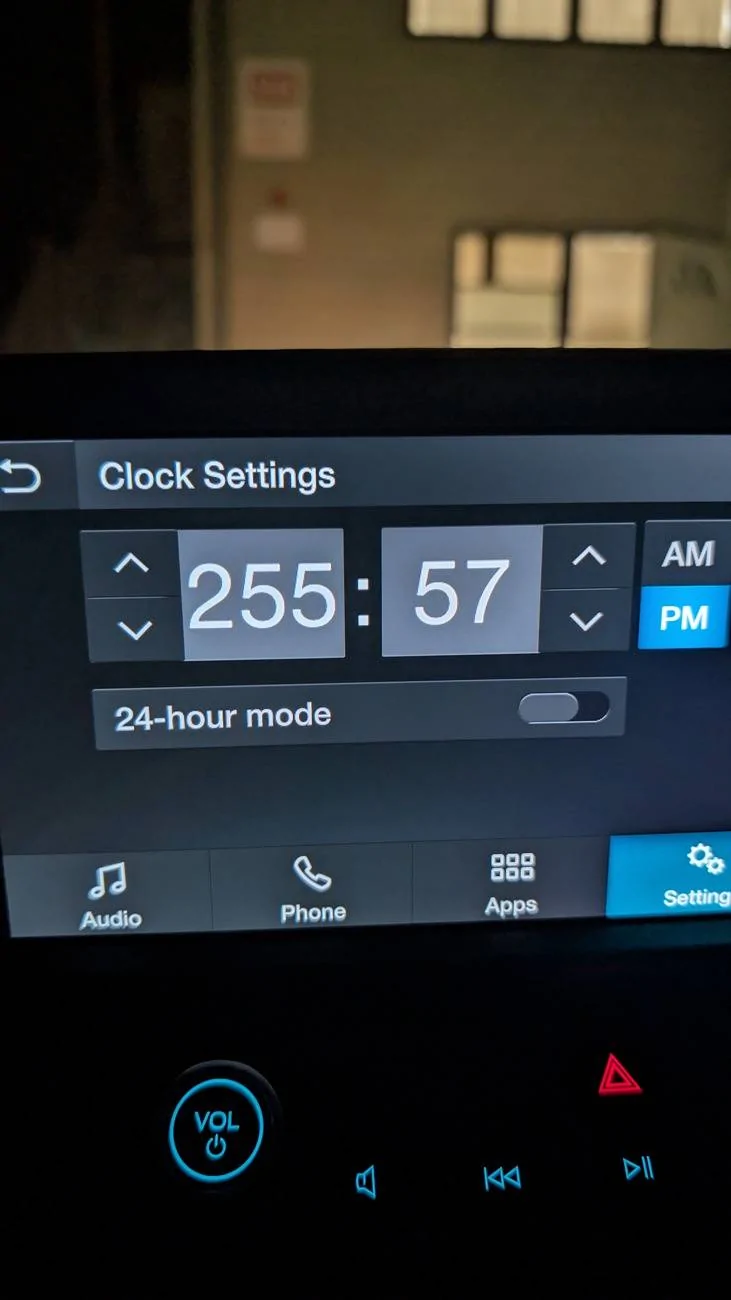
Clock Malfunction

seedyone

2.0L EcoBoost
New member
First Name
Chuck
Joined
Nov 19, 2024
Threads
0
Messages
3
Reaction score
1
Location
Traverse City, Michigan
Vehicle(s)
'24 Maverick XLT
Engine
2.0L EcoBoost
I have had that happen as well. Also my display freezes up at times.
My display did more than "freeze up at times," it froze up period. When I drove up to the dealer and backed in to a parking spot, it froze up on the backup camera! The Technician in Service did a Reset by turning on the radio, then long pressing the On/Off Volume knob (p. 397 in Owner's Manual) AND the Station Seek Forward button (p. 399, Using Seek, in Owner's Manual) SIMULTANEOUSLY. After a short "loading circle" -- fixed!
Sponsored


Ford Motor Company

Well-known member
Official Ford Account
Joined
Jan 6, 2022
Threads
7
Messages
3,789
Reaction score
3,916
Location
Dearborn, mi
Vehicle(s)
Maverick
Engine
Undecided
Every morning I have the same issue while setting the clock. There is no way to save the clock only to go back and a repeat

PXL_20241117_233859410.jpg
Hi there! Would you send us a private message with your VIN and dealership name and location? I’d like to look into this concern on my end.  
 

Rivers90

2.0L EcoBoost
Well-known member
First Name
Ben
Joined
Jul 17, 2021
Threads
16
Messages
821
Reaction score
1,048
Location
California
Vehicle(s)
XLT Tremor, Miata
Engine
2.0L EcoBoost
Clubs
 
My display did more than "freeze up at times," it froze up period. When I drove up to the dealer and backed in to a parking spot, it froze up on the backup camera! The Technician in Service did a Reset by turning on the radio, then long pressing the On/Off Volume knob (p. 397 in Owner's Manual) AND the Station Seek Forward button (p. 399, Using Seek, in Owner's Manual) SIMULTANEOUSLY. After a short "loading circle" -- fixed!
There is a recall for the freeze ups. But the Fix has not been released yet.
Sponsored


Top