
- Joined
- May 3, 2023
- Threads
- 16
- Messages
- 140
- Reaction score
- 164
- Location
- Québec, Canada
- Vehicle(s)
- 2025 Hybrid AWD XL
- Engine
- 2.5L Hybrid
- Thread starter
- #1
[Edit] I just found out that they sell anti-glare films specifically for this model, so that's certainly an option if you want to go the full digital route!
I also wanted to mention that I had to reach out to Wolfbox with a question and got a detailed answer back in less than 5 minutes, so color me impressed.
---
Scope
Since this is a mirror replacement, I think it makes sense for me to focus most of the attention on the mirror itself. After all, this is the part of the unit you’ll be using every single day, not just when you need to review footage.
The instruction guides suck
Let me get one thing out of the way: the instructions are terrible. They're vague, confusing, and the photos are so small and dark that they're basically black rectangles. If you're trying to confirm whether the bracket is installed correctly or what part you should be using, the booklets aren't going to be of much help. I had to lookup YouTube videos to piece it together.
There's some concerning labeling
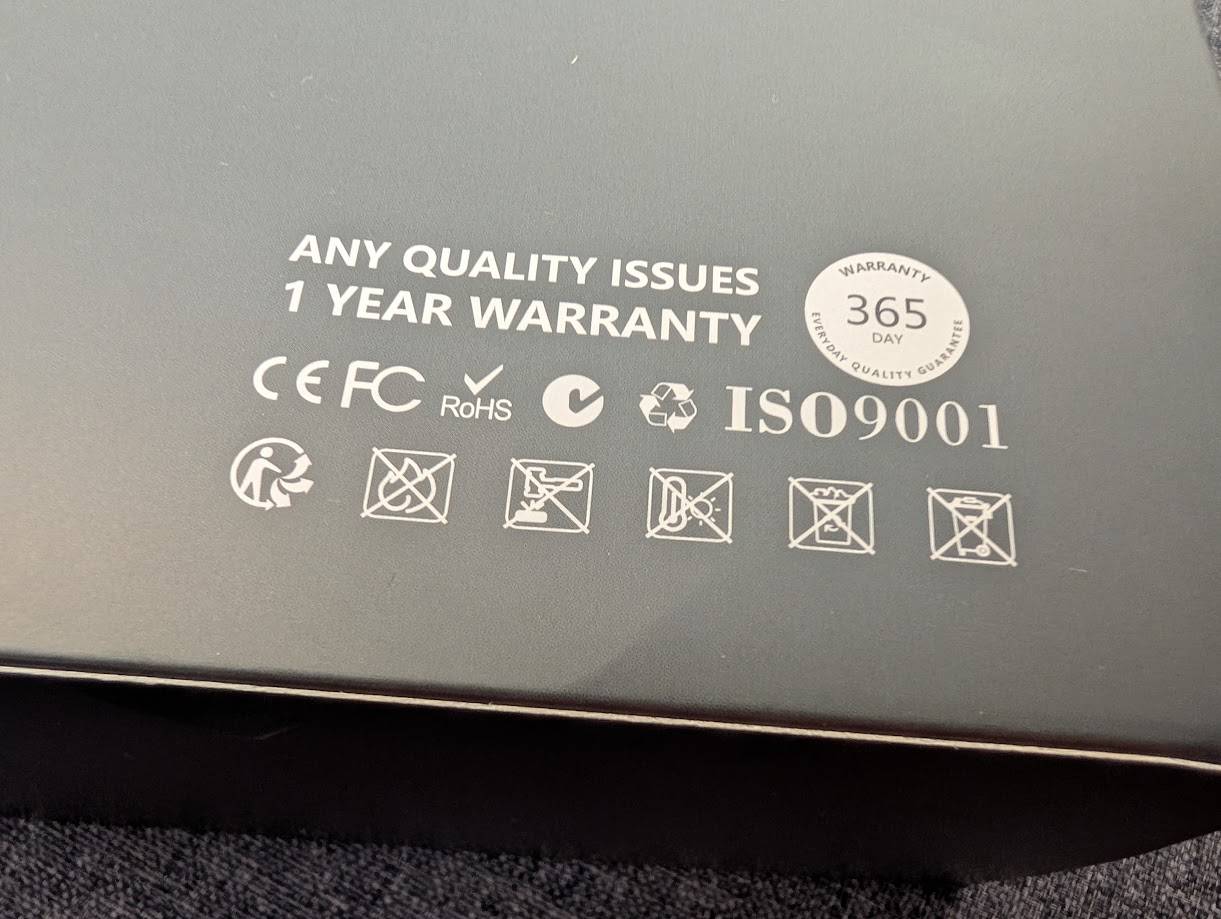
One thing that raised eyebrows is a pictogram on the box warning not to leave the unit in hot temperatures or direct sunlight, if I'm interpreting it correctly. I may be reading too much into it, but that sounds a lot like “it's not our fault if this thing explodes or melts on your windshield.” A little concerning for a product that lives behind glass and in the sun every single day.
Installation
Mounting the mirror was straightforward. I purchased the OEM mirror bracket kit rather than using straps to cover the factory mirror. The whole thing took less than five minutes to do; it's essentially just a couple of screws. If you plan on buying the G900 Pro, I strongly recommend picking up the OEM mirror bracket kit with it to avoid the cluttered appearance of the straps. The GPS module I stuck in the plastic tray found behind/on top of the mirror. The cover pops out with a little downward effort and there's a ton of empty space in there to store the GPS and tuck extra wiring.
The GPS, power, and rear camera cables all connect at the top of the mirror. This means you're left with three very visible connectors sticking out. It looks super sloppy and was quickly remediated with a 3D printed cover at the whopping cost of 20 cents' worth of materials. I get that they had to place the connectors on top to accommodate people who are using straps, but I really wish they had included a cover in the box, or at least angled adapters or something. Here's a photo of an early test print that wasn't fitting quite right yet, but should give you an idea of what I'm going for.
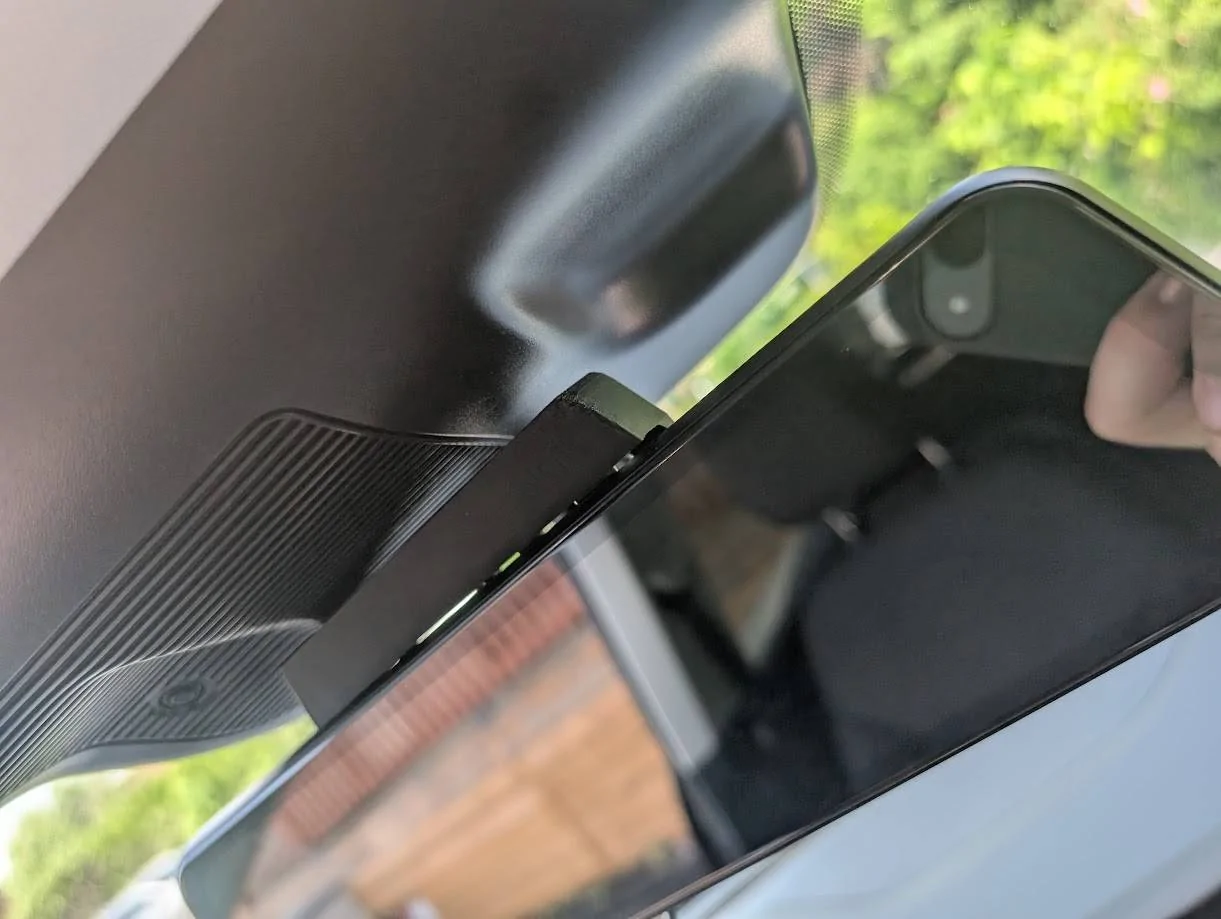
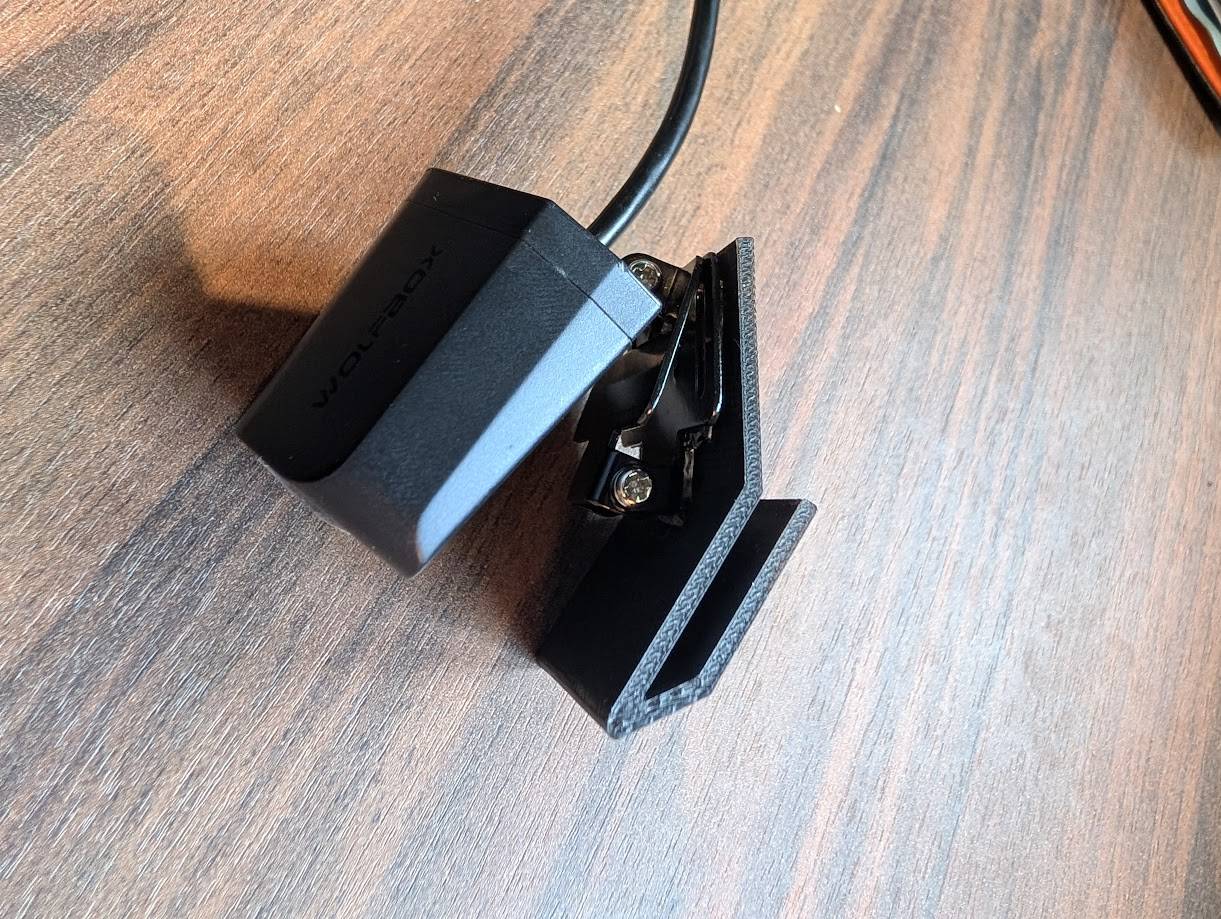
Installing the rear camera was a bit more of an involved process. The Maverick does not have a ton of good mounting spots and the camera itself has a large, awkward housing. I printed a clip that slides under the roof liner and is slightly angled downwards. This lets the camera sits in the cab, as high as possible, and right against the rear glass.
From what I've seen in photos, if your truck has the rear sliding window it should have a metal rail part that could be used to mount the camera instead.
The kit included a license plate mount, but given that the Maverick’s plate is so low, it would mean I couldn't use the camera as a mirror as all I'd see would be bumpers. It would also involve a lot more cable routing, and expose the camera to the elements. To me, it was not worth the hassle.
Another frustrating design issue is that the rear camera's cable is not removable. There's a short segment that unclips, but it's not a replaceable or standard cable. If it gets damaged, you either have to buy a whole new camera or solder in a replacement cable onto the board yourself. What makes this worse is that the other end of the cable uses a standard USB-C connector. Why not on both ends? It just feels like a deliberate choice to make repairs harder for no good reason.
How well does it work as a mirror?
The display portion is extremely glossy, but it’s not quite a real mirror. I’m guessing it’s meant to work like one when the screen is off, but it's more akin to your mirror is always in night mode. When combined with the factory-tinted rear window, it gets pretty dim. At night, it’s really only good for picking up headlights, and it's pretty bad in low light situations. Since the surface is plastic instead of solid glass, there’s also some noticeable warping and distortion. It’s usable, but again, quite dark.
You might think the digital screen would be better, but even with the brightness turned all the way up, it's dim and way too reflective. Part of that is, admittedly, due to me placing the camera in the cab, so the window's tint darkens the image. However, if you leave the mirror angled like a regular mirror (e.g., pointed at the rear window) all you really see is a reflection layered over the camera feed. So you're constantly adjusting it depending on whether you're trying to use it as a screen or just a mirror.
At night, you probably won't want to rely on the camera since the image quality is pretty bad. It's grainy, and headlights completely blow it out. So you’ll end up tilting the mirror back to where it would normally sit, just to use it like a regular mirror again. It turns into a lot of fiddling back and forth.
The camera's display has a wide-angle, almost fish-eye look to it. That’s not necessarily a bad thing since it helps cover your blind spots really well, but it does make everything look a lot farther away than they really really. That can be a problem, especially at highway speeds. The low resolution of the display makes it worse. With the fish-eye distortion and lack of detail, it would be pretty easy to miss a fast-approaching vehicle if you’re checking before passing someone.
[Update] I've also noticed the rear camera's stream stutters every second or so. It's real annoying.
Final Thoughts
Overall, despite my complaints, I don't think this is necessarily a bad product. It's not a great mirror, sure, but it does work fairly well. I don't plan on returning it, so maybe that says enough.
To their credit, I don’t think there’s a one-size-fits-all solution here. It feels like they tried to strike a balance between reflectivity and screen clarity, but instead of getting the best of both worlds, you end up with something that’s just kind of mediocre at both.
If you have any questions on the unit, or maybe have any tips for me, please do let me know!
I also wanted to mention that I had to reach out to Wolfbox with a question and got a detailed answer back in less than 5 minutes, so color me impressed.
---
Scope
Since this is a mirror replacement, I think it makes sense for me to focus most of the attention on the mirror itself. After all, this is the part of the unit you’ll be using every single day, not just when you need to review footage.
The instruction guides suck
Let me get one thing out of the way: the instructions are terrible. They're vague, confusing, and the photos are so small and dark that they're basically black rectangles. If you're trying to confirm whether the bracket is installed correctly or what part you should be using, the booklets aren't going to be of much help. I had to lookup YouTube videos to piece it together.
There's some concerning labeling
One thing that raised eyebrows is a pictogram on the box warning not to leave the unit in hot temperatures or direct sunlight, if I'm interpreting it correctly. I may be reading too much into it, but that sounds a lot like “it's not our fault if this thing explodes or melts on your windshield.” A little concerning for a product that lives behind glass and in the sun every single day.
Installation
Mounting the mirror was straightforward. I purchased the OEM mirror bracket kit rather than using straps to cover the factory mirror. The whole thing took less than five minutes to do; it's essentially just a couple of screws. If you plan on buying the G900 Pro, I strongly recommend picking up the OEM mirror bracket kit with it to avoid the cluttered appearance of the straps. The GPS module I stuck in the plastic tray found behind/on top of the mirror. The cover pops out with a little downward effort and there's a ton of empty space in there to store the GPS and tuck extra wiring.
The GPS, power, and rear camera cables all connect at the top of the mirror. This means you're left with three very visible connectors sticking out. It looks super sloppy and was quickly remediated with a 3D printed cover at the whopping cost of 20 cents' worth of materials. I get that they had to place the connectors on top to accommodate people who are using straps, but I really wish they had included a cover in the box, or at least angled adapters or something. Here's a photo of an early test print that wasn't fitting quite right yet, but should give you an idea of what I'm going for.
Installing the rear camera was a bit more of an involved process. The Maverick does not have a ton of good mounting spots and the camera itself has a large, awkward housing. I printed a clip that slides under the roof liner and is slightly angled downwards. This lets the camera sits in the cab, as high as possible, and right against the rear glass.
From what I've seen in photos, if your truck has the rear sliding window it should have a metal rail part that could be used to mount the camera instead.
The kit included a license plate mount, but given that the Maverick’s plate is so low, it would mean I couldn't use the camera as a mirror as all I'd see would be bumpers. It would also involve a lot more cable routing, and expose the camera to the elements. To me, it was not worth the hassle.
Another frustrating design issue is that the rear camera's cable is not removable. There's a short segment that unclips, but it's not a replaceable or standard cable. If it gets damaged, you either have to buy a whole new camera or solder in a replacement cable onto the board yourself. What makes this worse is that the other end of the cable uses a standard USB-C connector. Why not on both ends? It just feels like a deliberate choice to make repairs harder for no good reason.
How well does it work as a mirror?
The display portion is extremely glossy, but it’s not quite a real mirror. I’m guessing it’s meant to work like one when the screen is off, but it's more akin to your mirror is always in night mode. When combined with the factory-tinted rear window, it gets pretty dim. At night, it’s really only good for picking up headlights, and it's pretty bad in low light situations. Since the surface is plastic instead of solid glass, there’s also some noticeable warping and distortion. It’s usable, but again, quite dark.
You might think the digital screen would be better, but even with the brightness turned all the way up, it's dim and way too reflective. Part of that is, admittedly, due to me placing the camera in the cab, so the window's tint darkens the image. However, if you leave the mirror angled like a regular mirror (e.g., pointed at the rear window) all you really see is a reflection layered over the camera feed. So you're constantly adjusting it depending on whether you're trying to use it as a screen or just a mirror.
At night, you probably won't want to rely on the camera since the image quality is pretty bad. It's grainy, and headlights completely blow it out. So you’ll end up tilting the mirror back to where it would normally sit, just to use it like a regular mirror again. It turns into a lot of fiddling back and forth.
The camera's display has a wide-angle, almost fish-eye look to it. That’s not necessarily a bad thing since it helps cover your blind spots really well, but it does make everything look a lot farther away than they really really. That can be a problem, especially at highway speeds. The low resolution of the display makes it worse. With the fish-eye distortion and lack of detail, it would be pretty easy to miss a fast-approaching vehicle if you’re checking before passing someone.
[Update] I've also noticed the rear camera's stream stutters every second or so. It's real annoying.
Final Thoughts
Overall, despite my complaints, I don't think this is necessarily a bad product. It's not a great mirror, sure, but it does work fairly well. I don't plan on returning it, so maybe that says enough.
To their credit, I don’t think there’s a one-size-fits-all solution here. It feels like they tried to strike a balance between reflectivity and screen clarity, but instead of getting the best of both worlds, you end up with something that’s just kind of mediocre at both.
If you have any questions on the unit, or maybe have any tips for me, please do let me know!
Sponsored
Last edited: